[Plugin] Zero Tilt Camera
-
this is my one and only ruby attempt - a shortcut script to make camera look planar to ground (in which ever direction it is facing). useful for walkthroughs - so all verticals are nicely straight.
Added [Plugin] tag
if put in plugins dir - a command will be added to camera menu at the very bottom.
i use it via shortcut key. -
Hi, odowhacker:
I see so far there have been no replies. Everyone must be busy elsewhere? I think you may need to edit your Subject/title line to add "[Plugin]", or perhaps a moderator can do it for you, since this is posted in the Plugins subforum.
Best wishes,
mitcorb -
Hi Paul, I didn't download the plugin, but based on your description, how is it different from viewing SketchUp in parallel projection?
-
@unknownuser said:
how is it different from viewing SketchUp in parallel projection?
That's what I thought as well.
-
Hi,
@unknownuser said:
how is it different from viewing SketchUp in parallel projection?
This is perspective view with vertical lines parallel (architects like that sort of view!)
-
Looks similar to Two-Point Perspective without the label in the upper left corner. It's not quite the same though. thank you for this.
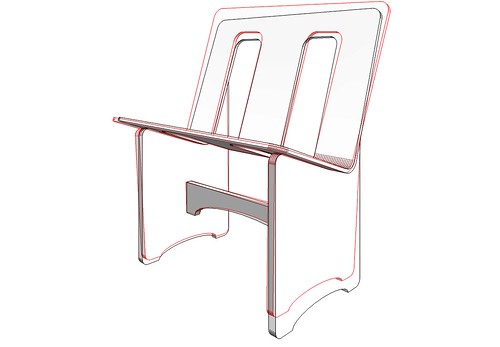
I did a quickie example.
Two Point:

Zero Tilt:
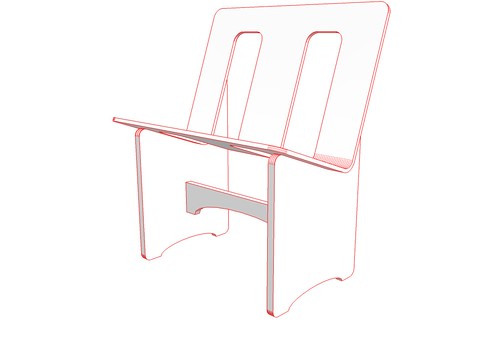
Combined:
-
I don't quite get this..
If the verticals are not parallel, which they obviously are not on the compared 2-point/zero tilt image , the camera does not have 0 tilt. ?
BTW, I typically use the 'position camera' to get 0 tilt, and then Walk to move back/forward and up down.
Works great too. -
maybe i shouldn't have posted this to plugins - it's rather simple and was meant ironic too.
a beginners try at coding ruby/SUapi...
the script is handy for me with walktrough animations where i would look around during setup (leave eye height and planar view) and also use different 'camera lens' settings.
the effect desired was that of a steady cam (with a weigth underneath and the camera set to 90° from that weight).
the two point perspective is kind of static and for me 'position camera' will often fail without a proper reference line or the axes.
i mainly use the shortcut for setting up scene views - sort of constructing a camera path. transitions look nicer this way (same eye heigth, 0tilt and you can do a rotational move along the way.)..the diversion in the chair overlay would occur if you choose 0tilt coming from a 2point perspective view. this won't work - i hadn't thought of the possiblity - i never use 2point.
try with a house. inside. use the walk or move tool (hand) to navigate around once you've chosen 0tilt. you'll see.attached a dennismethod output of some planar view of a few huts..
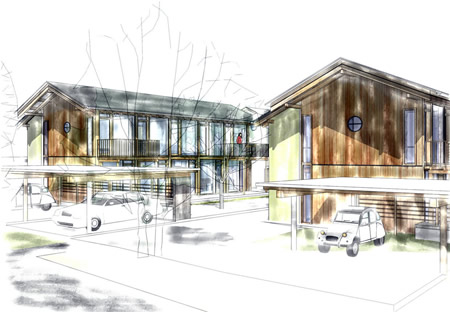 .
. -
@honoluludesktop said:
Hi Paul, I didn't download the plugin, but based on your description, how is it different from viewing SketchUp in parallel projection?
Oops, I meant 2 point perspective. Thanks for the explanation.
-
Thanks, I find this useful, especially when a shortcut is assigned.
-
Thanks a lot!
Anybody that has battled with shift lenses in architectural photography will appreciated this. -
It can be a useful plug-in. Thanks
 all the plug-ins are appreciated
 -
Just what I was looking for
It is very useful for rendering spherical/equirectangular panorama with Twilight.
If the camera is not level the panorama will be all wavy. -
Thank you for posting this... this is exactly what I was looking for... Finally, no more "dutch angles" during my transitions.
-
Thanks!
-
very good plugin .. very hsady
since some of render engines do not support Su's native '2 point perspective' .. -
 very useful plugin!
 -
Finally, i think i figured it out - the best description for this one is "perspective perpendicular center view", i used it a lot through the first button of Curic Align View, and now through Dezmo Dice "center (front, left, right, back) view".
Somebody please tell me if I'm wrong.!
It is very useful, and in SketchUp, there is no way that you can manually and precisely achieve this.








Hello! It looks like you're interested in this conversation, but you don't have an account yet.
Getting fed up of having to scroll through the same posts each visit? When you register for an account, you'll always come back to exactly where you were before, and choose to be notified of new replies (either via email, or push notification). You'll also be able to save bookmarks and upvote posts to show your appreciation to other community members.
With your input, this post could be even better 💗
Register Login


Advertisement