sketchucation logo sketchucation
    • 登入
    Oops, your profile's looking a bit empty! To help us tailor your experience, please fill in key details like your SketchUp version, skill level, operating system, and more. Update and save your info on your profile page today!
    🔌 Smart Spline | Fluid way to handle splines for furniture design and complex structures. Download

    [Plugin] Sketchup Ivy

    已排程 已置頂 已鎖定 已移動 Plugins
    732 貼文 172 Posters 315.4k 瀏覽 172 Watching
    正在載入更多貼文
    • 從舊到新
    • 從新到舊
    • 最多點贊
    回覆
    • 在新貼文中回覆
    登入後回覆
    此主題已被刪除。只有擁有主題管理權限的使用者可以查看。
    • TIGT 線上
      TIG Moderator
      最後由 編輯

      Now the real mystery...
      I had to install LiveIvy to check this...
      There is no file called LiveIvy_Base.rb in any of the three zip archives you can download... Where'd that come from?
      BUT there is a Textures folder that should contain 10 files, missing from your LiveIvy folder too...
      The file inside the Plugins folder called LiveIvy.rb should make no attempt to ' require' that file. It should read
      require "LiveIvy/LiveVector_core" require "LiveIvy/LiveIvy_branch" require "LiveIvy/LiveIvy_node" require "LiveIvy/LiveIvy_leaf" require "LiveIvy/LiveIvy_tool"
      And nothing more...
      It seems to be trying to load the LiveIvy_Base.rb file unsuccessfully.
      Not surprising, as it doesn't/shouldn't exist...
      EDIT: See next post where the issue is clarified 😒

      TIG

      1 條回覆 最後回覆 回覆 引用 0
      • TIGT 線上
        TIG Moderator
        最後由 編輯

        Now I realize what's up! 😒
        Someone*** has been messing on with the zipped set [see a few posts ago] and you have this faulty version installed !!! ***Pejman 😞

        The LiveIvy_Base.rb that does exist in that butchered version's subfolder is called from an also changed [auto-loaded] LiveIvy.rb file, and the LiveIvy_Base.rb file now includes the text to try and load the required tools...
        require "LiveIvy/LiveVector_core" require "LiveIvy/LiveIvy_branch" require "LiveIvy/LiveIvy_node" require "LiveIvy/LiveIvy_leaf" require "LiveIvy/LiveIvy_tool"
        BUT this should work because those files do exist, as the path is relative to the $LOAD_PATH list - and there's a subfolder of that name in Plugins!

        BUT it ain't! 😕

        However, this way should work too:
        load "LiveVector_core.rb" load "LiveIvy_branch.rb" load "LiveIvy_node.rb" load "LiveIvy_leaf.rb" load "LiveIvy_tool.rb"

        If you are going to mess with scripts ensure that they work properly afterwards !!
        Pejman 😡

        TIG

        1 條回覆 最後回覆 回覆 引用 0
        • thomthomT 離線
          thomthom
          最後由 編輯

          TIG - require doesn't work relative to the file it's being used it. It's relative to the search paths. Prefixing the folder relative to the plugins folder should be correct.

          Thomas Thomassen — SketchUp Monkey & Coding addict
          List of my plugins and link to the CookieWare fund

          1 條回覆 最後回覆 回覆 引用 0
          • TIGT 線上
            TIG Moderator
            最後由 編輯

            Doh!
            You are right.
            So why isn't it working ?
            The files seem to be there - though we can't see the main Plugins contents...
            The 'require' can simply get replaced with 'load' and it should work ??
            I've edited the post.
            The error message says it can't 'load' the file - presumably this is via 'require' ?
            I give up!

            TIG

            1 條回覆 最後回覆 回覆 引用 0
            • thomthomT 離線
              thomthom
              最後由 編輯

              Did you get the error as well? Or has it been just that user?

              Thomas Thomassen — SketchUp Monkey & Coding addict
              List of my plugins and link to the CookieWare fund

              1 條回覆 最後回覆 回覆 引用 0
              • TIGT 線上
                TIG Moderator
                最後由 編輯

                I haven't installed the 'rogue' version...
                As far as I can see from the code it should work, so I suspect it's a half-baked installation issue... BUT who knows?

                TIG

                1 條回覆 最後回覆 回覆 引用 0
                • T 離線
                  the.pjt
                  最後由 編輯

                  HI everybody .... sorry for my delays ..
                  😛
                  first of all : there is an important note : I'm not the developer , I just want to help Pierreden ... and you dear members ..
                  I will release the Full version or this plugin and toolbar .. I works good for me .. tested in my own computers ..
                  here you are
                  copy - paste and replace it all (not just LiveIvy.rb )

                  to Pierreden : please please use my works to improve your cool plugin , release it in the first post Pierreden and develop it more and more 😉

                  1 條回覆 最後回覆 回覆 引用 0
                  • Rich O BrienR 線上
                    Rich O Brien Moderator
                    最後由 編輯

                    @Pejman

                    I removed your original faulty file so as not to confuse members which file to download.

                    Download the free D'oh Book for SketchUp 📖

                    1 條回覆 最後回覆 回覆 引用 0
                    • T 離線
                      the.pjt
                      最後由 編輯

                      oh oh oh ... I'm so sorry ....and a stupid person ... sorry
                      I have uploaded previous file ...
                      that was not the new ZIP files ...

                      here is the full files ...
                      LiveIvy-1.zip

                      dear TIG , I's sorry for that mistake agane , I'm sorry for taking your time downloading ,reading it and writhing frum post .. sorry TIG ...

                      dear ThomThom .. I's sorry

                      😞
                      😕

                      I hope this This toolbar and its Icons could be usefull for you sketchukators ...
                      zipped from my own plugin folder
                      100% tested 😄
                      here is a screenshot
                      Ivy-screenshot.jpg

                      1 條回覆 最後回覆 回覆 引用 0
                      • rodrigonotorR 離線
                        rodrigonotor
                        最後由 編輯

                        thanks, now it´s working


                        30-07-2012 06-44-46 p.m..jpg

                        • Sketchando.net • www.arqcad.net •

                        1 條回覆 最後回覆 回覆 引用 0
                        • thomthomT 離線
                          thomthom
                          最後由 編輯

                          👍

                          Thomas Thomassen — SketchUp Monkey & Coding addict
                          List of my plugins and link to the CookieWare fund

                          1 條回覆 最後回覆 回覆 引用 0
                          • P 離線
                            pibuz
                            最後由 編輯

                            ..I still can't figure out how to install and make this plugin properly work 😆

                            I've downloaded the new addition by Pejman, but same error message when loading (something about not being able to insert an empty component..).
                            Moreover, no toolbar shows up.....
                            I'm no noob, but I really can't figure this out 😆

                            WEB (ita) - https://filipposcarso.wixsite.com/ordinentropico

                            1 條回覆 最後回覆 回覆 引用 0
                            • KrisidiousK 離線
                              Krisidious
                              最後由 編輯

                              delete your LiveIvy folder in side your plugins folder. make sure you have no plugins for liveivy inside your plugins folder.

                              reinstall by opening the last zip folder and dragging the plugin and folders into your plugins folder.

                              you'll need to restart sketchup. go to toolbars and turn on the liveivy toolbar.

                              should work. make sure that there are ivy components in your "Plugins\LiveIvy\Textures" folder.

                              By: Kristoff Rand
                              Home DesignerUnique House Plans

                              1 條回覆 最後回覆 回覆 引用 0
                              • KrisidiousK 離線
                                Krisidious
                                最後由 編輯

                                look at tips in the console. you'll have to grow the ivy branches and then hit ctrl click to put leaves on. you'll see green markers where leaves are going to be located. then hit shift click to finish.

                                By: Kristoff Rand
                                Home DesignerUnique House Plans

                                1 條回覆 最後回覆 回覆 引用 0
                                • charly2008C 離線
                                  charly2008
                                  最後由 編輯

                                  HI

                                  I installed the "LiveIvy 1" but there are generated only strains and no leaves. Am I doing something wrong? In the Ruby Console is displayed, see below.

                                  Problem solved: I had forgotten to press the ctrl key.
                                  Charly

                                  He who makes no mistakes, makes nothing

                                  1 條回覆 最後回覆 回覆 引用 0
                                  • charly2008C 離線
                                    charly2008
                                    最後由 編輯

                                    Hi Krisidious,

                                    Thank you for your help

                                    Charly

                                    He who makes no mistakes, makes nothing

                                    1 條回覆 最後回覆 回覆 引用 0
                                    • KrisidiousK 離線
                                      Krisidious
                                      最後由 編輯

                                      no problem I guess you figured it out before I even got my response in. have fun and feel free to post some examples. and settings to go with them.
                                      would love to add some presets to this plugin.

                                      By: Kristoff Rand
                                      Home DesignerUnique House Plans

                                      1 條回覆 最後回覆 回覆 引用 0
                                      • charly2008C 離線
                                        charly2008
                                        最後由 編輯

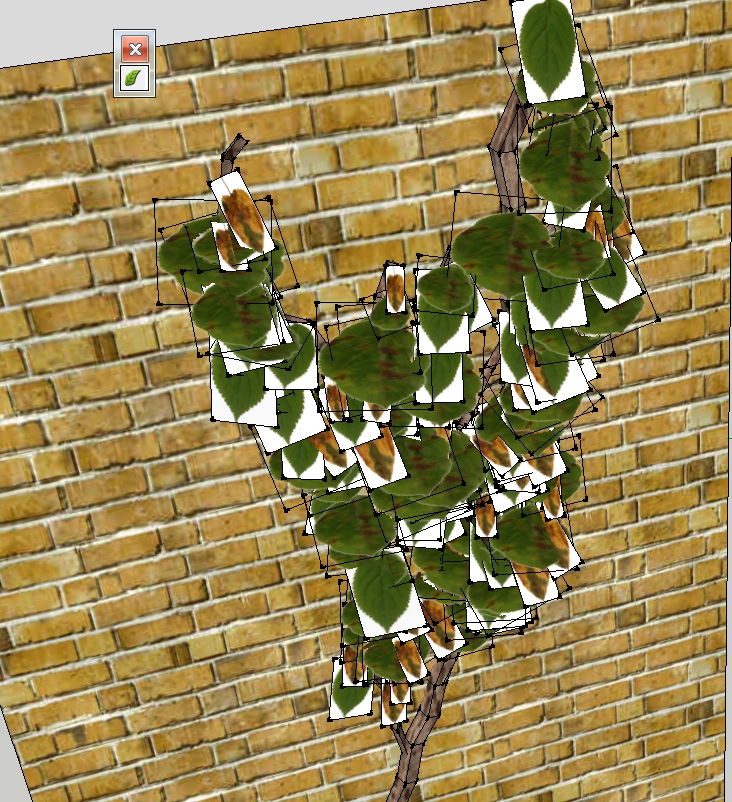
                                        Maybe you can help me again. Now the leaves are not transparent! The problem was treated in an earlier post but I could not find it until now.

                                        Charly

                                        2012-07-31_135450.jpg

                                        He who makes no mistakes, makes nothing

                                        1 條回覆 最後回覆 回覆 引用 0
                                        • KrisidiousK 離線
                                          Krisidious
                                          最後由 編輯

                                          I had to go in and edit each component and it's material. each material source needs to be a .png file for transparency. and then I hid the line edges and saved the component. let me see if I can upload mine.

                                          By: Kristoff Rand
                                          Home DesignerUnique House Plans

                                          1 條回覆 最後回覆 回覆 引用 0
                                          • P 離線
                                            pibuz
                                            最後由 編輯

                                            @krisidious said:

                                            delete your LiveIvy folder in side your plugins folder. make sure you have no plugins for liveivy inside your plugins folder.

                                            reinstall by opening the last zip folder and dragging the plugin and folders into your plugins folder.

                                            you'll need to restart sketchup. go to toolbars and turn on the liveivy toolbar.

                                            should work. make sure that there are ivy components in your "Plugins\LiveIvy\Textures" folder.

                                            I did exactly like this, last time. Just to make sure, I re-did that and it's just the same: "can't insert empty component" (I'm translating the message from italian). Under "View->toolbars" there is no option to turn on the LiveIvy toolbar. If I choose the tool manually, I can generate the red lines and leaves, but generating the actual geometry leads to no real geometry but a simple black line over the first stem's position (no leaves and no additional stems).

                                            ..your latest post also makes me wonder if these problems could be generated by base components saved in SU8 format..If so, could anybody convert them to the previous version, to maximize compatibility?


                                            WEB (ita) - https://filipposcarso.wixsite.com/ordinentropico

                                            1 條回覆 最後回覆 回覆 引用 0
                                            • 1
                                            • 2
                                            • 33
                                            • 34
                                            • 35
                                            • 36
                                            • 37
                                            • 35 / 37
                                            • 第一個貼文
                                              最後的貼文
                                            Buy SketchPlus
                                            Buy SUbD
                                            Buy WrapR
                                            Buy eBook
                                            Buy Modelur
                                            Buy Vertex Tools
                                            Buy SketchCuisine
                                            Buy FormFonts

                                            Advertisement