[Plugin] Sketchup Ivy
-
thanks srx. good point. iam actually using su7
-
@srx said:
When I start SU it begins with this:
Error Loading File LiveIvy.rb
Can't insert empty component.This is solved with replacing version 8 leaf components with version 7 in Textures folder...
but still not working:Error: #<NoMethodError: undefined method
-' for nil:NilClass> C:/Program Files (x86)/Google/Google SketchUp 7/Plugins/LiveIvy/LiveIvy_tool.rb:241:inbirth_stem'
C:/Program Files (x86)/Google/Google SketchUp 7/Plugins/LiveIvy/LiveIvy_tool.rb:234:ineach' C:/Program Files (x86)/Google/Google SketchUp 7/Plugins/LiveIvy/LiveIvy_tool.rb:234:inbirth_stem'
C:/Program Files (x86)/Google/Google SketchUp 7/Plugins/LiveIvy/LiveIvy_tool.rb:223:inbirth' C:/Program Files (x86)/Google/Google SketchUp 7/Plugins/LiveIvy/LiveIvy_tool.rb:99:inonLButtonDown'
C:/Program Files (x86)/Google/Google SketchUp 7/Plugins/LiveIvy/LiveIvy_tool.rb:234me to only version 5.04 worked a bit untill the shift click part
i got this in SU 6Error; #<ArgumentError; wrong number of arguments (2 for 1)> /Library/Application Support/Google SketchUp 6/SketchUp/Plugins/LiveIvy/LiveIvy_tool.rb;233;in `start_operation' /Library/Application Support/Google SketchUp 6/SketchUp/Plugins/LiveIvy/LiveIvy_tool.rb;233;in `birth_stem' /Library/Application Support/Google SketchUp 6/SketchUp/Plugins/LiveIvy/LiveIvy_tool.rb;223;in `birth' /Library/Application Support/Google SketchUp 6/SketchUp/Plugins/LiveIvy/LiveIvy_tool.rb;98;in `onLButtonDown' /Library/Application Support/Google SketchUp 6/SketchUp/Plugins/LiveIvy/LiveIvy_tool.rb;233 -
I try to install the last two version but i still have the same problem.
This message appears when i open sketchup: Error Loading File LiveIvy.rb Can't insert empty component.
Than i'm able to use correctly the plug-in untill the last step.
If i hold click+shift nothing happens. It the same when i only click (generate ivy)Can you help me?
thanks a lot. Very good work, great idea
-
Shift+Click still not work on My SketchupIvy.0.6.3.beta

is there something i should do beside waiting for the next release? -
@rabba89 said:
I try to install the last two version but i still have the same problem.
This message appears when i open sketchup: Error Loading File LiveIvy.rb Can't insert empty component.
Than i'm able to use correctly the plug-in untill the last step.
If i hold click+shift nothing happens. It the same when i only click (generate ivy)Can you help me?
thanks a lot. Very good work, great idearabba the components inside the texture pluggin two of them were done in sketchup 8. download the su8 free and resaved the file to su7 or su 6 depends on what version you are using,
-
just to say a thousand thanx to you Pierre

-
hi guyz
how is it do this plugin ?
I downloaded it but can not use it
-
There are a number of hiccups in each new Ruby that need to be sorted out. I'm sure that will happen. With many thanks to Pierreden for taking on this task.

I have only 2 plugins currently installed, Vray demo, and Ivy under SU8. I also resaved the 3 ivyleaf_x.skp file to my SU8 version.
v.0.5.4 : only produces one statement in the Ruby Console after it installs the Ivy leaves.
quietly_force_sync_mats_cb just calledbut otherwise works flawlessly.
v.0.6.2.beta : after 2 clicks, the following is noted in the Ruby Console.
(eval);1; warning; Float 0.05 out of range
Error; #<TypeError; nil can't be coerced into Fixnum>
C;/Program Files (x86)/Google/Google SketchUp 8/Plugins/LiveIvy/LiveIvy_branch.rb;20;in `-'
C;/Program Files (x86)/Google/Google SketchUp 8/Plugins/LiveIvy/LiveIvy_branch.rb;20;in `initialize'
C;/Program Files (x86)/Google/Google SketchUp 8/Plugins/LiveIvy/LiveIvy_branch.rb;49;in `new'
C;/Program Files (x86)/Google/Google SketchUp 8/Plugins/LiveIvy/LiveIvy_branch.rb;49;in `grow_stem'
C;/Program Files (x86)/Google/Google SketchUp 8/Plugins/LiveIvy/LiveIvy_branch.rb;38;in `each'
C;/Program Files (x86)/Google/Google SketchUp 8/Plugins/LiveIvy/LiveIvy_branch.rb;38;in `grow_stem'
C;/Program Files (x86)/Google/Google SketchUp 8/Plugins/LiveIvy/LiveIvy_tool.rb;203;in `grow_stem'
C;/Program Files (x86)/Google/Google SketchUp 8/Plugins/LiveIvy/LiveIvy_tool.rb;202;in `each'
C;/Program Files (x86)/Google/Google SketchUp 8/Plugins/LiveIvy/LiveIvy_tool.rb;202;in `grow_stem'
C;/Program Files (x86)/Google/Google SketchUp 8/Plugins/LiveIvy/LiveIvy_tool.rb;201;in `times'
C;/Program Files (x86)/Google/Google SketchUp 8/Plugins/LiveIvy/LiveIvy_tool.rb;201;in `grow_stem'
C;/Program Files (x86)/Google/Google SketchUp 8/Plugins/LiveIvy/LiveIvy_tool.rb;96;in `onLButtonDown'
crashed!
v.0.6.3.beta : after 2 clicks, the following is noted in the Ruby Console.
(eval);1; warning; Float 0.05 out of range
Error; #<TypeError; nil can't be coerced into Fixnum>
C;/Program Files (x86)/Google/Google SketchUp 8/Plugins/LiveIvy/LiveIvy_branch.rb;20;in `-'
C;/Program Files (x86)/Google/Google SketchUp 8/Plugins/LiveIvy/LiveIvy_branch.rb;20;in `initialize'
C;/Program Files (x86)/Google/Google SketchUp 8/Plugins/LiveIvy/LiveIvy_branch.rb;49;in `new'
C;/Program Files (x86)/Google/Google SketchUp 8/Plugins/LiveIvy/LiveIvy_branch.rb;49;in `grow_stem'
C;/Program Files (x86)/Google/Google SketchUp 8/Plugins/LiveIvy/LiveIvy_branch.rb;38;in `each'
C;/Program Files (x86)/Google/Google SketchUp 8/Plugins/LiveIvy/LiveIvy_branch.rb;38;in `grow_stem'
C;/Program Files (x86)/Google/Google SketchUp 8/Plugins/LiveIvy/LiveIvy_tool.rb;204;in `grow_stem'
C;/Program Files (x86)/Google/Google SketchUp 8/Plugins/LiveIvy/LiveIvy_tool.rb;203;in `each'
C;/Program Files (x86)/Google/Google SketchUp 8/Plugins/LiveIvy/LiveIvy_tool.rb;203;in `grow_stem'
C;/Program Files (x86)/Google/Google SketchUp 8/Plugins/LiveIvy/LiveIvy_tool.rb;202;in `times'
C;/Program Files (x86)/Google/Google SketchUp 8/Plugins/LiveIvy/LiveIvy_tool.rb;202;in `grow_stem'
C;/Program Files (x86)/Google/Google SketchUp 8/Plugins/LiveIvy/LiveIvy_tool.rb;90;in `onLButtonUp'
crashed!
cheers
-
@sadyo said:
Shift+Click still not work on My SketchupIvy.0.6.3.beta
Same problem and the Ivy not grow. I use the same parameters of the 0.5.4 version and not achive the same results.
SU ver. 8.0.3117
-
The 'LiveIvy' error is because a reference that is set to 'nil' and NOT a 'float' [number] so it can't use '-' on it... See line #20...
-
@tig said:
The 'LiveIvy' error is because a reference that is set to 'nil' and NOT a 'float' [number] so it can't use '-' on it... See line #20...
hi TIG,
if it actually has that error, why would it work on some setups and not others? just curious...
I can get it to run on the mac if I leave the startup ruby in the folder and load after startup, but only one of the leaves are transparent and in some image format that un-editable on my mac...
john
-
@tig said:
The 'LiveIvy' error is because a reference that is set to 'nil' and NOT a 'float' [number] so it can't use '-' on it... See line #20...
looks like just a simple typing mistake. I found out quickly its best to leave to Ruby console open then run your script to see what errors occur.
driven: Its very difficult to have one ruby satisfy the quirks of 2 OS's. If I had bothered to make my simple rubies work for 2 OS's I would not be enjoying my retirement now.
-
@tomot said:
v.0.5.4 : only produces one statement in the Ruby Console after it installs the Ivy leaves.
quietly_force_sync_mats_cb just calledbut otherwise works flawlessly.
That is generated by V-Ray for SketchUp.
-
@jamalito said:
hi guyz
how is it do this plugin ?
I downloaded it but can not use itis anyone tell me how is this work ?
-
extract the rar file (http://www.win-rar.com/) into your Sketchup Plugin folder, located in the Google program files: Both LiveIvy.rb and the directory LiveIvy should be directly in the Plugin folder. Restart sketchup, select the faces you wish the ivy to grow on and access the plugin the the dropdown menu "Plugins" The GUI should appear, click the tab Usage for a full explanation of ...usage.
btw: Pierreden - this is my favorite GUI of any sketchup plugin, bravo
-
I thought I would be able to add a 4th leaf to the LiveIvy.tool.rb script.
Having made a new ivyleaf_4.skp file and adding the following code paragraphunless ;;Pdn;;LiveIvy;;Definitions.present?("ivyleaf_4") #path = File.join(pathname, 'Textures/ivyleaf_4.skp') pathname = Sketchup.find_support_file "ivyleaf_4.skp", "Plugins/LiveIvy/Textures/" definitions.load pathname endI thought would have worked ......it did not!
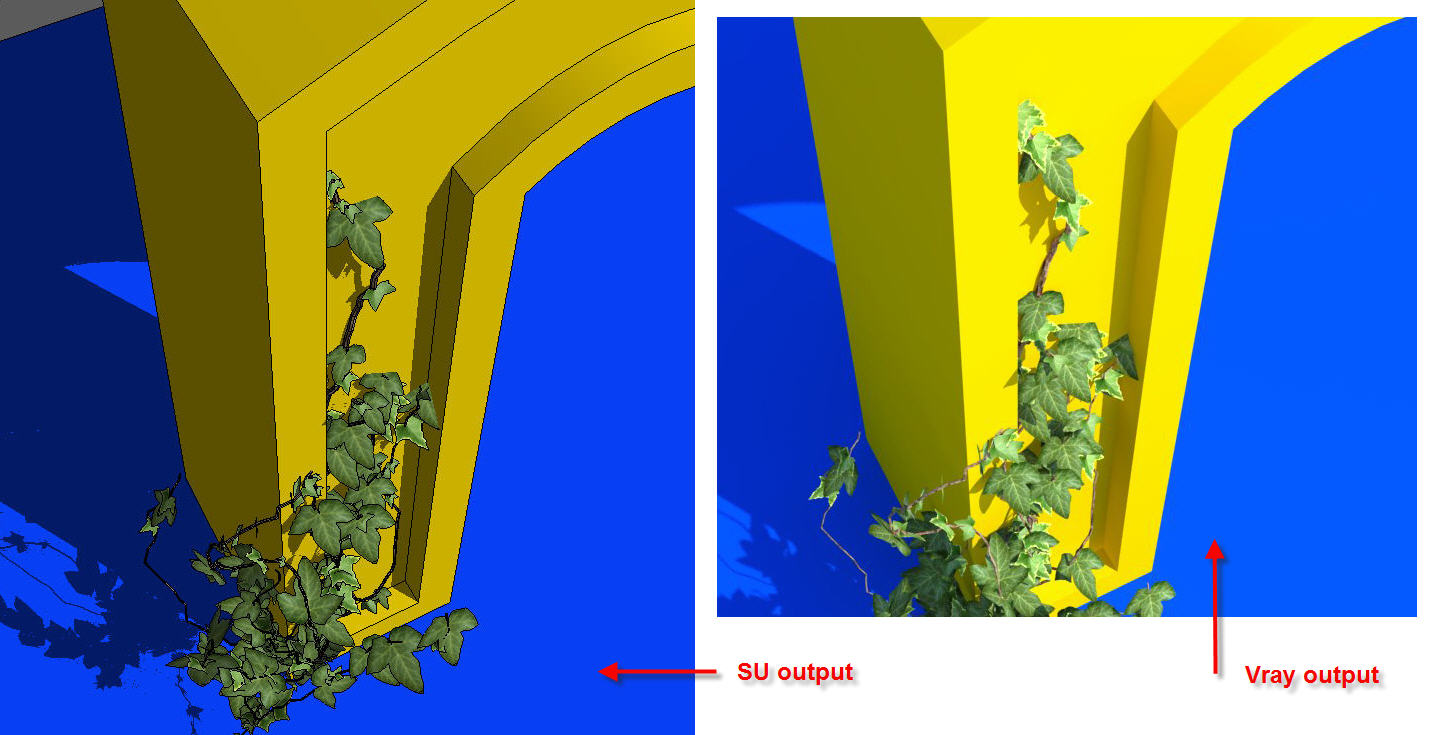
 any ideas what else needs to be changed to accept a 4th leaf? I also made the leaves into actual cutouts, the procedure is similar to making "face me components". I will post the new revised leaves soon.
-
Oh yes,I agree the leaves need to be .png's with alpha channel, especially for render purposes, I'd like to have something similar to fur plugin that I can choose what to use as leaves if possible.
Face me would be awesome.
-
@solo said:
Oh yes,I agree the leaves need to be .png's with alpha channel, especially for render purposes, I'd like to have something similar to fur plugin that I can choose what to use as leaves if possible.
Face me would be awesome.
have a look at the attached Texture folder, it contains the Ivy shown above.
let me know how it works!
(if you only have winzip just rename texture.rar to texture.zip and open it with winzip)
-
0.6.3 is the version I'm using now... The ivy is not closing on shift + click. Was playing with 0.5.4 earlier and it worked perfectly. I've playing trying it out on sketchup 8. (yes i deleted the previous version) Just reporting... No complaints..
 great work on the plugin mate..!
 -
first of all thanks for this pluggin. its wonderful. I have the following request.
-
two skp files were done in su8, its better if they are done in SU6, they can be opened in su7 and su8. if they were done in SU 8 then it has error in SU7 and SU6.
-
Please make the leaf textures as png file with background as transparent. its easier to render. instead of tiff or jpg
-
HOw is the possibility where user can load its own skp files. rather than depending on the three skp file leaves.
again my honest to goodness thanks to you pierre.
-









Advertisement