sketchucation logo sketchucation
    • 登入
    Oops, your profile's looking a bit empty! To help us tailor your experience, please fill in key details like your SketchUp version, skill level, operating system, and more. Update and save your info on your profile page today!
    ⚠️ Important | Libfredo 15.6b introduces important bugfixes for Fredo's Extensions Update

    [Plugin] Recurve

    已排程 已置頂 已鎖定 已移動 Plugins
    68 貼文 24 Posters 45.2k 瀏覽 24 Watching
    正在載入更多貼文
    • 從舊到新
    • 從新到舊
    • 最多點贊
    回覆
    • 在新貼文中回覆
    登入後回覆
    此主題已被刪除。只有擁有主題管理權限的使用者可以查看。
    • K 離線
      kyyu
      最後由 編輯

      @unknownuser said:

      probably my oldest plugin request has finally happened 😄
      weld with no dialog boxes.

      I never liked the 2 dialog boxes, either. Always answered "no". So I commented they out, in my modified version. 😎

      1 條回覆 最後回覆 回覆 引用 0
      • M 離線
        mmscanlo
        最後由 編輯

        Super helpful, thanks for sharing 😄

        1 條回覆 最後回覆 回覆 引用 0
        • utilerU 離線
          utiler
          最後由 編輯

          Thanks TIG.... 👍

          Just Curious...

          1 條回覆 最後回覆 回覆 引用 0
          • D 離線
            Diggsey
            最後由 編輯

            Just updated the first post with update 1.3. It includes the changes suggested by Jeff.

            1 條回覆 最後回覆 回覆 引用 0
            • mitcorbM 離線
              mitcorb
              最後由 編輯

              Thanks, Diggsey:
              I just downloaded it to give it a try.

              I take the slow, deliberate approach in my aimless wandering.

              1 條回覆 最後回覆 回覆 引用 0
              • Rich O BrienR 離線
                Rich O Brien Moderator
                最後由 編輯

                Really like this plugin.

                One suggestion is that the context-menu 'Select Only' is changed as it is already used by Thomthom's Selection Tools. So I've 2 'Select Only' options.

                Maybe all menu items under 'Recurve'

                Download the free D'oh Book for SketchUp 📖

                1 條回覆 最後回覆 回覆 引用 0
                • D 離線
                  Diggsey
                  最後由 編輯

                  I've uploaded a new version. It behaves the same as the last version, but if you open it in notepad you can change the line:
                  RECURVE_ALL_UNDER_RECURVE_MENU = false
                  to:
                  RECURVE_ALL_UNDER_RECURVE_MENU = true

                  That will put the Select Only menu under the Recurve menu.

                  1 條回覆 最後回覆 回覆 引用 0
                  • Rich O BrienR 離線
                    Rich O Brien Moderator
                    最後由 編輯

                    Thank you 👍

                    Download the free D'oh Book for SketchUp 📖

                    1 條回覆 最後回覆 回覆 引用 0
                    • jeff hammondJ 離線
                      jeff hammond
                      最後由 編輯

                      @diggsey said:

                      Just updated the first post with update 1.3. It includes the changes suggested by Jeff.

                      wow! that's great.
                      it's been added to my shortcuts and has replaced my most used ruby.. so long good friend (weld) 😄

                      [btw - the 'select curve and recurve' (⇧W) seems like magic 😄]

                      thanks so much!

                      dotdotdot

                      1 條回覆 最後回覆 回覆 引用 0
                      • B 離線
                        Ben Ritter
                        最後由 編輯

                        Thank you Diggsey.

                        1 條回覆 最後回覆 回覆 引用 0
                        • pilouP 離線
                          pilou
                          最後由 編輯

                          @unknownuser said:

                          does this perform the same function as weld?
                          

                          yes and much more

                          Sorry but I miss something 😳 😳 😳
                          Where is the function "weld" or similar in this plug?
                          How weld this with it?
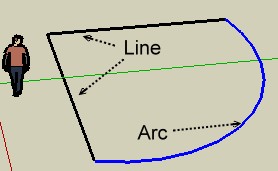
                          recurve.jpg

                          Frenchy Pilou
                          Is beautiful that please without concept!
                          My Little site :)

                          1 條回覆 最後回覆 回覆 引用 0
                          • Rich O BrienR 離線
                            Rich O Brien Moderator
                            最後由 編輯

                            Recurve Edge = Weld

                            Select edges - Right click - Recurve edge

                            Download the free D'oh Book for SketchUp 📖

                            1 條回覆 最後回覆 回覆 引用 0
                            • pilouP 離線
                              pilou
                              最後由 編輯

                              Sorry that works not 😮
                              I select the 2 lines + the arc then apply Right click "Recurve Edges"
                              That only explode my arc in segments!
                              Nothing is welded! 😲
                              This plug don't work with the V6 ?

                              Edit: That works for the V7 😒

                              Frenchy Pilou
                              Is beautiful that please without concept!
                              My Little site :)

                              1 條回覆 最後回覆 回覆 引用 0
                              • Rich O BrienR 離線
                                Rich O Brien Moderator
                                最後由 編輯

                                And v8

                                Is it time to upgrade? 😉

                                Download the free D'oh Book for SketchUp 📖

                                1 條回覆 最後回覆 回覆 引用 0
                                • pilouP 離線
                                  pilou
                                  最後由 編輯

                                  I have all versions but all my plugs (I am a Plug test pilot collector 💚 ) are on the V6! 😉

                                  Frenchy Pilou
                                  Is beautiful that please without concept!
                                  My Little site :)

                                  1 條回覆 最後回覆 回覆 引用 0
                                  • simon le bonS 離線
                                    simon le bon
                                    最後由 編輯

                                    Dear Pilou and Rich,

                                    You have certainly missed this discrete announcing from Freddo for his:
                                    Alternate directory for Plugins

                                    @unknownuser said:

                                    Hi,

                                    Till SU8, Sketchup relies on a 'hard-coded' location for the Plugins, which is typically in C:\Program Files\Google\Google SketchUp X\Plugins. This has tow main drawbacks:

                                    1. This Plugin folder being in the System area, it may be protected for write access. I have heard that schools and some companies usually have PCs where access to C:\ is disabled.

                                    2. The Plugin directory is attached to each version of Sketchup. So if you use several SU version, in particular for transition, you have to install and then update plugins in each application domain.

                                    Highlighted by me (simon)I have been using for a while now a small script to overcome this situation. My requirement was primarily to be able to have a single plugin directory where I could easily test SU6, SU7 and SU8 without updating files for each application..........

                                    (read next on his thread)......

                                    I think a lot of SketchUp users like us still use .. v6 v7 v8 (why do we keep them? that is an interesting question 😉 ) . Maintain the plugins up to date in each SU plugin directory version is effectively confusing and tiring. So Freddo's Alternate Directory seems a good solution

                                    😉 simon.

                                    1 條回覆 最後回覆 回覆 引用 0
                                    • pilouP 離線
                                      pilou
                                      最後由 編輯

                                      Not sure in this case that is this who makes fail the tool in the V6 😄
                                      Waiting adivice of the author 😄

                                      Frenchy Pilou
                                      Is beautiful that please without concept!
                                      My Little site :)

                                      1 條回覆 最後回覆 回覆 引用 0
                                      • D 離線
                                        Diggsey
                                        最後由 編輯

                                        I'm afraid I can't find out why it doesn't work in v6 because I only have versions 7 and 8 and google only host older downloads for sketchup pro.

                                        It could be that the method it uses simply doesn't work in v6. You can test this by making a curve and copying it. Explode the copy and then make it into a group and position it exactly over the original curve. Then explode the group. If you are left with a curve, the method should work.

                                        1 條回覆 最後回覆 回覆 引用 0
                                        • thomthomT 離線
                                          thomthom
                                          最後由 編輯

                                          @diggsey said:

                                          I'm afraid I can't find out why it doesn't work in v6 because I only have versions 7 and 8 and google only host older downloads for sketchup pro.

                                          Pro reverts into Free when the trial period of over.

                                          Thomas Thomassen — SketchUp Monkey & Coding addict
                                          List of my plugins and link to the CookieWare fund

                                          1 條回覆 最後回覆 回覆 引用 0
                                          • thomthomT 離線
                                            thomthom
                                            最後由 編輯

                                            I ran Recurve on SU6 - selected a set of connected edges.

                                            Got the following error in the Ruby Console:
                                            Error: #<NoMethodError: undefined methodbreak_edges=' for Sketchup:Module>
                                            C:/Program Files (x86)/Google/Google SketchUp 6/Plugins/recurve.rb:213:in recurve' C:/Program Files (x86)/Google/Google SketchUp 6/Plugins/recurve.rb:247:in recurve_selection'
                                            C:/Program Files (x86)/Google/Google SketchUp 6/Plugins/recurve.rb:361
                                            C:/Program Files (x86)/Google/Google SketchUp 6/Plugins/recurve.rb:361:in call'

                                            Sketchup.break_edges was added in SU7 - that's when SU started to automatically split edges. So you should be able to make a wrapper that only use these methods and still have the plugin functioning properly. Just test for Sketchup.respond_to?( :break_edges= ).

                                            Thomas Thomassen — SketchUp Monkey & Coding addict
                                            List of my plugins and link to the CookieWare fund

                                            1 條回覆 最後回覆 回覆 引用 0
                                            • 1
                                            • 2
                                            • 3
                                            • 4
                                            • 2 / 4
                                            • 第一個貼文
                                              最後的貼文
                                            Buy SketchPlus
                                            Buy SUbD
                                            Buy WrapR
                                            Buy eBook
                                            Buy Modelur
                                            Buy Vertex Tools
                                            Buy SketchCuisine
                                            Buy FormFonts

                                            Advertisement




