Solid Tools crashing on mac
-
Hi Edson et al,
I've tried as well with your exact steps and its working for me as well.
What kind of Mac are you using Edson?
Do you know the video card?
Do you have Hardware Acceleration enabled?I can't figure what could be conflicting, maybe a Ruby script. Do you have anything non-standard installed? If you remove all 3rd party Ruby scripts does it still happen?
OS X 10.6.6
SU 8.0.4810
Processor: 2.53 GHz Intel Core i5
Memory: 4 Gb
Video Card: NVIDIA GeForce GT 330MJody
-
I'm having horrible luck with the solids tools. Dell Precision M6400, Vista. SketchUp Pro 8, latest official release.
What i've found is that if i have solid components with multiple copies or that may have been scaled - and I perform a solid tools operation - SketchUp will crash.
I've also found that if the component axis is rotated in space (such as a rafter) - this will force a crash. If I explode and re-create the component using the default axis, I get hit and miss crashes.
The only way I've been able to continue to use the solid tools is to explode and create a group. This keeps the axis in the same orientation as the model axis, and things seem to run OK.
Not sure if this helps. Attached is a model - the red timbers are components - they force a crash on my machine. The blue timbers are groups. They work fine.
I can shoot a video if needed...
-
OK, I just swapped my backup folder of Plugins from my original SketchUp install. All is working fine on that model I posted.
So... there is a conflicting plugin somewhere...
Here's what I was running:
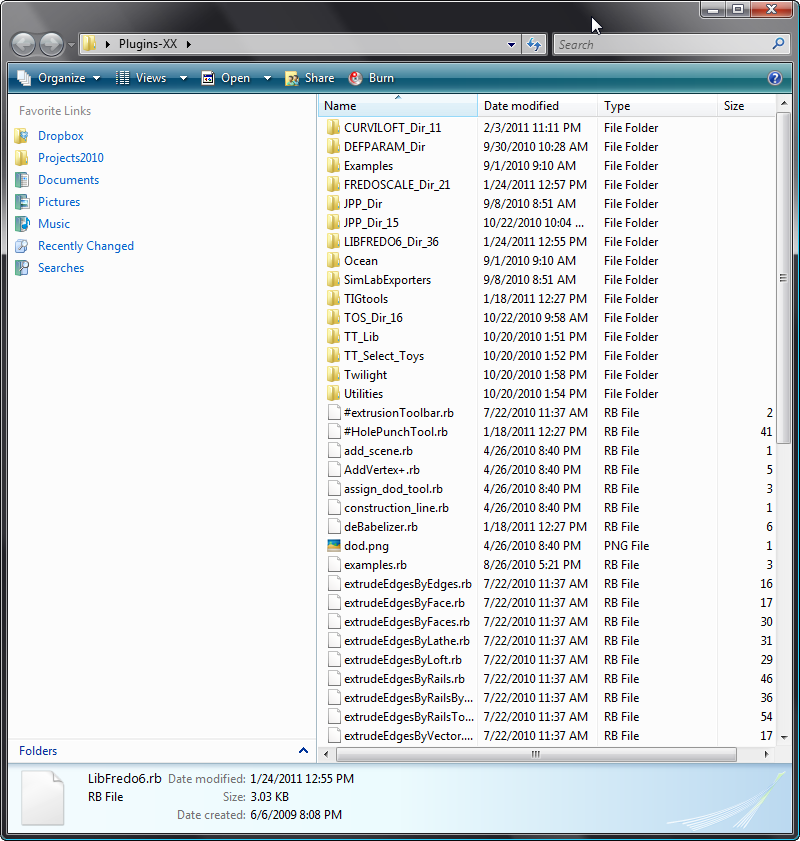
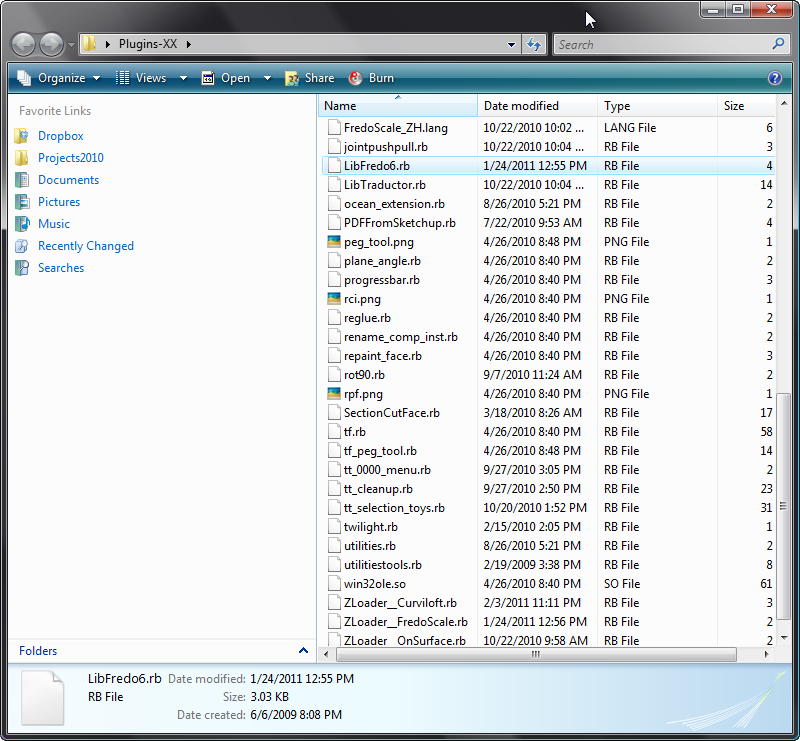
-
@bmike said:
OK, I just swapped my backup folder of Plugins from my original SketchUp install. All is working fine on that model I posted.
So... there is a conflicting plugin somewhere...
Here's what I was running:Hi again,
Tricia is running through a couple tests, and it does seem likely on our end that there may be a conflicting plugin installed. Can you share with us the list of plugins that you have installed when you see crashing or other instability with Solid Tools?
thanks-
john
. -
@jbacus said:
@bmike said:
OK, I just swapped my backup folder of Plugins from my original SketchUp install. All is working fine on that model I posted.
So... there is a conflicting plugin somewhere...
Here's what I was running:Hi again,
Tricia is running through a couple tests, and it does seem likely on our end that there may be a conflicting plugin installed. Can you share with us the list of plugins that you have installed when you see crashing or other instability with Solid Tools?
thanks-
john
.See the list above. That is what is in my folder when I crash. No problems when I run with the originals. I'm in the process of moving them over 1 by 1 now...
-
Seems that the problem is with TIGs hole punch tool. I removed it, and things seem to be working fine.
-
No need to do 1-by-1...
Do a half of them first - if no error then it's not in that half so set those aside.
Then do half of what's left - if no error then it's not in that half set those aside - etc etc until you have the few 'suspects' left.
However, if there is an error with the 'half' you tested then set the rest aside, and now keep halving the suspect ones - you know the culprit is in there somewhere...
This way you eliminate half of the 'suspected files' at each step and so you can quickly zoom in on the culprit [if any ]
]
If it's some weird interaction of two seemingly unconnected scripts dong it 1-by-1 won't help anyway. -
As it seems to 'be' my HolePunching tool causing the issue I would be interested to see why ?
I use it and have no problems doing these other operations ? Perhaps a MAC issue ? What's your OS ?
The HolePunch tool does nothing to Boolean or related operations so I am currently at a loss to see what this could be ...
-
Confirmed. Put #HolePunchTool.rb back in my Plugin folder and it immediately crashed on a SolidTools operation.
Could it be the way SketchUp handles renaming components?
My prior work around was to explode and create group(s) - do the operation, then re-make the components.
This method worked - but as soon as I had components to do the operation(s), I would crash.Dell Precision M6400, Vista Something, SketchUp Pro8...latest.
-
@unknownuser said:
Hi Edson et al,
I've tried as well with your exact steps and its working for me as well.
What kind of Mac are you using Edson?
Do you know the video card?
Do you have Hardware Acceleration enabled?I can't figure what could be conflicting, maybe a Ruby script. Do you have anything non-standard installed? If you remove all 3rd party Ruby scripts does it still happen?
OS X 10.6.6
SU 8.0.4810
Processor: 2.53 GHz Intel Core i5
Memory: 4 Gb
Video Card: NVIDIA GeForce GT 330MJody
macbook pro 2.8 GHz Intel Core 2 Duo
memory: 4Gb
OS X 10.6.7
video cards: NVIDIA GeForce 9400M + NVIDIA GeForce 9600M GT
hardware acceleration ONthe only I have not tried is to use the solid tools with no extra plugins. I'll do it next. I suspect of some conflict with some ruby script. I wiil try to find that out as soon as I can.
-
@jbacus said:
Hi again,
Tricia is running through a couple tests, and it does seem likely on our end that there may be a conflicting plugin installed. Can you share with us the list of plugins that you have installed when you see crashing or other instability with Solid Tools?
thanks-
john
.john,
I have 325 items on my plugins folder. do you want me to post a sequence of screen shots of it? just say the word and I will do it. -
@edson said:
@jbacus said:
Hi again,
Tricia is running through a couple tests, and it does seem likely on our end that there may be a conflicting plugin installed. Can you share with us the list of plugins that you have installed when you see crashing or other instability with Solid Tools?
thanks-
john
.john,
I have 325 items on my plugins folder. do you want me to post a sequence of screen shots of it? just say the word and I will do it.Are you using TIGs HolePunch? I found that to be the problem.
-
@bmike said:
Are you using TIGs HolePunch? I found that to be the problem.
yes, I have it in my plugins folder. I will report here as soon as I have tested the solid tools without it in my plugins folder.
but if HolePunch is causing the conflict, I am sure TIG will find the reason for that. I am more than thankful to him for all the time I have saved using his numerous scripts.
-
@edson said:
I am more than thankful to him for all the time I have saved using his numerous scripts.
+1,000, for sure. lots of helpful things from TIG have passed through my SketchUp models.
-
@edson said:
I have 325 items on my plugins folder.
...that's kind of a lot of plugins, Edson...
john
. -
I assume you don't have the 'Outliner' window open whilst you are doing these operations - that is a known and notorious cause of crashes...
The HolePunch tool does use observers to ensure that the cutting component and its 'hole' are 'linked' they select, move together etc.
I assume the objects you are trying to 'boolean' are simple non-cutting instances that haven't any 'hole-punching' connections... The HolePunchSelectionObserver only kicks in if certain prerequisites are met like component behavior and paired attributes... There is also a tools Observer that spots if you are 'copying' punched-objects... but again I don't see how that might kick in in this case...
Clearly Hole Punching works 'safely' on my PC and also for many other users, I am [currently] at a loss as to why it might be causing this in your specific case[s]... I get Edson's example to boolean perfectly in all varieties with HolePunching enabled ???
The code is 'open' so if Google spot what might be up I'd be more than grateful...
-
@tig said:
I assume you don't have the 'Outliner' window open whilst you are doing these operations - that is a known and notorious cause of crashes...
The HolePunch tool does use observers to ensure that the cutting component and its 'hole' are 'linked' they select, move together etc.
I assume the objects you are trying to 'boolean' are simple non-cutting instances that haven't any 'hole-punching' connections... The HolePunchSelectionObserver only kicks in if certain prerequisites are met like component behavior and paired attributes... There is also a tools Observer that spots if you are 'copying' punched-objects... but again I don't see how that might kick in in this case...
Clearly Hole Punching works 'safely' on my PC and also for many other users, I am [currently] at a loss as to why it might be causing this in your specific case[s]... I get Edson's example to boolean perfectly in all varieties with HolePunching enabled ???
The code is 'open' so if Google spot what might be up I'd be more than grateful...
TIG,
yes, you are right. my outliner window was closed.
I removed the HolePunchTool from my plugins folder and tried the solid tools with all the files with which I had problems before. no problems at all. I am not sure this is conclusive evidence but it looks like there is some kind of conflict between HolePunchTool and Solid Tools on mac.
-
Are there any MAC users with 'HolePunch' loaded who are getting good results with Solid Tools too ?
Perhaps Google can cast some light on what might be happening... -
Hi all,
We'll take a look and see if we can figure out what the conflict is.
Tricia
-
Hi Tricia, long time no see! I hope you are fine!






Advertisement