sketchucation logo sketchucation
    • Login
    Oops, your profile's looking a bit empty! To help us tailor your experience, please fill in key details like your SketchUp version, skill level, operating system, and more. Update and save your info on your profile page today!
    Mac User? | Join the Rayscaper Beta for Mac Learn More

    FluidImporter free .obj importer Beta 1.0.5 Updated

    Scheduled Pinned Locked Moved Extensions & Applications Discussions
    extensions
    168 Posts 46 Posters 97.1k Views 46 Watching
    Loading More Posts
    • Oldest to Newest
    • Newest to Oldest
    • Most Votes
    Reply
    • Reply as topic
    Log in to reply
    This topic has been deleted. Only users with topic management privileges can see it.
    • A
      AriseSavage
      last edited by

      I've tried to import an OBJ file in all OBJ importers I could find, and also tested in other apps like Blender or Rhino and I can't get the texture mapped ok.

      When I use the model inside the rendering app based on libgdx, it appears fine, at least the top of it.

      Anyone knows why the ship.obj file doesn't look ok in sketchup?

      This is how the model should look like:
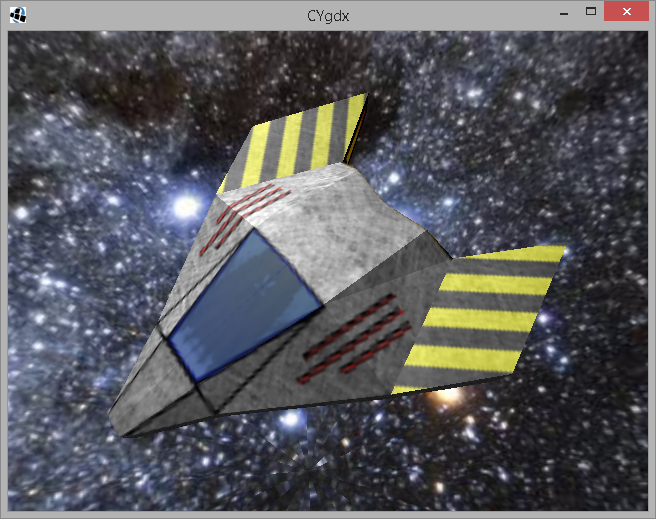
      Ship rendered (how it should like)


      The texture


      Full zip archive

      1 Reply Last reply
      Reply Quote 0
      • TIGT
        TIG Moderator
        last edited by

        I don't know why the UV mapping is messed up in this case...
        BUT it is fixable. πŸ˜„
        Import the OBJ and the UV mapping is rubbish...
        Now edit the 'ship' Material [oddly named 'cube1_auv' !] - edit its image ship.PNG.
        In Gimp [or PS] - rotate it 180 degrees and then flip it - see the thumbnail in the Materials Browser screen-shot, compared to the original ship.PNG [which I've also attached]...
        Save/close the image and the Material updates - the UV mapping is now corrected... πŸ€“


        Capture.PNG


        ship.png

        TIG

        1 Reply Last reply
        Reply Quote 0
        • A
          AriseSavage
          last edited by

          Thanks, now I have to figure out a way to batch process the images I assume to convert from Sketchup to my LibGDX obj scene loader.

          1 Reply Last reply
          Reply Quote 0
          • TIGT
            TIG Moderator
            last edited by

            You could rotate 180 and then flip the PNG images using Gimp or PS, before the OBJ import...
            There are batch plugins for Gimp to let you do this, en mass...
            See Gimp's BIMP http://alessandrofrancesconi.it/projects/bimp/

            TIG

            1 Reply Last reply
            Reply Quote 0
            • F
              fluid
              last edited by

              Just released v.1.0.1 featuring:

              • Units options
              • Flip YZ option
              • Read color and texture from material library
              • Triangulate polygons option
              • Should handle negative indices (not tested)

              Thanks to TIG for the suggestions.
              Check at the end of the page: http://www.fluidimporter.com/downloads

              1 Reply Last reply
              Reply Quote 0
              • R
                Rivalz
                last edited by

                When ever I install the new FluidImporter 2 for SketchUp 2015 64bit - OSX my sketchup will crash on start up. Placing the .plugin file in the package contents only causes it crash when I go to select file>import. If anyone has any ideas or more info please let me know.

                1 Reply Last reply
                Reply Quote 0
                • J
                  jumpjack
                  last edited by

                  How do I install the plugin without running the executable? I extracted all the files using Uniextract, but now what?

                  1 Reply Last reply
                  Reply Quote 0
                  • Rich O BrienR
                    Rich O Brien Moderator
                    last edited by

                    @jumpjack said:

                    How do I install the plugin without running the executable?

                    What's the purpose of not using the .exe?

                    Download the free D'oh Book for SketchUp πŸ“–

                    1 Reply Last reply
                    Reply Quote 0
                    • J
                      jumpjack
                      last edited by

                      keeping my office pc clean

                      1 Reply Last reply
                      Reply Quote 0
                      • F
                        fluid
                        last edited by

                        We just released FluidImporter Pro, which imports the following formats: .obj, .fbx, .stl, .ply, .x, .3ds, .dae, .ase

                        Also the regular FluidImporter has been updated (it's now called FluidImporter Lite).

                        Please check http://www.fluidimporter.com for instruction on how to install and use it.

                        1 Reply Last reply
                        Reply Quote 0
                        • F
                          fluid
                          last edited by

                          We just released FluidImporter 3.1.0. You can get it here.

                          Here's what's new:

                          • Faster import
                          • FluidImporter is now a full .rbz extension, with a single file for Windows/OSX
                          • You can access FluidImporter funtionality through the menu Extensions -> FluidImporter
                          • Added edge smooth option
                          • Options are now saved so you don't lose your settings when closing SkechUp

                          1 Reply Last reply
                          Reply Quote 0

                          Hello! It looks like you're interested in this conversation, but you don't have an account yet.

                          Getting fed up of having to scroll through the same posts each visit? When you register for an account, you'll always come back to exactly where you were before, and choose to be notified of new replies (either via email, or push notification). You'll also be able to save bookmarks and upvote posts to show your appreciation to other community members.

                          With your input, this post could be even better πŸ’—

                          Register Login
                          • 1
                          • 2
                          • 3
                          • 4
                          • 5
                          • 8
                          • 9
                          • 2 / 9
                          • First post
                            Last post
                          Buy SketchPlus
                          Buy SUbD
                          Buy WrapR
                          Buy eBook
                          Buy Modelur
                          Buy Vertex Tools
                          Buy SketchCuisine
                          Buy FormFonts

                          Advertisement