sketchucation logo sketchucation
    • 登入
    Oops, your profile's looking a bit empty! To help us tailor your experience, please fill in key details like your SketchUp version, skill level, operating system, and more. Update and save your info on your profile page today!
    🔌 Smart Spline | Fluid way to handle splines for furniture design and complex structures. Download

    [Plugin]T2H_BuildingStructureTools2.2.4 in20141207

    已排程 已置頂 已鎖定 已移動 Plugins
    337 貼文 108 Posters 476.7k 瀏覽 108 Watching
    正在載入更多貼文
    • 從舊到新
    • 從新到舊
    • 最多點贊
    回覆
    • 在新貼文中回覆
    登入後回覆
    此主題已被刪除。只有擁有主題管理權限的使用者可以查看。
    • T 離線
      tak2hata
      最後由 編輯

      @goga63 said:

      Good day !
      Found bug in versions of Sketchup 2013 and Sketchup2014.
      in Sketchup 2014 when you open the "Component Options" message on the error.
      If using the editor Attribute in the Directory "BEAM_SPECS" attribute "PATH" to change the value of " [Point3d(0, 0, 0), Point3d(0, 100, 0)] "
      to Point3d(0, 0, 0), Point3d(0, 100, 0) " , deleting the characters "[" and "]" ,
      the error message does not occur.

      http://ipic.su/img/img7/fs/error.1410935291.jpg

      Hi,goga63.
      I understand the problem.
      I try to fix it.
      Thanks.


      by TAK2HATA

      1 條回覆 最後回覆 回覆 引用 0
      • T 離線
        tak2hata
        最後由 編輯

        Hi,All.
        I update this to Version2.0.1a in 2014.09.28.
        Some new function and Improves and Bugfixs.
        Please watch what's new movie on top of thread.
        Thanks!


        by TAK2HATA

        1 條回覆 最後回覆 回覆 引用 0
        • KrisidiousK 離線
          Krisidious
          最後由 編輯

          nice improvements... That wall tool looks nice. Can it possibly do curved walls? or transform lines into walls?

          By: Kristoff Rand
          Home DesignerUnique House Plans

          1 條回覆 最後回覆 回覆 引用 0
          • G 離線
            goga63
            最後由 編輯

            Thank, tak2hata !!!
            Excellent !!!
            but ...now the length of the replaced part is not equal to the length of the deleted...
            https://www.youtube.com/watch?v=CNm6fd-uhIU%26amp;list=UUYHOlAYFzT2R55uH7KDFIaQ

            1 條回覆 最後回覆 回覆 引用 0
            • T 離線
              tak2hata
              最後由 編輯

              @goga63 said:

              Thank, tak2hata !!!
              Excellent !!!
              but ...now the length of the replaced part is not equal to the length of the deleted...
              https://www.youtube.com/watch?v=CNm6fd-uhIU%26amp;list=UUYHOlAYFzT2R55uH7KDFIaQ

              Hi,goga63.
              Thanks for your testing.
              But I can not make same scene.
              Please send me your tested scene file with mwall files.

              Thanks.


              by TAK2HATA

              1 條回覆 最後回覆 回覆 引用 0
              • T 離線
                tak2hata
                最後由 編輯

                Hi,All.
                It has been a long time. 😉
                I re-updated to version2.0.2a.

                The problem that goga63 told me is fixed.

                But this script is very long.
                So I think there will be any other problems.

                I will check for more time.

                Thanks.


                by TAK2HATA

                1 條回覆 最後回覆 回覆 引用 0
                • G 離線
                  goga63
                  最後由 編輯

                  Yes ! now everything works !!!
                  ...but if I find bugs ...
                  ...I'll be back ...
                  😎 😎 😎

                  1 條回覆 最後回覆 回覆 引用 0
                  • G 離線
                    goga63
                    最後由 編輯

                    ... using the new features of the plugin ...

                    [flash=425,344:19h84au5]http://www.youtube.com/v/osD9DL--Wu0&hl=en&fs=1&rel=0[/flash:19h84au5]

                    1 條回覆 最後回覆 回覆 引用 0
                    • B 離線
                      bohdeechozo
                      最後由 編輯

                      Can anyone help me with ese kind of structure? Would beams with measures 100x50x2,5mm. I am not able to produce with the application. Thank you.
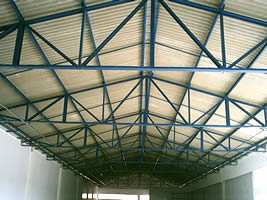

                      trelicafoto2.jpg

                      1 條回覆 最後回覆 回覆 引用 0
                      • C 離線
                        cadmunkey
                        最後由 編輯

                        Havent used this in a while. Can someone remind me how to create a slab. Do I select a face and then apply all, or select outer lines and draw by clicks? Nothing seems to work for me and I must be doing something wrong as all the other items work fine.

                        Edit: figured it out, click face then draw by clicks. Doh!

                        1 條回覆 最後回覆 回覆 引用 0
                        • C 離線
                          cadmunkey
                          最後由 編輯

                          Using the new SHAPE class, does the ALIGN function not work with this? No matter how I draw my shape it draws it with a justification of bottom right. Any workaround?

                          1 條回覆 最後回覆 回覆 引用 0
                          • T 離線
                            tak2hata
                            最後由 編輯

                            Hi,ALL.
                            I update this to v2.1.0 in 2014.11.01.
                            Some Improves.

                            Hi,Cadmunkey.
                            "SHAPE" class not support ALIGN option.
                            I will consider the method for Align of "SHAPE" in future.

                            Thanks.


                            by TAK2HATA

                            1 條回覆 最後回覆 回覆 引用 0
                            • C 離線
                              cadmunkey
                              最後由 編輯

                              @tak2hata said:

                              Hi,ALL.
                              I update this to v2.1.0 in 2014.11.01.
                              Some Improves.

                              Hi,Cadmunkey.
                              "SHAPE" class not support ALIGN option.
                              I will consider the method for Align of "SHAPE" in future.

                              Thanks.

                              OK, thanks for considering it. Such a great plugin I couldn't live without now 😉

                              1 條回覆 最後回覆 回覆 引用 0
                              • facerF 離線
                                facer
                                最後由 編輯

                                T2H,
                                Great plugin, keep up the good work!

                                V2.1.0 - Question ??
                                I am using Skp 2014, W7, 32bit

                                1. I note that I can only get the "Draw by click" to work in the SMALL - simple window of
                                  the Toggle_UI. I find in the SMALL UI it is hard to read the data due to the small text size.
                                  The LARGER UI is easier for me to read. Can this be achieved?

                                2. Is the new STEEL BEAM (ref attachment) data saved for latter use?
                                  I can not find my new STEEL BEAM in the data.

                                Thanks again,
                                Ray
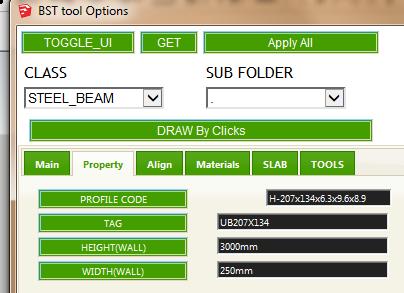

                                UB207x134 data input

                                1 條回覆 最後回覆 回覆 引用 0
                                • C 離線
                                  cadmunkey
                                  最後由 編輯

                                  @facer said:

                                  1. Is the new STEEL BEAM (ref attachment) data saved for latter use?
                                    I can not find my new STEEL BEAM in the data.

                                  Thanks again,
                                  Ray

                                  Did you create that in the table editor? If so it seems to shift newly created elements to the bottom of your lists, not in order of actual section size.

                                  1 條回覆 最後回覆 回覆 引用 0
                                  • T 離線
                                    tak2hata
                                    最後由 編輯

                                    Hi,all.
                                    I update this to v2.2.0. in 2014.11.16.
                                    Apply IFC classification in sketchup2015.
                                    Thanks!


                                    by TAK2HATA

                                    1 條回覆 最後回覆 回覆 引用 0
                                    • G 離線
                                      goga63
                                      最後由 編輯

                                      And again great work ! 👍 👍 👍
                                      Only after carrying over of function of editing of a profile directly in the table, the button "Profile Schema Edit" shows an empty window.

                                      Here new Russian translation to a plug-in.
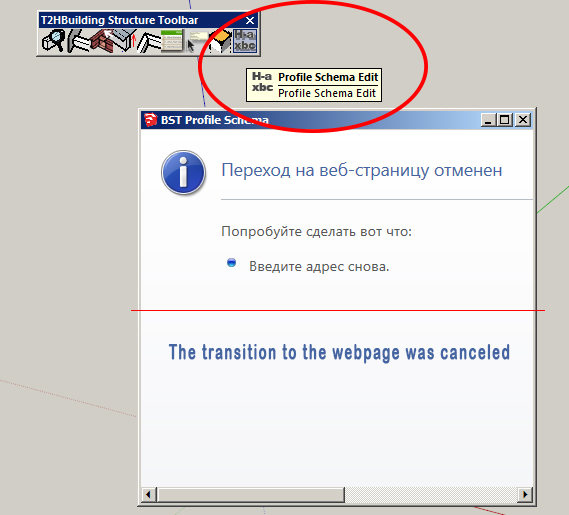

                                      lang_ru.txt


                                      BST.jpg

                                      1 條回覆 最後回覆 回覆 引用 0
                                      • C 離線
                                        cadmunkey
                                        最後由 編輯

                                        @tak2hata said:

                                        Hi,all.
                                        I update this to v2.2.0. in 2014.11.16.
                                        Apply IFC classification in sketchup2015.
                                        Thanks!

                                        Genius! Thank you so much for this update 😄 👍

                                        1 條回覆 最後回覆 回覆 引用 0
                                        • OxerO 離線
                                          Oxer
                                          最後由 編輯

                                          Thanks for the update, the Profile Schema Edit window doesn't open because in the line 545 of main.rb file the path isn't correct:

                                           line 548-> htmfile = File.join(File.dirname(__FILE__),'bst_profile_creator2.html')
                                          

                                          You need fix the path to:

                                           line 548-> htmfile = File.join(File.dirname(__FILE__),'bst_profile_creator.html')
                                          

                                          "The result is the end what is important is the process" by Oxer
                                          http://www.oxervision.blogspot.com/

                                          1 條回覆 最後回覆 回覆 引用 0
                                          • C 離線
                                            cadmunkey
                                            最後由 編輯

                                            Strange, I'm using the new version and didn't have that issue Oxer.

                                            1 條回覆 最後回覆 回覆 引用 0
                                            • 1
                                            • 2
                                            • 13
                                            • 14
                                            • 15
                                            • 16
                                            • 17
                                            • 17 / 17
                                            • 第一個貼文
                                              最後的貼文
                                            Buy SketchPlus
                                            Buy SUbD
                                            Buy WrapR
                                            Buy eBook
                                            Buy Modelur
                                            Buy Vertex Tools
                                            Buy SketchCuisine
                                            Buy FormFonts

                                            Advertisement