sketchucation logo sketchucation
    • Login
    Oops, your profile's looking a bit empty! To help us tailor your experience, please fill in key details like your SketchUp version, skill level, operating system, and more. Update and save your info on your profile page today!
    Mac User? | Join the Rayscaper Beta for Mac Learn More

    [Plugin]T2H_BuildingStructureTools2.2.4 in20141207

    Scheduled Pinned Locked Moved Plugins
    337 Posts 108 Posters 544.9k Views 108 Watching
    Loading More Posts
    • Oldest to Newest
    • Newest to Oldest
    • Most Votes
    Reply
    • Reply as topic
    Log in to reply
    This topic has been deleted. Only users with topic management privileges can see it.
    • sumasterS
      sumaster
      last edited by

      Hello Tak2hata Sir,

      NOW Its working . . . . . . . Thanks . . . . . ๐Ÿ˜

      Thank you,
      SUmaster

      1 Reply Last reply
      Reply Quote 0
      • G
        goga63
        last edited by

        Good day !
        Found bug in versions of Sketchup 2013 and Sketchup2014.
        in Sketchup 2014 when you open the "Component Options" message on the error.
        If using the editor Attribute in the Directory "BEAM_SPECS" attribute "PATH" to change the value of " [Point3d(0, 0, 0), Point3d(0, 100, 0)] "
        to Point3d(0, 0, 0), Point3d(0, 100, 0) " , deleting the characters "[" and "]" ,
        the error message does not occur.

        http://ipic.su/img/img7/fs/error.1410935291.jpg

        1 Reply Last reply
        Reply Quote 0
        • T
          tak2hata
          last edited by

          @goga63 said:

          Good day !
          Found bug in versions of Sketchup 2013 and Sketchup2014.
          in Sketchup 2014 when you open the "Component Options" message on the error.
          If using the editor Attribute in the Directory "BEAM_SPECS" attribute "PATH" to change the value of " [Point3d(0, 0, 0), Point3d(0, 100, 0)] "
          to Point3d(0, 0, 0), Point3d(0, 100, 0) " , deleting the characters "[" and "]" ,
          the error message does not occur.

          http://ipic.su/img/img7/fs/error.1410935291.jpg

          Hi,goga63.
          I understand the problem.
          I try to fix it.
          Thanks.


          by TAK2HATA

          1 Reply Last reply
          Reply Quote 0
          • T
            tak2hata
            last edited by

            Hi,All.
            I update this to Version2.0.1a in 2014.09.28.
            Some new function and Improves and Bugfixs.
            Please watch what's new movie on top of thread.
            Thanks!


            by TAK2HATA

            1 Reply Last reply
            Reply Quote 0
            • KrisidiousK
              Krisidious
              last edited by

              nice improvements... That wall tool looks nice. Can it possibly do curved walls? or transform lines into walls?

              By: Kristoff Rand
              Home DesignerUnique House Plans

              1 Reply Last reply
              Reply Quote 0
              • G
                goga63
                last edited by

                Thank, tak2hata !!!
                Excellent !!!
                but ...now the length of the replaced part is not equal to the length of the deleted...
                https://www.youtube.com/watch?v=CNm6fd-uhIU%26amp;list=UUYHOlAYFzT2R55uH7KDFIaQ

                1 Reply Last reply
                Reply Quote 0
                • T
                  tak2hata
                  last edited by

                  @goga63 said:

                  Thank, tak2hata !!!
                  Excellent !!!
                  but ...now the length of the replaced part is not equal to the length of the deleted...
                  https://www.youtube.com/watch?v=CNm6fd-uhIU%26amp;list=UUYHOlAYFzT2R55uH7KDFIaQ

                  Hi,goga63.
                  Thanks for your testing.
                  But I can not make same scene.
                  Please send me your tested scene file with mwall files.

                  Thanks.


                  by TAK2HATA

                  1 Reply Last reply
                  Reply Quote 0
                  • T
                    tak2hata
                    last edited by

                    Hi,All.
                    It has been a long time. ๐Ÿ˜‰
                    I re-updated to version2.0.2a.

                    The problem that goga63 told me is fixed.

                    But this script is very long.
                    So I think there will be any other problems.

                    I will check for more time.

                    Thanks.


                    by TAK2HATA

                    1 Reply Last reply
                    Reply Quote 0
                    • G
                      goga63
                      last edited by

                      Yes ! now everything works !!!
                      ...but if I find bugs ...
                      ...I'll be back ...
                      ๐Ÿ˜Ž ๐Ÿ˜Ž ๐Ÿ˜Ž

                      1 Reply Last reply
                      Reply Quote 0
                      • G
                        goga63
                        last edited by

                        ... using the new features of the plugin ...

                        [flash=425,344:19h84au5]http://www.youtube.com/v/osD9DL--Wu0&hl=en&fs=1&rel=0[/flash:19h84au5]

                        1 Reply Last reply
                        Reply Quote 0
                        • B
                          bohdeechozo
                          last edited by

                          Can anyone help me with ese kind of structure? Would beams with measures 100x50x2,5mm. I am not able to produce with the application. Thank you.
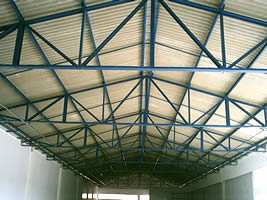

                          trelicafoto2.jpg

                          1 Reply Last reply
                          Reply Quote 0
                          • C
                            cadmunkey
                            last edited by

                            Havent used this in a while. Can someone remind me how to create a slab. Do I select a face and then apply all, or select outer lines and draw by clicks? Nothing seems to work for me and I must be doing something wrong as all the other items work fine.

                            Edit: figured it out, click face then draw by clicks. Doh!

                            1 Reply Last reply
                            Reply Quote 0
                            • C
                              cadmunkey
                              last edited by

                              Using the new SHAPE class, does the ALIGN function not work with this? No matter how I draw my shape it draws it with a justification of bottom right. Any workaround?

                              1 Reply Last reply
                              Reply Quote 0
                              • T
                                tak2hata
                                last edited by

                                Hi,ALL.
                                I update this to v2.1.0 in 2014.11.01.
                                Some Improves.

                                Hi,Cadmunkey.
                                "SHAPE" class not support ALIGN option.
                                I will consider the method for Align of "SHAPE" in future.

                                Thanks.


                                by TAK2HATA

                                1 Reply Last reply
                                Reply Quote 0
                                • C
                                  cadmunkey
                                  last edited by

                                  @tak2hata said:

                                  Hi,ALL.
                                  I update this to v2.1.0 in 2014.11.01.
                                  Some Improves.

                                  Hi,Cadmunkey.
                                  "SHAPE" class not support ALIGN option.
                                  I will consider the method for Align of "SHAPE" in future.

                                  Thanks.

                                  OK, thanks for considering it. Such a great plugin I couldn't live without now ๐Ÿ˜‰

                                  1 Reply Last reply
                                  Reply Quote 0
                                  • facerF
                                    facer
                                    last edited by

                                    T2H,
                                    Great plugin, keep up the good work!

                                    V2.1.0 - Question ??
                                    I am using Skp 2014, W7, 32bit

                                    1. I note that I can only get the "Draw by click" to work in the SMALL - simple window of
                                      the Toggle_UI. I find in the SMALL UI it is hard to read the data due to the small text size.
                                      The LARGER UI is easier for me to read. Can this be achieved?

                                    2. Is the new STEEL BEAM (ref attachment) data saved for latter use?
                                      I can not find my new STEEL BEAM in the data.

                                    Thanks again,
                                    Ray
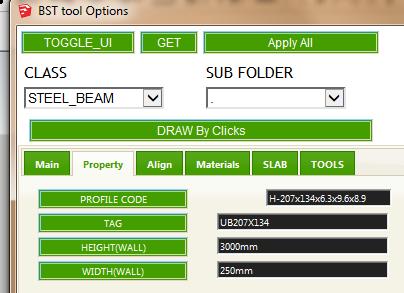

                                    UB207x134 data input

                                    1 Reply Last reply
                                    Reply Quote 0
                                    • C
                                      cadmunkey
                                      last edited by

                                      @facer said:

                                      1. Is the new STEEL BEAM (ref attachment) data saved for latter use?
                                        I can not find my new STEEL BEAM in the data.

                                      Thanks again,
                                      Ray

                                      Did you create that in the table editor? If so it seems to shift newly created elements to the bottom of your lists, not in order of actual section size.

                                      1 Reply Last reply
                                      Reply Quote 0
                                      • T
                                        tak2hata
                                        last edited by

                                        Hi,all.
                                        I update this to v2.2.0. in 2014.11.16.
                                        Apply IFC classification in sketchup2015.
                                        Thanks!


                                        by TAK2HATA

                                        1 Reply Last reply
                                        Reply Quote 0
                                        • G
                                          goga63
                                          last edited by

                                          And again great work ! ๐Ÿ‘ ๐Ÿ‘ ๐Ÿ‘
                                          Only after carrying over of function of editing of a profile directly in the table, the button "Profile Schema Edit" shows an empty window.

                                          Here new Russian translation to a plug-in.
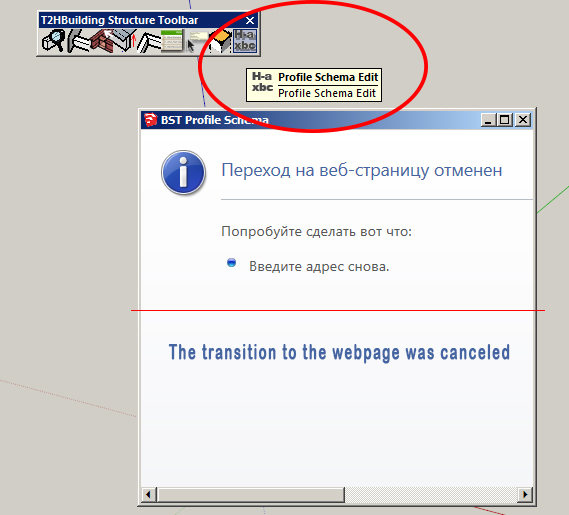

                                          lang_ru.txt


                                          BST.jpg

                                          1 Reply Last reply
                                          Reply Quote 0
                                          • C
                                            cadmunkey
                                            last edited by

                                            @tak2hata said:

                                            Hi,all.
                                            I update this to v2.2.0. in 2014.11.16.
                                            Apply IFC classification in sketchup2015.
                                            Thanks!

                                            Genius! Thank you so much for this update ๐Ÿ˜„ ๐Ÿ‘

                                            1 Reply Last reply
                                            Reply Quote 0

                                            Hello! It looks like you're interested in this conversation, but you don't have an account yet.

                                            Getting fed up of having to scroll through the same posts each visit? When you register for an account, you'll always come back to exactly where you were before, and choose to be notified of new replies (either via email, or push notification). You'll also be able to save bookmarks and upvote posts to show your appreciation to other community members.

                                            With your input, this post could be even better ๐Ÿ’—

                                            Register Login
                                            • 1
                                            • 2
                                            • 13
                                            • 14
                                            • 15
                                            • 16
                                            • 17
                                            • 15 / 17
                                            • First post
                                              Last post
                                            Buy SketchPlus
                                            Buy SUbD
                                            Buy WrapR
                                            Buy eBook
                                            Buy Modelur
                                            Buy Vertex Tools
                                            Buy SketchCuisine
                                            Buy FormFonts

                                            Advertisement