sketchucation logo sketchucation
    • Login
    Oops, your profile's looking a bit empty! To help us tailor your experience, please fill in key details like your SketchUp version, skill level, operating system, and more. Update and save your info on your profile page today!
    ⚠️ Update | Sketchucation Tools 5.0.8 released with licensing improvements and bugfixes Download

    [Tutorial > Texturing] Texturing an arch - #2

    Scheduled Pinned Locked Moved SketchUp Tutorials
    sketchup
    87 Posts 18 Posters 41.8k Views 18 Watching
    Loading More Posts
    • Oldest to Newest
    • Newest to Oldest
    • Most Votes
    Reply
    • Reply as topic
    Log in to reply
    This topic has been deleted. Only users with topic management privileges can see it.
    • J
      juanfernandez
      last edited by

      The first link is OK, Gai. The web administrators, I don't know why, shut off their web sites by night, and turn on then early in the morning. It's a provincial institution-Diputación Provincial in spanish- and they have this weird way of publishing their web sites.

      1 Reply Last reply
      Reply Quote 0
      • GaieusG
        Gaieus
        last edited by

        Yes, I can see now... "Reconstrucción Virtual > Próximamente". Is this what you are working on?

        Gai...

        1 Reply Last reply
        Reply Quote 0
        • J
          juanfernandez
          last edited by

          No, I am a newbie, and cannot take that job by now. I am a teacher, we plan do educative software and documents related to the Olmeda Villa. My 3D model is may way to learn SU with a motivating subject. Perhaps in the future I will be able of making something worth of the Villa. 😉

          1 Reply Last reply
          Reply Quote 0
          • GaieusG
            Gaieus
            last edited by

            Get me to do it then. I am an archaeologist, too. 😉

            Gai...

            1 Reply Last reply
            Reply Quote 0
            • J
              juanfernandez
              last edited by

              Ok, Gai, I'll take your word. ☀
              When I became profficient enough in SU to do the job, I'll call you. I have to work hard in SU. Then they have to let me take photographies and measurements of the Villa. I think there will be no problem, because I am in very good relations with the Villa's provincial managers.

              1 Reply Last reply
              Reply Quote 0
              • marvins_dadM
                marvins_dad
                last edited by

                Thanks guys! Thanks for the tutorial and the tools!
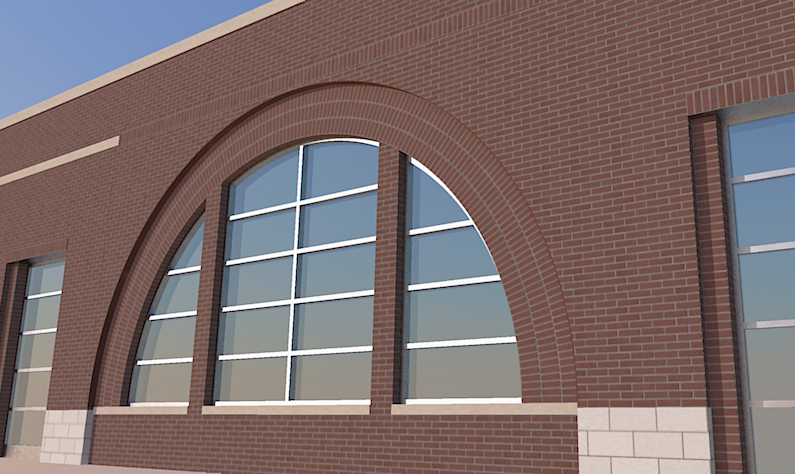
                Just saved me with this huge arch for an addition, which matches a design done 10 years ago on the same building.

                BTW - I didn't read past the initial steps since I didn't have any issues, but if you are matching an opening - make the height of the flat column of brick equal to the length of outer arc of the assembly. Did that make sense?

                Arch-mustang.jpg

                My Gallery

                1 Reply Last reply
                Reply Quote 0
                • GaieusG
                  Gaieus
                  last edited by

                  Nice arch! 👍

                  Of course, now we have Whaat's SketchUV Plugin (with tube mapping) which save even more time and head-ache...

                  @marvins_dad said:

                  BTW - I didn't read past the initial steps since I didn't have any issues, but if you are matching an opening - make the height of the flat column of brick equal to the length of outer arc of the assembly. Did that make sense?

                  I guess it all depends where you grab that column (inner or outer side) with Fredoscale.

                  Gai...

                  1 Reply Last reply
                  Reply Quote 0
                  • ziiarZ
                    ziiar
                    last edited by

                    Is there a way to do this without the FredoScale plugin? I'm making a gothic arch like the one mentioned in the previous thread:

                    http://sketchucation.com/forums/download/file.php?id=37073&mode=view/rokbox.jpg

                    I assume this was modeled with the follow me tool, which is what I did do model it.

                    1 Reply Last reply
                    Reply Quote 0
                    • thomthomT
                      thomthom
                      last edited by

                      This wasn't made with FredoScale nor the Follow me tool.

                      I drew the outline, then offset to make the inner hole. Then another offset to create the line in the middle. After that I selected the edges of the inner hole and moved it inwards.

                      hm... this is probably better suited with screenshots....

                      Thomas Thomassen — SketchUp Monkey & Coding addict
                      List of my plugins and link to the CookieWare fund

                      1 Reply Last reply
                      Reply Quote 0
                      • thomthomT
                        thomthom
                        last edited by

                        Thomas Thomassen — SketchUp Monkey & Coding addict
                        List of my plugins and link to the CookieWare fund

                        1 Reply Last reply
                        Reply Quote 0
                        • Rich O BrienR
                          Rich O Brien Moderator
                          last edited by

                          @Thom

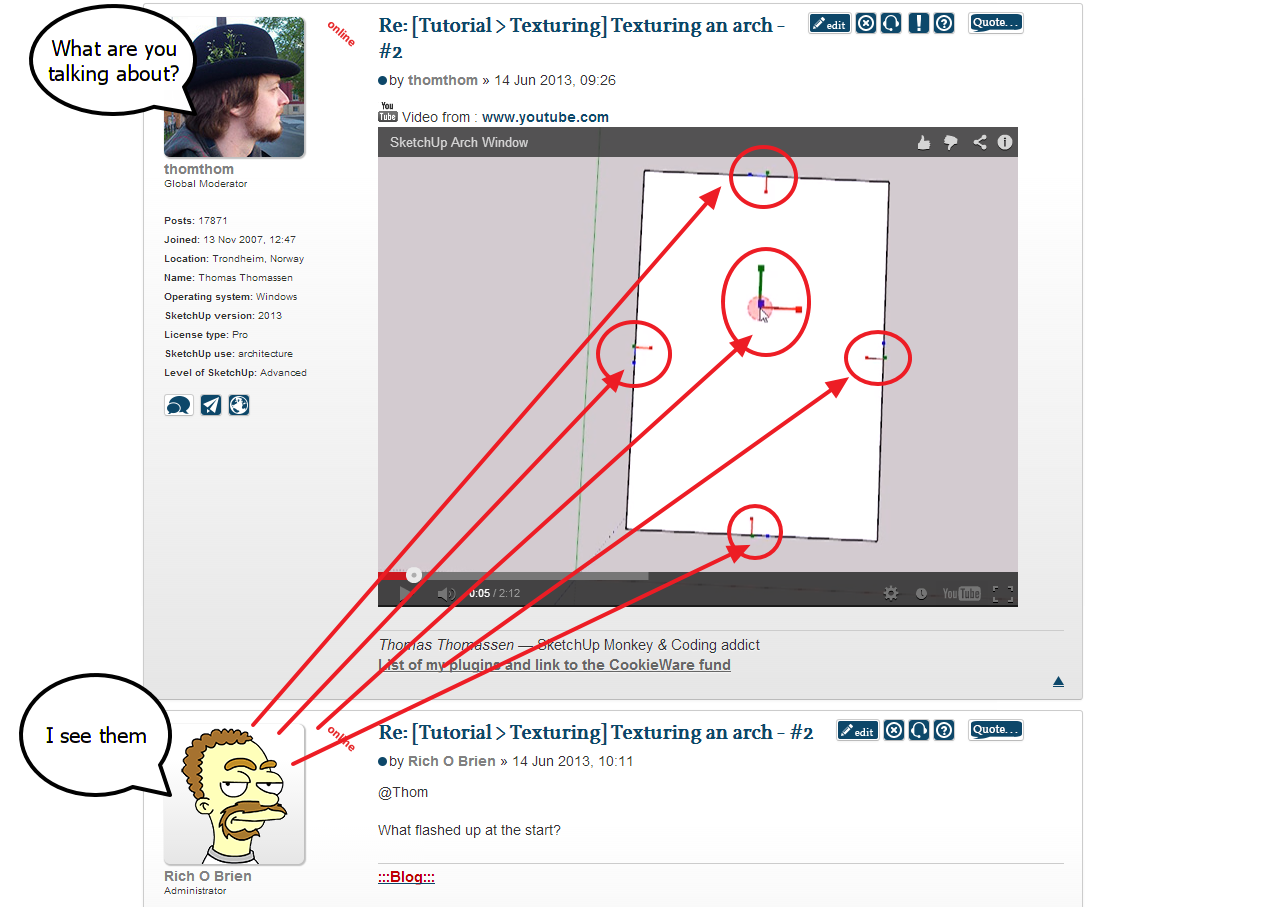
                          What flashed up at the start?

                          Download the free D'oh Book for SketchUp 📖

                          1 Reply Last reply
                          Reply Quote 0
                          • thomthomT
                            thomthom
                            last edited by

                            @rich o brien said:

                            What flashed up at the start?

                            ❓

                            Thomas Thomassen — SketchUp Monkey & Coding addict
                            List of my plugins and link to the CookieWare fund

                            1 Reply Last reply
                            Reply Quote 0
                            • Rich O BrienR
                              Rich O Brien Moderator
                              last edited by

                              image 1.png

                              Download the free D'oh Book for SketchUp 📖

                              1 Reply Last reply
                              Reply Quote 0
                              • thomthomT
                                thomthom
                                last edited by

                                ah - I use shortcuts of often I don't even notice it. That's my tool to inspect face and edge normals: http://sketchucation.com/forums/viewtopic.php?t=21472#p180592

                                Thomas Thomassen — SketchUp Monkey & Coding addict
                                List of my plugins and link to the CookieWare fund

                                1 Reply Last reply
                                Reply Quote 0
                                • ziiarZ
                                  ziiar
                                  last edited by

                                  Thanks thomthom! But I'm still not sure how to use the arcs as a perpendicular path for the textures like you did.

                                  http://sketchucation.com/forums/download/file.php?id=37072

                                  1 Reply Last reply
                                  Reply Quote 0
                                  • GaieusG
                                    Gaieus
                                    last edited by

                                    It's time to make some new tutorials based on newer plugins (or newer versions of plugins). I might put together something during the week-end.

                                    Gai...

                                    1 Reply Last reply
                                    Reply Quote 0
                                    • ziiarZ
                                      ziiar
                                      last edited by

                                      That would be great! looking forward to it.

                                      1 Reply Last reply
                                      Reply Quote 0

                                      Hello! It looks like you're interested in this conversation, but you don't have an account yet.

                                      Getting fed up of having to scroll through the same posts each visit? When you register for an account, you'll always come back to exactly where you were before, and choose to be notified of new replies (either via email, or push notification). You'll also be able to save bookmarks and upvote posts to show your appreciation to other community members.

                                      With your input, this post could be even better 💗

                                      Register Login
                                      • 1
                                      • 2
                                      • 3
                                      • 4
                                      • 5
                                      • 5 / 5
                                      • First post
                                        Last post
                                      Buy SketchPlus
                                      Buy SUbD
                                      Buy WrapR
                                      Buy eBook
                                      Buy Modelur
                                      Buy Vertex Tools
                                      Buy SketchCuisine
                                      Buy FormFonts

                                      Advertisement