sketchucation logo sketchucation
    • Login
    Oops, your profile's looking a bit empty! To help us tailor your experience, please fill in key details like your SketchUp version, skill level, operating system, and more. Update and save your info on your profile page today!
    Mac User? | Join the Rayscaper Beta for Mac Learn More

    [Plugin] Normal Map Maker

    Scheduled Pinned Locked Moved Plugins
    43 Posts 21 Posters 61.5k Views 21 Watching
    Loading More Posts
    • Oldest to Newest
    • Newest to Oldest
    • Most Votes
    Reply
    • Reply as topic
    Log in to reply
    This topic has been deleted. Only users with topic management privileges can see it.
    • GaieusG
      Gaieus
      last edited by

      You can quite easily create bump maps from (raw) geometry if you project a greyscale image from one side and then export an image from the other side.

      Gai...

      1 Reply Last reply
      Reply Quote 0
      • Bob JamesB
        Bob James
        last edited by

        Just browsing through, got interested, and don't understand your reply.

        @gaieus said:

        You can quite easily create bump maps from (raw) geometry if you project a greyscale image from one side and then export an image from the other side.

        project (from what onto to what?) a greyscale image from one side (of what?)

        export an image from the other side (of what?)

        i7-4930K 3.4Ghz, 2x GTX780 6GB, 32GB DDR3-1600 ECC, OCZ Vertex 4 500GB, WD Black 3TB, 32TB NAS, 4x 27" Monitors, SpaceMouse Pro, X-keys XK-60

        1 Reply Last reply
        Reply Quote 0
        • T
          Tuttlet
          last edited by

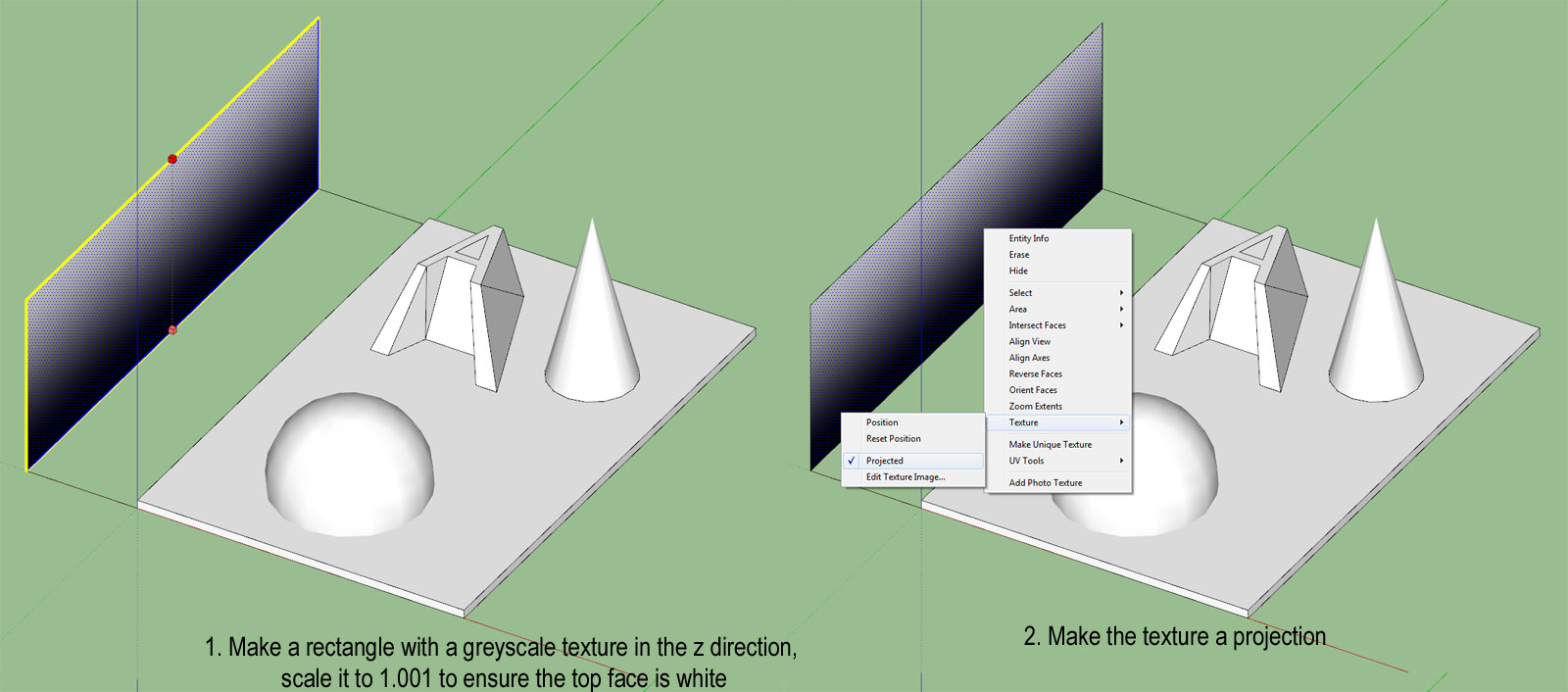
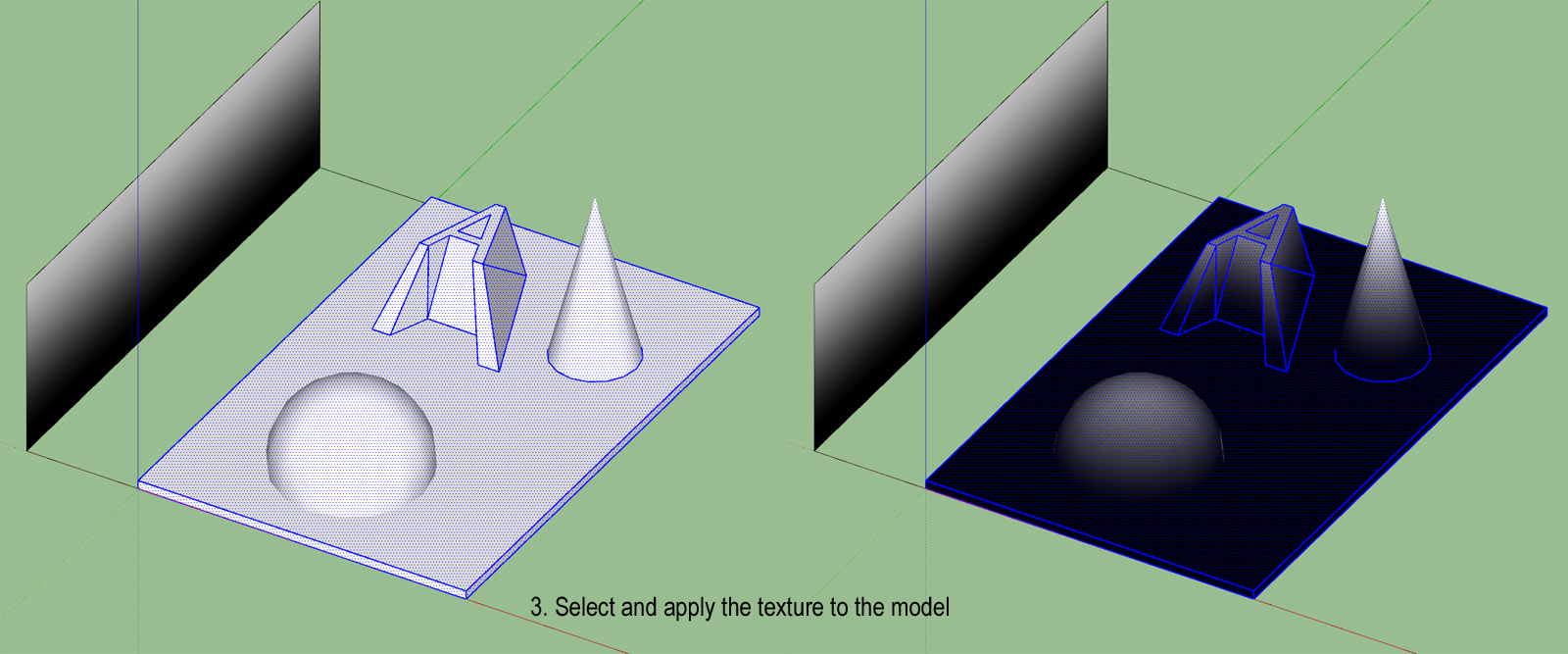
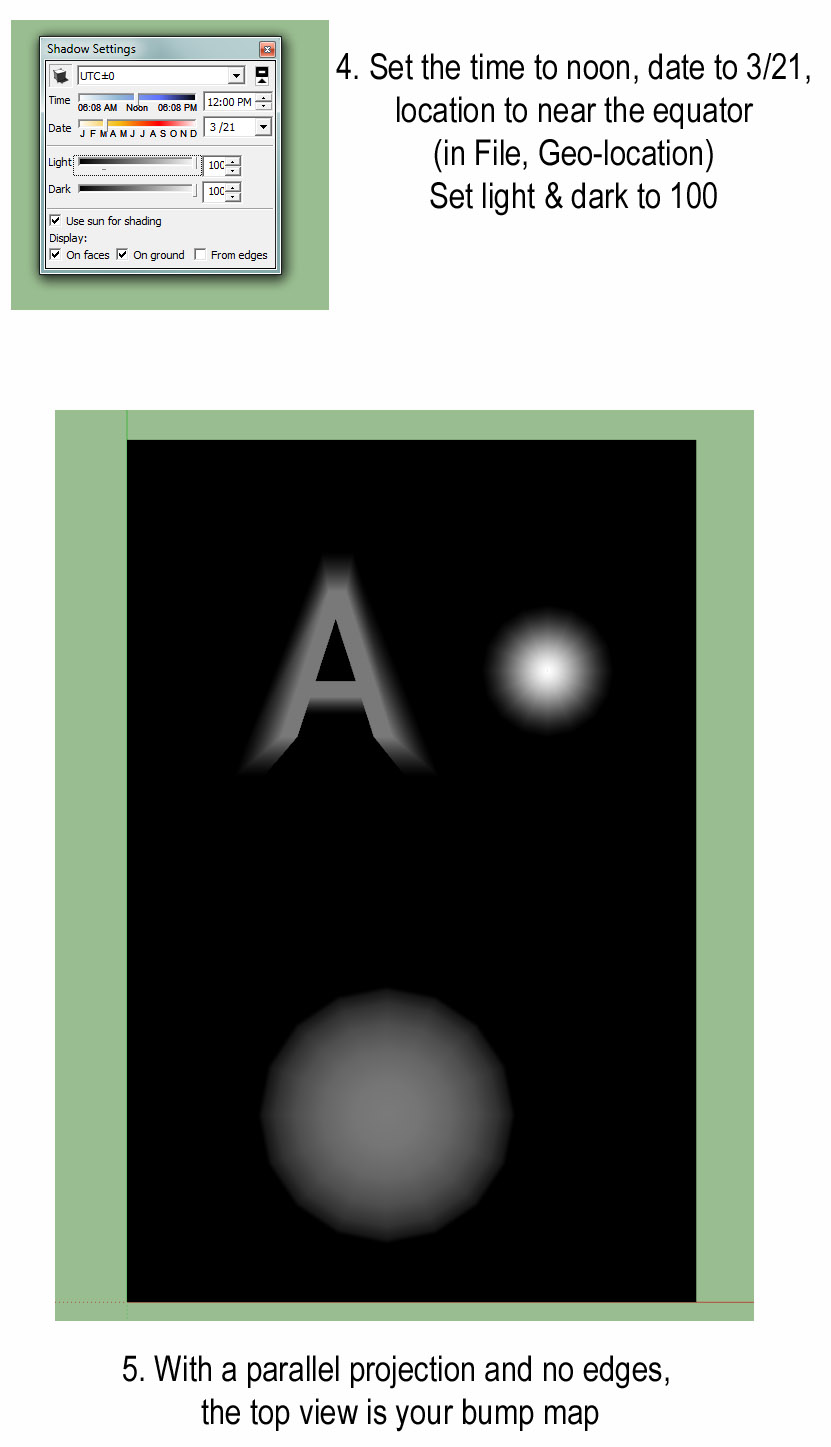
          I believe this is the procedure:

          1. Make a rectangle with a greyscale texture in the z direction, scale it to 1.001 to ensure the top face is white

          2. Make the texture a projection
            Bump12.jpg

          3. Select and apply the texture to the model
            Bump3.jpg

          4. Set the time to noon, date to 3/21, location to near the equator (in File, Geo-location). Set light & dark to 100

          5. With a parallel projection and no edges, the top view is your bump map
            Bump45.jpg

          1 Reply Last reply
          Reply Quote 0
          • thomthomT
            thomthom
            last edited by

            You can do the same without a texture, use white Fog on black geometry.

            Thomas Thomassen β€” SketchUp Monkey & Coding addict
            List of my plugins and link to the CookieWare fund

            1 Reply Last reply
            Reply Quote 0
            • T
              Tuttlet
              last edited by

              @thomthom said:

              You can do the same without a texture, use white Fog on black geometry.

              Hey, that's even easier. Thanks.

              But aren't white areas usually interpreted as higher than black. I seem to get the right result with black fog on white geometry.

              1 Reply Last reply
              Reply Quote 0
              • thomthomT
                thomthom
                last edited by

                @tuttlet said:

                @thomthom said:

                You can do the same without a texture, use white Fog on black geometry.

                Hey, that's even easier. Thanks.

                But aren't white areas usually interpreted as higher than black. I seem to get the right result with black fog on white geometry.

                Ah, yea - my logic is inverted this morning! πŸ˜„ 😳

                Thomas Thomassen β€” SketchUp Monkey & Coding addict
                List of my plugins and link to the CookieWare fund

                1 Reply Last reply
                Reply Quote 0
                • sicksickisckS
                  sicksickisck
                  last edited by

                  great plugin and real deserves to update :]

                  ideas ;]
                  -read well smoothing groups!
                  -Z-grab [without the need of the selection of the polygons; works with components and groups]

                  • AO version hehe [dream:p]
                  1 Reply Last reply
                  Reply Quote 0
                  • V
                    v66995
                    last edited by

                    May i ask if this works on Sketchup 2015(i am using window 10)?
                    I'm a total noob to sketchup , I've tried putting the rb file into sketchup tool folder, and it shows some error when i start up my sketchup ,so i downloaded the rbz file at extension warehouse.

                    I try to test the plugin with a simple cube. 1.jpg
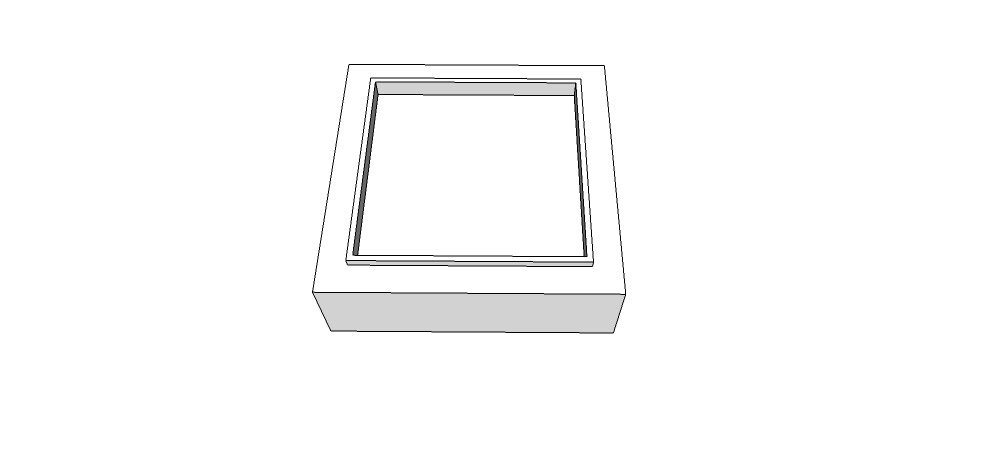
                    Then i select everything?->extension->Normal map maker-> export
                    After its done , i went check the file , it only shows a purple square cube without the depths of other colors like the youtube tutorial shown.

                    Normal.png

                    I did everything i can , things like : changing to parallel view/ top view first before activiating the normal map maker or applying material and then try again.
                    It didn't work. did i do anything wrong or ?

                    Please help /_\ ....

                    Thanks all..

                    Vic.

                    1 Reply Last reply
                    Reply Quote 0
                    • pbacotP
                      pbacot
                      last edited by

                      You need some surfaces visible from above which are NOT perpendicular to the camera view.

                      MacOSX MojaveSketchUp Pro v19 Twilight v2 Thea v3 PowerCADD

                      1 Reply Last reply
                      Reply Quote 0
                      • JQLJ
                        JQL
                        last edited by

                        Yeah, what pbacot said is basically that all surfaces you have there have the same normal, therefore the same color and so you have a flat normal on the map.

                        You should slitghtly taper your shape into truncated piramidal shapes.

                        www.casca.pt
                        Visit us on facebook!

                        1 Reply Last reply
                        Reply Quote 0
                        • V
                          v66995
                          last edited by

                          Ohh ok ! i got it !
                          Thank you so much Pbacot and JQL for the help !

                          1 Reply Last reply
                          Reply Quote 0

                          Hello! It looks like you're interested in this conversation, but you don't have an account yet.

                          Getting fed up of having to scroll through the same posts each visit? When you register for an account, you'll always come back to exactly where you were before, and choose to be notified of new replies (either via email, or push notification). You'll also be able to save bookmarks and upvote posts to show your appreciation to other community members.

                          With your input, this post could be even better πŸ’—

                          Register Login
                          • 1
                          • 2
                          • 3
                          • 1 / 3
                          • First post
                            Last post
                          Buy SketchPlus
                          Buy SUbD
                          Buy WrapR
                          Buy eBook
                          Buy Modelur
                          Buy Vertex Tools
                          Buy SketchCuisine
                          Buy FormFonts

                          Advertisement