Invisible Toolbars????
-
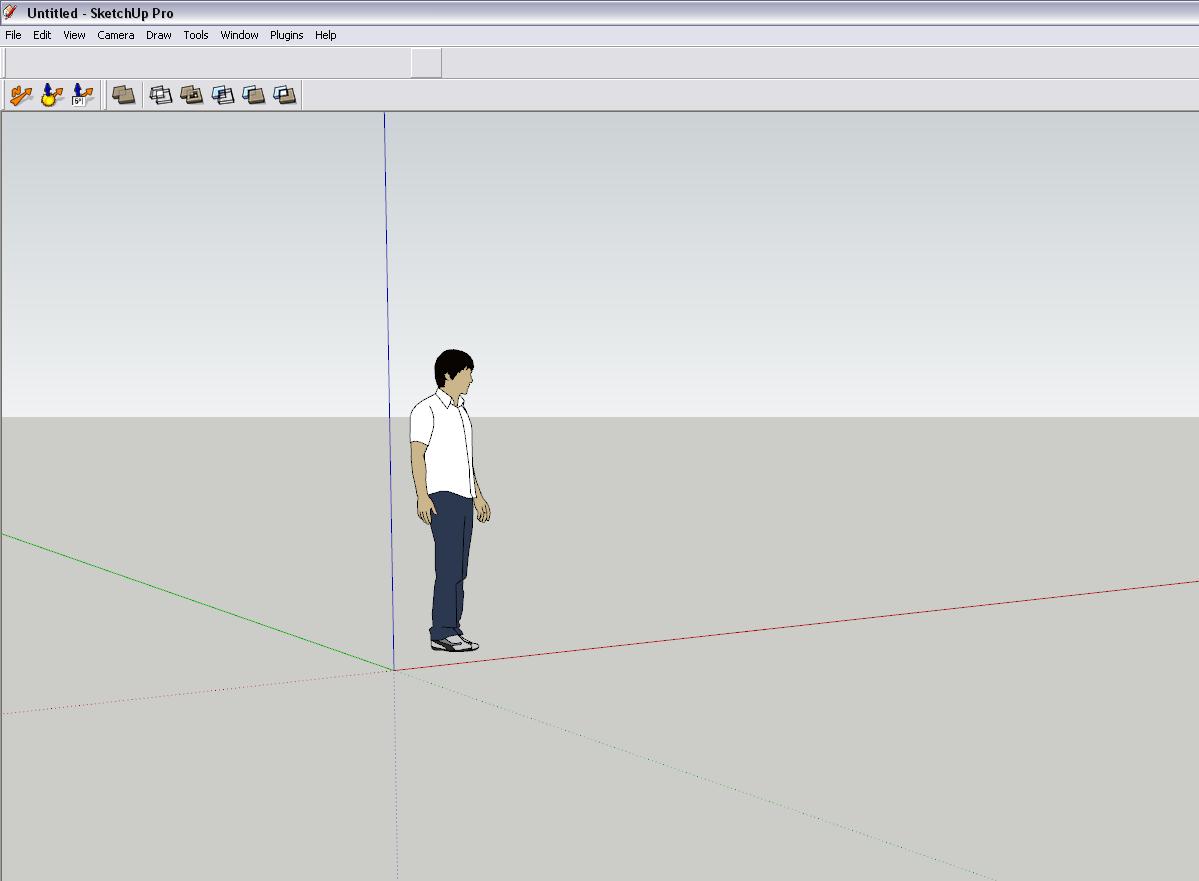
We recently encoutered a problem that we need some assistance with. we are currently using SU 7 and recently upgraded to SU 8. For some reason all the ruby scrpits we had used before are now not showing thier icons on the toolbar. when we move the mouse over the grey open space where the toolbar is docked SU 7 & 8 shows that it recognises the toolbar but for some reason the icons are not being displayed. We have unistalled SU 7 & 8 completely off the PC and re-installed, then re-applied our ruby scripts and this problem has persisted. could anyone assist us on this matter.
Another thing to mention is that all the SU standard toolbars are still showing thier icons its only bugging out with the add on ruby scripts. I have attached a screen shot to make the problem a little more understandable.

-
"re-applied" the plugins... does that mean you copied them from the SU7 installation, or did you re-download and install freshly?
-
Missing toolbar icons are probably due to the plugins not being installed properly.
Is that empty space one big toolbar? Are you using Jim's custom toolbar plugin or something similar? -
hi there thomthom
i re-installed them from a folder on my server.
when i installed SU8 for the first time everything was fine, the the other day i imported a file into SU, when i tried to explode the group SU8 would hang. and su7 as well.
thinking that it was the SU programs i stupidly uninstalled them. only to find out that it was actually the file that was corrupt. now that i have re-installed SU a couple of times needless to say. and the icons are on strike!!!!
SU8 and 7 are working fine on my PC with windows7 thou.
thanks quim
-
yeah the big space is supposed to be the 1001 bit tool bar, the funny thing is that the drop down menus work
-
along with the 1001 bit tool bar. BZ_toolbar , extended standard toolbar , and shape bender are doing the same thing.
and thats to name a few. -
Got a screenshot of your Plugins folder?
And your 1001 folder? (or some of the other sub-folders for the plugins)btw- when installing 1001bit, isn't there a file that must be copied back to the Plugins folder?
-
i will post it in a few minutes
thanks -
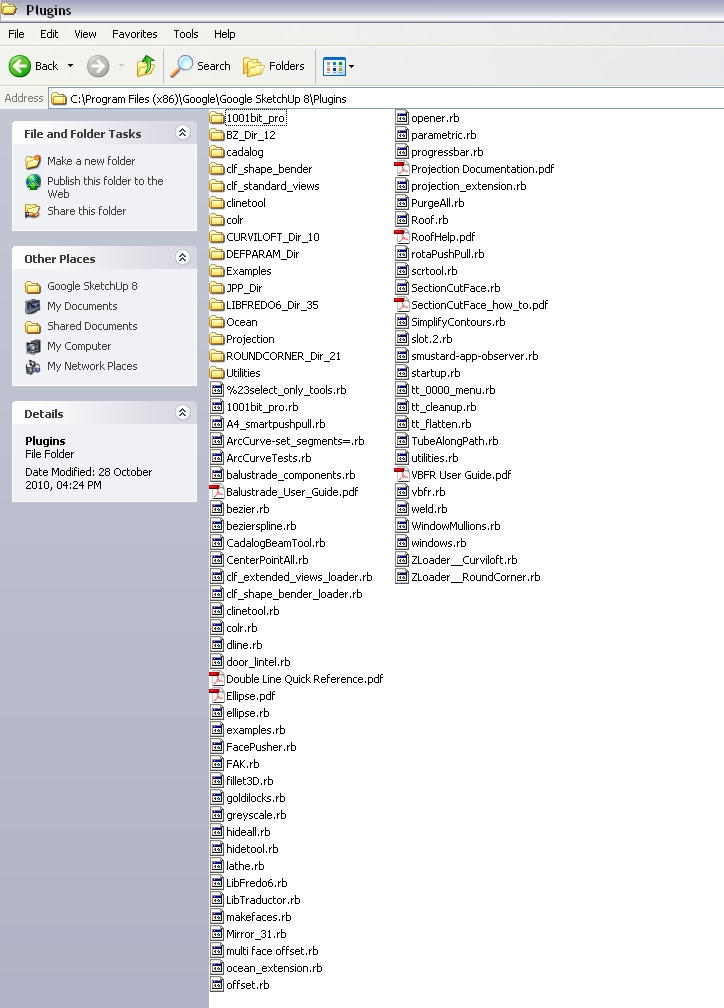
here is a screen shot of my plugins folder.
with regards to copying a file back to the plugin folder for 1001 bit.
i don't think it is necessary as the tool set worked properly before.thanks quim
-
I don't see anything unusual there... what about one of the subfolders of a plugin where the images should be?
-
Thomas you're the Man !!!!!!


I did'nt even think of that

When I read
@thomthom said:what about one of the subfolders of a plugin where the images should be?
only then it struck me I had 2 Seagate BlackArmor NAS 220 servers installed recently to replace my backup hard drives, and in the process of trying to figure out how the servers could backup each other up "NAS to NAS", I selected a check box "Drag and sort". by doing this all the Images,Videos and Music files were removed from there original folders and combined into new folders. BONUS for zip files! I just need to unzip them back into the the unzipped folders on the server, Install and Bob's your uncle!!!.
Thanks a Million
Quim -
 bwaah - I'd never had guessed such a thing would have been the cause...
Glad you worked it out.

-
Strangely enough, my views toolbar is nowhere to be seen. I was trying to place it around when it just disappeared!
I can still see the tick in View -> toolbars -> views, but no matter I cant seem to get it back.
can only get the job done from camera -> standard views.
I have not installed any plugins etc.
Any help or suggestion, much appreciated in advance.
-
Maybe try to reset the workspace? (Under Preferences)
-
@thomthom said:
Maybe try to reset the workspace? (Under Preferences)
Thanks TT for your reply,
Did that, no sign of the Views palette still.
-
Hi
Just installed Extended Standard Views in Sketchup 2013pro
Been using it in sketchup pro 8
But icons toolbar is invisible
Going to uninstall and install again to check
Is there any ruby code I can type to set the toolbar visible at the center of the screen ?Regards
-
It is a known serious issue with v2013.

It happens with installing/loading plugins in several different ways - it's not just with ones from the Plugin Store.
It also happens at random, so it's hard to track down.
I know Trimble are on to it... [they need to be!]Overview:
In v2013 when a new plugin is loaded, if that plugin makes a toolbar then that toolbar should appear floating in the top left quadrant of the main screen.
That is the system default and we scripters have no control over this.
Sometimes v2013 can decide [on a whim ] to put this new toolbar docked into the top-bar.
Which wouldn't be so bad...
If it wasn't for the fact that it also places it underneath any existing toolbars that might already be docked there !
And of course two docked toolbars can't occupy the same screen-space [which is something to do with quantum mechanics ] - so this then breaks the newer toolbar[s] stuck below the originals...
There are two ways of [hopefully] fixing it, as far as I know:
Brute force method:
Ensure that the toolbar in question is 'checked' in the toolbar dialog or dropdown list - so it's set to be visible [but of course it's not visible as it's below other things !]...
Drag the preexisting docked toolbars off the top-bar, leaving them floating... until you see the 'hidden' toolbar beneath.
Try and drag that toolbar off too.
It'll probably remain 'glued' fast onto the top-bar !
Try double clicking on it a few times, this ought to loosen it.
Now drag it and place it floating or docked where you wish - it's hopefully fixed...
Tidy up the other toolbars again...Registry hack method
Alternatively, you can try hacking the Registry... but only if you feel competent and up to it...
This particular example covers a mythical toolbar named 'Acme Tools', but the principle applies to any toolbar - just match the toolbars-listing's 'name'...
Close SketchUp...
The new toolbar settings are found in the Registry [Run > regedit] under:
HKEY_CURRENT_USER\Software\SketchUp\SketchUp 2013\RubyWorkspace
Search in that for 'Acme Tools' using 'Find'...
You'll get something like:
HKEY_CURRENT_USER\Software\SketchUp\SketchUp 2013\RubyWorkspace\ToolbarsUser-Bar2
Its actual '-BarN' reference will vary for your setup.
Make a note of the value of its key 'BarID', for example:**59650**
Now look through the nearby listed items for the THREE matching entries:
HKEY_CURRENT_USER\Software\SketchUp\SketchUp 2013\RubyWorkspace\RubyToolBar-**59650** HKEY_CURRENT_USER\Software\SketchUp\SketchUp 2013\RubyWorkspace\BasePane-**59650** HKEY_CURRENT_USER\Software\SketchUp\SketchUp 2013\Pane-**59650**
Delete those THREE entries in turn [DO NOTHING ELSE!].
Close 'regedit'.On a restart of SketchUp the toolbar with that name should now be 'reset'.
If needed [unlikely], make sure it is 'checked' as active in the toolbars dialog or dropdown list...
It should now appear docked nicely in the top-bar, perhaps between other preexisting toolbars.
You can then easily un-dock it [drag], so it's floating and then relocate it as desired...The sooner this issue is fixed the better !
-
Thank you very much TIG
Finally it all makes sense ....
Michel (Quebec) -
We are indeed working on a fix for this in SketchUp 2013. It was a last minute regression that snuck in. Hopefully our fix will address a number of the initial toolbar state issues.
Regards,
Tyler -
@tyler miller said:
We are indeed working on a fix for this in SketchUp 2013. It was a last minute regression that snuck in. Hopefully our fix will address a number of the initial toolbar state issues.
Regards,
Tyler
Usually the 'invisible' new toolbar is made docked stuck below an existing toolbar in the top-bar, instead of the correct floating version. Moving the overlaid toolbars off and double-clicking the stuck new one usually fixes the issue.
A recent report in another SCF thread [reported separately to Chris Fullmer: http://sketchucation.com/forums/viewtopic.php?p=477668#p477668] had a similar 'invisible' toolbar issue on an XP machine, BUT although it was 'checked' as visible it was not found to be docked on any of the bars... Having got the OP to do the registry hack of deleting its entries after SketchUp it was still 'invisible'... usually on Win7 etc it is added to the top-bar docked but suitably spaced between others... on the XP PC it was now docked beneath the top-bars other docked toolbars BUT beneath them, so the initial drag off + double-click to loosen fix worked that time...
Of course none of this would be necessary if the new toolbar were always created 'floating' [like it should be], or at least some startup code ensured that no two docked toolbars occupy the same space, thereby avoiding this overlay/gluing issue [and also to fix preexisting issues when v13M1 appears]
On a separate note...
I have also reported separately that there is another 'floating' toolbar issue, I'll reiterate it here in case you are not in that loop...
Here's how to replicate it...
On a Win7 computer [although I suspect other OS will have the same issue?]
Open SketchUp 2013.
Arrange some docked and some floating toolbars - use a mix of native, native-ruby and ruby...
Close SketchUp.
Open SketchUp.
All toolbars are remembered just as you left them.
Now minimize SketchUp to the task-bar.
Right-click > context-menu on its task-bar icon and choose 'Close'.
Open SketchUp.
All docked and floating native toolbars are remembered just as you left them.
BUT all floating native-ruby and ruby created toolbars have been deactivated !!!






Advertisement