sketchucation logo sketchucation
    • Login
    Oops, your profile's looking a bit empty! To help us tailor your experience, please fill in key details like your SketchUp version, skill level, operating system, and more. Update and save your info on your profile page today!
    Mac User? | Join the Rayscaper Beta for Mac Learn More

    [Plugin] Bitmap To Mesh

    Scheduled Pinned Locked Moved Plugins
    264 Posts 75 Posters 517.1k Views 75 Watching
    Loading More Posts
    • Oldest to Newest
    • Newest to Oldest
    • Most Votes
    Reply
    • Reply as topic
    Log in to reply
    This topic has been deleted. Only users with topic management privileges can see it.
    • jeff hammondJ
      jeff hammond
      last edited by

      David,
      Use the scale tool to compress it vertically.

      dotdotdot

      1 Reply Last reply
      Reply Quote 0
      • david_hD
        david_h
        last edited by

        oh well. . . there's one for the duh thread.

        Thx 😳

        If I make it look easy...It is probably easy

        1 Reply Last reply
        Reply Quote 0
        • thomthomT
          thomthom
          last edited by

          With version 0.2.0 you specify the height your self - either by using the cursor or entering a length in the VCB.

          Thomas Thomassen β€” SketchUp Monkey & Coding addict
          List of my plugins and link to the CookieWare fund

          1 Reply Last reply
          Reply Quote 0
          • spenceS
            spence
            last edited by

            thomthom, this is very cool. I can hardly believe you got this to work. I use this in Eon-Software's Vue and love it, now that it can be done on SU is incredible. VERY NICELY DONE!

            Spence

            1 Reply Last reply
            Reply Quote 0
            • david_hD
              david_h
              last edited by

              Pretty cool little Plugin. thanks for the update. . .. makes it much easier for us idiots. πŸ’š


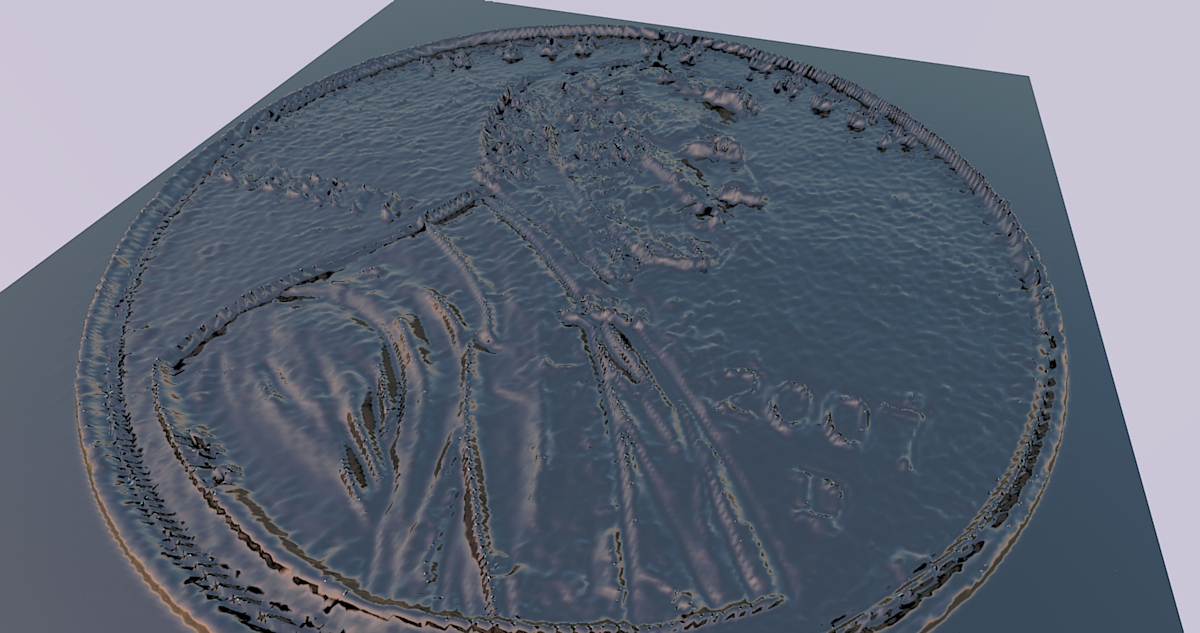
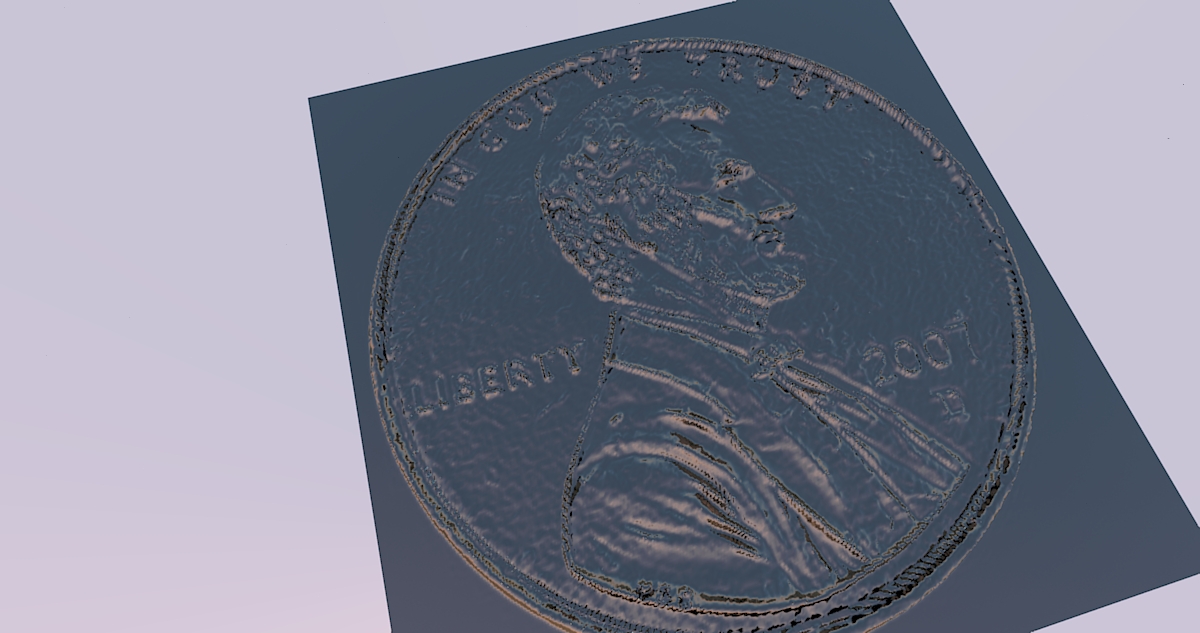
              penny 1.jpg


              penny2.jpg

              If I make it look easy...It is probably easy

              1 Reply Last reply
              Reply Quote 0
              • T
                thohan
                last edited by

                Thank you for this great plugin. πŸ˜„
                I did a quick test with it on a picture of a friend of mine with minimal pre-processing (just making the background black) and placed it on a norwegian coin.
                I think with some more effort, one can achieve much better results.

                http://img43.imageshack.us/img43/8434/smalltest.png

                It do however generate a mesh that is very big. I suppose merging the squares (?) which lie next to each other in the same height, would make it lighter?

                1 Reply Last reply
                Reply Quote 0
                • jamalitoJ
                  jamalito
                  last edited by

                  wow wow wow
                  where have you been ? man
                  I looking for such as plug-in
                  thank you so so much thomthom
                  you helped me
                  because I have a lot pictures I want to do it

                  Albert Einstein:
                  ((I am enough of an artist to draw freely upon my imagination. Imagination is more important than knowledge. Knowledge is limited. Imagination encircles the world.))

                  1 Reply Last reply
                  Reply Quote 0
                  • thomthomT
                    thomthom
                    last edited by

                    @thohan said:

                    It do however generate a mesh that is very big. I suppose merging the squares (?) which lie next to each other in the same height, would make it lighter?

                    Yea, it produces a very dense mesh - You can use my Cleanup script to remove edges between coplanar faces.

                    Nice coin by the way. πŸ˜„

                    Thomas Thomassen β€” SketchUp Monkey & Coding addict
                    List of my plugins and link to the CookieWare fund

                    1 Reply Last reply
                    Reply Quote 0
                    • M
                      marcomartim
                      last edited by

                      This plugin is great!

                      I use Sketchup with Phlatscript plugin to generate code G (2.5 D) to use on my CNC Router, lack a 3D plugin for editing G code on Sketchup.

                      For 3D and 4D, still use the Artcam,; Now with this plugin can create 3D models from photos, right in Sketchup.

                      Thank you.

                      1 Reply Last reply
                      Reply Quote 0
                      • C
                        Christmended
                        last edited by

                        Thanks for the awesome plugin!

                        Here is a test result I did.
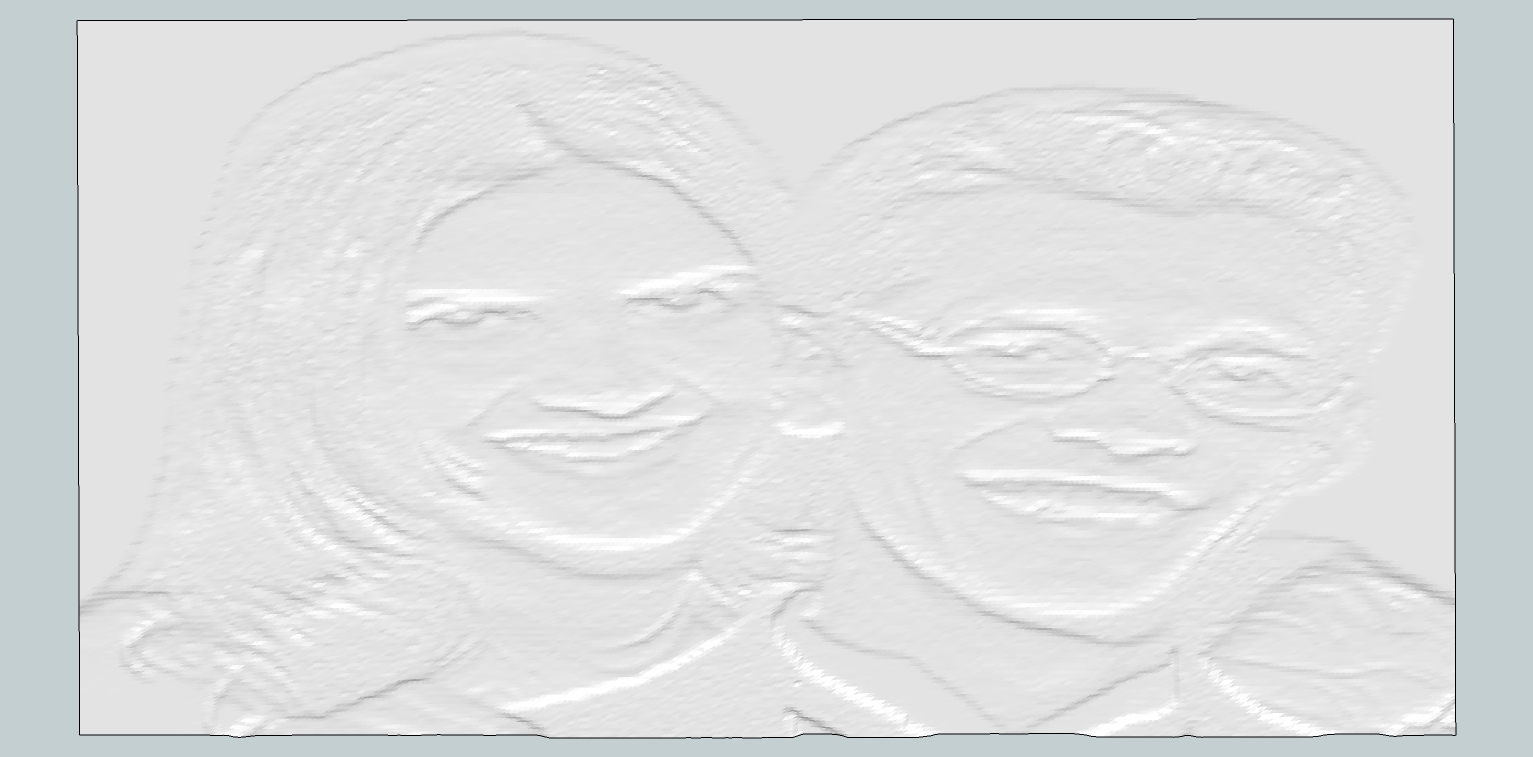

                        Heads screenshot.jpg

                        1 Reply Last reply
                        Reply Quote 0
                        • Dave RD
                          Dave R
                          last edited by

                          Shaun, that almost looks like a lithophane. Cool.

                          Etaoin Shrdlu

                          %

                          (THERE'S NO PLACE LIKE)

                          G28 X0.0 Y0.0 Z0.0

                          M30

                          %

                          1 Reply Last reply
                          Reply Quote 0
                          • H
                            Heven7_floor
                            last edited by

                            Great Plug-in, thank your gift to make SU plugin to display the thing happen πŸ‘ πŸ‘ πŸ‘

                            1 Reply Last reply
                            Reply Quote 0
                            • P
                              pichuneke
                              last edited by

                              The plugin works with bump mapping. I have no idea about what I am saying, but could it work with normal and displacement maps?

                              I have no idea about programming, except an unfinished Interactive Fiction game 5 years ago in the "popular" inform 6 language 😲 πŸ˜† πŸ˜†

                              Forgive my spanglish...

                              1 Reply Last reply
                              Reply Quote 0
                              • thomthomT
                                thomthom
                                last edited by

                                @pichuneke said:

                                I have no idea about what I am saying, but could it work with normal and displacement maps?

                                Displacement maps are the same as bump maps - grayscale heightmaps. As for normal maps, I don't really know how they work...

                                Thomas Thomassen β€” SketchUp Monkey & Coding addict
                                List of my plugins and link to the CookieWare fund

                                1 Reply Last reply
                                Reply Quote 0
                                • P
                                  pichuneke
                                  last edited by

                                  @thomthom said:

                                  @pichuneke said:

                                  I have no idea about what I am saying, but could it work with normal and displacement maps?

                                  Displacement maps are the same as bump maps - grayscale heightmaps. As for normal maps, I don't really know how they work...

                                  I have found a lot about normal maps here:

                                  http://www.google.com/search?hl=es&q=+site:gamedev.net+normal+map+algorithm&sa=X&ei=zwXHTLXUK4WO4Aa2yNXtDw&ved=0CBsQrQIwAA

                                  but it's written in chinese, or C++ ... πŸ˜† I don't know if it may interest you, I was spending my time a bit (as I don't understand a single word πŸ˜„ )

                                  Forgive my spanglish...

                                  1 Reply Last reply
                                  Reply Quote 0
                                  • arquitectomaracuchoA
                                    arquitectomaracucho
                                    last edited by

                                    excuse my English, Greetings πŸ‘Š
                                    Thomtom greetings, very good tool for many functions πŸ‘ . be possible to add option mesh, giving a percentage between simple and complex mesh, thanks πŸ‘

                                    1 Reply Last reply
                                    Reply Quote 0
                                    • thomthomT
                                      thomthom
                                      last edited by

                                      @arquitectomaracucho said:

                                      be possible to add option mesh, giving a percentage between simple and complex mesh, thanks πŸ‘

                                      That would be simply resizing the bitmap down - which is much more efficient to do in your favourite image editor than via a Ruby plugin.

                                      Thomas Thomassen β€” SketchUp Monkey & Coding addict
                                      List of my plugins and link to the CookieWare fund

                                      1 Reply Last reply
                                      Reply Quote 0
                                      • S
                                        Scott M
                                        last edited by

                                        Just downloaded the plugin an gave it a try.I folowed the promp but nothing is showing up it is saying generating mesh but continues to thnink as if unresponsive.Is my system just too slow or am I doing something wrong. Could someone outline the process.The images you guys posted look great.I allso operate a cnc and would lke very much to use this plugin.

                                        https://www.youtube.com/user/ecabinetstips

                                        1 Reply Last reply
                                        Reply Quote 0
                                        • thomthomT
                                          thomthom
                                          last edited by

                                          What image are you feeding it?
                                          How large?
                                          If you keep the Ruby Console open, do you get error messages?

                                          Thomas Thomassen β€” SketchUp Monkey & Coding addict
                                          List of my plugins and link to the CookieWare fund

                                          1 Reply Last reply
                                          Reply Quote 0
                                          • S
                                            Scott M
                                            last edited by

                                            @thomthom said:

                                            What image are you feeding it?
                                            How large?
                                            If you keep the Ruby Console open, do you get error messages?
                                            I am using a jepg emage that I exported as a bmp. emage. It is 395x640px.I set the width at 6 5/8" and typed in the depth at 1/8". The ruby console showes Bitmap to mesh.
                                            processing data took:4.6175s
                                            After a few min. console goes blank with a white screen and the curser turns to a hour glass. This is the way it stays.


                                            https://www.youtube.com/user/ecabinetstips

                                            1 Reply Last reply
                                            Reply Quote 0

                                            Hello! It looks like you're interested in this conversation, but you don't have an account yet.

                                            Getting fed up of having to scroll through the same posts each visit? When you register for an account, you'll always come back to exactly where you were before, and choose to be notified of new replies (either via email, or push notification). You'll also be able to save bookmarks and upvote posts to show your appreciation to other community members.

                                            With your input, this post could be even better πŸ’—

                                            Register Login
                                            • 1
                                            • 2
                                            • 10
                                            • 11
                                            • 12
                                            • 13
                                            • 14
                                            • 13 / 14
                                            • First post
                                              Last post
                                            Buy SketchPlus
                                            Buy SUbD
                                            Buy WrapR
                                            Buy eBook
                                            Buy Modelur
                                            Buy Vertex Tools
                                            Buy SketchCuisine
                                            Buy FormFonts

                                            Advertisement