sketchucation logo sketchucation
    • 登入
    Oops, your profile's looking a bit empty! To help us tailor your experience, please fill in key details like your SketchUp version, skill level, operating system, and more. Update and save your info on your profile page today!
    🔌 Smart Spline | Fluid way to handle splines for furniture design and complex structures. Download

    [Plugin] Work Plane

    已排程 已置頂 已鎖定 已移動 Plugins
    183 貼文 32 Posters 118.2k 瀏覽 32 Watching
    正在載入更多貼文
    • 從舊到新
    • 從新到舊
    • 最多點贊
    回覆
    • 在新貼文中回覆
    登入後回覆
    此主題已被刪除。只有擁有主題管理權限的使用者可以查看。
    • pilouP 離線
      pilou
      最後由 編輯

      Maybe a real radial grid will be fun 😄

      http://forums.sketchucation.com/download/file.php?id=55720

      Frenchy Pilou
      Is beautiful that please without concept!
      My Little site :)

      1 條回覆 最後回覆 回覆 引用 0
      • EarthMoverE 離線
        EarthMover
        最後由 編輯

        I agree with Mitcorb - Workflow is key. For me, pulling some of the items out of the right click menu and having an extended toolbar would be beneficial. Rotate, Move, Scale and Delete, specifically would be better served in a toolbar, IMO. I would like to be able to manipulate the workplane on the fly as much as possible. Would make for a better ability to use work planes when vertex editing.

        Everything else you are mentioning adding sounds perfect!

        BTW - I think this plugin deserves a mention in The Daily Catchup!

        3D Artist at Clearstory 3D Imaging
        Guide Tool at Winning With Sketchup
        Content Creator at Skapeup

        1 條回覆 最後回覆 回覆 引用 0
        • TIGT 離線
          TIG Moderator
          最後由 編輯

          WHEN I get the other options working I'll look at extending some of the toolbar items too... 🤓

          TIG

          1 條回覆 最後回覆 回覆 引用 0
          • TIGT 離線
            TIG Moderator
            最後由 編輯

            Here's v2.1 http://forums.sketchucation.com/viewtopic.php?p=274345#p274345
            There are lots of changes...
            Please read the notes on the linked page - I think I've addressed all issues to date. 🤓

            TIG

            1 條回覆 最後回覆 回覆 引用 0
            • CadFatherC 離線
              CadFather
              最後由 編輯

              😲 😲 😲 😲 😲 😲

              1 條回覆 最後回覆 回覆 引用 0
              • EarthMoverE 離線
                EarthMover
                最後由 編輯

                Wow killer update! 👍 👍

                3D Artist at Clearstory 3D Imaging
                Guide Tool at Winning With Sketchup
                Content Creator at Skapeup

                1 條回覆 最後回覆 回覆 引用 0
                • D 離線
                  dedmin
                  最後由 編輯

                  Excellent work, TIG! You guys just don't let me go away from SketchUP!

                  1 條回覆 最後回覆 回覆 引用 0
                  • pilouP 離線
                    pilou
                    最後由 編輯

                    Seems near perfection 😄
                    Seems just missing 😄
                    in adjust ask number of circles

                    and "center" is always some tricky ergonomy : possible with inference
                    but not evident on an inclined plan! 😉
                    I arrive one time on 20 try and must think! 😳

                    Will be more easy with another paradigme 😄
                    Center point = (pt1 pt2)/2 , (pt2 pt3)/2
                    and diameter size = smaller edge
                    (ok I can draw a diagonal for have the middle and then the center but...)
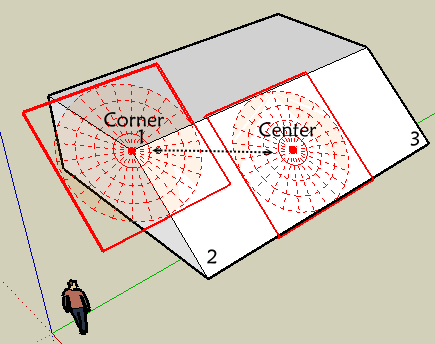

                    hard center.png

                    Frenchy Pilou
                    Is beautiful that please without concept!
                    My Little site :)

                    1 條回覆 最後回覆 回覆 引用 0
                    • pilouP 離線
                      pilou
                      最後由 編輯

                      PS Something curious when you "adjust" a circular Plane you obtain the Adjust menu of the rectangular work plane and of course Cirular is transformed in rectangular 😄!
                      Edit That was in the notes 😳

                      Frenchy Pilou
                      Is beautiful that please without concept!
                      My Little site :)

                      1 條回覆 最後回覆 回覆 引用 0
                      • TIGT 離線
                        TIG Moderator
                        最後由 編輯

                        Pilou!

                        I just knew you'd ask this... 😒
                        'Adjust' should recognize a rectangular and disk shaped WorkPlane and thereafter have alternative dialogs... it's on the list...
                        Currently you shouldn't get 'Adjust' as an option at all if the selected WorkPlane is a disk.
                        This coding error could be corrected... but I supposed one day soon I'll have to fix the 'Adjust' to do both kinds anyway...
                        😒 😒 😒

                        TIG

                        1 條回覆 最後回覆 回覆 引用 0
                        • kenK 離線
                          ken
                          最後由 編輯

                          TIG

                          Since the Cline Axes and Cline Normal are used to check alignment, would it be possible to add a set of TAB toggling 3 workplane disks at the origin of both of these plugin, so one would have a workplane to align the protractor. They would need to be to large, just big enough to allow one to the set the protractor's to the plane.

                          Thank you for ALL the work.

                          Ken

                          Fight like your the third monkey on Noah's Ark gangway.

                          1 條回覆 最後回覆 回覆 引用 0
                          • TIGT 離線
                            TIG Moderator
                            最後由 編輯

                            @unknownuser said:

                            TIG
                            Since the Cline Axes and Cline Normal are used to check alignment, would it be possible to add a set of TAB toggling 3 workplane disks at the origin of both of these plugin, so one would have a workplane to align the protractor. They would need to be to large, just big enough to allow one to the set the protractor's to the plane.
                            Thank you for ALL the work.
                            Ken

                            I suppose I could add an extra type 'WorkPlane...' > 'New Protractor' to do that - it's be quite easy to make...

                            TIG

                            1 條回覆 最後回覆 回覆 引用 0
                            • TIGT 離線
                              TIG Moderator
                              最後由 編輯

                              Here's v2.2 http://forums.sketchucation.com/viewtopic.php?p=274345#p274345
                              'New Protractor' option added.
                              'Adjust' now applies to a plane or a disk - with different dialogs to suit.
                              'New Disk' now has number of 'Segments' and 'Rings' options.

                              TIG

                              1 條回覆 最後回覆 回覆 引用 0
                              • D 離線
                                dedmin
                                最後由 編輯

                                Why rectangle tool doesn't draw on the Workplane?

                                1 條回覆 最後回覆 回覆 引用 0
                                • EarthMoverE 離線
                                  EarthMover
                                  最後由 編輯

                                  Dedmin, check pages 5 & 6 of this thread. Rectangle issue has been covered there. 😉

                                  3D Artist at Clearstory 3D Imaging
                                  Guide Tool at Winning With Sketchup
                                  Content Creator at Skapeup

                                  1 條回覆 最後回覆 回覆 引用 0
                                  • TIGT 離線
                                    TIG Moderator
                                    最後由 編輯

                                    @dedmin said:

                                    Why rectangle tool doesn't draw on the WorkPlane?

                                    It's a known issue with Sketchup itself - it occurs on all faces in groups/instances that are not axial or planar through the origin - not just this tool.
                                    There is a 3pt rectangle tool that will work - see the earlier thread...
                                    We await a fix from Google...

                                    TIG

                                    1 條回覆 最後回覆 回覆 引用 0
                                    • D 離線
                                      dedmin
                                      最後由 編輯

                                      Sorry 😳 😳

                                      1 條回覆 最後回覆 回覆 引用 0
                                      • pilouP 離線
                                        pilou
                                        最後由 編輯

                                        Maybe Hide in the Context Menu 😉
                                        Adjust Protractor
                                        and why not a protractor "rectangular" 😄

                                        That becomes the Rolls Royce of Work Plane 😎

                                        Frenchy Pilou
                                        Is beautiful that please without concept!
                                        My Little site :)

                                        1 條回覆 最後回覆 回覆 引用 0
                                        • kenK 離線
                                          ken
                                          最後由 編輯

                                          TIG

                                          The new "Protractor" option is implemented better than I could even image. Again thanks so much.

                                          Now, I will be quite as a mouse as I will be using the brand new tools.

                                          Ken

                                          Fight like your the third monkey on Noah's Ark gangway.

                                          1 條回覆 最後回覆 回覆 引用 0
                                          • CadFatherC 離線
                                            CadFather
                                            最後由 編輯

                                            there may be a glitch in the adjust menu on disk - it worked once, then i got the settings for the rectangular grid instead


                                            1 條回覆 最後回覆 回覆 引用 0
                                            • 1
                                            • 2
                                            • 3
                                            • 4
                                            • 5
                                            • 6
                                            • 7
                                            • 8
                                            • 9
                                            • 10
                                            • 6 / 10
                                            • 第一個貼文
                                              最後的貼文
                                            Buy SketchPlus
                                            Buy SUbD
                                            Buy WrapR
                                            Buy eBook
                                            Buy Modelur
                                            Buy Vertex Tools
                                            Buy SketchCuisine
                                            Buy FormFonts

                                            Advertisement


