sketchucation logo sketchucation
    • 登入
    Oops, your profile's looking a bit empty! To help us tailor your experience, please fill in key details like your SketchUp version, skill level, operating system, and more. Update and save your info on your profile page today!
    🔌 Smart Spline | Fluid way to handle splines for furniture design and complex structures. Download

    [Plugin] Work Plane

    已排程 已置頂 已鎖定 已移動 Plugins
    183 貼文 32 Posters 118.2k 瀏覽 32 Watching
    正在載入更多貼文
    • 從舊到新
    • 從新到舊
    • 最多點贊
    回覆
    • 在新貼文中回覆
    登入後回覆
    此主題已被刪除。只有擁有主題管理權限的使用者可以查看。
    • EarthMoverE 離線
      EarthMover
      最後由 編輯

      TIG,

      This is the issue I was having with getting the plane perpendicular. There is no problem getting it perpendicular when you create the plane by way of clicking on end point vertex or midpoints, however, when you try to use construction lines or non intersecting edges, it becomes almost impossible to pull out perpendicular. Also, being as though creating work planes perpendicular to the first two clicks is going to be 90% of the time for me, would be possible to add a toggle in the initial menu that will allow for automatically perpendicular planes to be generated? This would save a lot of viewport movement and having to draw snapping lines.
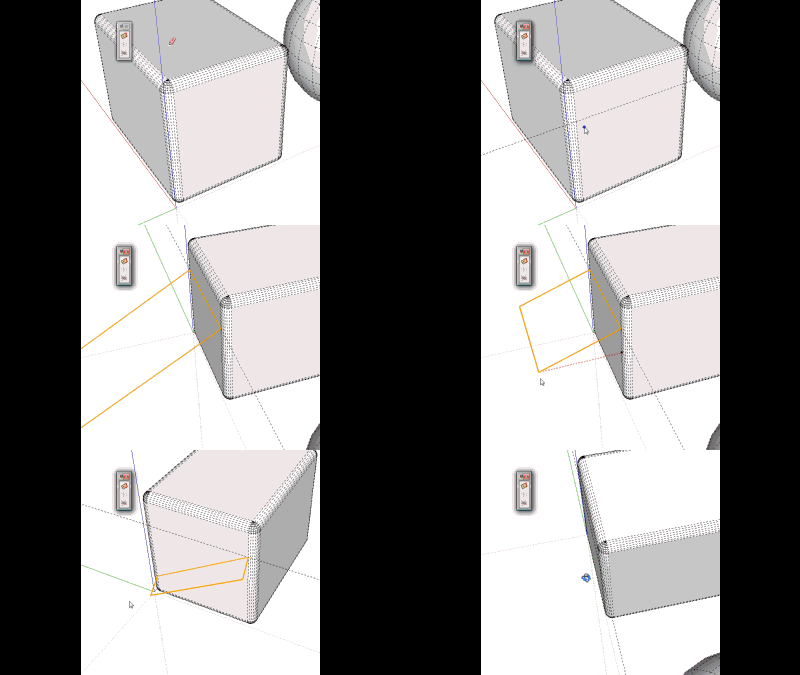
      Work Plane Perp.gif

      Also, the reason I was asking for a "Clear Work Planes" toggle, was that I was using it for more than just drawing on. I was trying to also use it in conjunction with Vertex Tools to control the manipulation of verticies in a more precise manner. It works really well for this, it just becomes too cluttered to work in a short time and the process of deleting the old planes takes as much time as moving the verticies, so the trade off is not worth it. Perhaps another toggle to switch on an option to have each newly created work plane overwrite the previous, creating only a single work plane on the layer at a time?
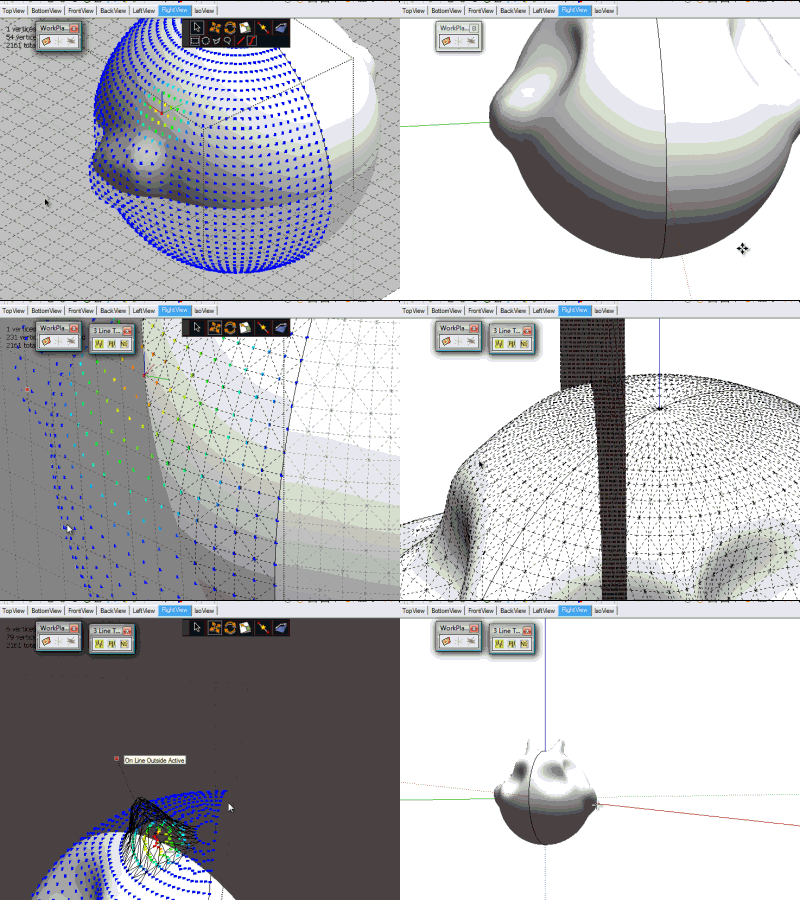

      Vertex work plane.gif

      3D Artist at Clearstory 3D Imaging
      Guide Tool at Winning With Sketchup
      Content Creator at Skapeup

      1 條回覆 最後回覆 回覆 引用 0
      • jeff hammondJ 離線
        jeff hammond
        最後由 編輯

        @earthmover said:

        TIG,

        This is the issue I was having with getting the plane perpendicular. There is no problem getting it perpendicular when you create the plane by way of clicking on end point vertex or midpoints, however, when you try to use construction lines or non intersecting edges, it becomes almost impossible to pull out perpendicular. Also, being as though creating work planes perpendicular to the first two clicks is going to be 90% of the time for me, would be possible to add a toggle in the initial menu that will allow for automatically perpendicular planes to be generated? This would save a lot of viewport movement and having to draw snapping lines.

        that's showing the problem i was trying to describe to a few people that want to be able to push/pull an edge... there's no way SU knows which way you want it to go.. the first two clicks are creating a line but what you're really trying trying to do is go perpendicular to the surface but the work plane is only concerned with going parallel to the line of the first two points and needs a 3rd reference.

        in that exact scenario, chris' perpendicular face tools would give you what you want with one click (click on a vertical hidden line of the cube and a plane will be drawn perpendicular).. that's my main use of perp.face.tools but maybe tig can borrow some stuff from it 😉

        [flash=660,405:l6au5yn7]http://www.youtube.com/v/3p9oON6TeTQ?fs=1&hl=en_US&color1=0x2b405b&color2=0x6b8ab6&border=1[/flash:l6au5yn7]

        [edit- likewise adam, you may actually prefer perpendicular face tools for some of that vertex editing.. at least in some of the scenarios... +, the groups aren't locked so they're easier to delete

        dotdotdot

        1 條回覆 最後回覆 回覆 引用 0
        • pilouP 離線
          pilou
          最後由 編輯

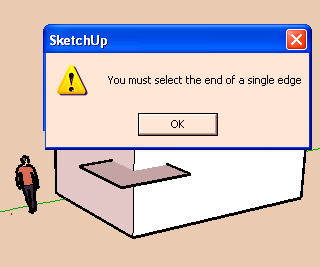
          Perpendicular face tool by Chris Fullmer thx Jeff 😎
          Ahhhhhhhh! Never thought (or remembered) to click on the segment 😮 👍

          That was not explicit due this alert message! 💚

          duhduh.png

          Frenchy Pilou
          Is beautiful that please without concept!
          My Little site :)

          1 條回覆 最後回覆 回覆 引用 0
          • TIGT 離線
            TIG Moderator
            最後由 編輯

            Here's v1.6 http://forums.sketchucation.com/viewtopic.php?p=274345#p274345
            The 'Tab' key now toggles the new WorkPlane between 'planar to the 3picked points' and 'perpendicular to plane of the 3 picked points [pt1/pt2 set the axial alignment], then you press <Enter> or double-click to confirm. Zero dimensions are now trapped in the Settings dialog.

            TIG

            1 條回覆 最後回覆 回覆 引用 0
            • TIGT 離線
              TIG Moderator
              最後由 編輯

              @unknownuser said:

              Why only by Center? And only length and not number of interval?
              Sure I can Unlock,move resize, lock but... 😄
              or I miss something?

              It was originally set by 'corner' at pt1, but due to popular demand it quickly changed to by 'center' at pt1.
              It IS more logical.
              It is after all a 'Work Plane' and you simply make it as big as you want...
              With the new context-menu 'Delete' tools it's easy to remove unneeded ones and make a new one... 😒
              If you set the plane's size you can have a grid [optional] with whatever spacing you want - e.g. entering a grid height larger than the plane's height gives just horizontal clines...
              You could even make two overlapping WorkPlanes with aligning grids.Capture.PNG
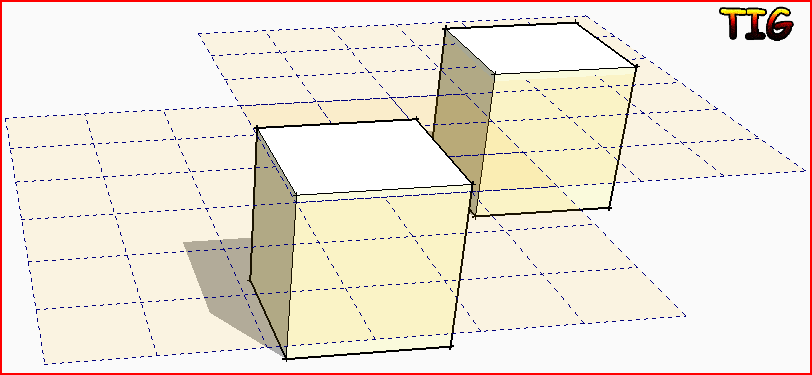
              TIG

              1 條回覆 最後回覆 回覆 引用 0
              • pilouP 離線
                pilou
                最後由 編輯

                Why only by Center?
                And only length and not number of interval? (ok this can be made but ask a calculate 😄

                Sure I can Unlock,move resize, lock but... 😄
                or I miss something?
                grid.jpg

                Frenchy Pilou
                Is beautiful that please without concept!
                My Little site :)

                1 條回覆 最後回覆 回覆 引用 0
                • EarthMoverE 離線
                  EarthMover
                  最後由 編輯

                  Thanks TIG. Brilliant idea to fix the perp plane issue. Works like a charm. Thanks for adding the context menu delete function. Big Help!

                  Work planes are also great for intersect slicing!

                  3D Artist at Clearstory 3D Imaging
                  Guide Tool at Winning With Sketchup
                  Content Creator at Skapeup

                  1 條回覆 最後回覆 回覆 引用 0
                  • pilouP 離線
                    pilou
                    最後由 編輯

                    Yes "It is after all a 'Work Plane'" 😄
                    It's easy to make intervals and then resize it on the object if I want just gride over my object face

                    say I want 5 and 7 intervals (I love prime numbers 💚
                    I enter 5 and 7 width & height, and then 1 and 1 grig width & height 😉

                    It's rustic but all can works ☀

                    Ps A 3D working planes?
                    Ok I can unlock, and copy move multiple, lock 😄
                    (or better use Grow by...tig 😉

                    Frenchy Pilou
                    Is beautiful that please without concept!
                    My Little site :)

                    1 條回覆 最後回覆 回覆 引用 0
                    • D 離線
                      DIEGO-RODRIGUEZ
                      最後由 編輯

                      thanks tig.
                      excellent option, rotated 90 with the Tab key. and the option to delete

                      1 條回覆 最後回覆 回覆 引用 0
                      • TIGT 離線
                        TIG Moderator
                        最後由 編輯

                        So to recap Pilou's technique for adding a WorkPlane to a whole [rectangular] face with desired divisions of say 7 & 5...
                        First make a new WorkPlane over the face so it's aligned/snapped onto it,.
                        Right-click to open the Settings dialog and enter 7 and 5 units, then grids at 1 and 1 units.
                        On completion right-click 'unlock' [or shortcut it - I have K and shift+K for locK/unlocK] and move it by a corner onto a face's corner,
                        Use 'Scale' on the WorkPlane and resize it in the X then Y dimensions to cover whole face.
                        'Lock' it if desired.
                        Now you have a WorkPlane that is an exact fit over the face with proportional divisions...
                        Use those to place or draw over as needed etc...Capture.PNG It's an alternative to using Move+Ctrl copy with \n in both directions on guides or lines...
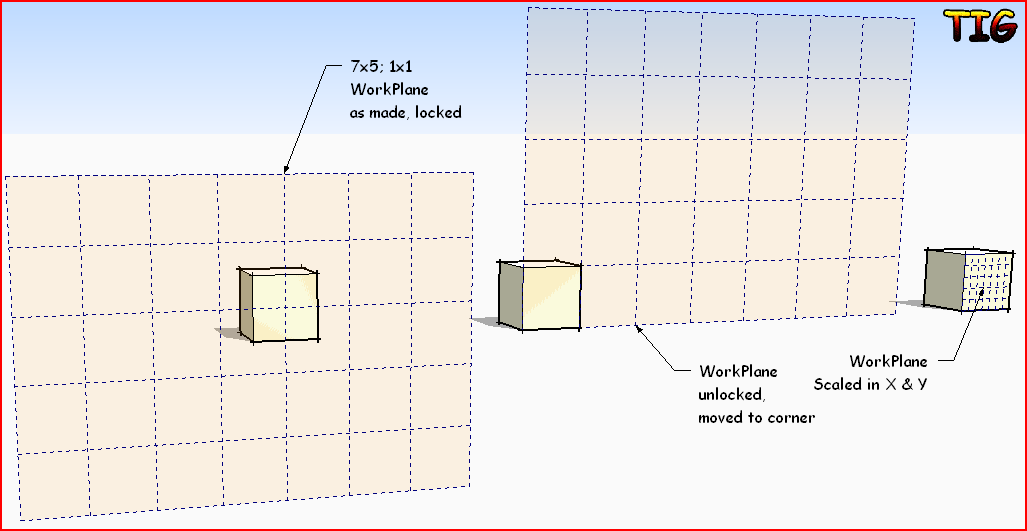
                        TIG

                        1 條回覆 最後回覆 回覆 引用 0
                        • TIGT 離線
                          TIG Moderator
                          最後由 編輯

                          @unknownuser said:

                          Can you try Grow with WorkPlane, I have always a big Splatch 😮

                          You are 'unlocking' it first ?
                          It works 'splatlessly' for me...

                          TIG

                          1 條回覆 最後回覆 回覆 引用 0
                          • B 離線
                            Ben Ritter
                            最後由 編輯

                            TIG, thank you very much for sharing your work. 👍 👍

                            With most of the plugins, it's obvious for me to see the application. In what ways do you see this application being used?

                            Thanks. Ben

                            1 條回覆 最後回覆 回覆 引用 0
                            • TIGT 離線
                              TIG Moderator
                              最後由 編輯

                              WorkPlane will have lots of applications - many I haven't even thought of!
                              For example, snapping objects/geometry onto a plane that's parallel to a face.plane but not necessarily overlapping it, or even just any notional plane from 3 picked points, that's not one of the standard 'views'.
                              A WorkPlane also 'slices' other geometry easily when used in conjunction with with intersect....

                              TIG

                              1 條回覆 最後回覆 回覆 引用 0
                              • jeff hammondJ 離線
                                jeff hammond
                                最後由 編輯

                                @earthmover said:

                                Work planes are also great for intersect slicing!

                                ☀

                                dotdotdot

                                1 條回覆 最後回覆 回覆 引用 0
                                • pilouP 離線
                                  pilou
                                  最後由 編輯

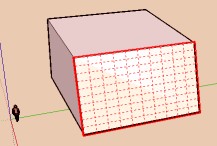
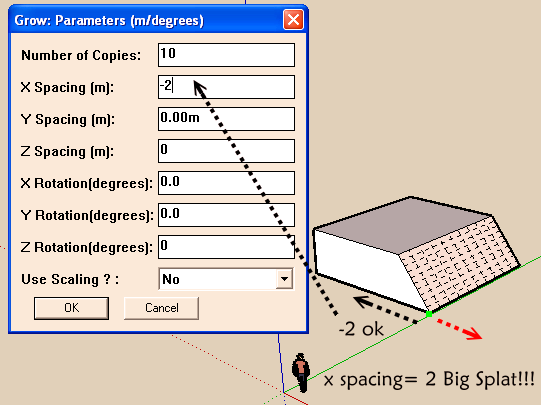
                                  Can you try Grow with Work plane, I have always a big Splat 😮
                                  I want copy *10 the "Work plane"
                                  I just make *10 on X axis , 2 as X spacing, all the rest = 0
                                  works fine for -2 as x spacing ☀
                                  all is created as I see it on the Outliner, but at the end Splat

                                  Edit Splat for 2 et -2 ! So very curious 😲
                                  😮Splat.png


                                  wplane.skp

                                  Frenchy Pilou
                                  Is beautiful that please without concept!
                                  My Little site :)

                                  1 條回覆 最後回覆 回覆 引用 0
                                  • pilouP 離線
                                    pilou
                                    最後由 編輯

                                    @ Tig you can use only Scale for make the fit on the face 😉

                                    Frenchy Pilou
                                    Is beautiful that please without concept!
                                    My Little site :)

                                    1 條回覆 最後回覆 回覆 引用 0
                                    • CadFatherC 離線
                                      CadFather
                                      最後由 編輯

                                      this is turning into a fun ruby too - what about if the c-lines were shorter? (one could always create infinite ones from them)
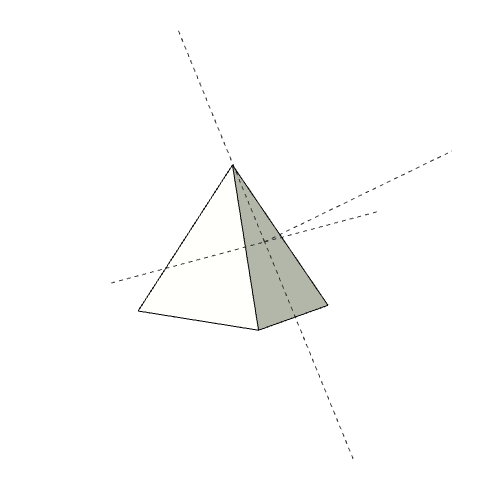
                                      sxl.png

                                      1 條回覆 最後回覆 回覆 引用 0
                                      • pilouP 離線
                                        pilou
                                        最後由 編輯

                                        No problem for make copy move multiple ☀

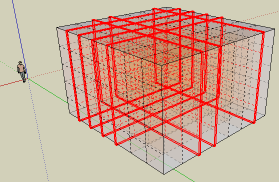
                                        But always Splate
                                        V6 with grow + Work plane don't works 😞
                                        V7 with grow + Work plane
                                        works with half : following X spacing is negative or not 😮splat1.png
                                        Frenchy Pilou
                                        Is beautiful that please without concept!
                                        My Little site :)

                                        1 條回覆 最後回覆 回覆 引用 0
                                        • kenK 離線
                                          ken
                                          最後由 編輯

                                          TIG

                                          The added function of the tab, rotating the plane 90 degrees, and the content menu deleting is to perfect. Glad to see this plugin has generated some activity.

                                          Thanks TIG

                                          Fight like your the third monkey on Noah's Ark gangway.

                                          1 條回覆 最後回覆 回覆 引用 0
                                          • W 離線
                                            watkins
                                            最後由 編輯

                                            Dear TIG,

                                            As CADFather suggested, shorter clines would be good. I haven't tried this plugin yet, but it strikes me that it would make an excellent alignment feature too, particularly if having made the feature one could drag it to a point while retaining the alignment with the plane.

                                            Thank you for all your hard work.

                                            Kind regards,
                                            Bob

                                            1 條回覆 最後回覆 回覆 引用 0
                                            • 1
                                            • 2
                                            • 3
                                            • 4
                                            • 5
                                            • 9
                                            • 10
                                            • 2 / 10
                                            • 第一個貼文
                                              最後的貼文
                                            Buy SketchPlus
                                            Buy SUbD
                                            Buy WrapR
                                            Buy eBook
                                            Buy Modelur
                                            Buy Vertex Tools
                                            Buy SketchCuisine
                                            Buy FormFonts

                                            Advertisement