sketchucation logo sketchucation
    • 登入
    Oops, your profile's looking a bit empty! To help us tailor your experience, please fill in key details like your SketchUp version, skill level, operating system, and more. Update and save your info on your profile page today!
    🔌 Smart Spline | Fluid way to handle splines for furniture design and complex structures. Download

    [Plugin] Work Plane

    已排程 已置頂 已鎖定 已移動 Plugins
    183 貼文 32 Posters 118.2k 瀏覽 32 Watching
    正在載入更多貼文
    • 從舊到新
    • 從新到舊
    • 最多點贊
    回覆
    • 在新貼文中回覆
    登入後回覆
    此主題已被刪除。只有擁有主題管理權限的使用者可以查看。
    • CadFatherC 離線
      CadFather
      最後由 編輯

      very interesting Ken....made me smile.. ..'half of infinity'.. ..gonna use that in class! 😲

      1 條回覆 最後回覆 回覆 引用 0
      • kenK 離線
        ken
        最後由 編輯

        Maybe, the clines could be 1/2 of infinite. That way the ends would show up on my large monitor.

        Ken

        Darn, don't know how to bring a smilie into this message. So just imagine a smiling face.

        Cadfather, fast fingers, slow eyes.

        Fight like your the third monkey on Noah's Ark gangway.

        1 條回覆 最後回覆 回覆 引用 0
        • EarthMoverE 離線
          EarthMover
          最後由 編輯

          Quick video I made showing a little of WorkPlane.rb in action -

          YouTube - Workplane.rb - A Sketchup plugin
          by AprC8Life

          [flash=480,385:87khe87q]http://www.youtube.com/v/xf56s_rKguw?fs=1&hl=en_US[/flash:87khe87q]

          3D Artist at Clearstory 3D Imaging
          Guide Tool at Winning With Sketchup
          Content Creator at Skapeup

          1 條回覆 最後回覆 回覆 引用 0
          • CadFatherC 離線
            CadFather
            最後由 編輯

            great clip Adam.. is that you playing too?

            1 條回覆 最後回覆 回覆 引用 0
            • EarthMoverE 離線
              EarthMover
              最後由 編輯

              The music? No. The video is done with all generic stuff that comes with Camtasia 7. Took about 10 minutes to edit and upload straight from Camtasia to Youtube. Then with Jim's SCF youtube bookmark, it embedded quick and easy. I figured I'd upgrade my Camtasia and drop my Screencast.com subscription, as it's a hassle. Glad you like the demo vid. It's always a big pain to try and draw details onto a busy surface, but with this plugin, it's a breeze!

              3D Artist at Clearstory 3D Imaging
              Guide Tool at Winning With Sketchup
              Content Creator at Skapeup

              1 條回覆 最後回覆 回覆 引用 0
              • D 離線
                DIEGO-RODRIGUEZ
                最後由 編輯

                tig.
                may add an option to enable / disable the grid?

                1 條回覆 最後回覆 回覆 引用 0
                • EarthMoverE 離線
                  EarthMover
                  最後由 編輯

                  Diego, if you right click before you draw the work plane, there is a grid on/off toggle.

                  3D Artist at Clearstory 3D Imaging
                  Guide Tool at Winning With Sketchup
                  Content Creator at Skapeup

                  1 條回覆 最後回覆 回覆 引用 0
                  • TIGT 離線
                    TIG Moderator
                    最後由 編輯

                    @Adam - Thanks a lot! An interesting demo - so it's also useful if you are modeling prehistoric reptiles ! 😉
                    @Diego - To change the WorkPlane Settings - i.e. the overall size or whether it has a grid [and what size that will be if it does] right-click in empty space anytime the tool is active and a dialog appears you can reset the values [if Grid? is true a second dialog will ask for those values] - see the notes in the first post...

                    TIG

                    1 條回覆 最後回覆 回覆 引用 0
                    • D 離線
                      DIEGO-RODRIGUEZ
                      最後由 編輯

                      if tig. I know.
                      I meant the possibility of changing the state of the grid, after created the work plane.

                      1 條回覆 最後回覆 回覆 引用 0
                      • EarthMoverE 離線
                        EarthMover
                        最後由 編輯

                        @tig said:

                        @Adam - Thanks a lot! An interesting demo - so it's also useful if you are modeling prehistoric reptiles ! 😉

                        Haha, yes or Dragon Tails! I just wanted to show trying to draw something in the midst of a ton of inference points with and without a work plane. One of the most practical applications I think will be drawing profiles and paths amidst busy architecture. But it also works great for drawing contour lines at a specific height, precisely moving verticies with vertex tools, slicing geometry, controlling bezier curve drawing, or creating a quick piece of graph paper for precision snapping. Truly a can't live without plugin!

                        3D Artist at Clearstory 3D Imaging
                        Guide Tool at Winning With Sketchup
                        Content Creator at Skapeup

                        1 條回覆 最後回覆 回覆 引用 0
                        • TIGT 離線
                          TIG Moderator
                          最後由 編輯

                          @diego-rodriguez said:

                          if tig. I know.
                          I meant the possibility of changing the state of the grid, after created the work plane.

                          I would be possible to update a preselected WorkPlane to a new size/grid spacing... I'll think about it... 🤓

                          TIG

                          1 條回覆 最後回覆 回覆 引用 0
                          • D 離線
                            DIEGO-RODRIGUEZ
                            最後由 編輯

                            ooo, thank you very much Tig.
                            and one more suggestion. only as a cosmetic.
                            usage:
                            run tool.
                            I choose first point. > Previewing a ghost Workplane . (You can vary the size in vcv. For example 10,10) (units would use the current model)
                            I choose the second point> to preview the grid phantom. (Divisions may vary)
                            I choose the third point> is generated work plane

                            1 條回覆 最後回覆 回覆 引用 0
                            • EarthMoverE 離線
                              EarthMover
                              最後由 編輯

                              Or, perhaps the first two clicks define the grid size automatically. This would make sense, as typically when working in a smaller space, you need a smaller gridding. Then from the context menu you can disable or adjust the grid size to suit.

                              3D Artist at Clearstory 3D Imaging
                              Guide Tool at Winning With Sketchup
                              Content Creator at Skapeup

                              1 條回覆 最後回覆 回覆 引用 0
                              • D 離線
                                DIEGO-RODRIGUEZ
                                最後由 編輯

                                @earthmover said:

                                Or, perhaps the first two clicks define the grid size automatically. This would make sense, as typically when working in a smaller space, you need a smaller gridding. Then from the context menu you can disable or adjust the grid size to suit.

                                yes. this option looks interesting

                                1 條回覆 最後回覆 回覆 引用 0
                                • EarthMoverE 離線
                                  EarthMover
                                  最後由 編輯

                                  Found another great use for work planes today......setting up spot lights! ☀

                                  3D Artist at Clearstory 3D Imaging
                                  Guide Tool at Winning With Sketchup
                                  Content Creator at Skapeup

                                  1 條回覆 最後回覆 回覆 引用 0
                                  • TIGT 離線
                                    TIG Moderator
                                    最後由 編輯

                                    Here's v1.7 http://forums.sketchucation.com/viewtopic.php?p=274345#p274345
                                    'New' and 'Adjust' options have been added to context-menu.
                                    'New' lets you make a new WorkPlane on the fly...
                                    'Adjust' lets you change one selected WorkPlane's Settings [Plane's h/w and Grid's h/w]
                                    Cline 'guide' rectangle and axes are now drawn whilst you are picking the points.
                                    The WorkPlane Grid is now always centered on pt-1, even if a grid-dim does not divide exactly into the plane-dim.

                                    TIG

                                    1 條回覆 最後回覆 回覆 引用 0
                                    • EarthMoverE 離線
                                      EarthMover
                                      最後由 編輯

                                      Perfect TIG....thanks!!! (Don't forget to update the post to 1.7)

                                      3D Artist at Clearstory 3D Imaging
                                      Guide Tool at Winning With Sketchup
                                      Content Creator at Skapeup

                                      1 條回覆 最後回覆 回覆 引用 0
                                      • TIGT 離線
                                        TIG Moderator
                                        最後由 編輯

                                        Pilou it's a glitch... v1.8 is in the pipeline now... 😒

                                        TIG

                                        1 條回覆 最後回覆 回覆 引用 0
                                        • pilouP 離線
                                          pilou
                                          最後由 編輯

                                          Ok So wait an see 😄

                                          Frenchy Pilou
                                          Is beautiful that please without concept!
                                          My Little site :)

                                          1 條回覆 最後回覆 回覆 引用 0
                                          • pilouP 離線
                                            pilou
                                            最後由 編輯

                                            Adjusment selected is curious 😄
                                            Here Grid was 10 10 , with 1 1 then 10 10 , with 3 3
                                            I understand that I have that asked (why there is not neat (3*3)
                                            but
                                            seems fill grid must be fully filled or red frame adjusted to 3 3 + rest(?)
                                            Hole is perturbating 😄
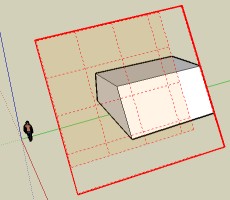
                                            redframe.jpg

                                            Not Delect selected?
                                            And option Center first point(actual default) or Framed face will be a must 😄(avoid to play with and unlock)

                                            Frenchy Pilou
                                            Is beautiful that please without concept!
                                            My Little site :)

                                            1 條回覆 最後回覆 回覆 引用 0
                                            • 1
                                            • 2
                                            • 3
                                            • 4
                                            • 5
                                            • 9
                                            • 10
                                            • 3 / 10
                                            • 第一個貼文
                                              最後的貼文
                                            Buy SketchPlus
                                            Buy SUbD
                                            Buy WrapR
                                            Buy eBook
                                            Buy Modelur
                                            Buy Vertex Tools
                                            Buy SketchCuisine
                                            Buy FormFonts

                                            Advertisement



