sketchucation logo sketchucation
    • 登入
    Oops, your profile's looking a bit empty! To help us tailor your experience, please fill in key details like your SketchUp version, skill level, operating system, and more. Update and save your info on your profile page today!
    🔌 Smart Spline | Fluid way to handle splines for furniture design and complex structures. Download

    [Plugin] Solid Inspector

    已排程 已置頂 已鎖定 已移動 Plugins
    303 貼文 99 Posters 286.5k 瀏覽 98 Watching
    正在載入更多貼文
    • 從舊到新
    • 從新到舊
    • 最多點贊
    回覆
    • 在新貼文中回覆
    登入後回覆
    此主題已被刪除。只有擁有主題管理權限的使用者可以查看。
    • K 離線
      Kyudos
      最後由 編輯

      Could someone please help a newbie out? Solid Inspector tells me something is wrong with the edges of the 'shelf' in this model, but I don't understand what it could be. It all looks 'ok...?


      What is wrong?

      1 條回覆 最後回覆 回覆 引用 0
      • K 離線
        Kyudos
        最後由 編輯

        Its OK - thanks for looking - but I figured it out! Internal faces! Could SI highlight the face rather than the edge? - that would've given me more of a clue...

        1 條回覆 最後回覆 回覆 引用 0
        • cottyC 離線
          cotty
          最後由 編輯

          The edge has more than 2 faces, so the highlight is right...

          my SketchUp gallery

          1 條回覆 最後回覆 回覆 引用 0
          • jgbJ 離線
            jgb
            最後由 編輯

            Deleting an edge of a face deletes the face. Highlighting the face would be redundant.


            jgb

            1 條回覆 最後回覆 回覆 引用 0
            • TIGT 離線
              TIG Moderator
              最後由 編輯

              You can delete an edge which then in turn deletes its associated face...
              Any 'coplanar' faces using it will survive that edge's deletion, and simply merge together into one bigger face.
              BUT if those faces you want to keep are not 'coplanar', then they too will disappear with the edge !

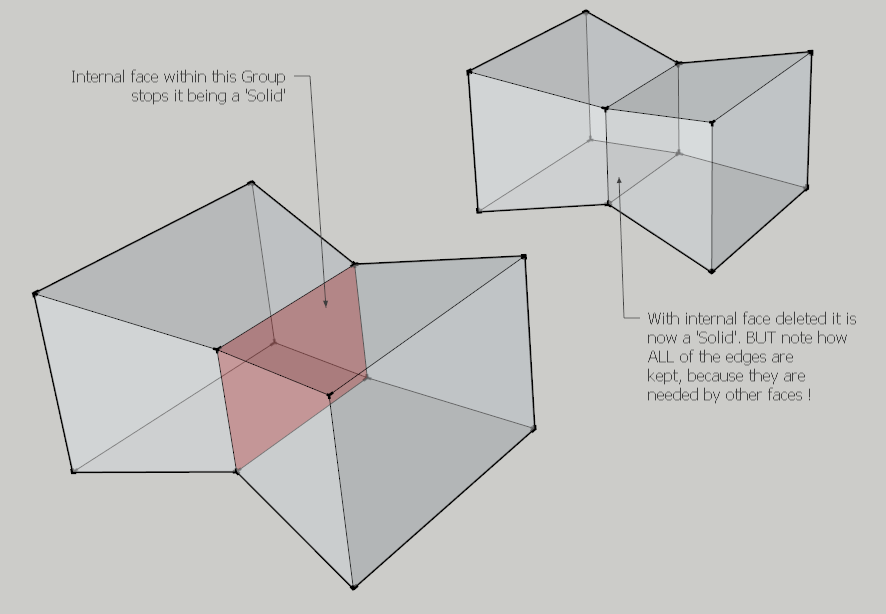
              This example shows how an inner face makes a group into a non-solid.
              Deleting just the face makes it solid - BUT in this case deleting any of the edges used by that unwanted face would not give the desired result, because other faces we want to retain rely on those edges - the faces are not 'coplanar'.

              Capture.PNG

              TIG

              1 條回覆 最後回覆 回覆 引用 0
              • K 離線
                Kyudos
                最後由 編輯

                TIG describes my issue exactly. The first thing I tried was deleting the 'edge', but was frustrated to find that didn't help. I'm not saying that highlighting the edge is wrong - but highlighting the problem face would have been more helpful to a know-nothing-noob like me 😄

                (I actually had to install the Manifold extension and run that for it to tell me what the problem was).

                1 條回覆 最後回覆 回覆 引用 0
                • TIGT 離線
                  TIG Moderator
                  最後由 編輯

                  Once you know it's an internal partition face [via Solid-Inspector]... then you can use a section-plane to cut into the form and let you see inside i [Xray-mode lets you see it, but not select it].

                  In that way you can easily select just that face problem and press <delete> to remove it.

                  The form should then be reported as a 'solid'...

                  If by 'Manifold' you mean my old plugin, then I suggest that my SolidSolver [or several newer tools] might be more appropriate to try to auto-fix these kind of issues... BUT understanding what the problem is and then manually fixing it is often more effective...

                  TIG

                  1 條回覆 最後回覆 回覆 引用 0
                  • M 離線
                    magazines
                    最後由 編輯

                    Does anyone else not see Solid Inspector listed after installing SU15? I can't seem to find it at all in the pull-down menus anymore. Did it move? I looked for it in SU14 and SU15 and reinstalled from both Sketchucation manager and the extension warehouse along with new library file. I've used it for years and found it near the bottom of the tools pull down menu. Working on Mac with Yosemite.

                    1 條回覆 最後回覆 回覆 引用 0
                    • Dave RD 離線
                      Dave R
                      最後由 編輯

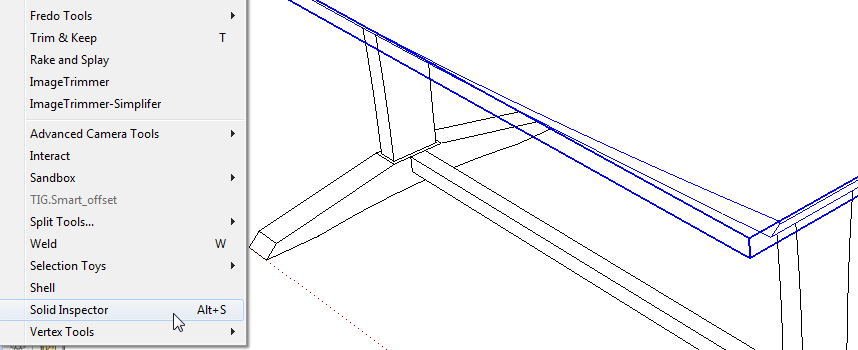
                      It works just fine for me in the Tools menu on both PC and Mac with SU2015.

                      Did you install the current version of TT_lib2?
                      Screenshot - 11_23_2014 , 8_50_00 AM.png

                      Etaoin Shrdlu

                      %

                      (THERE'S NO PLACE LIKE)

                      G28 X0.0 Y0.0 Z0.0

                      M30

                      %

                      1 條回覆 最後回覆 回覆 引用 0
                      • TIGT 離線
                        TIG Moderator
                        最後由 編輯

                        Is its Extension activated ?

                        TIG

                        1 條回覆 最後回覆 回覆 引用 0
                        • M 離線
                          magazines
                          最後由 編輯

                          Thanks for the quick responses! TIG, you are right. I never really use the extension manager, but sure enough TT_Lib2 is deactivated. In fact, I've tried to activate (load) it and restart SU twice now. No dice. Each time it deactivates it, no listing of Solid Inspector in the tools menu. Curiously, when I activate it, it shows up as green text in the list of activated extensions. Oh, thanks for updating Compo Spray by the way!
                          Dave, yes I have tried the new version of TT Library from the plugin store several times.

                          1 條回覆 最後回覆 回覆 引用 0
                          • TIGT 離線
                            TIG Moderator
                            最後由 編輯

                            Can you open your Plugins folder? then see if you have a file called "tt_solid_inspector.rb" and a subfolder named "tt_solid_inspector"...
                            If you also have the latest version of the TT_Lib2 [which it appears you do have!] then this plugin should also load as SketchUp starts...
                            If that plugin's Extension activated too ??

                            TIG

                            1 條回覆 最後回覆 回覆 引用 0
                            • thomthomT 離線
                              thomthom
                              最後由 編輯

                              TT_Lib2 should be used even if it's marked as disabled. As long as Solid Inspector is marked to load it should work.

                              Thomas Thomassen — SketchUp Monkey & Coding addict
                              List of my plugins and link to the CookieWare fund

                              1 條回覆 最後回覆 回覆 引用 0
                              • M 離線
                                magazines
                                最後由 編輯

                                Very odd. Yes, I've confirmed all of the above. TT_Lib2 always shows up as disabled even if I try to enable it and then restart. Matter of fact, it is the only one that shows disabled. And solid inspector does show as activated. And finally, in the plugins folder I've got both .rb files and folders for both TT_Lib2 and tt_solid_inspector.
                                When I go to Tools pull down menu it is not there.
                                But this is SU2014, not SU2015. It does show up in SU2015.

                                1 條回覆 最後回覆 回覆 引用 0
                                • thomthomT 離線
                                  thomthom
                                  最後由 編輯

                                  @magazines said:

                                  Matter of fact, it is the only one that shows disabled. And solid inspector does show as activated. And finally, in the plugins folder I've got both .rb files and folders for both TT_Lib2 and tt_solid_inspector.
                                  When I go to Tools pull down menu it is not there.
                                  But this is SU2014, not SU2015. It does show up in SU2015.

                                  😕

                                  Any chance (stab in the dark) you have my TT Menu extension installed in SU2014 which groups all my extension's menus under the Plugins menu?

                                  Thomas Thomassen — SketchUp Monkey & Coding addict
                                  List of my plugins and link to the CookieWare fund

                                  1 條回覆 最後回覆 回覆 引用 0
                                  • BoxB 離線
                                    Box
                                    最後由 編輯

                                    This is all rather odd, I just went to use Solid Inspector on a piece I had made with Bezier surface, and it's not there. It was there as recently as yesterday I think, but it may have been before I installed Bezier Surface, and the latest TT Lib with it.
                                    The subfolder and the .rb are both in the plugin folder as they should be and are in the active section of the plugin manager. I'm at a loss. Come to think of it, I know I used solid inspector late last night.
                                    Prior to finding it missing I had changed nothing since last using it. I have reinstalled both Lib and Inspector from the store and restarted and no joy.

                                    Even more strange, I have the same plugin folder for 2014 and 2015 (Cloud) and Inspector is there and working happily in 2014 along with Bezier.
                                    So my issue is with 2015 while Magazines is 2014. And No I don't have the Menu Extension, I had that in 2013 and didn't like it.

                                    1 條回覆 最後回覆 回覆 引用 0
                                    • thomthomT 離線
                                      thomthom
                                      最後由 編輯

                                      I cannot reproduce this. And since there is no error message I don't have the faintest idea either. 😞
                                      Any chance you guys could see if removing some extensions makes a difference?

                                      Thomas Thomassen — SketchUp Monkey & Coding addict
                                      List of my plugins and link to the CookieWare fund

                                      1 條回覆 最後回覆 回覆 引用 0
                                      • BoxB 離線
                                        Box
                                        最後由 編輯

                                        Sorry to say, and this might hurt me more than you because it's my all time favourite plugin, just disabling Bezier Surface makes it come back in both versions, for me.

                                        Edit:
                                        Opened a blank model and Inspector was there and usable.
                                        Enabled Bezier Surface with the plugin manager. Created patch, made shape, exploded and added faces to make a solid. Checked with solid Inspector and found the deliberate error.
                                        Saved file and closed.
                                        Opened file with Bezier surface still enabled from last usage.
                                        No Solid inspector in tools.

                                        So enabling BZ for a session rather than always on seems to be the way to go for now.

                                        1 條回覆 最後回覆 回覆 引用 0
                                        • tt_suT 離線
                                          tt_su
                                          最後由 編輯

                                          That is most bizarre and unexpected!
                                          I´m on vacation for the moment so I can´t dig in right this moment. Ping me next week will you, to remind me?

                                          1 條回覆 最後回覆 回覆 引用 0
                                          • BoxB 離線
                                            Box
                                            最後由 編輯

                                            Will do. I know how to work around it so all is well for me until you want more info.
                                            Have a great holiday.

                                            1 條回覆 最後回覆 回覆 引用 0
                                            • 1
                                            • 2
                                            • 12
                                            • 13
                                            • 14
                                            • 15
                                            • 16
                                            • 15 / 16
                                            • 第一個貼文
                                              最後的貼文
                                            Buy SketchPlus
                                            Buy SUbD
                                            Buy WrapR
                                            Buy eBook
                                            Buy Modelur
                                            Buy Vertex Tools
                                            Buy SketchCuisine
                                            Buy FormFonts

                                            Advertisement





