[Plugin][$] Vertex Tools
-
Hey Thomthom,
I was just playing with VertexTools, when I thought of two possible improvements; actually one workflow improvement and one major (and possibly impossible) re-design.
- With SketchUp's native Move-Tool, you can translate an object in two different ways:
-
click (object is attached to the curser), move it somewhere else, click again to release it
-
click-and-drag to somewhere else and release mouse button to release object
Right now thats not possible with VertexTools. And because we all love continuity, it would be a tremendous joy to have the plugin behave the same way
- Use the VertexTools-Icon as a Toggle Button
while VertexTools is active, it will intercept all the keyboard shortcuts for Move, Rotate and Scale.
Thus it actually feels like using native SketchUp tools, only with the enhancement of soft selection. In theory it wouldn't even make a difference, once the soft selection is set to zero.
-
@plot-paris said:
click (object is attached to the curser), move it somewhere else, click again to release it
This works for single vertices. Did you mean you wanted to pick edges/faces?
@plot-paris said:
click-and-drag to somewhere else and release mouse button to release object
Yea, I've had that on my list. Problem is that SketchUp behaviour will be different depending on user preferences - and currently there is no way to read the user preferences from Ruby. But I might just implement it as an always on feature.
@plot-paris said:
Use the VertexTools-Icon as a Toggle Button
while VertexTools is active, it will intercept all the keyboard shortcuts for Move, Rotate and Scale.
Thus it actually feels like using native SketchUp tools, only with the enhancement of soft selection. In theory it wouldn't even make a difference, once the soft selection is set to zero.I'm not sure how you are expecting that would work where it differs from what it does now... ? Once you jump into vertex mode and you have assigned the keyboard shortcuts then you stay in Vertex Tools until you exit the tool. Can you elaborate on how you'd like it to work?
-
ah yes, I didn't phrase it clearly enough:
In SketchUp I have the following keyboard shortcuts:
Q = Select
W = Move
E = Rotate
R = ScaleThe VertexTools Plugin has a Select, Move, Rotate and Scale tool of its own. But when I make a soft selection and then hit lets say "E" for the Rotate Tool, I will activate SketchUp's Rotate Tool, hence exiting the plugin.
Instead I would like the plugin to intercept this keyboard shortcut, that usually activates SketchUp's Rotate Tool, and enable VertexTools' own Rotate Tool instead.
Only after I exit / toogle off VertexTools, the letter "E" will bring me to SketchUp's Rotate tool.
So I guess what I want, is to completely replace all of SketchUp's manipulation tools with the new ones as long as the "Smooth Selection Mode" is active.So from a user's point of view activating VertexTools is similar to activating "Show Hidden Geometry". It affects the degree of control you have over the geometry, but you do not have to use a new set of tools...
Of course I am more than uncertain, that this is possible at all in SketchUp (intercepting shortcuts). But it would be such an awesomely integrated experience...
-
mmm.. in other word you want sketcup to act like 3dsmax? i like the whole shortcut thing as it is.
plus actually i wonder how do you can move/scale/rotate groups and components if vertex tools intercepts the native tool every time?? -
@plot-paris said:
The VertexTools Plugin has a Select, Move, Rotate and Scale tool of its own. But when I make a soft selection and then hit lets say "E" for the Rotate Tool, I will activate SketchUp's Rotate Tool, hence exiting the plugin.
Instead I would like the plugin to intercept this keyboard shortcut, that usually activates SketchUp's Rotate Tool, and enable VertexTools' own Rotate Tool instead.
Proxy commands for the rescue!
http://www.thomthom.net/software/vertex_tools/manual/shortcuts#proxy_functions -
man, thats genius! exactly what I was looking for!!!
and the trick of pressing a shortcut twice to exit the tool.... fantastic

-
I think I should make a video on setting up those. Because I don't think many people knows about them.
-
I didn't know this....
Do you have to have Vert mode avtivated to set it?
I've have Vert Tools set to Alt + V and the tools to Alt + M, S, R etc....
-
@rich o brien said:
Do you have to have Vert mode avtivated to set it?
Nope! Just reassign the shortcuts you have for the native Move, Roate, Scale and Select to Tools/Vertex Tools/Move etc.
See screenshot on this page: http://www.thomthom.net/software/vertex_tools/manual/shortcuts
An annoying limitation with SketchUp though, if you try to reassign Ctrl+A, Ctrl+T for Select All and Select None then it works only during that session. When you restart they are reverted.

-
@Thomthom not TT_SU
Is it possible that VT could respect CPoints?
-
Adding to wish-list. Will take a look at it.
-
Add these too...
Edge Slide
Vertex Move parallel to view direction. Without gizmo
Vertex Extrude
Quad Face FillWill i stop?
-
-
Hi,
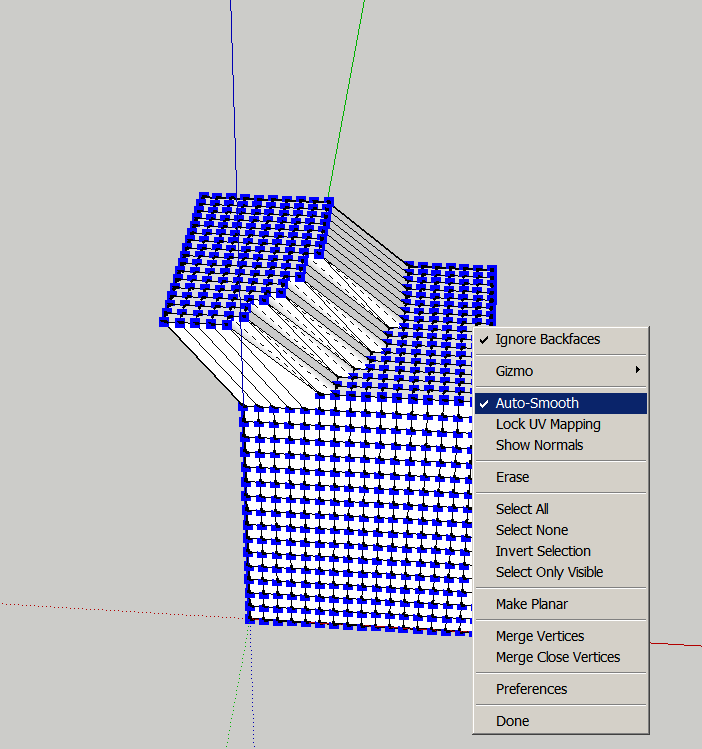
I do not know what I'm doing wrong. For me smoothing doesn't work although the function is checked. I thank you in advance for any help.
Charly
-
It is working. Turn off hidden geometry and you will see all the faces have 4 edges.
-
I assume you mean the soft selection? When you have the Select tool activated, enter a radius in the VCB.
-
Hi Thomas,
Yes that was what I meant. Thanks for the hint. -
If any OSX Mavericks users tried to register Vertex Tools recently and failed to do so there is a fix released (1.1.7) that takes care of the issue.
-
I've tried to create a simple star with vertex scaling (see screencast), but it's getting unsymmetrical, any ideas?
-
Did you try Shift + Blue scale?
Sent from my iPad







Hello! It looks like you're interested in this conversation, but you don't have an account yet.
Getting fed up of having to scroll through the same posts each visit? When you register for an account, you'll always come back to exactly where you were before, and choose to be notified of new replies (either via email, or push notification). You'll also be able to save bookmarks and upvote posts to show your appreciation to other community members.
With your input, this post could be even better 💗
Register Login


Advertisement