sketchucation logo sketchucation
    • Login
    Oops, your profile's looking a bit empty! To help us tailor your experience, please fill in key details like your SketchUp version, skill level, operating system, and more. Update and save your info on your profile page today!
    Mac User? | Join the Rayscaper Beta for Mac Learn More

    [Plugin][$] Vertex Tools

    Scheduled Pinned Locked Moved Plugins
    667 Posts 92 Posters 655.8k Views 92 Watching
    Loading More Posts
    • Oldest to Newest
    • Newest to Oldest
    • Most Votes
    Reply
    • Reply as topic
    Log in to reply
    This topic has been deleted. Only users with topic management privileges can see it.
    • thomthomT
      thomthom
      last edited by

      It should overwrite it. To be sure you can type in the Ruby Console: TT_Vertex::PLUGIN_VERSION - it should return 1.1.2 is successful.

      Thomas Thomassen β€” SketchUp Monkey & Coding addict
      List of my plugins and link to the CookieWare fund

      1 Reply Last reply
      Reply Quote 0
      • panixiaP
        panixia
        last edited by

        ya ya it was just solved, thanks anyway. it overwrites fine. πŸ‘

        1 Reply Last reply
        Reply Quote 0
        • thomthomT
          thomthom
          last edited by

          Version 1.1.3 Released

          • Fixes a Gizmo VCB adjustment bug.

          Thomas Thomassen β€” SketchUp Monkey & Coding addict
          List of my plugins and link to the CookieWare fund

          1 Reply Last reply
          Reply Quote 0
          • pilouP
            pilou
            last edited by

            Sorry where is the link for load the new beta ? 😳

            Frenchy Pilou
            Is beautiful that please without concept!
            My Little site :)

            1 Reply Last reply
            Reply Quote 0
            • thomthomT
              thomthom
              last edited by

              @unknownuser said:

              Sorry where is the link for load the new beta ? 😳

              No beta. Just log in to your account on the Vertex Tools website.

              Thomas Thomassen β€” SketchUp Monkey & Coding addict
              List of my plugins and link to the CookieWare fund

              1 Reply Last reply
              Reply Quote 0
              • cottyC
                cotty
                last edited by

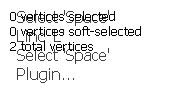
                It is possible to change the position of the screen text (top left) in a simple manner? It conflicts with the outputof the On Screen Rooling Reel plugin...
                textconflict.jpg

                my SketchUp gallery

                1 Reply Last reply
                Reply Quote 0
                • Rich O BrienR
                  Rich O Brien Moderator
                  last edited by

                  Did you try moving it? πŸ˜‰

                  Download the free D'oh Book for SketchUp πŸ“–

                  1 Reply Last reply
                  Reply Quote 0
                  • cottyC
                    cotty
                    last edited by

                    @rich o brien said:

                    Did you try moving it? πŸ˜‰

                    I thought of a not so simple solution 😎
                    Thank you! I will use this perfect solution until there is a complicated one...

                    my SketchUp gallery

                    1 Reply Last reply
                    Reply Quote 0
                    • thomthomT
                      thomthom
                      last edited by

                      @cotty said:

                      Thank you! I will use this perfect solution until there is a complicated one...

                      Complicated solution:

                      1. Hack the RBS encryption and decode the original source.
                      2. Find the code for the default position.
                      3. Recompile.
                      4. Bob is you uncle!

                      πŸ€“

                      Thomas Thomassen β€” SketchUp Monkey & Coding addict
                      List of my plugins and link to the CookieWare fund

                      1 Reply Last reply
                      Reply Quote 0
                      • mitcorbM
                        mitcorb
                        last edited by

                        Hi, ThomThom:
                        I just finished trolling through this entire thread, and I know I am missing something. In my first experiments with the tool, I make a random selection on the model and test the Gizmo. I orbit to the other side and see that I have also made a selection on the back side and deformed this in the same way. I thought there was a technique to select only that visible to the camera?

                        I take the slow, deliberate approach in my aimless wandering.

                        1 Reply Last reply
                        Reply Quote 0
                        • thomthomT
                          thomthom
                          last edited by

                          Enable "Ignore Backfaces" - where the vertices of every face with its backface facing the camera will not be selected.
                          Note this is not the same as what you see - it's entirely the relationship between the face normal and the camera.

                          To get true selection of only visible, Make your selection, then right click and choose "Select Only Visible".
                          http://www.thomthom.net/software/vertex_tools/manual/tools#select_only_visible

                          Thomas Thomassen β€” SketchUp Monkey & Coding addict
                          List of my plugins and link to the CookieWare fund

                          1 Reply Last reply
                          Reply Quote 0
                          • mitcorbM
                            mitcorb
                            last edited by

                            Thank you very much for this hint and thank you very much for an excellent tool.

                            I take the slow, deliberate approach in my aimless wandering.

                            1 Reply Last reply
                            Reply Quote 0
                            • opalO
                              opal
                              last edited by

                              @mitcorb said:

                              Hi, ThomThom:
                              I just finished trolling through this entire thread, and I know I am missing something. In my first experiments with the tool, I make a random selection on the model and test the Gizmo. I orbit to the other side and see that I have also made a selection on the back side and deformed this in the same way. I thought there was a technique to select only that visible to the camera?

                              pokes nose in Unless something has changed, right click on the tool bar.. ignore backfaces, or access the controls from the tools menu.. same selection, ignore backfaces

                              1 Reply Last reply
                              Reply Quote 0
                              • jo-keJ
                                jo-ke
                                last edited by

                                Just purchased this very useful tool. Didn't had time to play with it but I'm shure I will like it.
                                Thank you for your useful work.

                                http://www.zz7.de

                                1 Reply Last reply
                                Reply Quote 0
                                • thomthomT
                                  thomthom
                                  last edited by

                                  @jo-ke said:

                                  Just purchased this very useful tool. Didn't had time to play with it but I'm shure I will like it.
                                  Thank you for your useful work.

                                  πŸ‘ 😍 πŸ‘

                                  Thomas Thomassen β€” SketchUp Monkey & Coding addict
                                  List of my plugins and link to the CookieWare fund

                                  1 Reply Last reply
                                  Reply Quote 0
                                  • Bob JamesB
                                    Bob James
                                    last edited by

                                    I was using VT the other day to align some vertices one at a time to a straight edge and all of a sudden a small circle appeared in place of the cursor and I could move a vertex and just click on the next one and move it without having to go back to the select-tool/move-tool each time. I've not been able to find out how to get that little circle tool back. πŸ˜•

                                    i7-4930K 3.4Ghz, 2x GTX780 6GB, 32GB DDR3-1600 ECC, OCZ Vertex 4 500GB, WD Black 3TB, 32TB NAS, 4x 27" Monitors, SpaceMouse Pro, X-keys XK-60

                                    1 Reply Last reply
                                    Reply Quote 0
                                    • Rich O BrienR
                                      Rich O Brien Moderator
                                      last edited by

                                      If you have no verts selected and then activate the Move tool it goes into Hover Select mode and a little circle appears when you are over a vert to indicate it is selected.

                                      A shortcut to drop any selected verts is to right click and choose Select None. Now change to the move tool and this hover method is active.

                                      See you next month Bob πŸ˜‰

                                      Download the free D'oh Book for SketchUp πŸ“–

                                      1 Reply Last reply
                                      Reply Quote 0
                                      • Bob JamesB
                                        Bob James
                                        last edited by

                                        Thanks, Rich. Such a great tool πŸ‘ The merge vertices: oh yes. The gizmo

                                        Have tickets. Have reservations. Raring to go 😍

                                        i7-4930K 3.4Ghz, 2x GTX780 6GB, 32GB DDR3-1600 ECC, OCZ Vertex 4 500GB, WD Black 3TB, 32TB NAS, 4x 27" Monitors, SpaceMouse Pro, X-keys XK-60

                                        1 Reply Last reply
                                        Reply Quote 0
                                        • iichiversiiI
                                          iichiversii
                                          last edited by

                                          Best tool ever, it's completely changed sketchup forever, thanks TT πŸ‘

                                          Bring on the Rain...

                                          1 Reply Last reply
                                          Reply Quote 0
                                          • thomthomT
                                            thomthom
                                            last edited by

                                            Thanks guys! πŸ˜„

                                            Thomas Thomassen β€” SketchUp Monkey & Coding addict
                                            List of my plugins and link to the CookieWare fund

                                            1 Reply Last reply
                                            Reply Quote 0

                                            Hello! It looks like you're interested in this conversation, but you don't have an account yet.

                                            Getting fed up of having to scroll through the same posts each visit? When you register for an account, you'll always come back to exactly where you were before, and choose to be notified of new replies (either via email, or push notification). You'll also be able to save bookmarks and upvote posts to show your appreciation to other community members.

                                            With your input, this post could be even better πŸ’—

                                            Register Login
                                            • 1
                                            • 2
                                            • 30
                                            • 31
                                            • 32
                                            • 33
                                            • 34
                                            • 33 / 34
                                            • First post
                                              Last post
                                            Buy SketchPlus
                                            Buy SUbD
                                            Buy WrapR
                                            Buy eBook
                                            Buy Modelur
                                            Buy Vertex Tools
                                            Buy SketchCuisine
                                            Buy FormFonts

                                            Advertisement