sketchucation logo sketchucation
    • 登入
    Oops, your profile's looking a bit empty! To help us tailor your experience, please fill in key details like your SketchUp version, skill level, operating system, and more. Update and save your info on your profile page today!
    🔌 Smart Spline | Fluid way to handle splines for furniture design and complex structures. Download

    [Plugin][$] Curviloft 2.0a - 31 Mar 24 (Loft & Skinning)


    已排程 已置頂 已鎖定 已移動 Plugins
    1.3k 貼文 299 Posters 2.5m 瀏覽 297 Watching
    正在載入更多貼文
    • 從舊到新
    • 從新到舊
    • 最多點贊
    回覆
    • 在新貼文中回覆
    登入後回覆
    此主題已被刪除。只有擁有主題管理權限的使用者可以查看。
    • fredo6F 離線
      fredo6
      最後由 編輯

      @jgb
      It depends on your settings in the button palette

      • the mode of selection (Follow <-->)
      • the Break at Crossing button must be ON
        The small segments must also be 'plain' edges.

      Anyway, selecting each of the 3 or 4 contours is a good method too.

      Fredo

      1 條回覆 最後回覆 回覆 引用 0
      • Rich O BrienR 離線
        Rich O Brien Moderator
        最後由 編輯

        @unknownuser said:

        I have always thhought that this piece was a part of a secret space rocket due the warning text inserted 😄

        😆

        Download the free D'oh Book for SketchUp 📖

        1 條回覆 最後回覆 回覆 引用 0
        • pilouP 離線
          pilou
          最後由 編輯

          I have always thought that this piece was a part of a secret space rocket due the warning text inserted 😄

          Frenchy Pilou
          Is beautiful that please without concept!
          My Little site :)

          1 條回覆 最後回覆 回覆 引用 0
          • jgbJ 離線
            jgb
            最後由 編輯

            @unknownuser said:

            I have always thought that this piece was a part of a secret space rocket due the warning text inserted 😄

            The sink goes in the rocket cabin. 🤣

            And I thought I was being clever at hiding its purpose by just extracting the problem part. ☀


            jgb

            1 條回覆 最後回覆 回覆 引用 0
            • R 離線
              redmaya
              最後由 編輯

              i cant install... i followed the instruction.. i opened then extracted to plugin...

              1 條回覆 最後回覆 回覆 引用 0
              • Dave RD 離線
                Dave R
                最後由 編輯

                You have to give more than that for us to help you. 😒

                Go back and reread the instructions. Do you have administrative permission to install files into Plugins? Did you get LibFredo 4.6 and install it? Did you maintain the footprint of the files when installing it? What happens exactly when you try to install it? What happens exactly when you open SketchUp after installing it?

                Etaoin Shrdlu

                %

                (THERE'S NO PLACE LIKE)

                G28 X0.0 Y0.0 Z0.0

                M30

                %

                1 條回覆 最後回覆 回覆 引用 0
                • R 離線
                  redmaya
                  最後由 編輯

                  cant install libfredo... when i extract.. it says denied access.....
                  first i open it in winrar... then copy and paste libfredo6..rb and libfredo_dir_46 into googlesketchup plugin... then extract in winrar in the same location,,,, access denied

                  1 條回覆 最後回覆 回覆 引用 0
                  • Dave RD 離線
                    Dave R
                    最後由 編輯

                    You need to set up administrative rights to add files to the Plugins folder. This is one of the joys of Windows 7.

                    Etaoin Shrdlu

                    %

                    (THERE'S NO PLACE LIKE)

                    G28 X0.0 Y0.0 Z0.0

                    M30

                    %

                    1 條回覆 最後回覆 回覆 引用 0
                    • B 離線
                      Beto Ask
                      最後由 編輯

                      I already downloaded the plugin and copied all the files to the SketchUp plugins directory but when I open SketchUp it says that there is an error loading several files from curviloft, so the plugin isn't installed. What can I do or what am I doing wrong? please help!

                      1 條回覆 最後回覆 回覆 引用 0
                      • GaieusG 離線
                        Gaieus
                        最後由 編輯

                        @beto ask said:

                        What can I do?

                        Please, make sure to install everything correctly according to the instructions in the first post. If it still fails, make a screenshot of the ruby console when it displays those errors (or actually you can copy that text and paste it here).

                        Gai...

                        1 條回覆 最後回覆 回覆 引用 0
                        • thomthomT 離線
                          thomthom
                          最後由 編輯

                          @beto ask said:

                          I already downloaded the plugin and copied all the files to the SketchUp plugins directory but when I open SketchUp it says that there is an error loading several files from curviloft, so the plugin isn't installed. What can I do or what am I doing wrong? please help!

                          Read through this guide to how to install plugins: http://www.thomthom.net/thoughts/2012/01/installing-plugins-for-google-sketchup/
                          You might want to use the installer utility it links to.

                          Thomas Thomassen — SketchUp Monkey & Coding addict
                          List of my plugins and link to the CookieWare fund

                          1 條回覆 最後回覆 回覆 引用 0
                          • T 離線
                            transamws6
                            最後由 編輯

                            I'm getting errors trying to get this to run...
                            I believe I have the Fredo package installed correctly, but the Curviloft plugin seems to not be working.

                            I've read all of the install directions and i have un-zipped everything into the directories as instructed.

                            What am I missing?

                            Error Loading File bootstrap_Curviloft.rb
                            uninitialized constant Curviloft::T6Error Loading File CurviloftAlgo.rb
                            uninitialized constant Curviloft::T6Error Loading File CurviloftCurveMover.rb
                            uninitialized constant Curviloft::T6Error Loading File CurviloftPalette.rb
                            uninitialized constant Curviloft::T6Error Loading File CurviloftTool.rb
                            uninitialized constant Curviloft::T6Error Loading File Lib6Config.rb
                            uninitialized constant Traductor::T6Error Loading File Lib6EdgePicker.rb
                            uninitialized constant Traductor::T6Error Loading File Lib6Input.rb
                            uninitialized constant Traductor::T6Error Loading File Lib6Operation.rb
                            uninitialized constant Traductor::T6Error Loading File Lib6Palette.rb
                            uninitialized constant Traductor::T6Error Loading File Lib6Plugin.rb
                            uninitialized constant Traductor::T6Error Loading File Lib6PluginDialogs.rb
                            uninitialized constant Traductor::T6Error Loading File Lib6Protractor.rb
                            uninitialized constant Traductor::T6Error Loading File Lib6Selmode.rb
                            uninitialized constant Traductor::T6Error Loading File Lib6Startup.rb
                            uninitialized constant Traductor::T6Error Loading File Lib6Tool.rb
                            uninitialized constant Traductor::T6Error Loading File Lib6Translate.rb
                            uninitialized constant Traductor::T6Error Loading File Lib6Upgrade.rb
                            uninitialized constant Traductor::T6Error Loading File Lib6WebHtml.rb
                            uninitialized constant Traductor::T6Error Loading File Lib6WebXTable.rb
                            uninitialized constant Traductor::T6Error Loading File Lib6_txtmsg.rb
                            uninitialized constant Traductor::T6Error Loading File __loader.rb
                            undefined method `effective_load' for nil:NilClass

                            1 條回覆 最後回覆 回覆 引用 0
                            • massimoM 離線
                              massimo Moderator
                              最後由 編輯

                              Do you also installed the LibFredo6? It's clearly written in the very first post.

                              Cattura.JPG

                              1 條回覆 最後回覆 回覆 引用 0
                              • Dave RD 離線
                                Dave R
                                最後由 編輯

                                It appears to be an installation problem. Post a screen shot of your Plugins folder as well as the folders called CURVILOFT_Dir_12 and LIBFREDO_Dir_46.

                                Etaoin Shrdlu

                                %

                                (THERE'S NO PLACE LIKE)

                                G28 X0.0 Y0.0 Z0.0

                                M30

                                %

                                1 條回覆 最後回覆 回覆 引用 0
                                • T 離線
                                  transamws6
                                  最後由 編輯

                                  Here are the three screen shots, I couldn't figure out how to embed them in the reply, sorry about that...

                                  https://plus.google.com/photos/102203539408319890483/albums/5775843620657745937?authkey=CPiYyrqfi9zFNQ

                                  1 條回覆 最後回覆 回覆 引用 0
                                  • T 離線
                                    transamws6
                                    最後由 編輯

                                    I also used the installer plugin to try to install both but with no luck. I've gotten other plugins to work using the same approach so I'm kind of stumped... Could it be a version issue?

                                    1 條回覆 最後回覆 回覆 引用 0
                                    • Dave RD 離線
                                      Dave R
                                      最後由 編輯

                                      As I said, it's an install error.

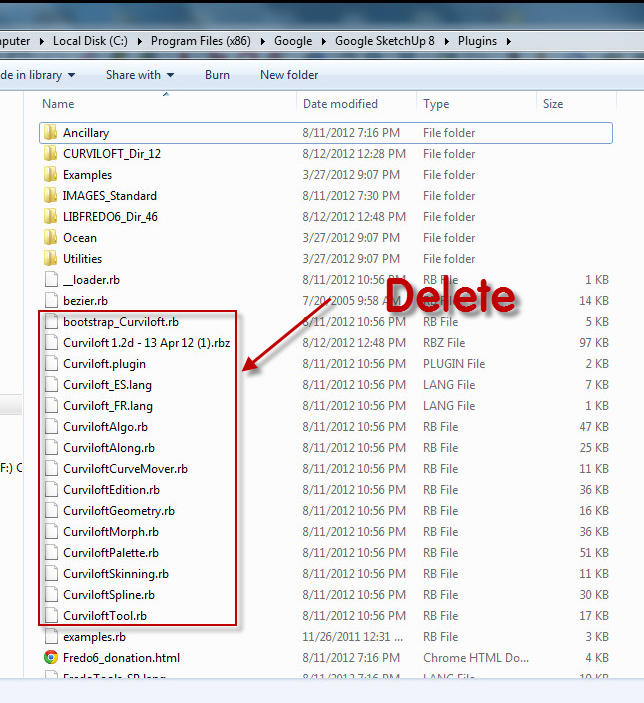
                                      You have extracted all those curviloft... .rb files into the Plugins folder. They are loading at the wrong place. They should be in the curviloft folder. Go back to the first post and look at the Footprint of the plugin as described by Fredo.

                                      I think if you delete all the curviloft .rb files you see in Plugins you'll probably be fine.
                                      Cloft 1.png

                                      Etaoin Shrdlu

                                      %

                                      (THERE'S NO PLACE LIKE)

                                      G28 X0.0 Y0.0 Z0.0

                                      M30

                                      %

                                      1 條回覆 最後回覆 回覆 引用 0
                                      • thomthomT 離線
                                        thomthom
                                        最後由 編輯

                                        You can also use this utility to help you install ZIP packages correctly: http://forums.sketchucation.com/viewtopic.php?t=42315

                                        Thomas Thomassen — SketchUp Monkey & Coding addict
                                        List of my plugins and link to the CookieWare fund

                                        1 條回覆 最後回覆 回覆 引用 0
                                        • T 離線
                                          transamws6
                                          最後由 編輯

                                          I get the same error after deleting.

                                          I tried using the install utility as well, as was recommended in earlier posts. I pointed to the libfredo plugin zip first, followed by the curviloft plugin zip.

                                          1 條回覆 最後回覆 回覆 引用 0
                                          • Dave RD 離線
                                            Dave R
                                            最後由 編輯

                                            Can you show a current shot of your entire Plugins folder and the current contents of the Curviloft and LiFredo folders. You must still have something installed incorrectly or the plugin would work without errors.

                                            You can upload your images to the forum by clicking on Upload Attachment below your text window.

                                            Etaoin Shrdlu

                                            %

                                            (THERE'S NO PLACE LIKE)

                                            G28 X0.0 Y0.0 Z0.0

                                            M30

                                            %

                                            1 條回覆 最後回覆 回覆 引用 0
                                            • 1
                                            • 2
                                            • 38
                                            • 39
                                            • 40
                                            • 41
                                            • 42
                                            • 65
                                            • 66
                                            • 40 / 66
                                            • 第一個貼文
                                              最後的貼文
                                            Buy SketchPlus
                                            Buy SUbD
                                            Buy WrapR
                                            Buy eBook
                                            Buy Modelur
                                            Buy Vertex Tools
                                            Buy SketchCuisine
                                            Buy FormFonts

                                            Advertisement




