sketchucation logo sketchucation
    • Login
    Oops, your profile's looking a bit empty! To help us tailor your experience, please fill in key details like your SketchUp version, skill level, operating system, and more. Update and save your info on your profile page today!
    Mac User? | Join the Rayscaper Beta for Mac Learn More

    [Plugin] Make Fur v.2.1.0(20140323)

    Scheduled Pinned Locked Moved Plugins
    650 Posts 255 Posters 1.3m Views 254 Watching
    Loading More Posts
    • Oldest to Newest
    • Newest to Oldest
    • Most Votes
    Reply
    • Reply as topic
    Log in to reply
    This topic has been deleted. Only users with topic management privileges can see it.
    • M
      mazureac
      last edited by

      Thanks for a super plugin!

      1 Reply Last reply
      Reply Quote 0
      • T
        torring
        last edited by

        Great plugin!

        1 Reply Last reply
        Reply Quote 0
        • S
          stef52
          last edited by

          Hello!
          i have a little problem with a piece of a terrain shaped with the sand box; what can i do to have a regular surface of grass instead of this triangulated one?

          http://img11.hostingpics.net/thumbs/mini_12231297gg.png

          1 Reply Last reply
          Reply Quote 0
          • T
            tak2hata
            last edited by

            Hi,stef52.

            @stef52 said:

            Hello!
            i have a little problem with a piece of a terrain shaped with the sand box; what can i do to have a regular surface of grass instead of this triangulated one?

            http://img11.hostingpics.net/thumbs/mini_12231297gg.png

            I think inputing larger number to "MaxNumber(/Face)" in dialog will improve the problem.
            How is it?
            Please reply if it does not improve the problem.
            Thanks.


            by TAK2HATA

            1 Reply Last reply
            Reply Quote 0
            • eidam655E
              eidam655
              last edited by

              hello,

              thanks for the plugin, grass making is now really easy (and by using component grass, it's also super fast as well!) 😄

              however, i have a question (a feature request): would it be possible to implement distributing by a B&W texture, or with an exponential fall-off (especially useful with the Valid Distance option)

              thanks for answers and i wish you good luck 😄

              I'm using SketchUp 2017, V-Ray 3.4

              1 Reply Last reply
              Reply Quote 0
              • D
                db9black
                last edited by

                hi tak2hata

                i just discoverd this plugin. this plugin is awesome!!! it's a great relief for all SU users. thank you very much! domo arigato gozaimashita!!!!

                1 Reply Last reply
                Reply Quote 0
                • mitcorbM
                  mitcorb
                  last edited by

                  @steph52:
                  Viewing your example suggested that you may need to set up a more regular mesh on that slope instead of stretched triangles. More like a fishnet grid. I may have misinterpreted the image, however.

                  I take the slow, deliberate approach in my aimless wandering.

                  1 Reply Last reply
                  Reply Quote 0
                  • T
                    tak2hata
                    last edited by

                    Hi,eidam655 and db9black and mitcorb.
                    Thanks for your replys. 😄
                    eidam655...
                    Your request is difficult for me.
                    I did not try processing from a picture yet.
                    I will search the method for that solution.
                    Please wait (without Expectation...Sorry.)


                    by TAK2HATA

                    1 Reply Last reply
                    Reply Quote 0
                    • A
                      azp136
                      last edited by

                      fur、txt、Oh, thank you

                      1 Reply Last reply
                      Reply Quote 0
                      • peter_shawP
                        peter_shaw
                        last edited by

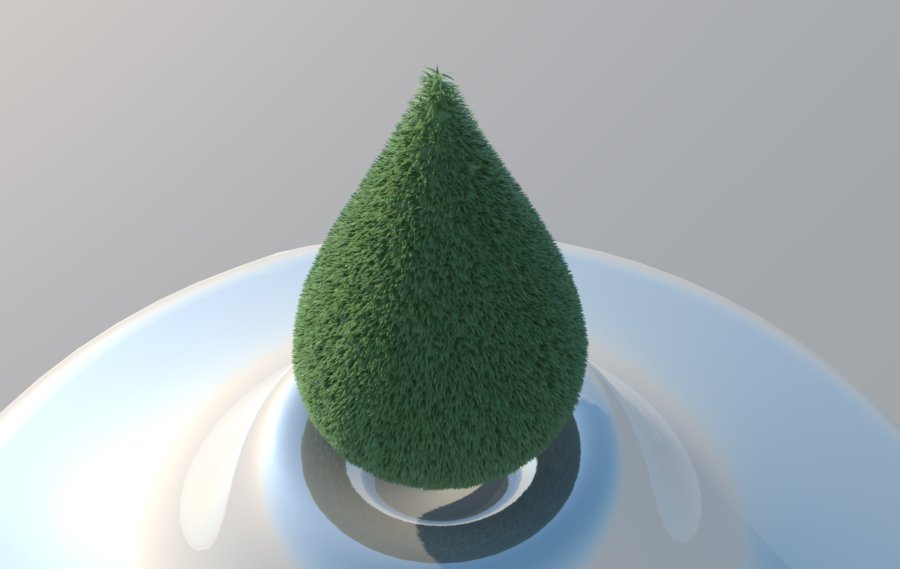
                        grastropfen.jpg
                        just found this plugin, it's awesome!

                        1 Reply Last reply
                        Reply Quote 0
                        • T
                          tak2hata
                          last edited by

                          @peter_shaw said:

                          [attachment=0:p83hevax]<!-- ia0 -->grastropfen.jpg<!-- ia0 -->[/attachment:p83hevax]
                          just found this plugin, it's awesome!

                          Hi ,peter_shaw.
                          very nice! 😍


                          by TAK2HATA

                          1 Reply Last reply
                          Reply Quote 0
                          • eidam655E
                            eidam655
                            last edited by

                            hi,

                            here's what i thought of:

                            current algorithm distributes fur to the whole face/polygon according to a function with multiple parameters, density being one of them. i would suggest something like:

                            request min and max density from user
                            request/load the density map from user (file)
                            stretch image on the face (300x300 px image onto a 1m x 1m face for example)
                            go through every pixel in image //yeah, this sucks while 1. there's no getPixelColor method in sketchup's sdk as far as i can see, and 2. this is a loop in a loop and takes ages to complete 😄
                            color value divided by white (100%) is the percentage
                            therefore current density for this area is minDensity+percentage*(maxDensity-minDensity)

                            ...and so on.

                            yes, there are probably more effective ways to do this.
                            no, i'm not a computer scientist.
                            no, i don't know ruby or sketchup's sdk.
                            no, i'm not sure how this should have helped you.

                            I'm using SketchUp 2017, V-Ray 3.4

                            1 Reply Last reply
                            Reply Quote 0
                            • S
                              ssw
                              last edited by

                              CREATING GRASS with HIDDEN EDGES in model with visible edges?

                              Any way to use the create grass function to do this? Can do this in the create crowd function, but it doesn't have the controls of the blade shape.

                              A wonderful plug-in that really helps create lush landscaping.

                              1 Reply Last reply
                              Reply Quote 0
                              • J
                                jdcamc
                                last edited by

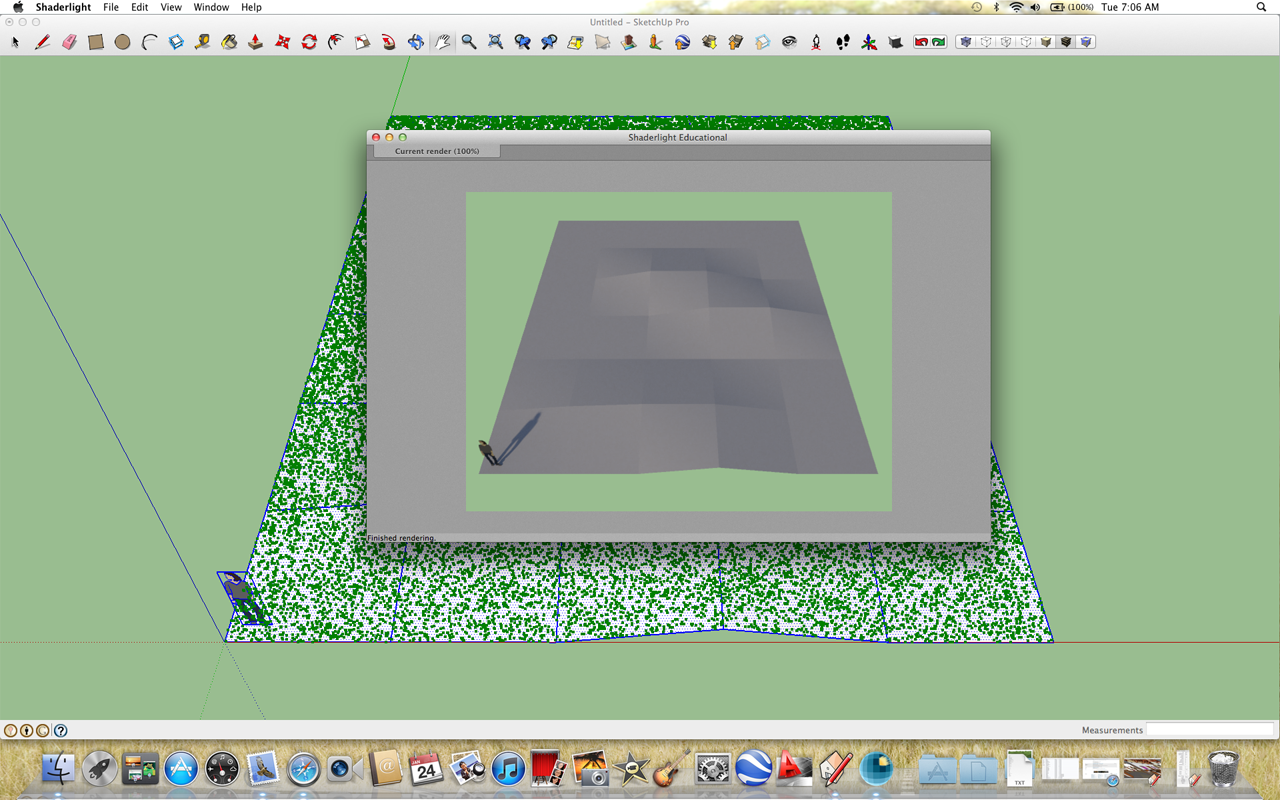
                                Help! I'm doing something wrong. Here is my setup:
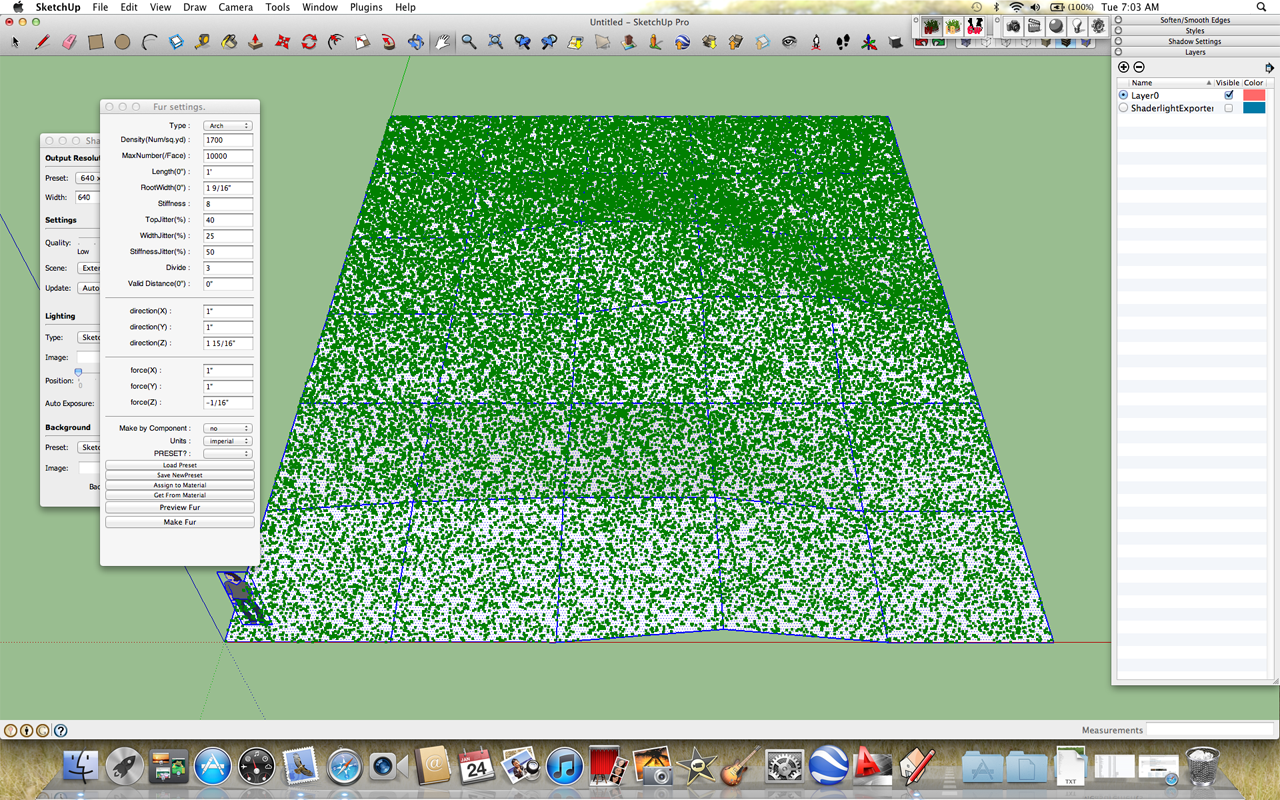
                                settings
                                and my render:
                                render
                                As you can see, the grass is just little green dots and the rendering shows nothing at all. What am I doing wrong? ❓

                                1 Reply Last reply
                                Reply Quote 0
                                • GaieusG
                                  Gaieus
                                  last edited by

                                  Those green dots are the preview only. Did you also press the Make fur button?

                                  Gai...

                                  1 Reply Last reply
                                  Reply Quote 0
                                  • J
                                    jdcamc
                                    last edited by

                                    Well, I thought I did. Let me try it again just to make sure.

                                    Thanks.

                                    1 Reply Last reply
                                    Reply Quote 0
                                    • J
                                      jdcamc
                                      last edited by

                                      yippee!! grass and everything - now I guess I'l have to start mowing....
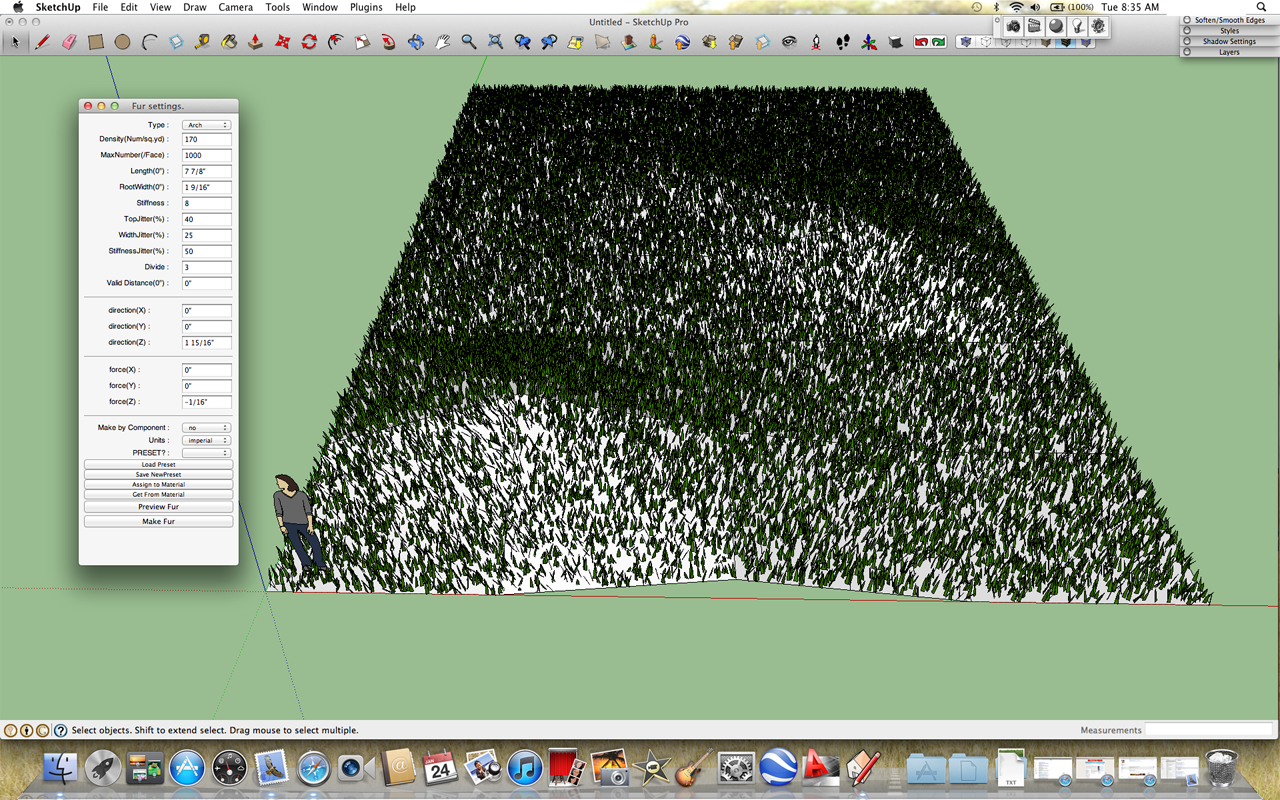
                                      Screen Shot 2012-01-24 at 8.35.09 AM copy.png

                                      😍

                                      1 Reply Last reply
                                      Reply Quote 0
                                      • N
                                        negiaf
                                        last edited by

                                        thanks alot
                                        its amazing

                                        1 Reply Last reply
                                        Reply Quote 0
                                        • A
                                          asmendong
                                          last edited by

                                          IVE DOWNLOADED THE MAKE FUR, BUT NO .EXE FILE, ONLY FUR_EN, NOT AND INSTALLER, ONLY IMAGES. ANY HELP PLSSS??

                                          1 Reply Last reply
                                          Reply Quote 0
                                          • TIGT
                                            TIG Moderator
                                            last edited by

                                            @asmendong said:

                                            IVE DOWNLOADED THE MAKE FUR, BUT NO .EXE FILE, ONLY FUR_EN, NOT AND INSTALLER, ONLY IMAGES. ANY HELP PLSSS??
                                            Arman
                                            Follow the installation instructions on the download page.
                                            There is no 'exe' file or an 'installer' etc. 😕
                                            Various files/subfolder in the downloaded 'archive' file will need extracting into the Sketchup Plugins folder... Before you restart Sketchup to get the expected menus/toolbars/etc...
                                            It sounds like you are a complete installation newbie ??? 😒
                                            There are many posts explaining how to do this in some detail... do a search on the SCF forums...
                                            Please [re]read these and the tools download page guidance notes - if you still can't install it come back to us...
                                            PS: Please don't post using ALL CAPS - it looks like you are shouting at us, it is also harder to read... AND it is generally regarded as bad manners on almost all forums... 😞

                                            TIG

                                            1 Reply Last reply
                                            Reply Quote 0

                                            Hello! It looks like you're interested in this conversation, but you don't have an account yet.

                                            Getting fed up of having to scroll through the same posts each visit? When you register for an account, you'll always come back to exactly where you were before, and choose to be notified of new replies (either via email, or push notification). You'll also be able to save bookmarks and upvote posts to show your appreciation to other community members.

                                            With your input, this post could be even better 💗

                                            Register Login
                                            • 1
                                            • 2
                                            • 5
                                            • 6
                                            • 7
                                            • 8
                                            • 9
                                            • 32
                                            • 33
                                            • 7 / 33
                                            • First post
                                              Last post
                                            Buy SketchPlus
                                            Buy SUbD
                                            Buy WrapR
                                            Buy eBook
                                            Buy Modelur
                                            Buy Vertex Tools
                                            Buy SketchCuisine
                                            Buy FormFonts

                                            Advertisement