sketchucation logo sketchucation
    • Login
    Oops, your profile's looking a bit empty! To help us tailor your experience, please fill in key details like your SketchUp version, skill level, operating system, and more. Update and save your info on your profile page today!
    Mac User? | Join the Rayscaper Beta for Mac Learn More

    [Plugin] Make Fur v.2.1.0(20140323)

    Scheduled Pinned Locked Moved Plugins
    650 Posts 255 Posters 1.3m Views 254 Watching
    Loading More Posts
    • Oldest to Newest
    • Newest to Oldest
    • Most Votes
    Reply
    • Reply as topic
    Log in to reply
    This topic has been deleted. Only users with topic management privileges can see it.
    • A
      autarchos
      last edited by

      Dear Mr. Paulo Wer:

      That is some fantastically lush and beautiful grass you have created! What is the probability that you would like to share your technique and component/material with the fur-worshipping masses?

      Besten Grüßen,
      Drazen Petrovic

      1 Reply Last reply
      Reply Quote 0
      • T
        thiloo
        last edited by

        thanks tak2hata for the quick explanation,

        wow, that´s also an powerful feature.
        sadly it´s not working if I choose "make by component - yes"!
        also, with component activated, the reaction to the force settings are quite unexpected?
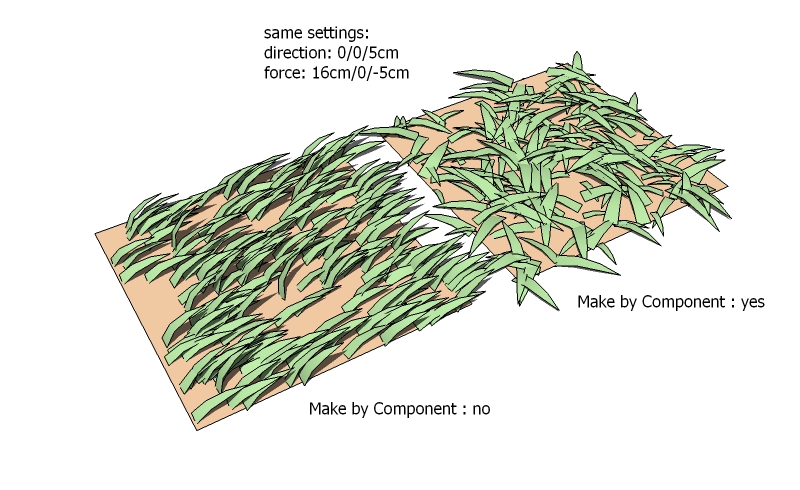
        fur_force.jpg
        I need the components for instancing -> rendering.

        again, Thank You for your time and effort

        1 Reply Last reply
        Reply Quote 0
        • thomthomT
          thomthom
          last edited by

          I see the same issue that thiloo describes.

          Thomas Thomassen — SketchUp Monkey & Coding addict
          List of my plugins and link to the CookieWare fund

          1 Reply Last reply
          Reply Quote 0
          • thomthomT
            thomthom
            last edited by

            Hehe - even the Googlers play around with this: http://sketchupdate.blogspot.com/2010/05/having-spent-last-three-hours-fiddling.html

            http://3.bp.blogspot.com/_mDRU50FpD-E/TAALyG_ckXI/AAAAAAAAAMI/geNk8IzxF7Y/s400/WithFur.png

            Thomas Thomassen — SketchUp Monkey & Coding addict
            List of my plugins and link to the CookieWare fund

            1 Reply Last reply
            Reply Quote 0
            • B
              bryan_gibson79
              last edited by

              As a user of Sketchup from its inception all i can say is WOW! about this plug-in. I gotta quick question though...Is there any easy way to hide all the linework on the blades of grass in sketchup with out rendering and without turning off all linework in the model? When you get alot it all turns black due to the linework. Anyone have any ideas?

              Thanks
              BG

              1 Reply Last reply
              Reply Quote 0
              • A
                autarchos
                last edited by

                Didier's Hide Faces/Edges plug-in is one method:

                http://rhin.crai.archi.fr/RubyLibraryDepot/Ruby/hide_faces_edges.rb

                @bryan_gibson79 said:

                As a user of Sketchup from its inception all i can say is WOW! about this plug-in. I gotta quick question though...Is there any easy way to hide all the linework on the blades of grass in sketchup with out rendering and without turning off all linework in the model? When you get alot it all turns black due to the linework. Anyone have any ideas?

                Thanks
                BG

                1 Reply Last reply
                Reply Quote 0
                • marleusM
                  marleus
                  last edited by

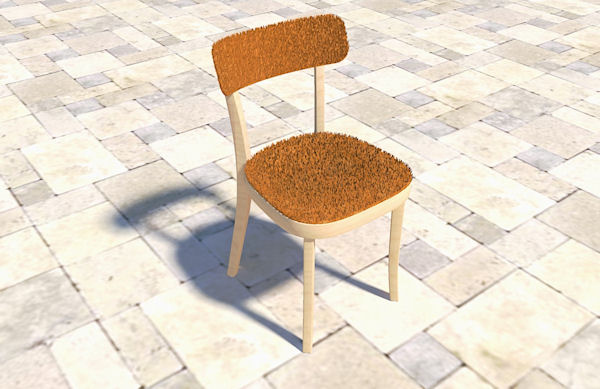
                  Really cool plugin

                  thanks a lot 👍 👍


                  softchair.jpg

                  Markus Sillander
                  Vantaa, Finland
                  I'm on FormFonts now
                  http://www.formfonts.com

                  1 Reply Last reply
                  Reply Quote 0
                  • N
                    notareal
                    last edited by

                    It still amaze me what this plugin can do
                    Perhaps later styling with hair guides? Like in Max or Blender. Not that it have to be so extensive, but in a spirit of those.

                    Welcome to try Thea Render, Thea support | kerkythea.net -team member

                    1 Reply Last reply
                    Reply Quote 0
                    • P
                      paulower
                      last edited by

                      @autarchos said:

                      Dear Mr. Paulo Wer: That is some fantastically lush and beautiful grass you have created! What is the probability that you would like to share your technique and component/material with the fur-worshipping masses?
                      Besten Grüßen,
                      Drazen Petrovic

                      Yes, sure I can explain:
                      1 - I created a normal plane in SketchUp and used the Sandbox tool SketchUp to create the topography of the land;
                      2 - I used two maps (two textures) of different grass. A grass that is normal, and the other is like a bush (do not know how to say it in English).

                      • Do not forget to apply the texture on both sides, ie, in the back and front face.

                      **3 -**Create a component for each texture (one for the grass normal and other to grass bush);
                      **4 -**In the Settings Window FUR, I made the adjustments and settings required, such as:

                      • TopJitter (%): 1
                      • Direction (X): 0mm
                      • Direction (Y): 0mm
                      • Direction (Z): 500m or 5000m (not mm. That in my example)
                      • In the menu drop down "Make by Component", choose the component that you created;

                      5 - Click on Make Fur;
                      **6 -**I did the render in V-Ray for SketchUp. In V-Ray only applied the map Alpha in Diffuse;

                      I still do not know for sure the function of all commands, but recommend you do the tests in Make FUR. If you want the maps are on the links below:

                      File - Map Alpha Mask

                      File - Map Grass

                      _______________________________
                      My Blog
                      Baú SketchUp

                      Baú SketchUp
                      Visite nosso blog.. Visit our blog Baú SketchUp

                      1 Reply Last reply
                      Reply Quote 0
                      • thomthomT
                        thomthom
                        last edited by

                        paulower: that's a nice setup. Thanks for sharing.
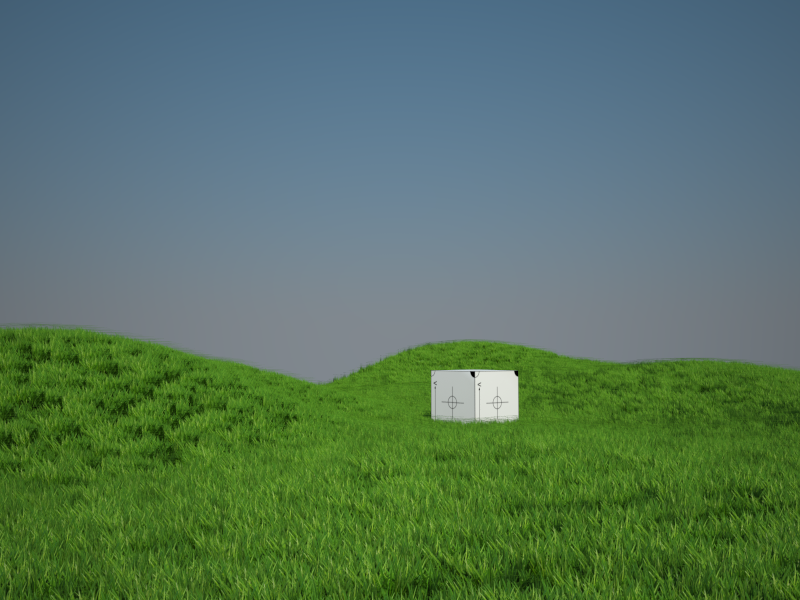
                        Render01.png

                        👍

                        Thomas Thomassen — SketchUp Monkey & Coding addict
                        List of my plugins and link to the CookieWare fund

                        1 Reply Last reply
                        Reply Quote 0
                        • thomthomT
                          thomthom
                          last edited by

                          @tak2hata said:

                          Sorry ,Now I examines the method to remember dialog position.
                          That demands the javascript knowledge from me.
                          I will update few day later.

                          No need for javasscript to remember the window's position. SU does this for you if you specify a preference key.

                          Error 404 (Not Found)!!1

                          favicon

                          (code.google.com)

                          @unknownuser said:

                          pref_key
                          The registry entry where the location and size of the dialog will be saved. If preferences_key is not included, the location and size will not be stored.

                          Thomas Thomassen — SketchUp Monkey & Coding addict
                          List of my plugins and link to the CookieWare fund

                          1 Reply Last reply
                          Reply Quote 0
                          • J
                            jaceguay
                            last edited by

                            Nothing happend when i click make fur, the ruby console show this:

                            Error: #<TypeError: no implicit conversion to float from nil>
                            C:/Program Files/Google/Google SketchUp 7/Plugins/fur_en.rb:541:in initialize' C:/Program Files/Google/Google SketchUp 7/Plugins/fur_en.rb:541:in new'
                            C:/Program Files/Google/Google SketchUp 7/Plugins/fur_en.rb:541:in fur_inputbox' C:/Program Files/Google/Google SketchUp 7/Plugins/fur_en.rb:1561 C:/Program Files/Google/Google SketchUp 7/Plugins/fur_en.rb:1561:in call'

                            Does anyone know what can be done to adress this error?

                            1 Reply Last reply
                            Reply Quote 0
                            • J
                              jeabdc
                              last edited by

                              ThankY ขอบคุณมากครับ

                              1 Reply Last reply
                              Reply Quote 0
                              • Didier BurD
                                Didier Bur
                                last edited by

                                Hi,

                                @unknownuser said:

                                Does anyone know what can be done to adress this error?

                                After taking a look at the code, line 541 has something to do with "Direction (X)" Y and Z factors.
                                Yours are undefined (nil), so check your values in the dialog box and try to change them with something else than zero and see if it works. Check your decimal "," or "." too.
                                Hope this helps,

                                DB

                                1 Reply Last reply
                                Reply Quote 0
                                • J
                                  jaceguay
                                  last edited by

                                  Thanks for the fast response, changing the values return another error:

                                  Error: #<TypeError: no implicit conversion to float from nil>
                                  C:/Program Files/Google/Google SketchUp 7/Plugins/fur_en.rb:852:in initialize' C:/Program Files/Google/Google SketchUp 7/Plugins/fur_en.rb:852:in new'
                                  C:/Program Files/Google/Google SketchUp 7/Plugins/fur_en.rb:852:in show_webdialog' C:/Program Files/Google/Google SketchUp 7/Plugins/fur_en.rb:792:in call'

                                  1 Reply Last reply
                                  Reply Quote 0
                                  • J
                                    jonorman
                                    last edited by

                                    same problem here. after installing last version..

                                    Error: #<TypeError: no implicit conversion to float from nil>
                                    C:/Program Files (x86)/Google/Google SketchUp 7/Plugins/fur_en.rb:541:in initialize' C:/Program Files (x86)/Google/Google SketchUp 7/Plugins/fur_en.rb:541:in new'
                                    C:/Program Files (x86)/Google/Google SketchUp 7/Plugins/fur_en.rb:541:in fur_inputbox' C:/Program Files (x86)/Google/Google SketchUp 7/Plugins/fur_en.rb:1561 C:/Program Files (x86)/Google/Google SketchUp 7/Plugins/fur_en.rb:1561:in call'

                                    buuuuhuuuuu... miss my fur/grass plugin 😢

                                    1 Reply Last reply
                                    Reply Quote 0
                                    • T
                                      tak2hata
                                      last edited by

                                      Hi
                                      I uploaded version1.4.
                                      Change is...

                                      Remember webdialog position.(Thanks thomthom 😄 )
                                      Add new mode "Crowd".(Multi Instance scattering.)

                                      @jonorman said:

                                      same problem here. after installing last version..

                                      Error: #<TypeError: no implicit conversion to float from nil>
                                      C:/Program Files (x86)/Google/Google SketchUp 7/Plugins/fur_en.rb:541:in initialize' C:/Program Files (x86)/Google/Google SketchUp 7/Plugins/fur_en.rb:541:in new'
                                      C:/Program Files (x86)/Google/Google SketchUp 7/Plugins/fur_en.rb:541:in fur_inputbox' C:/Program Files (x86)/Google/Google SketchUp 7/Plugins/fur_en.rb:1561 C:/Program Files (x86)/Google/Google SketchUp 7/Plugins/fur_en.rb:1561:in call'

                                      buuuuhuuuuu... miss my fur/grass plugin 😢

                                      In this version ,I changed convert string to length method little.
                                      When that error is happened , I want look your dialog parameter.
                                      I think problem is around "s_to_l" method.

                                      @thiloo said:

                                      thanks tak2hata for the quick explanation,

                                      wow, that´s also an powerful feature.
                                      sadly it´s not working if I choose "make by component - yes"!
                                      also, with component activated, the reaction to the force settings are quite unexpected?
                                      [attachment=0:367xbin3]<!-- ia0 -->fur_force.jpg<!-- ia0 -->[/attachment:367xbin3]
                                      I need the components for instancing -> rendering.

                                      again, Thank You for your time and effort

                                      "make by component -- yes" was added after making this plugin.
                                      This plugin originaly use for "make by component -- no".
                                      I do not have good way to componentinstance direction control.

                                      When I find good way,I will change it.

                                      Thanks.


                                      by TAK2HATA

                                      1 Reply Last reply
                                      Reply Quote 0
                                      • S
                                        sloof
                                        last edited by

                                        how to use this ?

                                        somebody help me please ?

                                        1 Reply Last reply
                                        Reply Quote 0
                                        • J
                                          jonorman
                                          last edited by

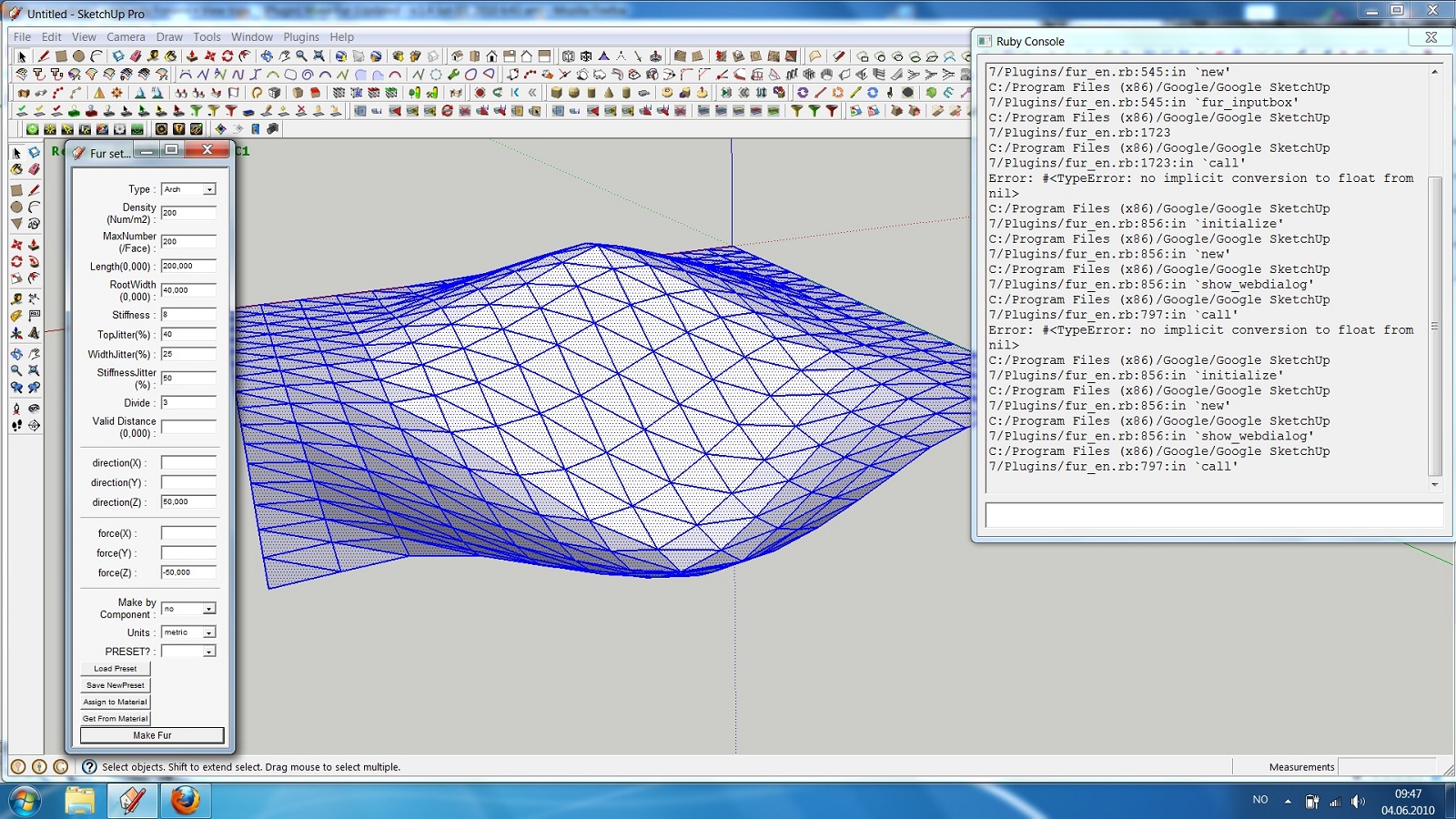
                                          screen dump of SU trying to use fur.


                                          screen dump 001.jpg

                                          1 Reply Last reply
                                          Reply Quote 0
                                          • T
                                            tak2hata
                                            last edited by

                                            @jonorman said:

                                            screen dump of SU trying to use fur.

                                            Hi,jonorman.
                                            I updated version 1.4a.

                                            Sorry,I forgat changing "s_to_l".
                                            now it changed.
                                            It may be work.


                                            by TAK2HATA

                                            1 Reply Last reply
                                            Reply Quote 0

                                            Hello! It looks like you're interested in this conversation, but you don't have an account yet.

                                            Getting fed up of having to scroll through the same posts each visit? When you register for an account, you'll always come back to exactly where you were before, and choose to be notified of new replies (either via email, or push notification). You'll also be able to save bookmarks and upvote posts to show your appreciation to other community members.

                                            With your input, this post could be even better 💗

                                            Register Login
                                            • 1
                                            • 2
                                            • 18
                                            • 19
                                            • 20
                                            • 21
                                            • 22
                                            • 32
                                            • 33
                                            • 20 / 33
                                            • First post
                                              Last post
                                            Buy SketchPlus
                                            Buy SUbD
                                            Buy WrapR
                                            Buy eBook
                                            Buy Modelur
                                            Buy Vertex Tools
                                            Buy SketchCuisine
                                            Buy FormFonts

                                            Advertisement