sketchucation logo sketchucation
    • 登入
    Oops, your profile's looking a bit empty! To help us tailor your experience, please fill in key details like your SketchUp version, skill level, operating system, and more. Update and save your info on your profile page today!
    🔌 Smart Spline | Fluid way to handle splines for furniture design and complex structures. Download

    [Plugin] Extrude Edges by Rails

    已排程 已置頂 已鎖定 已移動 Plugins
    381 貼文 71 Posters 354.0k 瀏覽 71 Watching
    正在載入更多貼文
    • 從舊到新
    • 從新到舊
    • 最多點贊
    回覆
    • 在新貼文中回覆
    登入後回覆
    此主題已被刪除。只有擁有主題管理權限的使用者可以查看。
    • TIGT 離線
      TIG Moderator
      最後由 編輯

      These problems seem to relate to the way the vertices in the the curves are ordered. They are reordered by the script before making the mesh... BUT obviously not well enough in some cases.

      If you explode the three curves in your railQ.skp in turn and then immediately weld them back into new curves they make the mesh perfectly... So my re-order and weld's must vary somewhere...

      I'll look at the ordering algorithms etc and release an update asap... 😒

      TIG

      1 條回覆 最後回覆 回覆 引用 0
      • D 離線
        Daniel S
        最後由 編輯

        Amazing TIG!!!
        Thanky you!!!

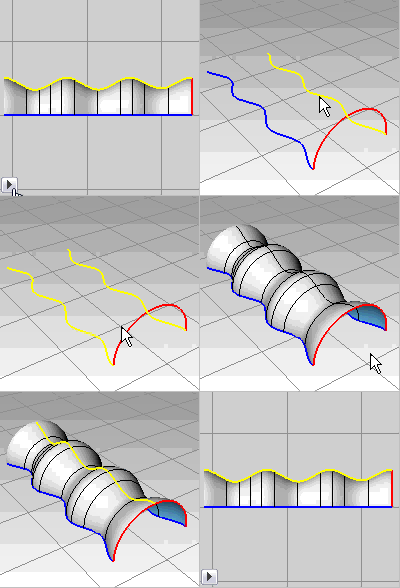
        How about an option to maintain height?
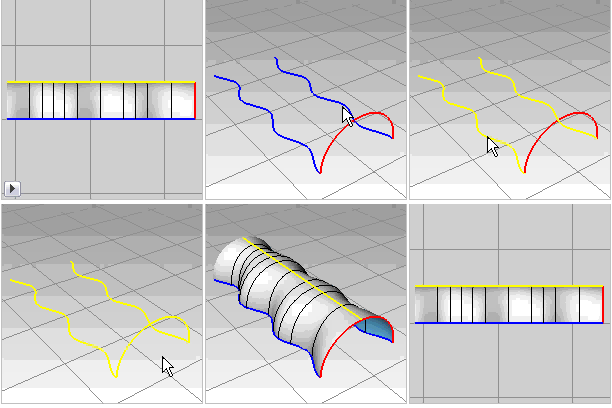
        In your script shape curves scale in both the height and width dimensions. It will be great to have an option to remove the association between the height scaling from the width scaling for some models.

        As an example: here is what your script make:
        2.gif

        And here with Maintain height:
        1.gif

        Daniel S

        1 條回覆 最後回覆 回覆 引用 0
        • jeff hammondJ 離線
          jeff hammond
          最後由 編輯

          @tig said:

          These problems seem to relate to the way the vertices in the the curves are ordered. They are reordered by the script before making the mesh... BUT obviously not well enough in some cases.

          didn't even realize vertices were in a particular order 😄 .. is the grid example something to do with the order as well or something different?

          daniel, that's going into a different territory in that the profile changes as it moves along the rails (the halfcircle doesn't remain the same in terms of shape).. if something like that is possible in SU then i have another request that's similar though different.. i'll hold off on asking for now 😄

          dotdotdot

          1 條回覆 最後回覆 回覆 引用 0
          • P 離線
            Panga
            最後由 編輯

            Thanks a lot for this new tool, it'll be very usefull !!

            1 條回覆 最後回覆 回覆 引用 0
            • pilouP 離線
              pilou
              最後由 編輯

              When you want draw a "straight" curve line with some number of segments for fit with other curves for The TIG Plug
              Draw a line, Right Click Divide then Weld = some painful 😮

              A more quicky trick 💭
              Draw a polyline of 1 segment by the BezierSpline of Fredo6
              Then Right Click / Convert to Segmentor and enter the number of segments 😉
              Et voilà 💚

              It's a pity than we can't draw an arc circle "Straight" or scale it to 0 or Bulge =0 ! 😡

              Frenchy Pilou
              Is beautiful that please without concept!
              My Little site :)

              1 條回覆 最後回覆 回覆 引用 0
              • MALAISEM 離線
                MALAISE
                最後由 編輯

                TIG some Champagne ?
                Amazing tool made by TIG 👍 👍
                MALAISE

                La Connaissance n'a de valeur que partagée

                1 條回覆 最後回覆 回覆 引用 0
                • X 離線
                  xrok1
                  最後由 編輯

                  great plug thanks!
                  maybe you could combine this with edges by edges then have the option to pick just 1 rail or 2? one more function, one less plugin! 😄

                  “There are three classes of people: those who see. Those who see when they are shown. Those who do not see.”

                  http://www.Twilightrender.com try it!

                  1 條回覆 最後回覆 回覆 引用 0
                  • X 離線
                    xrok1
                    最後由 編輯

                    Jeff, i found that if you explode the rails then weld them again that the problem is fixed. at least for me.

                    “There are three classes of people: those who see. Those who see when they are shown. Those who do not see.”

                    http://www.Twilightrender.com try it!

                    1 條回覆 最後回覆 回覆 引用 0
                    • TIGT 離線
                      TIG Moderator
                      最後由 編輯

                      @xrok1 said:

                      Jeff, i found that if you explode the rails then weld them again that the problem is fixed. at least for me.

                      This is the temporary fix... I'm incorporating this into the code so the glitches don't happen... However that makes new glitches which I'm now fixing............. 🤓

                      TIG

                      1 條回覆 最後回覆 回覆 引用 0
                      • X 離線
                        xrok1
                        最後由 編輯

                        oops, sorry i could help. 😳
                        😆

                        “There are three classes of people: those who see. Those who see when they are shown. Those who do not see.”

                        http://www.Twilightrender.com try it!

                        1 條回覆 最後回覆 回覆 引用 0
                        • TIGT 離線
                          TIG Moderator
                          最後由 編輯

                          xrok1 😉
                          Your idea of being able to pick a profile and then pick just one rail is quite simple to do.
                          For the next update I will add that option - you'll simply pick the profile and click on rail twice - if you pick another rail it works as now, if you pick the same rail again then it's assumed that it has a 'twin' at the other end of the profile and uses that... simplicity... 💭

                          TIG

                          1 條回覆 最後回覆 回覆 引用 0
                          • utilerU 離線
                            utiler
                            最後由 編輯

                            TIG, probably a silly question, but what is the difference from this plugin and extrudebyedges?
                            http://forums.sketchucation.com/viewtopic.php?f=180&t=20065&st=0&sk=t&sd=a&hilit=extrude+edges

                            Is is simple that this script allows for more random meshes?

                            Just Curious...

                            1 條回覆 最後回覆 回覆 引用 0
                            • X 離線
                              xrok1
                              最後由 編輯

                              awsome.

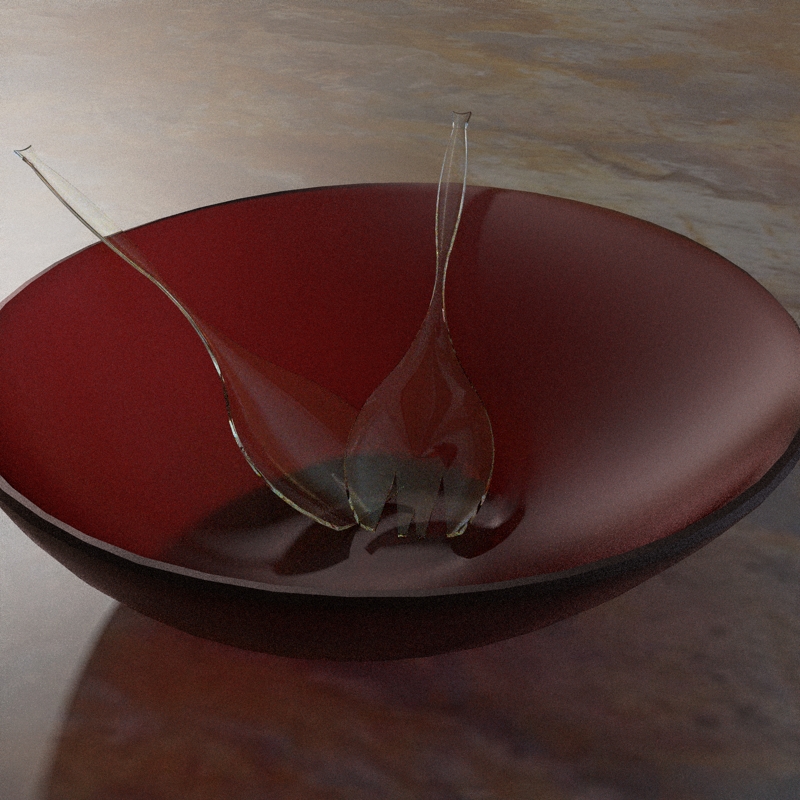
                              BTW, your plug is turning me into some kind of artsy fartsy... STOP IT! 😆

                              Capture.JPG

                              “There are three classes of people: those who see. Those who see when they are shown. Those who do not see.”

                              http://www.Twilightrender.com try it!

                              1 條回覆 最後回覆 回覆 引用 0
                              • utilerU 離線
                                utiler
                                最後由 編輯

                                Thanks mate, clear as crystal..... 👍

                                Just Curious...

                                1 條回覆 最後回覆 回覆 引用 0
                                • mitcorbM 離線
                                  mitcorb
                                  最後由 編輯

                                  @xrok1:
                                  for your excellent bowl and spork and "foon" model, did you use specific dimensions and scale? Or was this a free form experiment and the model elements proportioned by eye?
                                  I am preparing to use Extrude by Rails with dimensional or scale control and was wondering about this.
                                  Thanks, mitcorb

                                  I take the slow, deliberate approach in my aimless wandering.

                                  1 條回覆 最後回覆 回覆 引用 0
                                  • X 離線
                                    xrok1
                                    最後由 編輯

                                    it was freeform 😆 but i can't see any reason it couldn't be dimensioned accurately if you wish to.

                                    “There are three classes of people: those who see. Those who see when they are shown. Those who do not see.”

                                    http://www.Twilightrender.com try it!

                                    1 條回覆 最後回覆 回覆 引用 0
                                    • majidM 離線
                                      majid
                                      最後由 編輯

                                      WOW TIG !!!! this is great!! thank you...you are killing me slowly 😉 you ruby programmers are changing SU to a verrry different app. !!!thank you mate again

                                      My inspiring A, B, Sketches book: https://sketchucation.com/shop/books/intermediate/2612-alphabet-inspired-sketches--inspiring-drills-for-architects--3d-artists-and-designers-

                                      1 條回覆 最後回覆 回覆 引用 0
                                      • TIGT 離線
                                        TIG Moderator
                                        最後由 編輯

                                        @utiler said:

                                        TIG, probably a silly question, but what is the difference from this plugin and extrudebyedges?
                                        http://forums.sketchucation.com/viewtopic.php?f=180&t=20065&st=0&sk=t&sd=a&hilit=extrude+edges

                                        Is is simple that this script allows for more random meshes?

                                        ExtrudeEdgesByEdges takes two groups - edges in them need not be continuous - and makes a mesh - it extrudes each edge in one set in the direction of the edges in the other - there is no 'followme' etc...
                                        ExtrudeEdgesByRails is similar BUT it only works on curves. It takes a selected profile and makes a mesh from it along two selected rails [or with the forthcoming version one rail picked twice - making it similar in that usage to EEbyEdges]. The main difference is that at each pair of 'nodes' [vertices] in the two rails the profile is placed and rotated and then scaled to fit between the rails, giving a smoothly curving mesh surface: also the number of 'nodes' in each rail is equalized if the number of vertices in the two rails is uneven - now making the 'lofting' of two unequally segmented rails possible...

                                        TIG

                                        1 條回覆 最後回覆 回覆 引用 0
                                        • mitcorbM 離線
                                          mitcorb
                                          最後由 編輯

                                          TIG:
                                          What are the possibilities of being able to orbit and inspect the initial results of the extrusion on rails while going through the checklist so that decisions can be made in the workflow? Does this make sense?

                                          I take the slow, deliberate approach in my aimless wandering.

                                          1 條回覆 最後回覆 回覆 引用 0
                                          • TIGT 離線
                                            TIG Moderator
                                            最後由 編輯

                                            @mitcorb said:

                                            TIG:
                                            What are the possibilities of being able to orbit and inspect the initial results of the extrusion on rails while going through the checklist so that decisions can be made in the workflow? Does this make sense?

                                            It's something that's not so easy to do... but I'll look at it - I currently have a version with most of the bugs ironed out - it'll be published soonest...


                                            TIG

                                            1 條回覆 最後回覆 回覆 引用 0
                                            • 1
                                            • 2
                                            • 13
                                            • 14
                                            • 15
                                            • 16
                                            • 17
                                            • 18
                                            • 19
                                            • 20
                                            • 15 / 20
                                            • 第一個貼文
                                              最後的貼文
                                            Buy SketchPlus
                                            Buy SUbD
                                            Buy WrapR
                                            Buy eBook
                                            Buy Modelur
                                            Buy Vertex Tools
                                            Buy SketchCuisine
                                            Buy FormFonts

                                            Advertisement