sketchucation logo sketchucation
    • 登入
    Oops, your profile's looking a bit empty! To help us tailor your experience, please fill in key details like your SketchUp version, skill level, operating system, and more. Update and save your info on your profile page today!
    🔌 Smart Spline | Fluid way to handle splines for furniture design and complex structures. Download

    [Plugin] Extrude Edges by Rails

    已排程 已置頂 已鎖定 已移動 Plugins
    381 貼文 71 Posters 348.8k 瀏覽 71 Watching
    正在載入更多貼文
    • 從舊到新
    • 從新到舊
    • 最多點贊
    回覆
    • 在新貼文中回覆
    登入後回覆
    此主題已被刪除。只有擁有主題管理權限的使用者可以查看。
    • D 離線
      driven
      最後由 編輯

      the curtain draws open on a New Year, have a good one

      learn from the mistakes of others, you may not live long enough to make them all yourself...

      1 條回覆 最後回覆 回覆 引用 0
      • pilouP 離線
        pilou
        最後由 編輯

        Extrude edges by rail v2 is better than Soap Skin Bubble! 😉
        Drawing Mesh is more regular!
        That will be better for the UV!
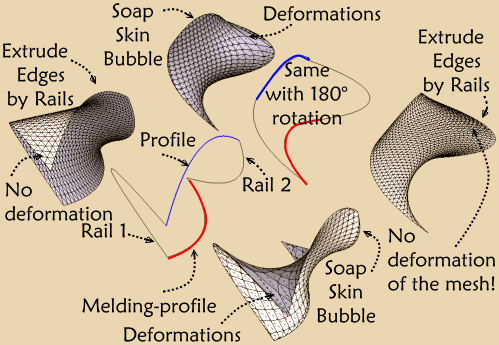

        eer_v2.png

        Frenchy Pilou
        Is beautiful that please without concept!
        My Little site :)

        1 條回覆 最後回覆 回覆 引用 0
        • pilouP 離線
          pilou
          最後由 編輯

          Works like a charm 👍
          The funny thing is that curves are not obliged to touch themselve! 💚
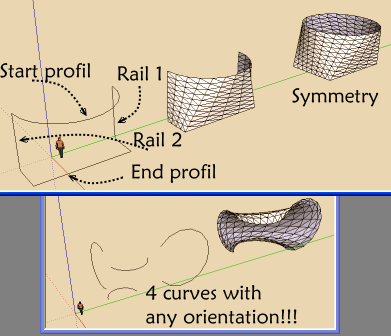

          charm1.png

          Frenchy Pilou
          Is beautiful that please without concept!
          My Little site :)

          1 條回覆 最後回覆 回覆 引用 0
          • TIGT 離線
            TIG Moderator
            最後由 編輯

            In fact, if the rails / profiles are looped [i.e. they are without an end] then it is better if they don't touch. The profiles are 'moved' to the ends of the rails before making the mesh in any case...
            Thanks for the demos - if you would like to make a detailed tutorial I won't stop you ! 😉

            En fait, si les rails / profils sont bouclées [c'est à dire qu'ils sont sans fin], alors il vaut mieux qu'ils ne se touchent pas. Les profils sont «déplacés» à l'extrémité des rails avant de rendre le maillage, en tout cas ... Merci pour les démos - si vous souhaitez faire un tutoriel détaillé je ne vais pas vous arrêter! 😉

            TIG

            1 條回覆 最後回覆 回覆 引用 0
            • juan974J 離線
              juan974
              最後由 編輯

              THANK YOU SO MUCH
              It helps me a lot to finish this drawing22338_238938657257_605187257_3142467_6757725_n.jpg, i've give up some months ago ...
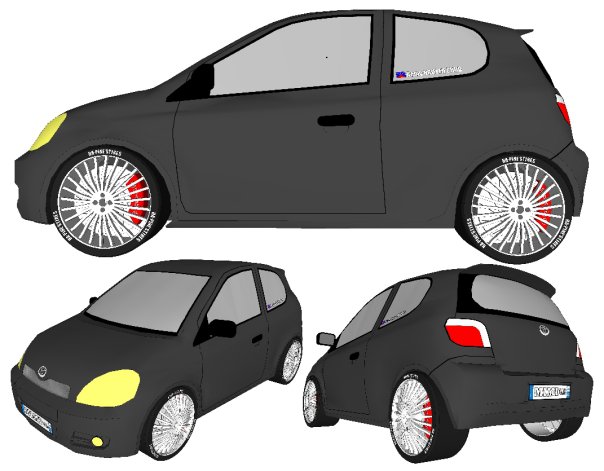
              i bet it will be the most used plugin for me (whit weld.rb) ...
              yaris pour mimi.pdf

              juan974 (Réunion island)
              website : http://sketchucation.com/click.php?url=http://www.tarn.us

              1 條回覆 最後回覆 回覆 引用 0
              • pilouP 離線
                pilou
                最後由 編輯

                Seems there is a little bug! (in Round corner or EEbR) 😮
                (after making a round corner with the Fredo6 plug)
                (erased faces, welding sides)
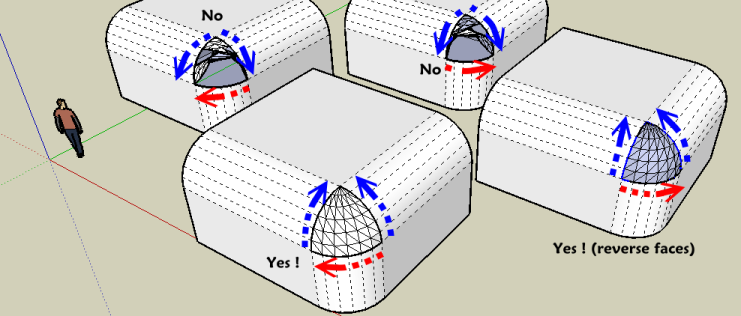

                bug.png


                bug.skp

                Frenchy Pilou
                Is beautiful that please without concept!
                My Little site :)

                1 條回覆 最後回覆 回覆 引用 0
                • D 離線
                  driven
                  最後由 編輯

                  @unknownuser said:

                  Seems there is a little bug!

                  might be related to this
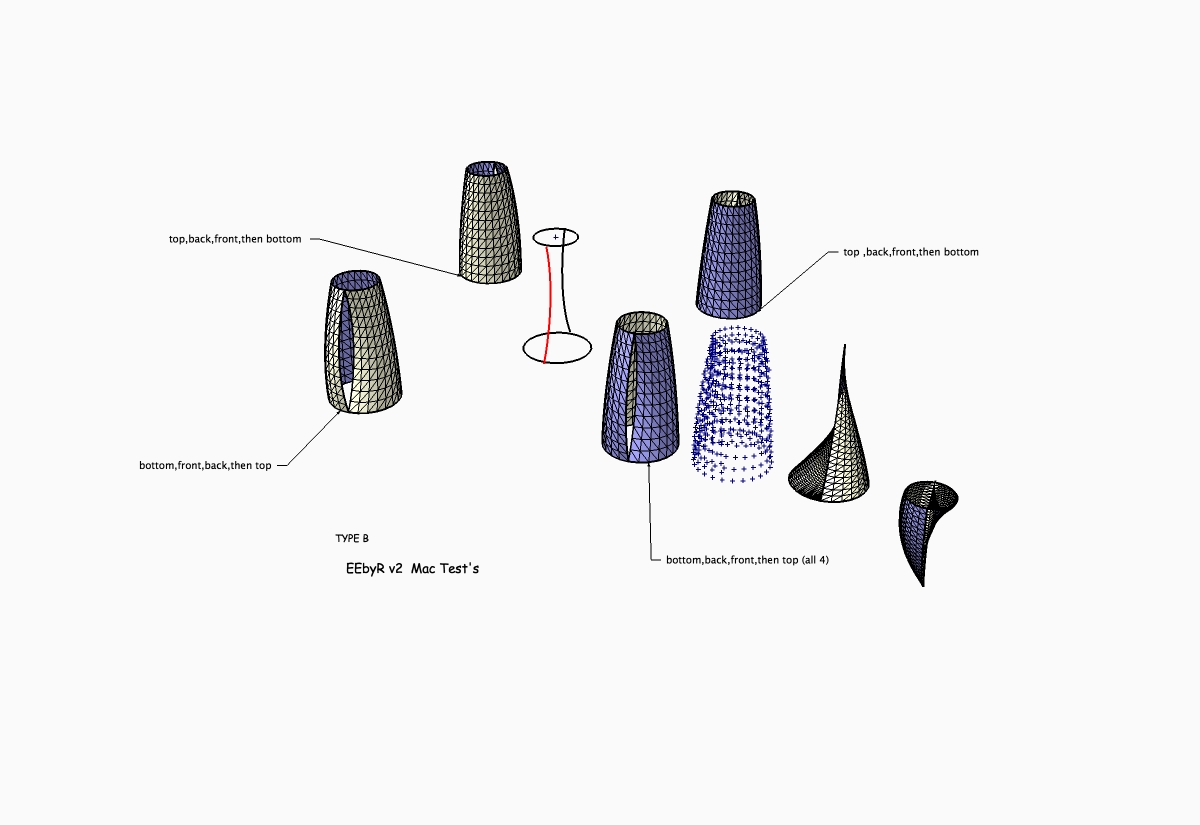
                  I only seem to have problems when I select in this order sequence

                  in all the test I've done on ramps, curtains, TIG's rails and more, I seem to only have a problem with one direction of selection, (other then complete cock-ups)
                  I don't know if it's a clockwise V counterclockwise issue or what, but one way round seems to generate hidden grouped and ungrouped geometry DURING the operation that seem to account for the result, the only rail never effected in the above test is still in red,
                  when the hidden geometry was behind any of the other three i had one of the odd results, and it wasn't there at the start of each run. often there were 3 or 4 sets of hidden bits. A ran this particular drawing in six different drawings 20 or 30 time, the problems were always on the same selection.

                  Only got the points cloud the once?

                  TIG, one thing I would appreciate is an escape key, if you accidently choose 2nd rail twice (instead of the profile) it can generate vast numbers of edges

                  john

                  learn from the mistakes of others, you may not live long enough to make them all yourself...

                  1 條回覆 最後回覆 回覆 引用 0
                  • Bob JamesB 離線
                    Bob James
                    最後由 編輯

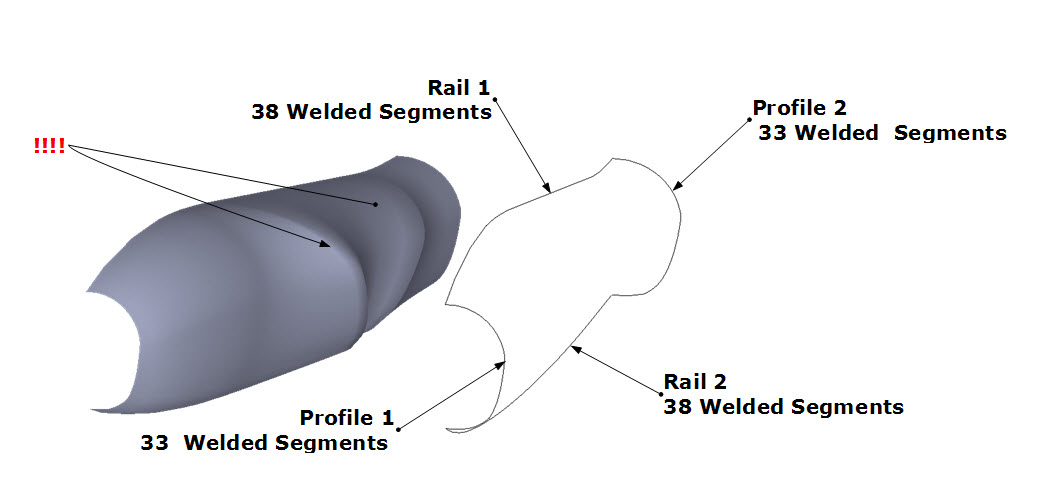
                    I have been trying to use this ruby since version 1 to make an aircraft body.

                    I just can't seem to get it to work even with version 2.

                    Profile 2 is just a scaled up version of profile 1.

                    All lines are welded after setting to the matching number of segments.

                    This is just the latest in many tries.

                    Help 😕


                    Edges by Rails 2.jpg

                    i7-4930K 3.4Ghz, 2x GTX780 6GB, 32GB DDR3-1600 ECC, OCZ Vertex 4 500GB, WD Black 3TB, 32TB NAS, 4x 27" Monitors, SpaceMouse Pro, X-keys XK-60

                    1 條回覆 最後回覆 回覆 引用 0
                    • JClementsJ 離線
                      JClements
                      最後由 編輯

                      Bob, did you try manually exploding each of the rails and profiles first and then re-weld each?

                      John | Illustrator | Beaverton, Oregon

                      1 條回覆 最後回覆 回覆 引用 0
                      • TIGT 離線
                        TIG Moderator
                        最後由 編輯

                        @bob james said:

                        I have been trying to use this ruby since version 1 to make an aircraft body.
                        I just can't seem to get it to work even with version 2.
                        Profile 2 is just a scaled up version of profile 1.
                        All lines are welded after setting to the matching number of segments.
                        This is just the latest in many tries.
                        Help 😕
                        You can try exploding the Curves and immediately re-Welding them back together - sometimes Curves get muddled in the data-base...
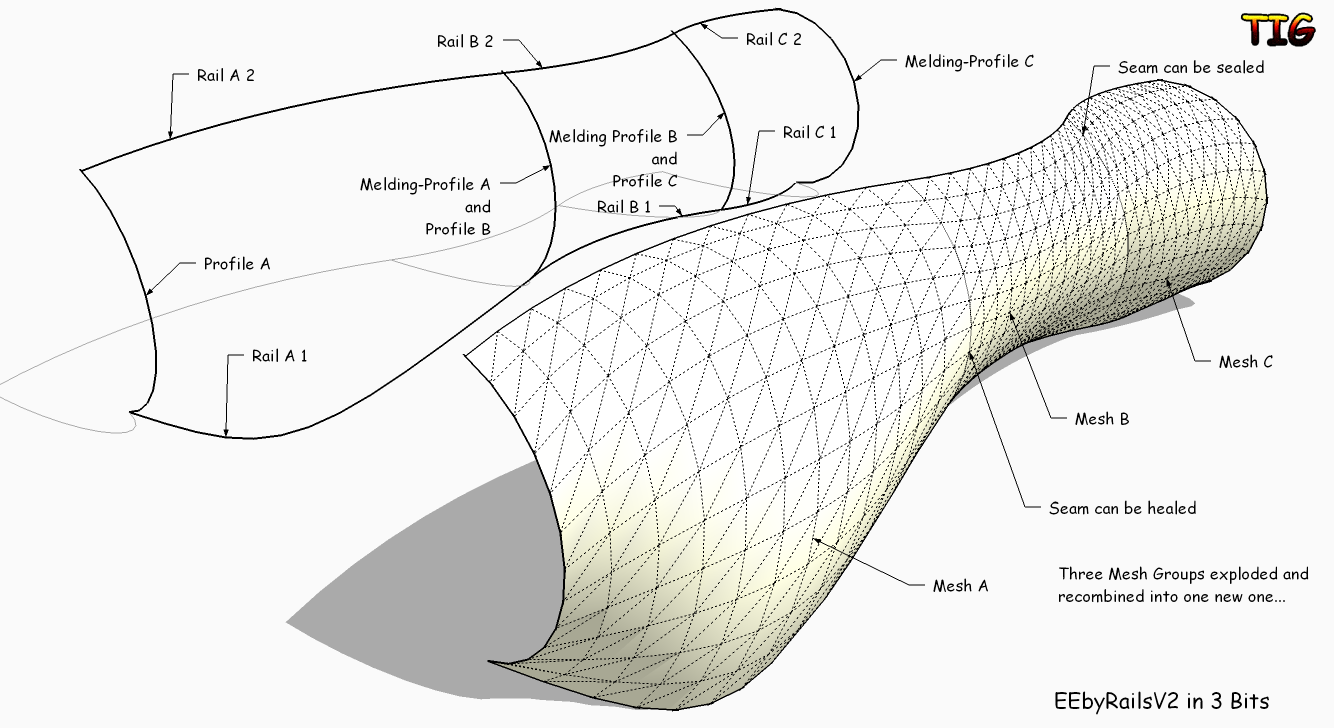
                        OR try splitting the shape into say three pieces with extra intermediate 'profiles' and make say three meshes and join them at the end ?
                        Like this...EEbyRailsV2_3Bits.png
                        TIG

                        1 條回覆 最後回覆 回覆 引用 0
                        • charly2008C 離線
                          charly2008
                          最後由 編輯

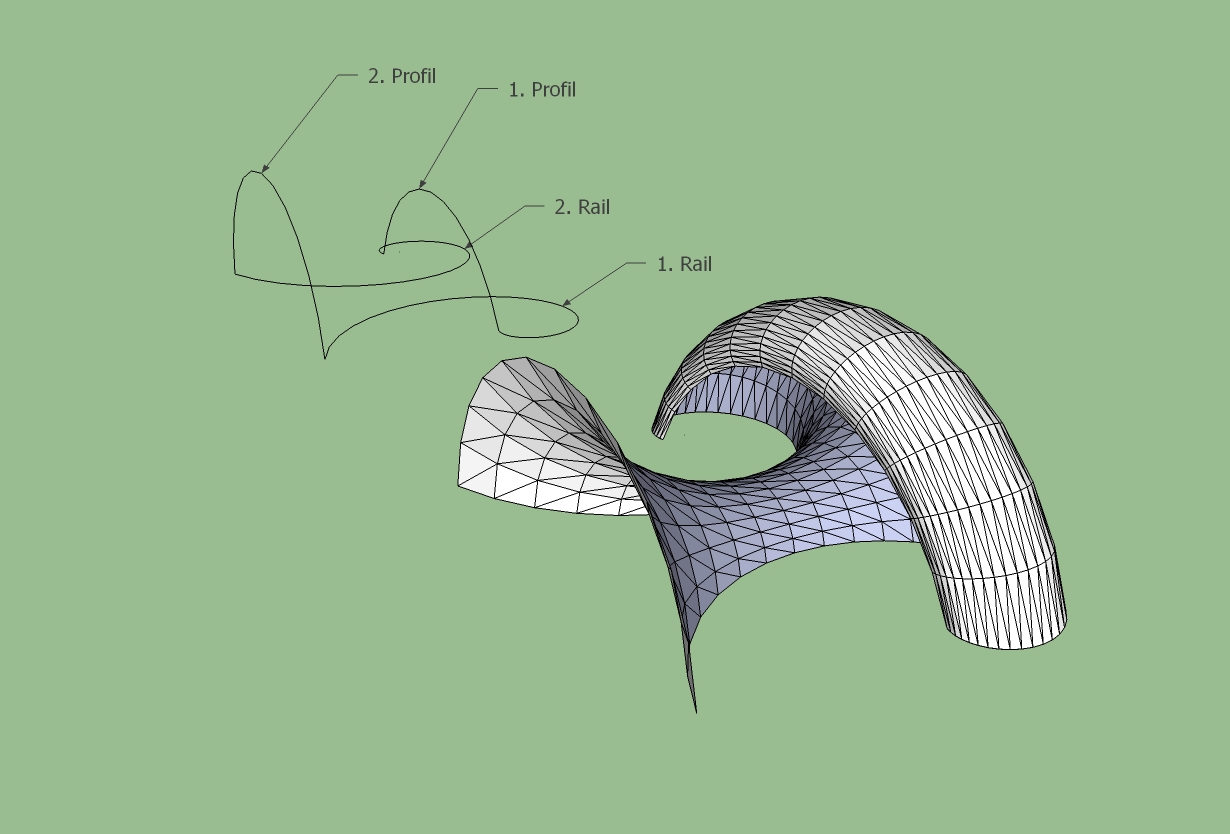
                          This is a truly phenomenal tool. Some tries.

                          Test1.jpg


                          Test2.jpg


                          Test3.jpg

                          He who makes no mistakes, makes nothing

                          1 條回覆 最後回覆 回覆 引用 0
                          • D 離線
                            driven
                            最後由 編輯

                            @bob james said:

                            This is just the latest in many tries.

                            Help :?

                            Hi Bob, some more things to try...

                            There are basically 8 ways ( that could give your expected outcome) for any 4 loose profiles (16 if you add surfaces to each, 32 if you don't mind Scaling the length or width back after processing )- Most give either normals or reversed identical copies, some differ and that might be the one you want.

                            What I've done with stubborn ones is
                            save them into a new drawing, scale x 10, explode curves, re-Weld, moveCopy of each line out-board by a fraction

                            you now have 8 line segments, 4 attached + 4 unattached, name or number them, (e.g. L1,L2; T1,T2; R1,R2; B1,B2),
                            if you really want to be methodical, make 8, 16 or 32 sets of this, side by side, cut and paste in place (just to be sure there clean)
                            go through all combinations i.e. L1-T1-L2-B2 and name the new group after each combination is used, if you don't want to scale back to size use attached lines as you rails for the first 8 sets

                            If none work at all you probably have a ruby class, i get some issues if I've used certain tools to make the curves, but closing and reopening the drawing clears those and I also had a problem selectonopen. rb so I binned it and use the space bar.

                            this plugin is worth getting to know, it's very,very useful ...

                            john

                            PS. to speed things up click no all pop-ups, and then you have a proper record of what does what.

                            learn from the mistakes of others, you may not live long enough to make them all yourself...

                            1 條回覆 最後回覆 回覆 引用 0
                            • Bob JamesB 離線
                              Bob James
                              最後由 編輯

                              @driven said:

                              PS. to speed things up click no all pop-ups, and then you have a proper record of what does what.

                              John,

                              I'm not sure I understand your suggestion, but thank you for it.

                              Not too sure what "click no all pop-ups" means ❓

                              Bob

                              i7-4930K 3.4Ghz, 2x GTX780 6GB, 32GB DDR3-1600 ECC, OCZ Vertex 4 500GB, WD Black 3TB, 32TB NAS, 4x 27" Monitors, SpaceMouse Pro, X-keys XK-60

                              1 條回覆 最後回覆 回覆 引用 0
                              • Bob JamesB 離線
                                Bob James
                                最後由 編輯

                                Thanks, TIG: I may have "broken the code" another way (random luck?)

                                I lowered the segment count to 20 in the rails. The only problem I can see is the "puckering" at the front end.
                                The wings and tail surface were also made with EEbR.

                                The nose piece was made with another great ruby: Soap Skin Bubble.

                                I made the more complete model some time ago by "brute force": note how much smoother the latest is.

                                Charly2008: Could be the start of some awesome spaceships 😄


                                New and old model


                                !["Puckering at the nose"](/uploads/imported_attachments/lWWo_Puckering.jpg ""Puckering at the nose"")

                                i7-4930K 3.4Ghz, 2x GTX780 6GB, 32GB DDR3-1600 ECC, OCZ Vertex 4 500GB, WD Black 3TB, 32TB NAS, 4x 27" Monitors, SpaceMouse Pro, X-keys XK-60

                                1 條回覆 最後回覆 回覆 引用 0
                                • TIGT 離線
                                  TIG Moderator
                                  最後由 編輯

                                  @bob james said:

                                  @driven said:

                                  PS. to speed things up click no all pop-ups, and then you have a proper record of what does what.

                                  John,
                                  I'm not sure I understand your suggestion, but thank you for it.
                                  Not too sure what "click no all pop-ups" means ❓
                                  Bob

                                  When the Mesh is made you get a series of dialogs pop-ups that ask if you want to do things to it - like 'Reverse Faces'.
                                  If you answer 'No' to all of them you get to see what's been done... admittedly loads of temporary never-seen groups, point-clouds and the like have gone, but you get to see the mesh edges, triangulation etc that might otherwise be changed had you answered 'Yes'.
                                  The first option 'Reverse Rail...' can only be done by the script, but all of the the others can be done outside of the script after the Mesh is finished, using built-in SUp tools like Reverse, Intersect, Smooth etc or readily available plugins like Erase-Coplanar-Edges...
                                  I recommend that you try and keep the 'bits' relatively simple, with common profiles used from one to the next, mirroring halves etc...

                                  TIG

                                  1 條回覆 最後回覆 回覆 引用 0
                                  • Bob JamesB 離線
                                    Bob James
                                    最後由 編輯

                                    Got it.

                                    Click no for all pop-ups. I've been doing that and smoothing after it's all done.

                                    i7-4930K 3.4Ghz, 2x GTX780 6GB, 32GB DDR3-1600 ECC, OCZ Vertex 4 500GB, WD Black 3TB, 32TB NAS, 4x 27" Monitors, SpaceMouse Pro, X-keys XK-60

                                    1 條回覆 最後回覆 回覆 引用 0
                                    • D 離線
                                      driven
                                      最後由 編輯

                                      @bob james said:

                                      @driven said:

                                      I'm not sure I understand your suggestion, but thank you for it.
                                      Bob

                                      Hi Bob,
                                      I see TIG has covered what I meant by pop-ups, but in case it's a more overall misunderstanding.
                                      A few more bits...
                                      Any ruby can only do what YOU tell it to do, based on your understanding of what the script author has told it to do, based on his understanding of SU team has told SU to do, and on and on....
                                      So as non-authors the only bit we can do is either randomly stumble about using a script and hope it works (which is quite fun) or we can methodically evaluate OUR input and keep track of what happens when we do certain things. Then if we come across something 'odd' we can then ask someone else to try exactly what we've done to see if it might be a 'bug' somewhere up stream or simply a local issue.
                                      Because Mac's can have there own set of problems with SU I have been using the above approach on many rubies to make sure problems aren't just me, or my mac's, and it's a great way of getting your head around what can and can't be done with a new ruby.
                                      I also check results against other methods and sometimes (but not with the ground breaking one like this) find that the vanilla SU tools or a discarded 'oldskool' ruby do what I've been trying to achieve for weeks much faster.

                                      cheers for a another great script TIG...

                                      john

                                      learn from the mistakes of others, you may not live long enough to make them all yourself...

                                      1 條回覆 最後回覆 回覆 引用 0
                                      • TIGT 離線
                                        TIG Moderator
                                        最後由 編輯

                                        Here's v2.1 http://forums.sketchucation.com/viewtopic.php?p=201286#p201286

                                        General speed improvements and tidying up.
                                        Toolbar added and Tooltip Text added to command.
                                        Outliner clash minimized with start+commit changes.
                                        Undo's step back through Smoothing, Reversing etc.
                                        Rare incomplete coplanar edge deletion fixed.
                                        Faces orientation fixed if has a flat face at zero.

                                        To do: Consolidate the closing option dialogs into one dialog.

                                        Feedback please...

                                        TIG

                                        1 條回覆 最後回覆 回覆 引用 0
                                        • D 離線
                                          driven
                                          最後由 編輯

                                          Hi Tig,

                                          Just to confirm it all seems to work on the mac, tool bar stays between sessions, no new clashes, needed a few more 'first rail reversals' then previous, but I just randomly chucked down and rotated 2 lines to test on, so not surprised, just gets better... cheers.

                                          one thought, is it possible to allow navigating to see if you need to reverse a rail, from some views the new mesh can hide an issue?

                                          john

                                          learn from the mistakes of others, you may not live long enough to make them all yourself...

                                          1 條回覆 最後回覆 回覆 引用 0
                                          • U 離線
                                            urs0815
                                            最後由 編輯

                                            Hallo Tig,

                                            great plugin! 👍

                                            could you make it possible, that if I change one of the original curves/rails,
                                            the mesh gets rebuild automatically...

                                            1 條回覆 最後回覆 回覆 引用 0
                                            • 1
                                            • 2
                                            • 11
                                            • 12
                                            • 13
                                            • 14
                                            • 15
                                            • 19
                                            • 20
                                            • 13 / 20
                                            • 第一個貼文
                                              最後的貼文
                                            Buy SketchPlus
                                            Buy SUbD
                                            Buy WrapR
                                            Buy eBook
                                            Buy Modelur
                                            Buy Vertex Tools
                                            Buy SketchCuisine
                                            Buy FormFonts

                                            Advertisement