sketchucation logo sketchucation
    • 登入
    Oops, your profile's looking a bit empty! To help us tailor your experience, please fill in key details like your SketchUp version, skill level, operating system, and more. Update and save your info on your profile page today!
    🔌 Smart Spline | Fluid way to handle splines for furniture design and complex structures. Download

    Sketchup 7.1 bugs

    已排程 已置頂 已鎖定 已移動 SketchUp Bug Reporting
    sketchup
    66 貼文 24 Posters 11.8k 瀏覽 24 Watching
    正在載入更多貼文
    • 從舊到新
    • 從新到舊
    • 最多點贊
    回覆
    • 在新貼文中回覆
    登入後回覆
    此主題已被刪除。只有擁有主題管理權限的使用者可以查看。
    • R 離線
      remus
      最後由 編輯

      I was still seeing it after switching to perspective, so dont know how reliably that works for fixing the issue.

      http://remusrendering.wordpress.com/

      1 條回覆 最後回覆 回覆 引用 0
      • N 離線
        NewOne
        最後由 編輯

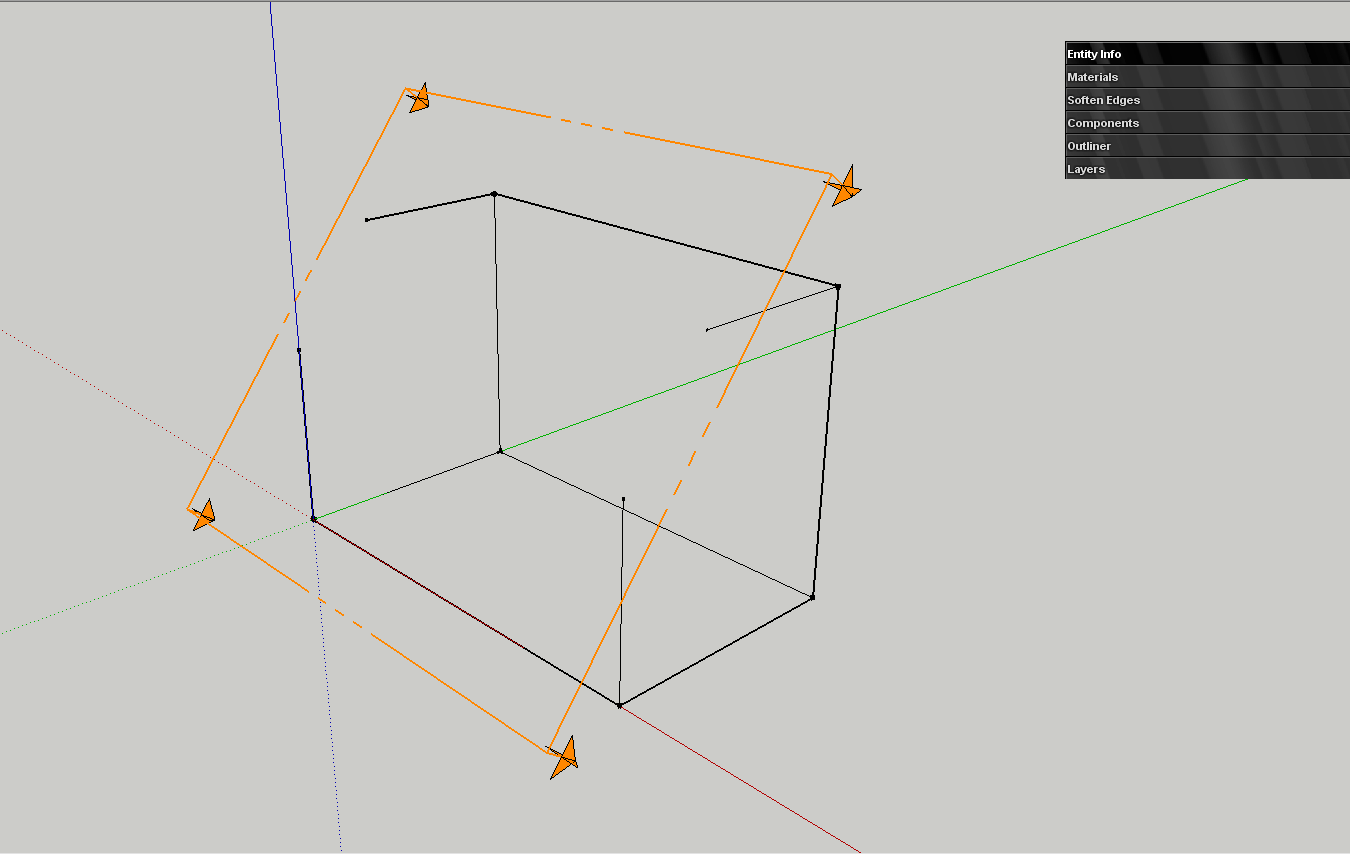
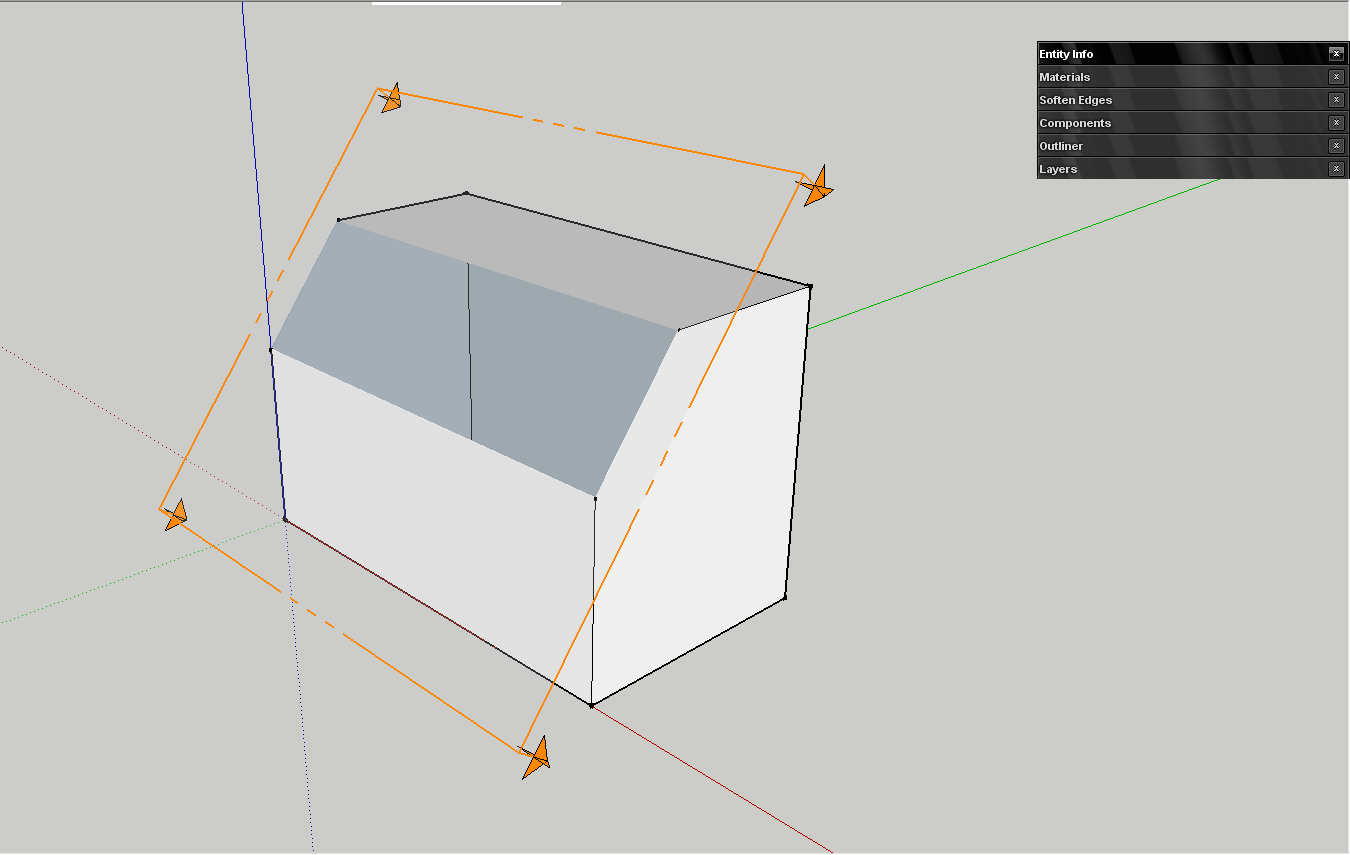
        The wireframe remains without section edges if I move the plane, but the shaded version regains its edges if I focus on a face or I move the section plane.
        wframe section.png


        shaded section.png

        1 條回覆 最後回覆 回覆 引用 0
        • M 離線
          mirjman
          最後由 編輯

          I get a bugsplat when trying to export a jpg at 9000x5700, shadows on, anti-alias off

          I recall exporting large resolution images has been a problem for a while, has the reason for this error ever been formally addressed? It also seems to be sporadic.

          1 條回覆 最後回覆 回覆 引用 0
          • A 離線
            Aerilius
            最後由 編輯

            I have the impression that it's similar to z-fighting: the section cut is in plane to the roofing face.

            1 條回覆 最後回覆 回覆 引用 0
            • N 離線
              NewOne
              最後由 編輯

              @aerilius said:

              I have the impression that it's similar to z-fighting: the section cut is in plane to the roofing face.

              But it's not happening on vertical or horizontan plane, only on slope.

              1 條回覆 最後回覆 回覆 引用 0
              • B 離線
                berling
                最後由 編輯

                Regarding the section cut bug.

                I am finding that the perspective has no affect section cut bug.

                But one thing about z-fighting, it is a rendering problem of having two faces on top of each other. This section cut bug is clearly triangulating the faces with what appears to be hidden geometry.

                Also, the problem is even worse if you have more geometry on the surface (see attached model).

                Do other users have this problem from a fresh model? I would hate to reinstall as a test if I don't have to.

                Also,
                MacBook Pro, 10.5.8 w/ 2.4 GHz Intel Core 2 Duo, 2 GB SDRAM


                SketchUp_SectionTool-ERROR-2.skp

                1 條回覆 最後回覆 回覆 引用 0
                • SketchUp Guide TommyS 離線
                  SketchUp Guide Tommy
                  最後由 編輯

                  Oops. It looks like a missed a step:

                  1. Go into Perspective mode.
                  2. Move the section plane further into the model so it goes past the roof surface.
                  3. Move the section plane back to the starting position. The triangulation should be gone.
                  4. Go back to Parallel Projection.

                  Sorry about that 😕

                  Regards,
                  SGT

                  1 條回覆 最後回覆 回覆 引用 0
                  • D 離線
                    dedmin
                    最後由 編輯

                    Scrolling in component browser and material browser doesn't work.

                    1 條回覆 最後回覆 回覆 引用 0
                    • GaieusG 離線
                      Gaieus
                      最後由 編輯

                      At least in the component browser, as far as I can remember, it has never worked. If only it did, of course.

                      Gai...

                      1 條回覆 最後回覆 回覆 引用 0
                      • D 離線
                        dedmin
                        最後由 編輯

                        It works, but only in list view.

                        1 條回覆 最後回覆 回覆 引用 0
                        • massimoM 離線
                          massimo Moderator
                          最後由 編輯

                          Had two bugsplats simply running Firefox with only SU 7.1 opened and minimized. 😕

                          1 條回覆 最後回覆 回覆 引用 0
                          • M 離線
                            markozeta
                            最後由 編輯

                            I can't select a section plane once I put it in my model!

                            Help!

                            BSME - Cal Poly Pomona
                            Sketchup Pipe Maniac

                            1 條回覆 最後回覆 回覆 引用 0
                            • B 離線
                              berling
                              最後由 編輯

                              @markozeta said:

                              I can't select a section plane once I put it in my model!

                              Help!

                              The section plane is a little strange. If you have geometry on the other side of the section cut you will select it. Zoom out some to a point where there is no geometry behind the section and select from there.

                              Also, Tommys fix does not actually fix the bug but it is sort of a work around. The section plain does not snap back to the face so after moving it it is no longer on it. For now, the best thing to do to avoid this bug is to move the section into the building, something like .1". Its not perfect but it does the trick.

                              1 條回覆 最後回覆 回覆 引用 0
                              • takesh hT 離線
                                takesh h
                                最後由 編輯

                                I thought somebody reported the loss of their plugins... now I cannot find the post, was I dreaming?
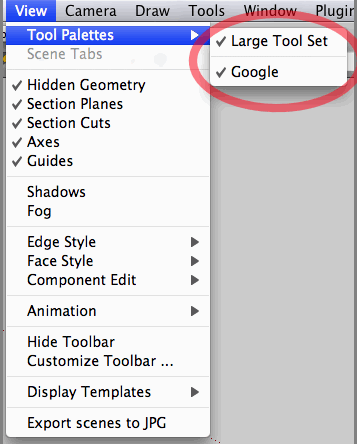
                                Anyway, after upgrading to 7.1, looks like all of my toolset is gone except Google's.
                                Script files are physically there, sitting in two "Plugins" folders (I'm on a Mac), and they are enabled at [SketchUp]>[Preferences]>[Extensions].
                                Some of them are visible in my workspace. Others I have no way to start them.
                                IF anybody encountered the similar problems and solved it, please let me know.

                                71-2.gif

                                1 條回覆 最後回覆 回覆 引用 0
                                • T 離線
                                  tfdesign
                                  最後由 編輯

                                  Sorry for repeating this (I mentioned it within a post on keying in length- which appears to be buggy too),

                                  I'm drawing a line out from a corner at a 45º angle, but I've got no angle snap (despite changing the model info preferences between different angle snap sizes). Sometimes the snap will work, but most of the time, I'm there pulling my hair out trying to get it to snap to something. I don't remember having this problem before.

                                  Anyone else seeing or finding this?

                                  (Macbook Pro 2.16GHz Intel Core Duo 2, 3 gigs ram, ATI Radeon X1600)

                                  Tom

                                  PS I'm also repeating the parallel projection bug, as mentioned earlier too. This is also really frustrating!! I want to upgrade to Pro, and I've got the money too, but these little things always make me put my credit card away again. And if I go back to using (ie reinstall) SU7, then how can I find these bugs? (and I pick up the previous bugs too!). Software should work when it is sold- not half work. This is not good.

                                  My book "Let's SketchUp!" Download from here

                                  1 條回覆 最後回覆 回覆 引用 0
                                  • B 離線
                                    bjanzen
                                    最後由 編輯

                                    I attempted to answer your other post. "I think you're mis-understanding angle snap", Barry snapped.

                                    1 條回覆 最後回覆 回覆 引用 0
                                    • T 離線
                                      tfdesign
                                      最後由 編輯

                                      @bjanzen said:

                                      I attempted to answer your other post. "I think you're mis-understanding angle snap", Barry snapped.

                                      Yes, I probably am. I need to spend some more time with the manual (well Aidan Chopra's manual. Absolutely Brilliant Aidan! 😄 ). It's crazy but I trained using Solidworks, but I'm finding relearning SketchUp a bit of a tough one!! (probably because there is no history).

                                      We're getting there 😄

                                      Thanks for the reply, Barry.

                                      Tom

                                      My book "Let's SketchUp!" Download from here

                                      1 條回覆 最後回覆 回覆 引用 0
                                      • B 離線
                                        bjanzen
                                        最後由 編輯

                                        No problem... it does depend on what you're coming from to understand some of the things about SketchUp. When I started, I was not accustomed to being able to modify things after the second click (via the Measurements box / VCB). But after you get into SketchUp, it's a real joy to use, as displayed by my many feeble attempts at humor and fun.

                                        So I'm guessing a typical SketchUp user would draw a line, select it, select the rotate tool, click on one end, click on the other end, hold down option (I'm on Mac) to copy move, rotate a bit and then type "45" and return and have 2 lines, same length, 45º angle.

                                        b

                                        1 條回覆 最後回覆 回覆 引用 0
                                        • T 離線
                                          tim
                                          最後由 編輯

                                          I've had a couple of very odd SUpro crashes in the last few days; no crashlog, no report to Apple, just .... gone. The Console shows
                                          05-10-09 6:30:29 PM com.apple.launchd.peruser.501[121] ([0x0-0x2c02c].com.google.sketchuppro7[296]) Exited with exit code: 1
                                          which isn't so very helpful.

                                          Interestingly Layout has done the same thing a couple of times
                                          06-10-09 6:47:59 PM com.apple.launchd.peruser.501[121] ([0x0-0x3af3af].com.google.LayOut[7913]) Exited with exit code: 1
                                          Possibly associated with theLO crash are some messages about Intrinsic Alchemy v3.2 Beta-0903

                                          I haven't been doing anything different to my normal work, the machine hasn't changed in recent days (no hardware alterations, no updates loaded etc) and it's all been running pretty well generally.

                                          1 條回覆 最後回覆 回覆 引用 0
                                          • B 離線
                                            bishopski
                                            最後由 編輯

                                            @markozeta said:

                                            I can't select a section plane once I put it in my model!

                                            Help!

                                            I've got the same problem.

                                            I can get around it by grouping everything together, adding the section plane, selecting all then subtracting everything bar the plane, but it's not ideal

                                            1 條回覆 最後回覆 回覆 引用 0
                                            • 1
                                            • 2
                                            • 3
                                            • 4
                                            • 4 / 4
                                            • 第一個貼文
                                              最後的貼文
                                            Buy SketchPlus
                                            Buy SUbD
                                            Buy WrapR
                                            Buy eBook
                                            Buy Modelur
                                            Buy Vertex Tools
                                            Buy SketchCuisine
                                            Buy FormFonts

                                            Advertisement
