sketchucation logo sketchucation
    • 登入
    Oops, your profile's looking a bit empty! To help us tailor your experience, please fill in key details like your SketchUp version, skill level, operating system, and more. Update and save your info on your profile page today!
    ⚠️ Important | Libfredo 15.6b introduces important bugfixes for Fredo's Extensions Update

    [Plugin] Drape Cpoints

    已排程 已置頂 已鎖定 已移動 Plugins
    46 貼文 23 Posters 47.3k 瀏覽 23 Watching
    正在載入更多貼文
    • 從舊到新
    • 從新到舊
    • 最多點贊
    回覆
    • 在新貼文中回覆
    登入後回覆
    此主題已被刪除。只有擁有主題管理權限的使用者可以查看。
    • EarthMoverE 離線
      EarthMover
      最後由 編輯

      Sounds like he's looking for a real physics based cloth simulation plugin for sketchup. That seems as though it would be better integrated into sketchy physics as it has the framework for gravity simulation. I would love to see it, but I imagine it's still a far way off unless SU 8 implements a better engine under the hood.

      3D Artist at Clearstory 3D Imaging
      Guide Tool at Winning With Sketchup
      Content Creator at Skapeup

      1 條回覆 最後回覆 回覆 引用 0
      • X 離線
        xrok1
        最後由 編輯

        great plugin. thankyou. here is the .zip file that contains this and the other two plugins needed to create a mesh. maybe you could add it to your original post. would be less confusing for some. 😳


        DRAPE_TRIANGULATE_DELU_Plugins.zip

        “There are three classes of people: those who see. Those who see when they are shown. Those who do not see.”

        http://www.Twilightrender.com try it!

        1 條回覆 最後回覆 回覆 引用 0
        • olisheaO 離線
          olishea
          最後由 編輯

          TIG..I've got a problem.

          The construction points appear, but they are not draped over the mesh (see screengrab). It just creates a regular, flat grid of c points under my mesh.

          Am I doing something wrong?
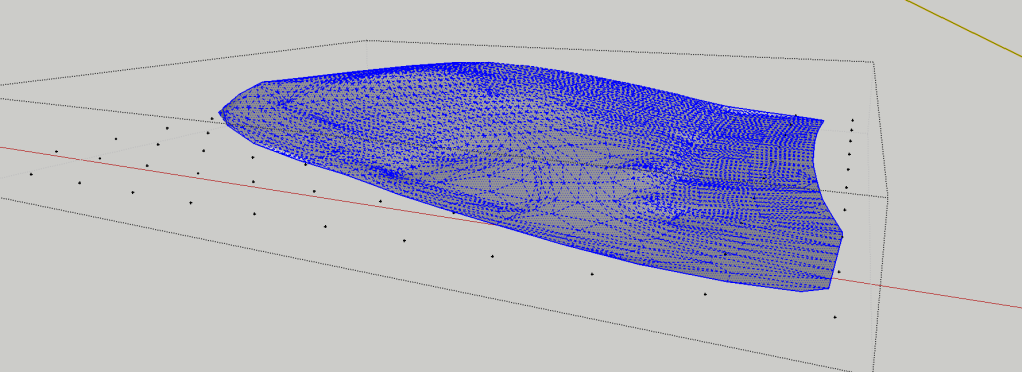
          http://i654.photobucket.com/albums/uu269/olishea/Picture26.png

          oli

          1 條回覆 最後回覆 回覆 引用 0
          • olisheaO 離線
            olishea
            最後由 編輯

            Never mind, I've got it to work now. You have to drape points over a group....I was triple clicking the mesh and then trying to use the plugin. duh!

            I am using this to simplify a dirty 3D topographical survey and it work beautifully! such a good idea. I was just about to start manually draping construction points then I thought, "hang on a minute.....there MUST be a plugin for this"

            so thank you ever so much for taking the time to make and share this wonderful ruby! It will save me lots and lots of time and stress so hats off to TIG! bravo!

            oli

            1 條回覆 最後回覆 回覆 引用 0
            • thomthomT 離線
              thomthom
              最後由 編輯

              @olishea said:

              Never mind, I've got it to work now. You have to drape points over a group....I was triple clicking the mesh and then trying to use the plugin. duh!

              I am using this to simplify a dirty 3D topographical survey and it work beautifully! such a good idea. I was just about to start manually draping construction points then I thought, "hang on a minute.....there MUST be a plugin for this"

              so thank you ever so much for taking the time to make and share this wonderful ruby! It will save me lots and lots of time and stress so hats off to TIG! bravo!

              If I remember correctly, the Archiland plugin has a tool that recreates a terrain in a regular pattern: http://forums.sketchucation.com/viewtopic.php?f=323&t=13760#p102771

              Thomas Thomassen — SketchUp Monkey & Coding addict
              List of my plugins and link to the CookieWare fund

              1 條回覆 最後回覆 回覆 引用 0
              • olisheaO 離線
                olishea
                最後由 編輯

                ah thomthom thank you!! i didnt know that plugin existed. you can really simplify a mesh with it, nice one!! and cheers to cadfather too.

                here is a screenshot of my mesh tests.

                Think i will be using the triangulated construction points at 5000mm centres....detailed enough for my needs. I love the archiland "simplify contours" tool as well, its a great idea.
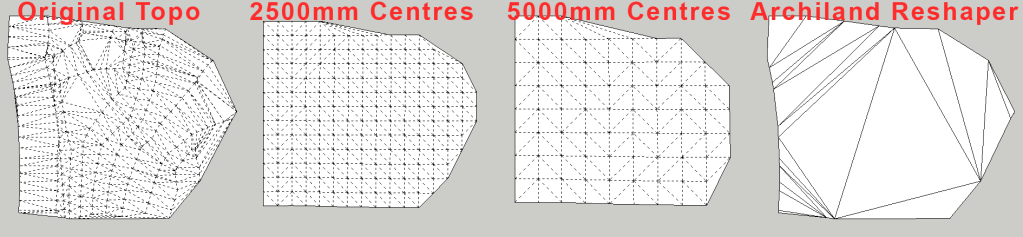
                http://i654.photobucket.com/albums/uu269/olishea/Picture28-1.png

                oli

                1 條回覆 最後回覆 回覆 引用 0
                • EdsonE 離線
                  Edson
                  最後由 編輯

                  @earthmover said:

                  Another use for the script.....5 minute bedspread. (Bed model from warehouse)

                  adam,

                  did you just move the points using the regular move tool or did you use another plugin to make the bedspread?

                  edson mahfuz, architect| porto alegre • brasil
                  http://www.mahfuz.arq.br

                  1 條回覆 最後回覆 回覆 引用 0
                  • EarthMoverE 離線
                    EarthMover
                    最後由 編輯

                    Yes, Edson I just moved the Cpoints manually before running the triangulate plugin to give the appearance of ruffled edges. I also used JPP to give thickness to simulate the fold over atop the pillows.

                    3D Artist at Clearstory 3D Imaging
                    Guide Tool at Winning With Sketchup
                    Content Creator at Skapeup

                    1 條回覆 最後回覆 回覆 引用 0
                    • Y 離線
                      yukonhoo
                      最後由 編輯

                      @tig said:

                      The script 'points_cloud_triangulation.rb' [which shows in the Plugins menu as 'Triangulate Points'] is here...
                      http://www.crai.archi.fr/RubyLibraryDepot/Ruby/points_cloud_triangulation.rb
                      that also requires 'delauney2.rb' - which you can get here...
                      http://forums.sketchucation.com/viewtopic.php?p=117071#p117071
                      🤓

                      Thanks!!

                      1 條回覆 最後回覆 回覆 引用 0
                      • TIGT 離線
                        TIG Moderator
                        最後由 編輯

                        @yukonhoo said:

                        @tig said:

                        The script 'points_cloud_triangulation.rb' [which shows in the Plugins menu as 'Triangulate Points'] is here...
                        http://www.crai.archi.fr/RubyLibraryDepot/Ruby/points_cloud_triangulation.rb
                        that also requires 'delauney2.rb' - which you can get here...
                        http://forums.sketchucation.com/viewtopic.php?p=117071#p117071
                        🤓

                        Thanks!!

                        I have recently updated a version of the 'cloud' tool and a related delauney3 - do a search on the Plugins forum... 🤓

                        TIG

                        1 條回覆 最後回覆 回覆 引用 0
                        • Didier BurD 離線
                          Didier Bur
                          最後由 編輯

                          Hi,

                          Note that I recently changed the old typo in the main script 'require ./delauney2.rb' to 'require 'delaunay2.rb'
                          The required file has been renamed 'delaunay2.rb'
                          Regards,

                          DB

                          1 條回覆 最後回覆 回覆 引用 0
                          • tibetT 離線
                            tibet
                            最後由 編輯

                            @earthmover said:

                            Another use for the script.....5 minute bedspread. (Bed model from warehouse)

                            hi,
                            could you please make step by step tut for creating your wonderful "5-minute bedspread" for those, who´re in the process of learning, just a bit far behind you (youtube is fine too)

                            thanks !

                            SU 2015 Pro on Win10 x64

                            1 條回覆 最後回覆 回覆 引用 0
                            • Rich O BrienR 離線
                              Rich O Brien Moderator
                              最後由 編輯

                              Excellent Adam 👍

                              Download the free D'oh Book for SketchUp 📖

                              1 條回覆 最後回覆 回覆 引用 0
                              • pilouP 離線
                                pilou
                                最後由 編輯

                                Nice tut! ☀

                                Frenchy Pilou
                                Is beautiful that please without concept!
                                My Little site :)

                                1 條回覆 最後回覆 回覆 引用 0
                                • N 離線
                                  nomeradona
                                  最後由 編輯

                                  Wow Adam that is a cool tutorial.

                                  visit my blog: http://www.nomeradona.blogspot.com

                                  1 條回覆 最後回覆 回覆 引用 0
                                  • EarthMoverE 離線
                                    EarthMover
                                    最後由 編輯

                                    Thanks guys..glad it was helpful. Here's a few tests of the method on different shapes. It's not as good as a physics based cloth simulation, but the results are fairly convincing. For table cloths, you just need to make sure you have a ground shape object that is slightly larger than the table and in the same group, so that the Cpoints will drape down and onto the ground. The same method can be used to make water in a stream bed or snow on a rooftop.
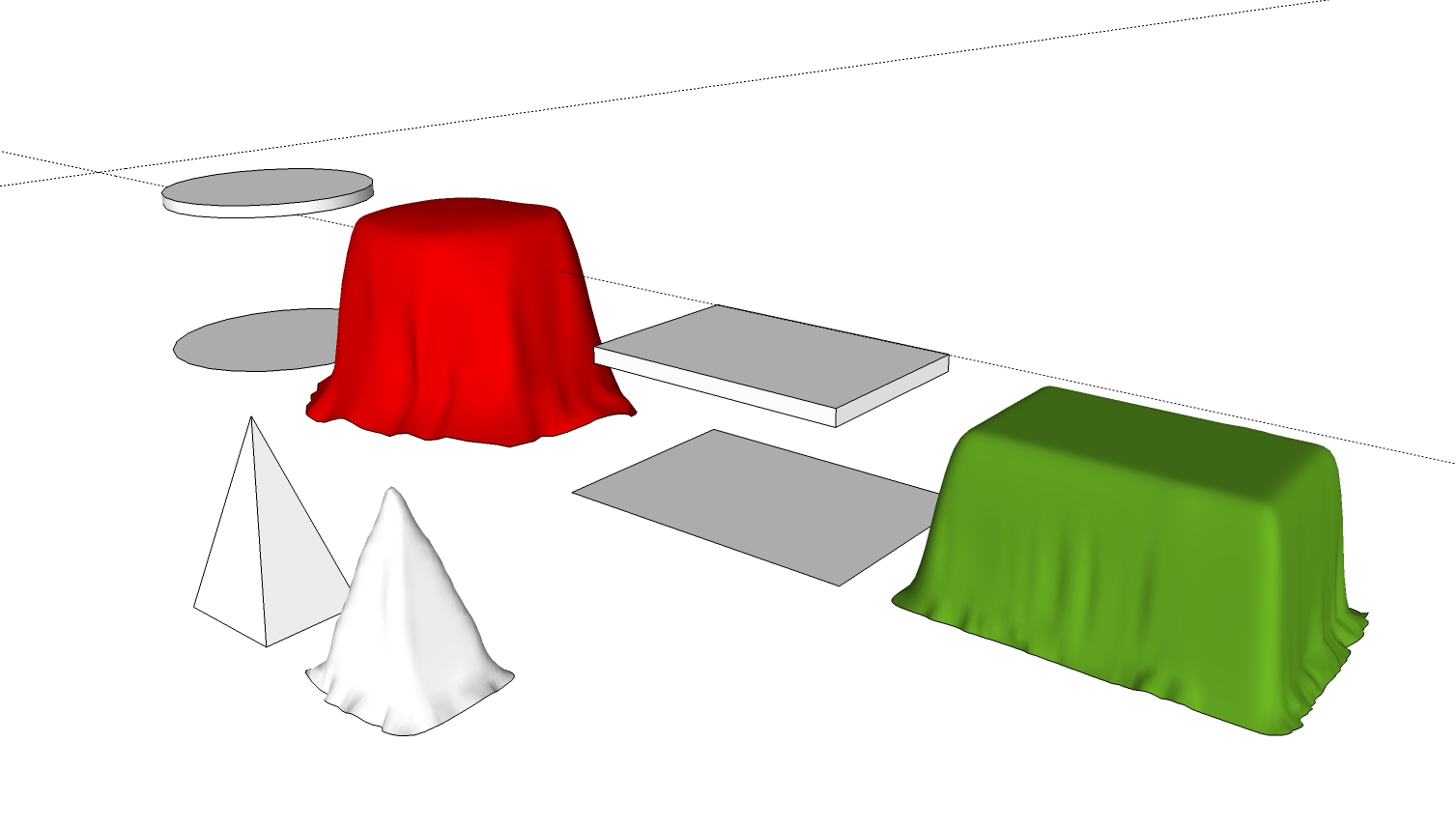

                                    Drape shapes.jpg

                                    3D Artist at Clearstory 3D Imaging
                                    Guide Tool at Winning With Sketchup
                                    Content Creator at Skapeup

                                    1 條回覆 最後回覆 回覆 引用 0
                                    • tibetT 離線
                                      tibet
                                      最後由 編輯

                                      hi earthmover,
                                      thanks for your valuable time and desire to share your knowledge among sketchup fans/learners.
                                      it´s pretty cool, well done!
                                      cheers!

                                      SU 2015 Pro on Win10 x64

                                      1 條回覆 最後回覆 回覆 引用 0
                                      • EarthMoverE 離線
                                        EarthMover
                                        最後由 編輯

                                        Tibet, here is a quick tutorial on the bedsheet.

                                        [flash=800,600:pdjve3kf]http://www.youtube.com/v/wIcHHsjQ-Mo[/flash:pdjve3kf]

                                        3D Artist at Clearstory 3D Imaging
                                        Guide Tool at Winning With Sketchup
                                        Content Creator at Skapeup

                                        1 條回覆 最後回覆 回覆 引用 0
                                        • X 離線
                                          xrok1
                                          最後由 編輯

                                          @tig said:

                                          @yukonhoo said:

                                          @tig said:

                                          The script 'points_cloud_triangulation.rb' [which shows in the Plugins menu as 'Triangulate Points'] is here...
                                          http://www.crai.archi.fr/RubyLibraryDepot/Ruby/points_cloud_triangulation.rb
                                          that also requires 'delauney2.rb' - which you can get here...
                                          http://forums.sketchucation.com/viewtopic.php?p=117071#p117071
                                          🤓

                                          Thanks!!

                                          I have recently updated a version of the 'cloud' tool and a related delauney3 - do a search on the Plugins forum... 🤓

                                          "and a related delauney3" can't find this?

                                          “There are three classes of people: those who see. Those who see when they are shown. Those who do not see.”

                                          http://www.Twilightrender.com try it!

                                          1 條回覆 最後回覆 回覆 引用 0
                                          • TIGT 離線
                                            TIG Moderator
                                            最後由 編輯

                                            @xrok1 said:

                                            @tig said:

                                            @yukonhoo said:

                                            @tig said:

                                            The script 'points_cloud_triangulation.rb' [which shows in the Plugins menu as 'Triangulate Points'] is here...
                                            http://www.crai.archi.fr/RubyLibraryDepot/Ruby/points_cloud_triangulation.rb
                                            that also requires 'delauney2.rb' - which you can get here...
                                            http://forums.sketchucation.com/viewtopic.php?p=117071#p117071
                                            🤓

                                            Thanks!!

                                            I have recently updated a version of the 'cloud' tool and a related delauney3 - do a search on the Plugins forum... 🤓

                                            "and a related delauney3" can't find this?

                                            The delauney3.rb is a modified version I wrote to use with my version of The Triangulate-Points tool here http://forums.sketchucation.com/viewtopic.php?p=301274#p301274 = the .rb is in the zip file with the tool's .rb...
                                            It in no way replaces or affects other tools using earlier 'delauney' scripts - however the earlier scripts can clash with so other tools so that is why I rewrote the modularized versions of them...


                                            TIG

                                            1 條回覆 最後回覆 回覆 引用 0
                                            • 1
                                            • 2
                                            • 3
                                            • 2 / 3
                                            • 第一個貼文
                                              最後的貼文
                                            Buy SketchPlus
                                            Buy SUbD
                                            Buy WrapR
                                            Buy eBook
                                            Buy Modelur
                                            Buy Vertex Tools
                                            Buy SketchCuisine
                                            Buy FormFonts

                                            Advertisement




