sketchucation logo sketchucation
    • 登入
    Oops, your profile's looking a bit empty! To help us tailor your experience, please fill in key details like your SketchUp version, skill level, operating system, and more. Update and save your info on your profile page today!
    🔌 Smart Spline | Fluid way to handle splines for furniture design and complex structures. Download

    [Plugin][$] RoundCorner - v3.4a - 31 Mar 24


    已排程 已置頂 已鎖定 已移動 Plugins
    1.5k 貼文 473 Posters 3.4m 瀏覽 472 Watching
    正在載入更多貼文
    • 從舊到新
    • 從新到舊
    • 最多點贊
    回覆
    • 在新貼文中回覆
    登入後回覆
    此主題已被刪除。只有擁有主題管理權限的使用者可以查看。
    • J 離線
      JuanV.Soler
      最後由 編輯

      yes 👍
      its working OK with the new release located as you told


      1.png


      2.png


      3.png


      4.png

      ,))),

      1 條回覆 最後回覆 回覆 引用 0
      • T 離線
        tawny
        最後由 編輯

        Really nice plugin, thanks

        1 條回覆 最後回覆 回覆 引用 0
        • fredo6F 離線
          fredo6
          最後由 編輯

          @artchi said:

          The opportunity to do offset is not uniform, and is different for each person?

          http://f3.s.qip.ru/17QY0OfBP.png

          Unfortunately, RoundCorner only supports symetrical rounding, in particular because its primary objective is to round corners with 3 or more edges.

          For custom rounding of single edges, I would suggest you have a look at ProfileBuilder by Whaat.

          Fredo

          1 條回覆 最後回覆 回覆 引用 0
          • ARTchiA 離線
            ARTchi
            最後由 編輯

            The opportunity to do offset is not uniform, and is different for each face?

            http://f3.s.qip.ru/17QY0OfBP.png

            1 條回覆 最後回覆 回覆 引用 0
            • JQLJ 離線
              JQL
              最後由 編輯

              Fredo,

              Thanks for all your hard and useful work.

              Recently I installed latest version of roundcorner and also installed Libfredo. I'm using additional folders and Roundcorner is installed in an additional folder even if Libfredo is in Sketchup 2013 Pro plugins folder. The plugin works fine so far. However I get this message when I open SU:

              "You must install Libfredo5.0 or higher to run Fredo6_RoundCorner"

              As I said Libfredo is installed and the plugin is working, but the folders of the plugin and library are different...

              Of course I can live with the problem and I can even move the files to be together... but I like to keep all plugins I can, on a shared folder.

              Thanks and best regards,

              JQL

              www.casca.pt
              Visit us on facebook!

              1 條回覆 最後回覆 回覆 引用 0
              • fredo6F 離線
                fredo6
                最後由 編輯

                @JQL

                It is NOT recommended to have LibFredo6 and the other plugins like RoundCorner in different directories.

                It's even not guaranteed it works (for now, but also for the future)

                So please put them together in a single directory.

                Fredo

                1 條回覆 最後回覆 回覆 引用 0
                • JQLJ 離線
                  JQL
                  最後由 編輯

                  Fredo,

                  Thanks for the info.

                  Even if I'm used to have additional folders for plugins, now and then I still have to put some plugin into the main folder. So I'll move the plugin to be in the same folder as library.

                  Besides that I would like to know if your recommendation is relative to your plugins only, or your advice is that ALL plugins from every developer should be in main folder for plugins?

                  If so I'll leave only the plugins being tested in an alternate folder.

                  Thanks again and best regards,

                  JQL

                  www.casca.pt
                  Visit us on facebook!

                  1 條回覆 最後回覆 回覆 引用 0
                  • fredo6F 離線
                    fredo6
                    最後由 編輯

                    @jql said:

                    Besides that I would like to know if your recommendation is relative to your plugins only, or your advice is that ALL plugins from every developer should be in main folder for plugins?

                    If so I'll leave only the plugins being tested in an alternate folder.

                    All my plugins are compatible with an alternate Plugins directory but can of course be put in the SU Standard plugin directory as well. Simply LibFredo6 and the plugins should be in the same folder.

                    In your case, if you set up an alternate plugin directory, feel free to put LibFredo6 and my plugins there.

                    Some plugins hard-code the location of the Plugin and must be instlled in the standard SU Plugin directory. But there are less and less. However, it is good to check.

                    Fredo

                    1 條回覆 最後回覆 回覆 引用 0
                    • JQLJ 離線
                      JQL
                      最後由 編輯

                      Thanks Fredo, will do!

                      www.casca.pt
                      Visit us on facebook!

                      1 條回覆 最後回覆 回覆 引用 0
                      • K 離線
                        kyel808
                        最後由 編輯

                        hey hello i try to use "round corner" in sketch up 8 on mac everything works fine apart from the plugin window beeing stuck on either the side or top bottom of the sketchup window which would be okay but its so small i cant really see anything of whats going on. is there a way to un attach it so i can freely move it around or just make it a bit bigger so i can see on where to klick? thanks a lot in advance
                        added a screenshot so you guys can see what i mean by small 😄 http://s22.postimg.org/gtchosoo1/Bildschirmfoto_2013_08_07_um_00_28_54.png

                        1 條回覆 最後回覆 回覆 引用 0
                        • A 離線
                          anushma
                          最後由 編輯

                          @kubusipit said:

                          I have the same problem with crash issue. I use Win XP SP 3 with skethup 8. I'm using 2 GB RAM. everytime I applied round corners, my sketchup always crash and shut down. I've tried every setting, it didn't work. Is there any way to solve this problem? I'm totaly confused, whether my XP had something wrong or my Sketchup? thanx for respond.

                          Jeem

                          Hello, I seem to have the same problem, my SU 8 crashe... I use Win7 Core2 32 bit with 4 GB RAM. I've tried uninstalling and reinstalling bit to no effect. How can I solve this problem.
                          thnks

                          1 條回覆 最後回覆 回覆 引用 0
                          • Dave RD 離線
                            Dave R
                            最後由 編輯

                            Perhaps it's because you haven't set permissions for the Plugins folder correctly. This is probably the most common reason Win7 users have difficulty making plugins work. This has been covered repeatedly in this thread as well as others.

                            Etaoin Shrdlu

                            %

                            (THERE'S NO PLACE LIKE)

                            G28 X0.0 Y0.0 Z0.0

                            M30

                            %

                            1 條回覆 最後回覆 回覆 引用 0
                            • J 離線
                              jamalutlo
                              最後由 編輯

                              hello
                              MR fredo6
                              when Updated RoundCorner I got problem with my SU is crashing I don't know what is problem
                              sometimes it crushed when it starting to computing but all time when after finish from computing and I want to making it to Group component crush crush SU 😒

                              http://s24.postimg.org/ava5v52dx/image.png

                              http://s22.postimg.org/j1byygyzl/image.png

                              1 條回覆 最後回覆 回覆 引用 0
                              • TIGT 離線
                                TIG Moderator
                                最後由 編輯

                                @jamal

                                Have you installed the latest version of the tool AND LibFredo ?

                                Both are needed...

                                Also if you have Vray beta loading it can cause issues with several legit tools...
                                Stop it loading and see it if that was the culprit...

                                TIG

                                1 條回覆 最後回覆 回覆 引用 0
                                • carnereroC 離線
                                  carnerero
                                  最後由 編輯

                                  I'm a SketchUp 2013 user I've already installed the RoundCorner plugin and since then when I start using the SketchUp this message appears ....Error Loading File Utilities/utilitiesTools.rb
                                  Could not find included file 'Utilities/utilitiesTools.rb'

                                  Anybody knows the solutions to avoid this annoying start window?

                                  1 條回覆 最後回覆 回覆 引用 0
                                  • TIGT 離線
                                    TIG Moderator
                                    最後由 編輯

                                    Have you installed the latest version of the tool AND LibFredo ?
                                    Both are needed...

                                    TIG

                                    1 條回覆 最後回覆 回覆 引用 0
                                    • carnereroC 離線
                                      carnerero
                                      最後由 編輯

                                      Yes I do,....but I have the Podium V2 beta, do you think this program may produce the error?, it will be better to uninstall the Podium V2?
                                      Many thanks for your quick answer!

                                      1 條回覆 最後回覆 回覆 引用 0
                                      • TIGT 離線
                                        TIG Moderator
                                        最後由 編輯

                                        Yes, some beta renderers like Vray & Podium might mess with legit tools...

                                        TIG

                                        1 條回覆 最後回覆 回覆 引用 0
                                        • R 離線
                                          rayc
                                          最後由 編輯

                                          Hi---
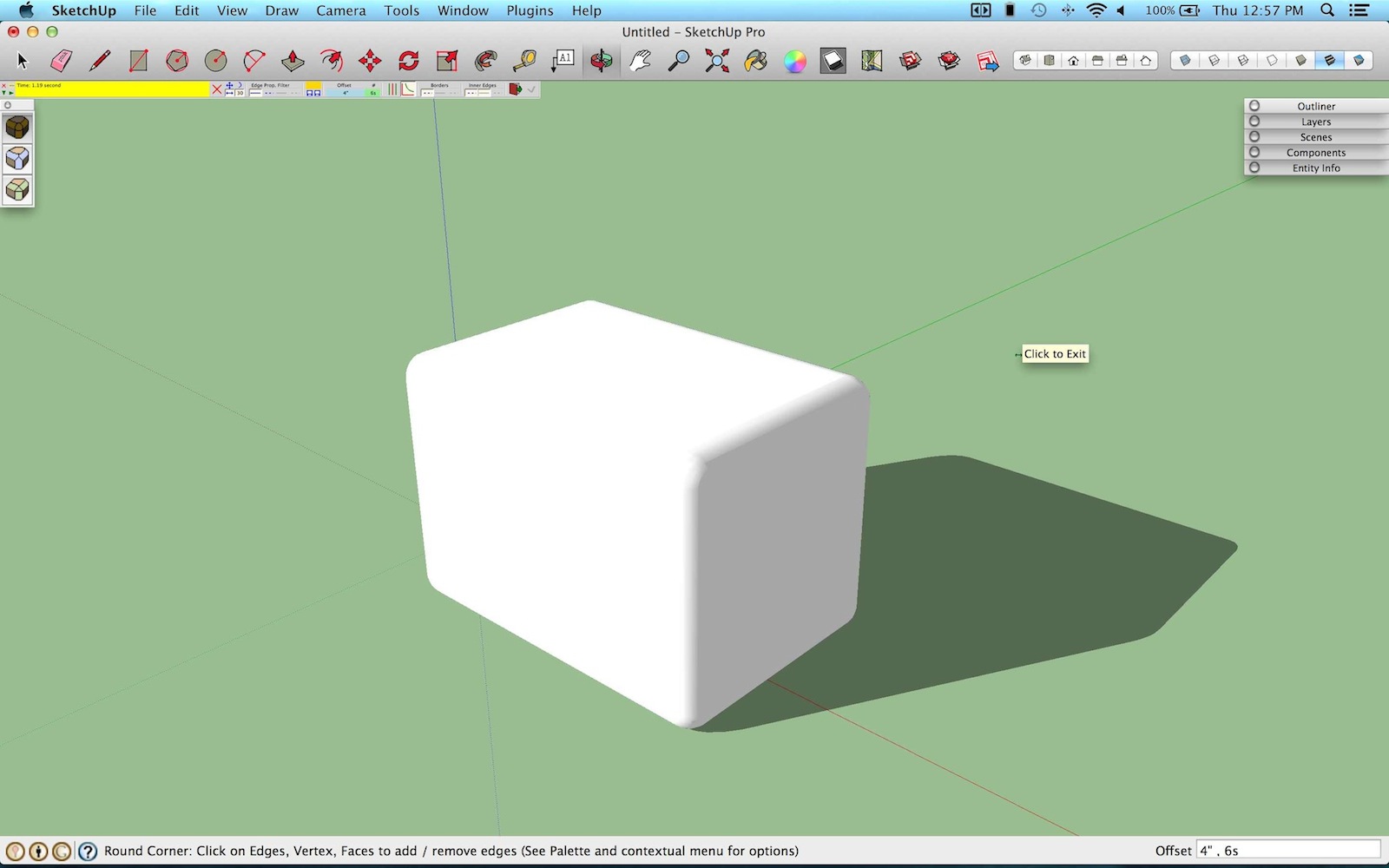
                                          I recently found the round corner plugin which works beautifully for the 3d filleting that I needed. Thank you so much for this amazing tool. One think I am wondering is how to enlarge the size of the editing palette. I am running a macbook w/ retina and the palette is hard to read. Let me know. Thanks again.

                                          Cheers!

                                          _
                                          R A Y


                                          Screen Shot 2013-08-22 at 12.57.53 PM.jpg

                                          1 條回覆 最後回覆 回覆 引用 0
                                          • fredo6F 離線
                                            fredo6
                                            最後由 編輯

                                            @rayc said:

                                            One think I am wondering is how to enlarge the size of the editing palette. I am running a macbook w/ retina and the palette is hard to read. Let me know.

                                            The palette is based on 'pixels' of the Sketchup 2D drawing methods. So it is not easy to change that.

                                            What is the definition of your screen?

                                            Fredo

                                            1 條回覆 最後回覆 回覆 引用 0
                                            • 1
                                            • 2
                                            • 5
                                            • 6
                                            • 7
                                            • 8
                                            • 9
                                            • 73
                                            • 74
                                            • 7 / 74
                                            • 第一個貼文
                                              最後的貼文
                                            Buy SketchPlus
                                            Buy SUbD
                                            Buy WrapR
                                            Buy eBook
                                            Buy Modelur
                                            Buy Vertex Tools
                                            Buy SketchCuisine
                                            Buy FormFonts

                                            Advertisement