sketchucation logo sketchucation
    • 登入
    Oops, your profile's looking a bit empty! To help us tailor your experience, please fill in key details like your SketchUp version, skill level, operating system, and more. Update and save your info on your profile page today!
    🔌 Smart Spline | Fluid way to handle splines for furniture design and complex structures. Download

    [Plugin] extrudeEdgesByEdges.rb

    已排程 已置頂 已鎖定 已移動 Plugins
    190 貼文 76 Posters 219.1k 瀏覽 76 Watching
    正在載入更多貼文
    • 從舊到新
    • 從新到舊
    • 最多點贊
    回覆
    • 在新貼文中回覆
    登入後回覆
    此主題已被刪除。只有擁有主題管理權限的使用者可以查看。
    • GaieusG 離線
      Gaieus
      最後由 編輯

      OK TIG, that's what I meant. In fact, I'd probably not need it for coplanar curves (I can't really imagine a situation like that when it's needed butof course, who knows) but definitely something other than perpendicular can be handy.

      Even better this "freedom" of the different elements in the groups (I guess that's why they are grouped but I wou;ldn't understand the answer anyway 😄 )

      If you don't mind... 😳

      Gai...

      1 條回覆 最後回覆 回覆 引用 0
      • TIGT 離線
        TIG Moderator
        最後由 編輯

        @unknownuser said:

        @unknownuser said:

        Tip: single lines and arcs won't group, so draw another edge,
        then group everything, edit the group and erase the temporary
        edge...

        Seems it's not necessary! 😉 (line, arc)
        Just go Menu Edit / Group for each object! 😉
        Then launch the plug

        I find that single lines or arcs won't group, but drawing another temporary line with it then grouping, then editing the group and deleting the temporary line seems to work to give a single arc group... It's because I use ashortcut key that isn't available on a single selection, BUT the Menu Edit >> Make-Group item is still OK... So if you can group single arcs via the menu without a hitch then that's great...
        Any ideas on improvements or clever uses welcomed...

        TIG

        1 條回覆 最後回覆 回覆 引用 0
        • pilouP 離線
          pilou
          最後由 編輯

          @unknownuser said:

          Tip: single lines and arcs won't group, so draw another edge,
          then group everything, edit the group and erase the temporary
          edge...

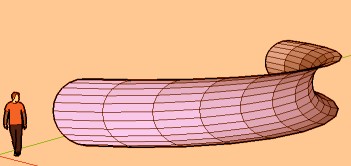
          Seems it's not necessary! 😉 (line, arc)
          Just go Menu Edit / Make Group for each object! 😉
          Then launch the plug

          Works like a charm! Bravo! 😎
          Here with 2 arcs without "another edge"! 😉

          extrudeedges.jpg


          edtig.jpg

          Frenchy Pilou
          Is beautiful that please without concept!
          My Little site :)

          1 條回覆 最後回覆 回覆 引用 0
          • pilouP 離線
            pilou
            最後由 編輯

            Next steps will be with 4 curves closed so Coons surfaces 😉

            Frenchy Pilou
            Is beautiful that please without concept!
            My Little site :)

            1 條回覆 最後回覆 回覆 引用 0
            • C 離線
              chango70
              最後由 編輯

              WOW This is like Rhino Sweep alone rail. Very cool!

              1 條回覆 最後回覆 回覆 引用 0
              • S 離線
                sepo
                最後由 編輯

                Thanks TIG..
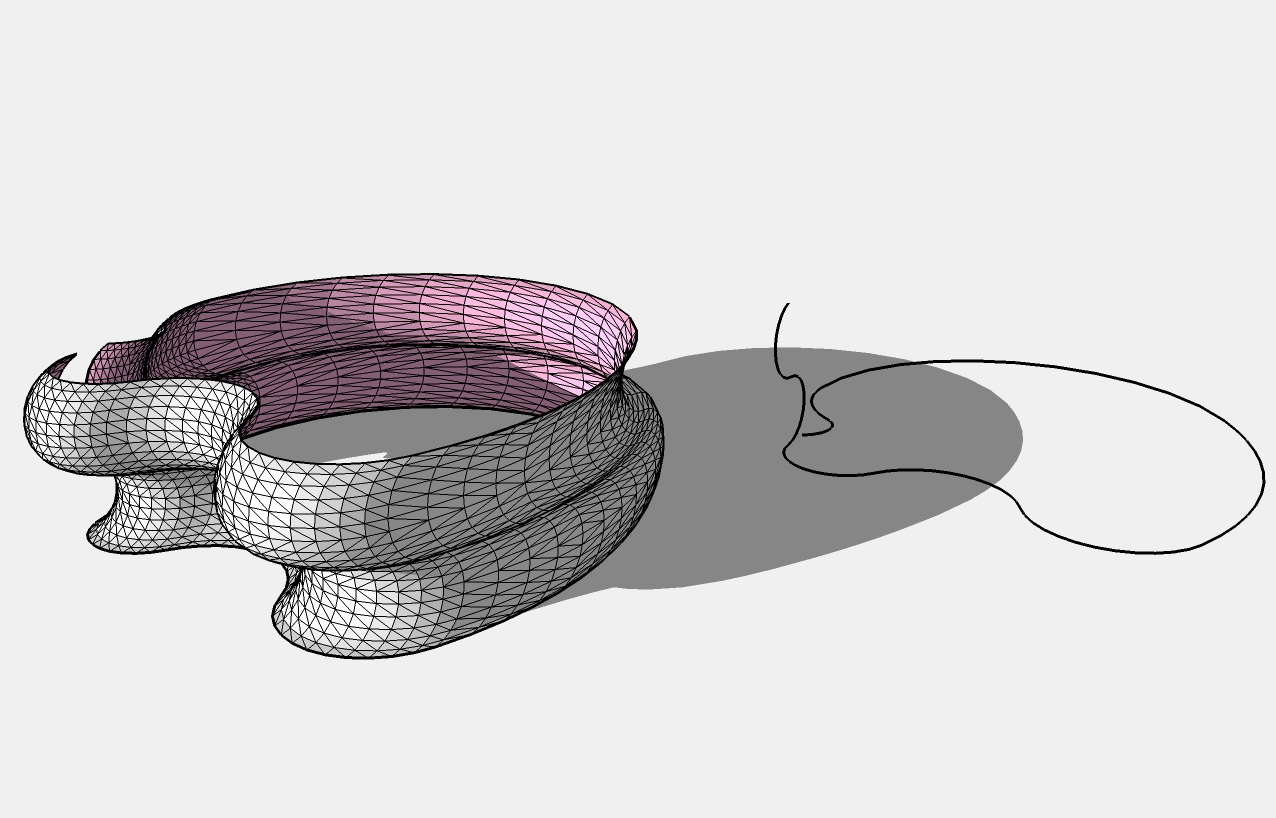
                I noticed it actually does not follow and rotate along the path. Although interesting proposition, and it works without any problems, it would be usefull if it coud also work in manner that can be predictable in design terms.

                test.jpg

                1 條回覆 最後回覆 回覆 引用 0
                • S 離線
                  sepo
                  最後由 編輯

                  I pushed it with a lot of geometry and it seems very stable. It performs orienting and reversing faces without problem. Triangulation did not make any problems as well. 👍 👍

                  1 條回覆 最後回覆 回覆 引用 0
                  • D 離線
                    dtrarch
                    最後由 編輯

                    TIG

                    One can add a point too and then group. ☀

                    Killer script.

                    dtr

                    1 條回覆 最後回覆 回覆 引用 0
                    • TIGT 離線
                      TIG Moderator
                      最後由 編輯

                      It doesn't matter what's in the groups - only edges get processed...

                      TIG

                      1 條回覆 最後回覆 回覆 引用 0
                      • TIGT 離線
                        TIG Moderator
                        最後由 編輯

                        @sepo said:

                        Thanks TIG... I noticed it actually does not follow and rotate along the path. Although interesting proposition, and it works without any problems, it would be usefull if it coud also work in manner that can be predictable in design terms.
                        This tool extrudes edges by edges without rotation. If you want rotation use followme tool or followme_and_keep script: you'll need to make the profile faced first by adding a back set of lines - you also need to unhide/unsmooth all edges to get a 'mesh'... The advantage of extrudeEdgesByEdges is that the profile and path can be in complex in 3D and also not continuous...

                        TIG

                        1 條回覆 最後回覆 回覆 引用 0
                        • EarthMoverE 離線
                          EarthMover
                          最後由 編輯

                          Thanks TIG!

                          3D Artist at Clearstory 3D Imaging
                          Guide Tool at Winning With Sketchup
                          Content Creator at Skapeup

                          1 條回覆 最後回覆 回覆 引用 0
                          • mitcorbM 離線
                            mitcorb
                            最後由 編輯

                            TIG:
                            This was the subject of one of my first wishful posts. "Extrude" a curve along a curve.
                            Excellent work!!!! This is another one of those jaw droppers. We're gonna have you bronzed. Plotparis will jump out of his seat when he sees this.
                            Thank you.
                            mitcorb

                            I take the slow, deliberate approach in my aimless wandering.

                            1 條回覆 最後回覆 回覆 引用 0
                            • mitcorbM 離線
                              mitcorb
                              最後由 編輯

                              TIG:
                              This also works with the freehand tool in SU6, if anybody was wondering.
                              mitcorb

                              I take the slow, deliberate approach in my aimless wandering.

                              1 條回覆 最後回覆 回覆 引用 0
                              • utilerU 離線
                                utiler
                                最後由 編輯

                                Really great tool, TIG!!!!

                                Just Curious...

                                1 條回覆 最後回覆 回覆 引用 0
                                • N 離線
                                  nino
                                  最後由 編輯

                                  TIG,
                                  It is great, Thanks
                                  http://www.iran-eng.com/images/smilies/icon_gol.gif

                                  1 條回覆 最後回覆 回覆 引用 0
                                  • urgenU 離線
                                    urgen
                                    最後由 編輯

                                    👍 👍 👍 great tool! thanks!

                                    --pupil forever...------

                                    1 條回覆 最後回覆 回覆 引用 0
                                    • R 離線
                                      REDS
                                      最後由 編輯

                                      Its very useful thing. Thanks

                                      1 條回覆 最後回覆 回覆 引用 0
                                      • R 離線
                                        rv1974
                                        最後由 編輯

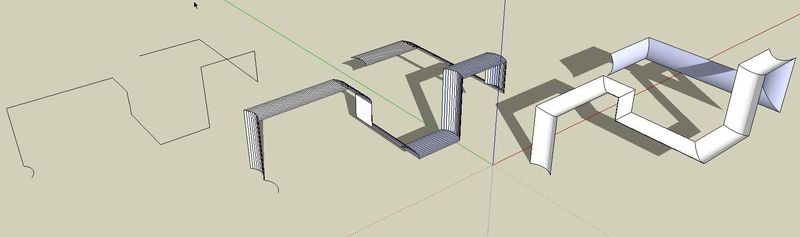
                                        Hi TIG! Instead\in addition to(?) of consistant orientation mode (in the center: extrudeEdgesByEdges.rb) It'd be perfect to get the one of profiles get turned along another one (the right example: push-pull+eraser)
                                        Thanks.

                                        ScreenShot043.jpg

                                        1 條回覆 最後回覆 回覆 引用 0
                                        • D 離線
                                          donkey_b
                                          最後由 編輯

                                          it's GOOD thx

                                          1 條回覆 最後回覆 回覆 引用 0
                                          • TIGT 離線
                                            TIG Moderator
                                            最後由 編輯

                                            @rv1974 said:

                                            Hi TIG! Instead\in addition to(?) of consistant orientation mode (in the center: extrudeEdgesByEdges.rb) It'd be perfect to get the one of profiles get turned along another one (the right example: push-pull+eraser)
                                            Thanks.

                                            For that use followme tool or followme_and_keep script... add lines to the profile to make a face then erase the 'back' edges to make the shape required. EEbyE works with non-coplanar profiles and paths, and non-contiguous edges in paths and profile[as FAK] - which isn't possible with traditional followme...

                                            TIG

                                            1 條回覆 最後回覆 回覆 引用 0
                                            • 1
                                            • 2
                                            • 3
                                            • 4
                                            • 5
                                            • 9
                                            • 10
                                            • 1 / 10
                                            • 第一個貼文
                                              最後的貼文
                                            Buy SketchPlus
                                            Buy SUbD
                                            Buy WrapR
                                            Buy eBook
                                            Buy Modelur
                                            Buy Vertex Tools
                                            Buy SketchCuisine
                                            Buy FormFonts

                                            Advertisement