sketchucation logo sketchucation
    • 登入
    Oops, your profile's looking a bit empty! To help us tailor your experience, please fill in key details like your SketchUp version, skill level, operating system, and more. Update and save your info on your profile page today!
    🔌 Smart Spline | Fluid way to handle splines for furniture design and complex structures. Download

    [Plugin] HoverSelect - v1.5a - 07 Oct 17

    已排程 已置頂 已鎖定 已移動 Plugins
    81 貼文 34 Posters 126.1k 瀏覽 34 Watching
    正在載入更多貼文
    • 從舊到新
    • 從新到舊
    • 最多點贊
    回覆
    • 在新貼文中回覆
    登入後回覆
    此主題已被刪除。只有擁有主題管理權限的使用者可以查看。
    • fredo6F 離線
      fredo6
      最後由 fredo6 編輯

      **%(#008000)[# Permission to use this software for any purpose and without fee is hereby granted

      Distribution of this software for any purpose is subject to:

      - the expressed, written consent of the author

      - the inclusion of the present copyright notice in all copies.]**

      Please UPGRADE to this latest version 1.5 if you run OSX High Sierra.

      http://forums.sketchucation.com/download/file.php?id=49290

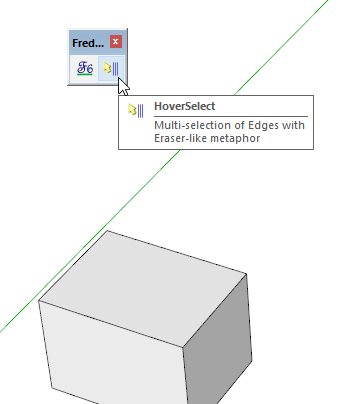
      Following an interesting request from AcesHigh, here is a small plugin HoverSelect, helping to select multiple edges by mouse over, a little bit like the Eraser tool in Sketchup (i.e. you click down and then mouse over to select).

      Basically,

      • you click down on a non-selected edge, keep the mouse button down and move the cursor to select other edges until you release the mouse button. Then, you can continue with this method for building progressively the selection. This also means that you will add to the selection by just clicking on edge too.

      • If you click down on a selected edge, then the mode is Unselection when you mouse-over. Edges will be individually unselected.

      • If you click down on a face, the tool select all edges of the face, then you can continue adding edge while maintaining the mouse button down.

      • You exit the toolby clicking in the Empty space (cursor appears as a check mark).
        The plugin offers several options and working modes:

      • Edge property filter: Plain, Smooth, Soft, Hidden

      • Selection mode: individual edges, extend to curve, extend to all connected, co-facial and follow-it edges (via toggle keys Ctrl and Shift), selection by faces.

      • Undo / Redo(using Arrow keys)
        All options are available via short cuts and from the contextual menu (the best is to have a look at it!).

      http://forums.sketchucation.com/download/file.php?id=49286

      HoverSelect Quickcard - English - v1.2 - 27 Nov 13.pdf
      Just drop the attached PDF file into the SU Plugins directory to have it accessible from within Sketchup.

      • Sketchup: v6, v7, v8, 2013, 2014, 2015, 2016, 2017
      • Platform: Windows and Mac
      • Language: English, French, Chinese ((Diweiman and **ShuangYu[/b
      • [b]Menus**: by default, it is installed in Tools > Fredo6 Collection > HoverSelect
      • Icon toolbar: by Default ‘Fredo6 Tools.
        HoverSelect.png
      • The plugin is free, for private and commercial usage. There is a donation menu however.

      http://forums.sketchucation.com/download/file.php?id=49287

      There are now multiple ways to install scripts

      • SCF Plugin Store (SU8 and above) - recommended method
      • Unzip (all SU versions and for installations in an alternate Plugins directory)
      • Extension Manager with RBZ files (SU8 and SU13)

      Whatever way you install, you must end up with the following footprint:
      HoverSelect - Footprint.png
      The standard SU Plugins root directories are:
      Windows SU8: C:\Program Files\Google\Google SketchUp 8\Plugins
      Windows SU13: C:\Program Files\SketchUp\SketchUp 2013/Plugins
      Windows SU14: C:\Users<username>\AppData\Roaming\SketchUp\SketchUp 2014\SketchUp\Plugins

      Mac SU8: Macintosh HD/Library/Application Support/Google SketchUp 8/SketchUp/Plugins
      Mac SU13: ~/Library/Application Support/SketchUp 2013/SketchUp/Plugins
      Mac SU14: ~/Library/Application Support/SketchUp 2014/SketchUp/Plugins

      CAUTION: NEVER rename or move files from their folders. If you are unsure of your unzip operation, do it in a neutral folder and check that you reconstruct the right footprint. Then transfer the folders and files to the SU Plugin Directory.

      http://forums.sketchucation.com/download/file.php?id=49285

      If you run SU8 and above, the strongly recommended installation method is to Autoinstall with the SCF Plugin Store tool.

      Otherwise, you can download the HoverSelectrbz file from the Plugin Store page for HoverSelect.

      IMPORTANT: Requires to download LibFredo6 7.7 or higher if not already installed

      **Note for SU6 and SU7 users, download the rbz file from the plugin store page, and change its extension from .rbz to .zip
      Then:

      1. Open the zip archive
      2. Select All (Ctrl A)
      3. Extract into the Sketchup Plugin Directory
      4. Answer YES to OVERWRITE all existing files if any
      5. Make sure you get the correct footprint (one rb file and one folder)**
        CONFLICTING PLUGINS: some plugins conflicts with some of my scripts
      • Some versions of Podium
      • SunPosition
      • Matchbox

      http://forums.sketchucation.com/download/file.php?id=49284

      No Video available

      http://forums.sketchucation.com/download/file.php?id=49289

      HoverSelect 1.5a – 07 Oct 17: Support of OSX High Sierra

      HoverSelect 1.4a – 13 Nov 15: Maintenance release

      HoverSelect 1.3a – 20 Oct 14: Release for non-ascii usernames

      HoverSelect 1.2a – 27 Nov 13: Release for future Sketchup Compatibility

      HoverSelect 1.0a – 29 Nov 09: Initial public release

      1 條回覆 最後回覆 回覆 引用 0
      • X 離線
        xrok1
        最後由 編輯

        that,s awesome, i've been whining for something like this since i started using SU years ago! 😍

        “There are three classes of people: those who see. Those who see when they are shown. Those who do not see.”

        http://www.Twilightrender.com try it!

        1 條回覆 最後回覆 回覆 引用 0
        • BepB 離線
          Bep
          最後由 編輯

          Thanks Fredo for this great effort, 👍 👍

          At my first try i notist that i could not deselect on a click the last selected line ,or reselect the last deselected line.
          Did i discover a small bug or is this behavour on purpose. 😕

          Thank you again for this plugin.

          Greetings,

          Bep van Malde

          "History is written by the winners"

          1 條回覆 最後回覆 回覆 引用 0
          • R 離線
            remus
            最後由 編輯

            At the risk of sounding like a spoilt child, would it be possible to make this plugin work with faces?

            Thanks for another very useful plugin, by the way.

            http://remusrendering.wordpress.com/

            1 條回覆 最後回覆 回覆 引用 0
            • EarthMoverE 離線
              EarthMover
              最後由 編輯

              Great Fredo! Thank you thank you thank you! I also second the request to be able to hover/drag/paint select faces.

              3D Artist at Clearstory 3D Imaging
              Guide Tool at Winning With Sketchup
              Content Creator at Skapeup

              1 條回覆 最後回覆 回覆 引用 0
              • fredo6F 離線
                fredo6
                最後由 編輯

                @bep said:

                At my first try i notist that i could not deselect on a click the last selected line ,or reselect the last deselected line.
                Did i discover a small bug or is this behavour on purpose. 😕
                Bep van Malde

                That was a small bug. Thanks for signaling. I fixed it in the version 1.0b, updated in the main post.

                1 條回覆 最後回覆 回覆 引用 0
                • fredo6F 離線
                  fredo6
                  最後由 編輯

                  @remus said:

                  At the risk of sounding like a spoilt child, would it be possible to make this plugin work with faces?

                  I think this is mangeable for Faces (and actually for any type of entity, for instance group and components, or construction point).

                  Also, I am looking is I can include a Rectangle and lasso selection. My idea is however to include in the selection edges which are:

                  • visible from the view camera
                  • being totally, but also partially in the rectangle.

                  Fredo

                  1 條回覆 最後回覆 回覆 引用 0
                  • EarthMoverE 離線
                    EarthMover
                    最後由 編輯

                    Yes Fredo, Lasso and rectangle selection and being able to toggle between complete and partial crossing windows for selection would be absolutely brilliant. This would bring SU's selection tools a little closer to being on par with the rest of the 3D world. 👍 👍 👍 You're the man!

                    3D Artist at Clearstory 3D Imaging
                    Guide Tool at Winning With Sketchup
                    Content Creator at Skapeup

                    1 條回覆 最後回覆 回覆 引用 0
                    • H 離線
                      Howard leslie
                      最後由 編輯

                      Fredo,
                      This selection script of yours sounds brilliant although I've not tried it yet.
                      ........
                      An idea If you do implement selection by rectangle........

                      An idea might be to devise the tool so that if users draw the selection rectangle from the North West corner to the South East corner of the screen (ie top left to lower right) then all geometry COMPLETELY inside this rectangle is selected.

                      If users draw the selection rectangle from the South East corner to the North West corner of the screen (ie lower right to top left) then all geometry INSIDE AND CROSSING this rectangle is selected.

                      Hope this makes sense.
                      Thanks very much for all your hard work and effort in devising this tool so far.
                      .................

                      Regards
                      Howard L'

                      1 條回覆 最後回覆 回覆 引用 0
                      • kenK 離線
                        ken
                        最後由 編輯

                        Fredo,

                        I get a Bug Splat each time I try to open the PDF documentation. Sketchup quits, and give the Bug Splat, however the documentation does open.

                        However, thanks for this script. For me, I will find a great deal of use cleaning up models after Intersect with Model.

                        Again thanks

                        Ken

                        Fight like your the third monkey on Noah's Ark gangway.

                        1 條回覆 最後回覆 回覆 引用 0
                        • A 離線
                          AcesHigh
                          最後由 編輯

                          Fredo... you RULE! 😍 😄

                          1 條回覆 最後回覆 回覆 引用 0
                          • J 離線
                            jmmad
                            最後由 編輯

                            Nice Plugin Fredo
                            Thxs a lot
                            more control over selection is one thing SU was laking until now.

                            Would it be posible to make a ruby that selects multiple endpoints ?

                            Get Upa !

                            1 條回覆 最後回覆 回覆 引用 0
                            • fredo6F 離線
                              fredo6
                              最後由 編輯

                              @unknownuser said:

                              Fredo,

                              I get a Bug Splat each time I try to open the PDF documentation. Sketchup quits, and give the Bug Splat, however the documentation does open.
                              Ken

                              If you use my other scripts, can you try with their documentation to see if you get a bugsplat too. I do nothing special (standard UI.openURL) and this may be an issue with your Sketchup configuration or PC environment.

                              1 條回覆 最後回覆 回覆 引用 0
                              • fredo6F 離線
                                fredo6
                                最後由 編輯

                                @jmmad said:

                                Would it be posible to make a ruby that selects multiple endpoints ?

                                Do you mean vertices?

                                1 條回覆 最後回覆 回覆 引用 0
                                • kenK 離線
                                  ken
                                  最後由 編輯

                                  Fredo6

                                  Yes, I do get a Bug Splat when I open up your other documentations. I have other problems also, haven't been able to trace those down to any particular scrip or set of scrip’s. Therefore, I will just go about my way, remembering what not to do, and saving or archiving frequently.

                                  Again thanks for all your effort in these plugins.

                                  Ken

                                  Fight like your the third monkey on Noah's Ark gangway.

                                  1 條回覆 最後回覆 回覆 引用 0
                                  • J 離線
                                    jmmad
                                    最後由 編輯

                                    @unknownuser said:

                                    @jmmad said:

                                    Would it be posible to make a ruby that selects multiple endpoints ?

                                    Do you mean vertices?

                                    Yes Fredo it would be nice to select multiple vertices instead of lines, so the we can modify them (rotate, scale, move, etc..) all at the same time.
                                    But i have never seen a ruby that does that. Is it possible?

                                    Get Upa !

                                    1 條回覆 最後回覆 回覆 引用 0
                                    • A 離線
                                      August
                                      最後由 編輯

                                      @unknownuser said:

                                      ... if users draw the selection rectangle from the North West corner to the South East corner of the screen (ie top left to lower right) then all geometry COMPLETELY inside this rectangle is selected.

                                      If users draw the selection rectangle from the South East corner to the North West corner of the screen (ie lower right to top left) then all geometry INSIDE AND CROSSING this rectangle is selected. ...

                                      Just to clarify my possibly mistaken understanding of the conversation so far --

                                      This tool is about ONLY selecting the VISIBLE geometry, right? The above describes what SU already does, selecting ALL geometry inside in the first case, and ALL geometry even partially inside in the second case, including ALL geometry, including parts on the backside of the front object and parts that may be at a great distance.

                                      Howard Leslie is too modest when he says "An idea might be ..." Using the direction the selection rectangle is drawn as the way to toggle what is included should, of course, echo what SU already does. Anything else would be too confusing.

                                      August

                                      “An idea, like a ghost, must be spoken to a little before it will explain itself.”
                                      [floatr:v1mcbde2]-- Charles Dickens[/floatr:v1mcbde2]

                                      1 條回覆 最後回覆 回覆 引用 0
                                      • fredo6F 離線
                                        fredo6
                                        最後由 編輯

                                        New version **HoverSelect 1.1a**available, with some additional features, mainly:

                                        • Edge selection (and un-selection) via rectangle, by mouse dragging, for visible-only edges (but also for all edges, as in native Sketchup)
                                        • Configuration of the precision for picking edges
                                        • Options (modifiers and filter) accessible via a button palette (experimental). There are indeed also accessible via the contextual menu and shortcuts.

                                        see main post at http://www.sketchucation.com/forums/scf/viewtopic.php?f=180&t=18916#p155058

                                        1 條回覆 最後回覆 回覆 引用 0
                                        • J 離線
                                          jmmad
                                          最後由 編輯

                                          Nice UI update Fredo
                                          I like that "button palette" that pops up with the command
                                          Thxs

                                          Get Upa !

                                          1 條回覆 最後回覆 回覆 引用 0
                                          • D 離線
                                            Daniel S
                                            最後由 編輯

                                            This is the next generation of UI in SketchUp!!!
                                            A lot better, quick, easy and more efficient than the webdialogs (and I assume that is also more compatible for macs).

                                            I make alternative icons and cursors for this plugin:
                                            Alternative Icons.jpg
                                            Here you can download them:
                                            To drop into HOVERSELECT_Dir_11 folder
                                            Extract into Plugins\HOVERSELECT_Dir_11 and set this ones in "Tools>Fredo6 Collection>HoverSelect>Default Parameters...
                                            Install Icons.jpg

                                            Thank you again Fredo!!

                                            Daniel S

                                            PS. The new Edge selection via rectangle dosen´t work inside groups (I mean double click on group to edit and then select the hoverselect).

                                            1 條回覆 最後回覆 回覆 引用 0
                                            • 1
                                            • 2
                                            • 3
                                            • 4
                                            • 5
                                            • 1 / 5
                                            • 第一個貼文
                                              最後的貼文
                                            Buy SketchPlus
                                            Buy SUbD
                                            Buy WrapR
                                            Buy eBook
                                            Buy Modelur
                                            Buy Vertex Tools
                                            Buy SketchCuisine
                                            Buy FormFonts

                                            Advertisement