sketchucation logo sketchucation
    • 登入
    Oops, your profile's looking a bit empty! To help us tailor your experience, please fill in key details like your SketchUp version, skill level, operating system, and more. Update and save your info on your profile page today!
    🔌 Smart Spline | Fluid way to handle splines for furniture design and complex structures. Download

    [Plugin] HoverSelect - v1.5a - 07 Oct 17

    已排程 已置頂 已鎖定 已移動 Plugins
    81 貼文 34 Posters 126.1k 瀏覽 34 Watching
    正在載入更多貼文
    • 從舊到新
    • 從新到舊
    • 最多點贊
    回覆
    • 在新貼文中回覆
    登入後回覆
    此主題已被刪除。只有擁有主題管理權限的使用者可以查看。
    • fredo6F 離線
      fredo6
      最後由 編輯

      @thomthom said:

      How do you actually draw filled shapes to the viewport?

      just use view.draw or view.draw2d with GL_POLYGON, GL_QUADS codes.

      Note that there is a bug in SU API for the 3D drawing (i.e. view.draw), which does not take into account the color set by view.drawing_color and always draws in black. I have signaled it to the SU team.

      Fredo

      1 條回覆 最後回覆 回覆 引用 0
      • thomthomT 離線
        thomthom
        最後由 編輯

        Ah, I was struggling with that. And drawing a polygon over a face causes z-fighting. 😕 Which there was a nice way to highlight faces...

        Thomas Thomassen — SketchUp Monkey & Coding addict
        List of my plugins and link to the CookieWare fund

        1 條回覆 最後回覆 回覆 引用 0
        • wind-borneW 離線
          wind-borne
          最後由 編輯

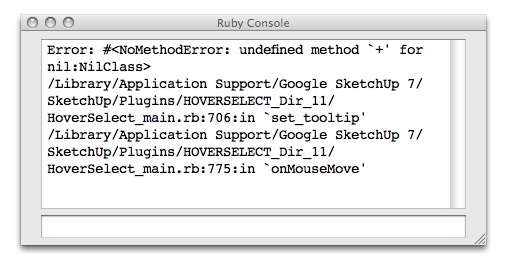
          Just joined recently to enter the wild, wacky world of ruby. Ran across this thread and realized this might be something i would use regularly, but only a couple of the functions work, no hovering, rectangle or lasso selecting. Clicking an edge, very difficult; clicking a face does select edges easily.

          Your other tools I downloaded work fantastic.😄
          Thanks in advance if you can steer me in right direction. 😆

          ruby.jpg

          "To read between the lines was easier than to follow the text."OSX 10.11.6

          %(#BF80BF)[SU 8 pro

          1 條回覆 最後回覆 回覆 引用 0
          • fredo6F 離線
            fredo6
            最後由 編輯

            The script is now translated to Chinese, thanks to the effort of the CLT Team at SketchupBar.
            see main post at http://forums.sketchucation.com/viewtopic.php?f=180&t=18916&hilit=plugin#p155058

            1 條回覆 最後回覆 回覆 引用 0
            • U 離線
              unclex
              最後由 編輯

              Where put the LANG?

              1 條回覆 最後回覆 回覆 引用 0
              • mitcorbM 離線
                mitcorb
                最後由 編輯

                From what I can tell, this is a tool for edge selection only.
                I could sure use a Hoverselect Only Faces as a way to select faces exposed to the camera. Otherwise, you box select every thing in the box from here to the horizon, then you have to unselect the stuff on the other side of the mesh that you discover after orbiting the model.
                One good use for a Hoverselect face tool is to then apply Joint Push Pull to those selected faces.

                I take the slow, deliberate approach in my aimless wandering.

                1 條回覆 最後回覆 回覆 引用 0
                • mitcorbM 離線
                  mitcorb
                  最後由 編輯

                  So... this is not a good idea?

                  I take the slow, deliberate approach in my aimless wandering.

                  1 條回覆 最後回覆 回覆 引用 0
                  • fredo6F 離線
                    fredo6
                    最後由 編輯

                    @mitcorb said:

                    So... this is not a good idea?

                    It is...

                    I may end up doing it in my redesign of HoverSelect

                    Fredo

                    1 條回覆 最後回覆 回覆 引用 0
                    • B 離線
                      blakelywallace
                      最後由 編輯

                      Hey Fredo,

                      Any news on the addition of a lasso selection tool? Would be super handy...

                      Many thanks for all your hard work 😄

                      1 條回覆 最後回覆 回覆 引用 0
                      • H 離線
                        hebeijianke
                        最後由 編輯

                        Hi
                        When I use this tool "Selection by rectangle:"
                        If I select a line that is hiden
                        It does not work

                        1 條回覆 最後回覆 回覆 引用 0
                        • fredo6F 離線
                          fredo6
                          最後由 編輯

                          @hebeijianke said:

                          Hi
                          When I use this tool "Selection by rectangle:"
                          If I select a line that is hiden
                          It does not work

                          By default, the rectangle selection selects only on visible edges (like the Eraser tool).
                          To include all edges, you have to use the Shift modifier (pressed or in toggle mode). The green rectangle border gets thicker and the hidden edges are highlighted.

                          Fredo

                          1 條回覆 最後回覆 回覆 引用 0
                          • H 離線
                            hebeijianke
                            最後由 編輯

                            Thanks
                            I see 😄

                            1 條回覆 最後回覆 回覆 引用 0
                            • dereiD 離線
                              derei
                              最後由 編輯

                              Script doesn't work for me, I mean it doesn't select anything. I have the menu, i can "use" the selection tool, but it doesn't select any edge. Compatibility issue with SU8 maybe?

                              DESIGNER AND ARTIST [DEREI.UK](http://derei.uk/l)

                              1 條回覆 最後回覆 回覆 引用 0
                              • OxerO 離線
                                Oxer
                                最後由 編輯

                                Hi Fredo and thanks for the plugin!
                                I have translated the plugin to Spanish language this is the file:

                                HoverSelect Spanish Language

                                "The result is the end what is important is the process" by Oxer
                                [http://www.oxervision.blogspot.com/(http://www.oxervision.blogspot.com/)]

                                1 條回覆 最後回覆 回覆 引用 0
                                • A 離線
                                  amuyobo
                                  最後由 編輯

                                  Just started using Sketchup - this plugin is an absolute must! Thank You!

                                  1 條回覆 最後回覆 回覆 引用 0
                                  • CarrozzaC 離線
                                    Carrozza
                                    最後由 編輯

                                    I have pretty much the same problems as Dereeei (see above): when I activate the plugin and click-hover on edges nothing get selected.
                                    What's worst, in rare occasions it works, it seems mostly after having performed a rectangle select action.
                                    What works flawlessly is the click-on-face selection, but that's the less useful feature because for what I understand it pretty much replicate the native double-click Sketchup funcionality.
                                    Could someone please help me make this great plugin work?
                                    Cheers!

                                    1 條回覆 最後回覆 回覆 引用 0
                                    • fredo6F 離線
                                      fredo6
                                      最後由 編輯

                                      @carrozza said:

                                      I have pretty much the same problems as Dereeei (see above): when I activate the plugin and click-hover on edges nothing get selected.

                                      Just in case, did you check the edge property filter? By default, HoverSelect does not select Smooth edges (even if they appear as plain edges). But you can change the filter.

                                      Fredo

                                      1 條回覆 最後回覆 回覆 引用 0
                                      • CarrozzaC 離線
                                        Carrozza
                                        最後由 編輯

                                        I thing filters are correct (all four button pressed); I can say it because when I disable some type of edges there's a forbid sign near the cursor while overing excluded edge types.
                                        I made tests in a few different situations and models, but no luck so far.

                                        In case it matters here are all the plugins installed:
                                        Chris's Shape Bender.
                                        Didier's Projections.
                                        Diggory's Recurve.
                                        Fredo's Bezier Spline, Curviloft, Hover Select, Scale, Joint PushPull, Round Corner, Tools on surface.
                                        ThomThom's Cleanup.

                                        I have Sketchup 8 running on Windows 7 64 bit, graphics card is Nvidia GeForce GT 525M (mobile).

                                        Thanks for your great plugins and your help.

                                        1 條回覆 最後回覆 回覆 引用 0
                                        • CarrozzaC 離線
                                          Carrozza
                                          最後由 編輯

                                          Fredo, is there hope you'll look into this issue?
                                          Unfortunately selecting only edges without faces is a real pain in Sketchup...

                                          1 條回覆 最後回覆 回覆 引用 0
                                          • fredo6F 離線
                                            fredo6
                                            最後由 編輯

                                            @carrozza said:

                                            Fredo, is there hope you'll look into this issue?
                                            Unfortunately selecting only edges without faces is a real pain in Sketchup...

                                            I'll see what I can do quickly and come back

                                            Fredo

                                            1 條回覆 最後回覆 回覆 引用 0
                                            • 1
                                            • 2
                                            • 3
                                            • 4
                                            • 5
                                            • 3 / 5
                                            • 第一個貼文
                                              最後的貼文
                                            Buy SketchPlus
                                            Buy SUbD
                                            Buy WrapR
                                            Buy eBook
                                            Buy Modelur
                                            Buy Vertex Tools
                                            Buy SketchCuisine
                                            Buy FormFonts

                                            Advertisement