sketchucation logo sketchucation
    • 登入
    Oops, your profile's looking a bit empty! To help us tailor your experience, please fill in key details like your SketchUp version, skill level, operating system, and more. Update and save your info on your profile page today!
    🔌 Smart Spline | Fluid way to handle splines for furniture design and complex structures. Download

    [Plugin] Shape Bender Beta

    已排程 已置頂 已鎖定 已移動 Plugins
    1.3k 貼文 331 Posters 1.8m 瀏覽 329 Watching
    正在載入更多貼文
    • 從舊到新
    • 從新到舊
    • 最多點贊
    回覆
    • 在新貼文中回覆
    登入後回覆
    此主題已被刪除。只有擁有主題管理權限的使用者可以查看。
    • D 離線
      driven
      最後由 編輯

      unclex,
      you should probably search the VirtualWind thread, as people who downloaded and it might still get notified if you ask there.

      I only ever used the plugin and I know VW development was stopped.

      good luck

      learn from the mistakes of others, you may not live long enough to make them all yourself...

      1 條回覆 最後回覆 回覆 引用 0
      • U 離線
        unclex
        最後由 編輯

        @driven said:

        unclex,
        you should probably search the VirtualWind thread, as people who downloaded and it might still get notified if you ask there.

        I only ever used the plugin and I know VW development was stopped.

        good luck

        Yes, VW has been Shut Down.
        But Somebody said, it could be purchased by a big company.

        and VW is a good flow software.....

        Thanx for help, Sorry for help

        1 條回覆 最後回覆 回覆 引用 0
        • bobpineoB 離線
          bobpineo
          最後由 編輯

          Hello Chris,
          Bob Pineo here, architect from Charlottesville, Va. We met at 3d basecamp in Bolder.
          How are you?
          any new plugins lately? Love your work.
          I'm dabbling with the idea of learning how to write ruby scripts.
          Can you recommend a book I might start with?
          thanks
          BP

          Bob Pineo, Design Develop LLC http://www.designdevelop.org.

          1 條回覆 最後回覆 回覆 引用 0
          • Chris FullmerC 離線
            Chris Fullmer
            最後由 編輯

            Hey Bob, good to see you on the forum here. How are you doing? Nothing new really at the moment. I've got a few that I've started on and never really completed, but they are nothing that asmazing really.

            Most people recommend a book called "the pickaxe", I think because it has a pickaxe on the cover:

            http://pragprog.com/titles/ruby/programming-ruby

            But it is actually called "Programming Ruby (2nd edition): The Pragmatic Programmers' Guide" and you can get it online for free:

            Programming Ruby: The Pragmatic Programmer's Guide

            favicon

            (www.ruby-doc.org)

            But the online version does make references to page numbers which are lost in the online version. But the online version is searchable, making it inredibly valuable.

            Also, my favorite tutorial for learning ruby is by Chris Pine. The tutorial chapters are on the left of the webpage, chapters 0 - 11:
            http://pine.fm/LearnToProgram/

            That one was really nice for a quick intro into ruby. Then beyond that, I've put together a few different tutorials on beginning interfacing SketchUp through ruby - which to me was more confusing that it needed to be. Its really pretty simple once you get the hang of it. I'll have to see if I can find links to my tutorials. They wre posted on this website at one point, but I think they've gone offline 😞

            Lately you've been tan, suspicious for the winter.
            All my Plugins I've written

            1 條回覆 最後回覆 回覆 引用 0
            • S 離線
              suraj1991
              最後由 編輯

              it dont seem to work on my computer i have scetchup pro 8 ?

              1 條回覆 最後回覆 回覆 引用 0
              • GaieusG 離線
                Gaieus
                最後由 編輯

                Hi Suraj,

                Are you sure you are doing everything well? Are you bending starting from the red axis? Also, have you installed progressbar.rb (I think it is needed).

                Gai...

                1 條回覆 最後回覆 回覆 引用 0
                • TIGT 線上
                  TIG Moderator
                  最後由 編輯

                  @suraj1991 said:

                  it dont seem to work on my computer i have scetchup pro 8 ?

                  If after checking Gaieus's advice...
                  What is the problem [if any] ?
                  Does it load without errors.
                  Is there a menu item?
                  Are there any error-messages when you use it?
                  If you try to use it with the Ruby Console open do you get error-messages shown in there ?

                  If you give us some more information to help us we can help you help yourself...

                  TIG

                  1 條回覆 最後回覆 回覆 引用 0
                  • charly2008C 離線
                    charly2008
                    最後由 編輯

                    Hi All,

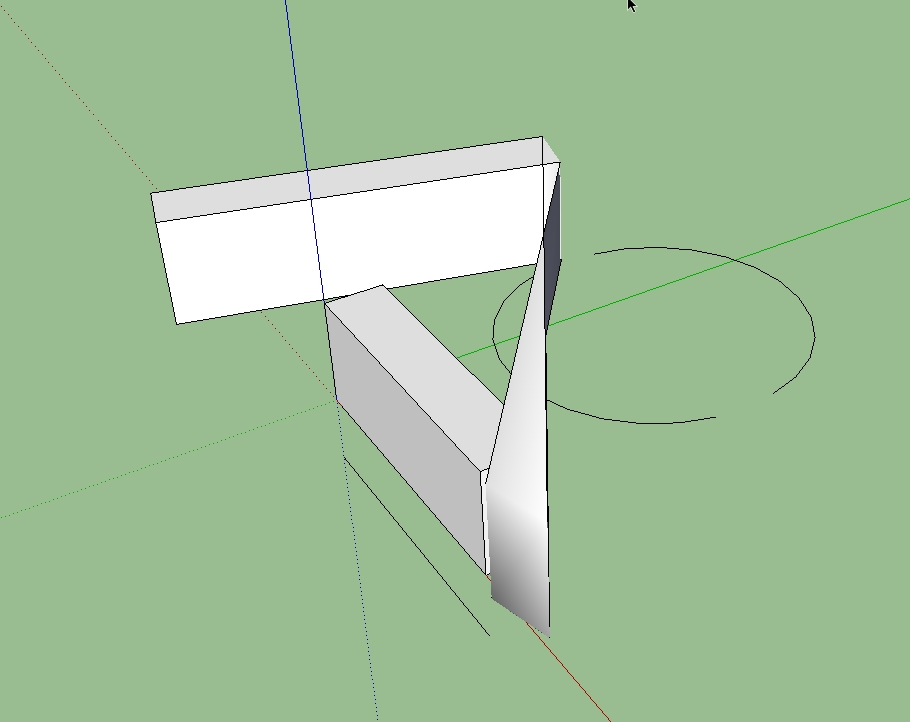
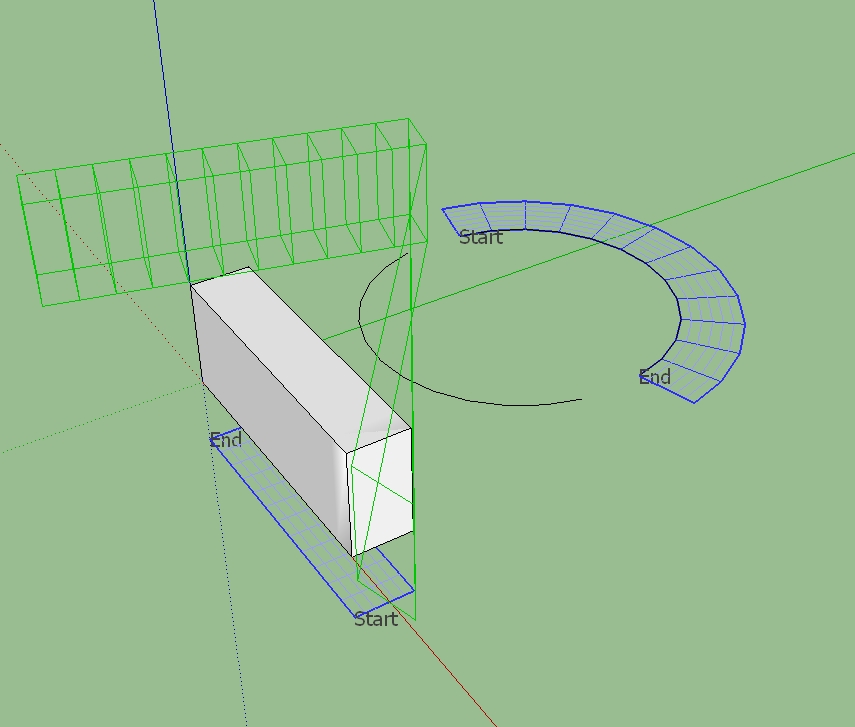
                    So far the plugin has worked without problems. I like it very much. Today I wanted to try something and the result was as shown in the photos. I do not know what's wrong. The problem is the same in both SKP 7 and 8.

                    The problem has solved itself after a restart Sketchup

                    Charly

                    2011-06-28_190732.jpg


                    2011-06-28_190748.jpg


                    Untitled5.skp

                    He who makes no mistakes, makes nothing

                    1 條回覆 最後回覆 回覆 引用 0
                    • Chris FullmerC 離線
                      Chris Fullmer
                      最後由 編輯

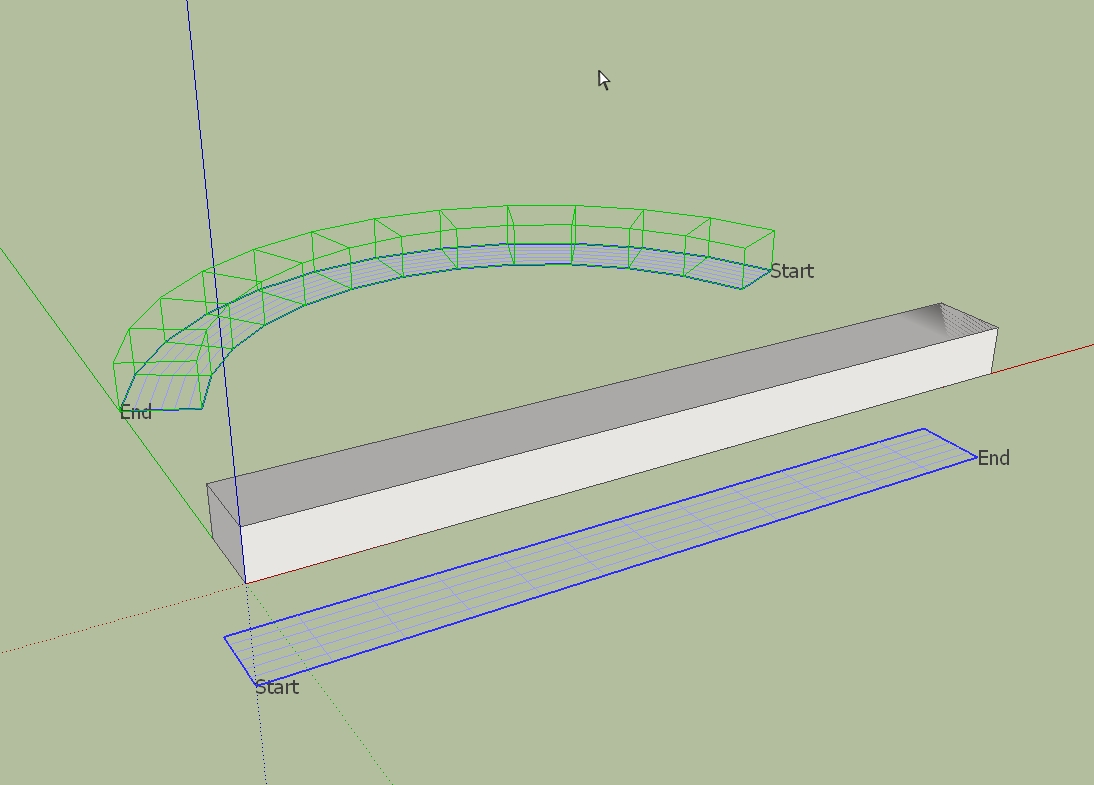
                      Hi Charly, you've got the start and ends mixed up. The arrow keys will toggle which end of the shape and path are supposed to be where. I would line them up so that starts are on the "left" (if you are looking straight down on the drawing, with the red axis going out to the right). So try pressing the up and down and left and right arrow keys until you get both "starts" to be to the left and the "ends" to be to the right. Then hit enter.

                      Chris

                      Lately you've been tan, suspicious for the winter.
                      All my Plugins I've written

                      1 條回覆 最後回覆 回覆 引用 0
                      • D 離線
                        d12dozr
                        最後由 編輯

                        It also looks like there is weird smoothing in Charly's original bar that may be messing it up.

                        This plugin is sooo useful, I really wish you had time to develop it further, Chris...I'd even pay for a completed version...whaddya think? 🤓

                        3D Printing with SketchUp Book
                        http://goo.gl/f7ooYh

                        1 條回覆 最後回覆 回覆 引用 0
                        • Rich O BrienR 離線
                          Rich O Brien Moderator
                          最後由 編輯

                          +1

                          This thing is killer

                          Download the free D'oh Book for SketchUp 📖

                          1 條回覆 最後回覆 回覆 引用 0
                          • charly2008C 離線
                            charly2008
                            最後由 編輯

                            Hi Chris, Marcus, Rich,

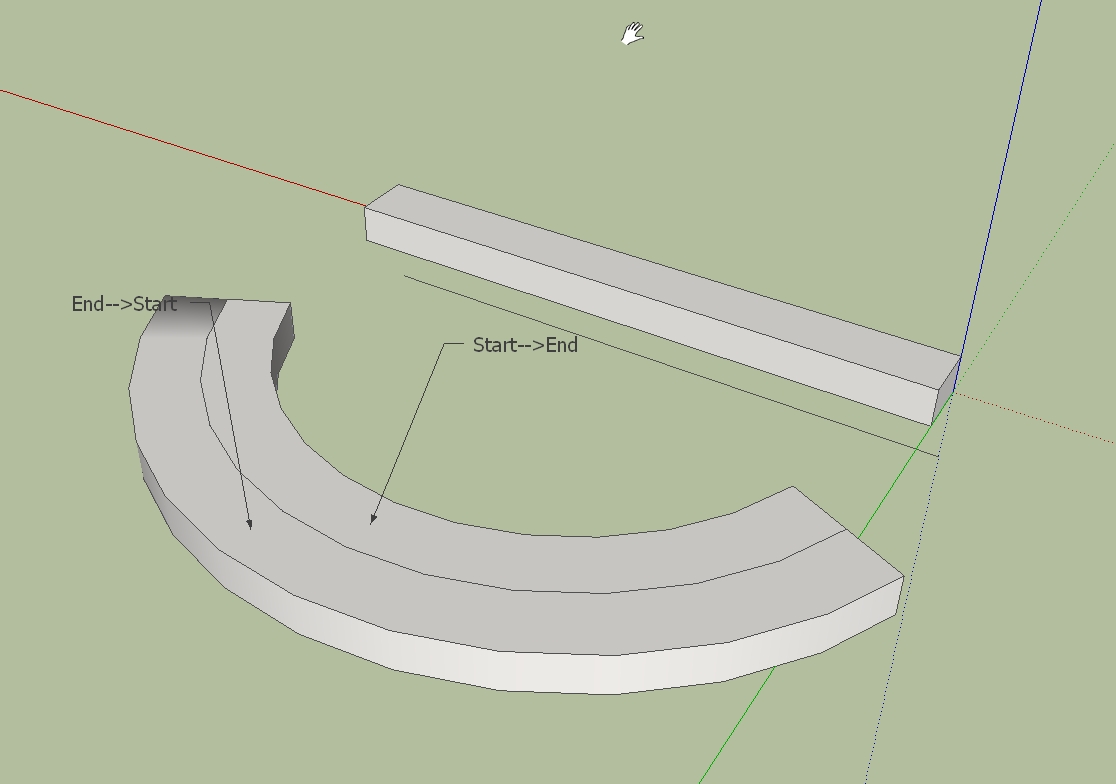
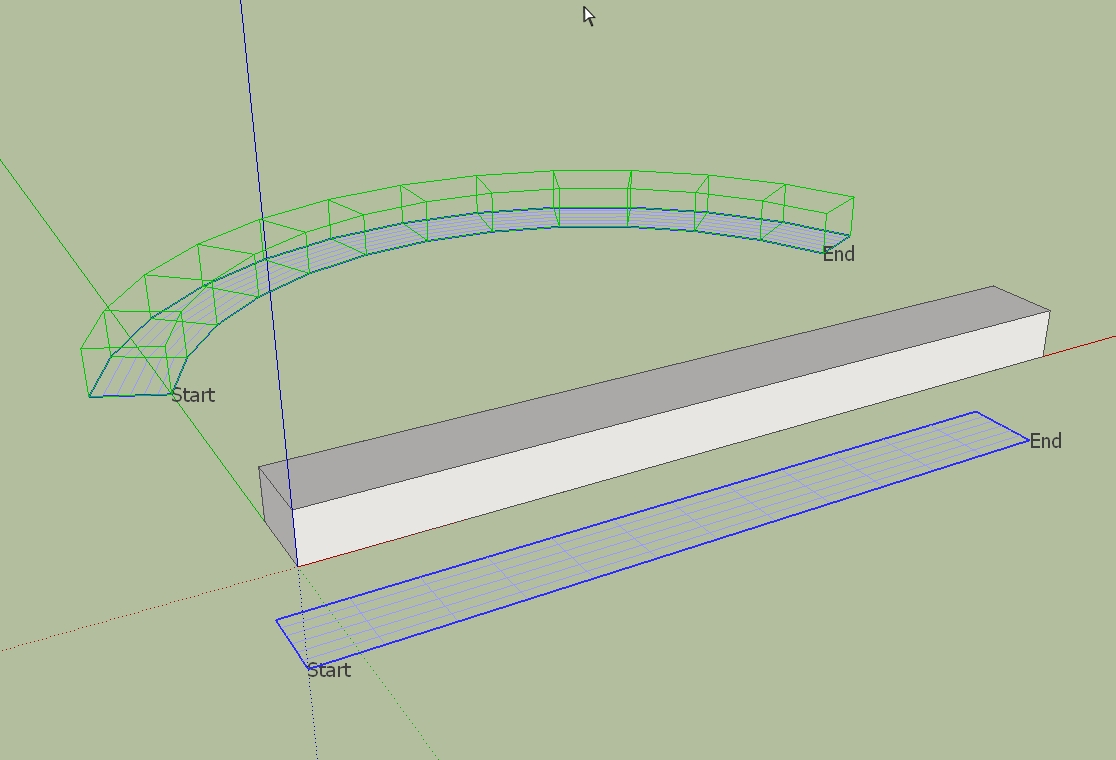
                            thanks for your quick response. In my experience the reverse of start - end has only the effect that the bended part is within or outside of the curve.

                            Charly

                            2011-06-29_002752.jpg


                            2011-06-29_002852.jpg


                            2011-06-29_003249.jpg

                            He who makes no mistakes, makes nothing

                            1 條回覆 最後回覆 回覆 引用 0
                            • charly2008C 離線
                              charly2008
                              最後由 編輯

                              Hi All,

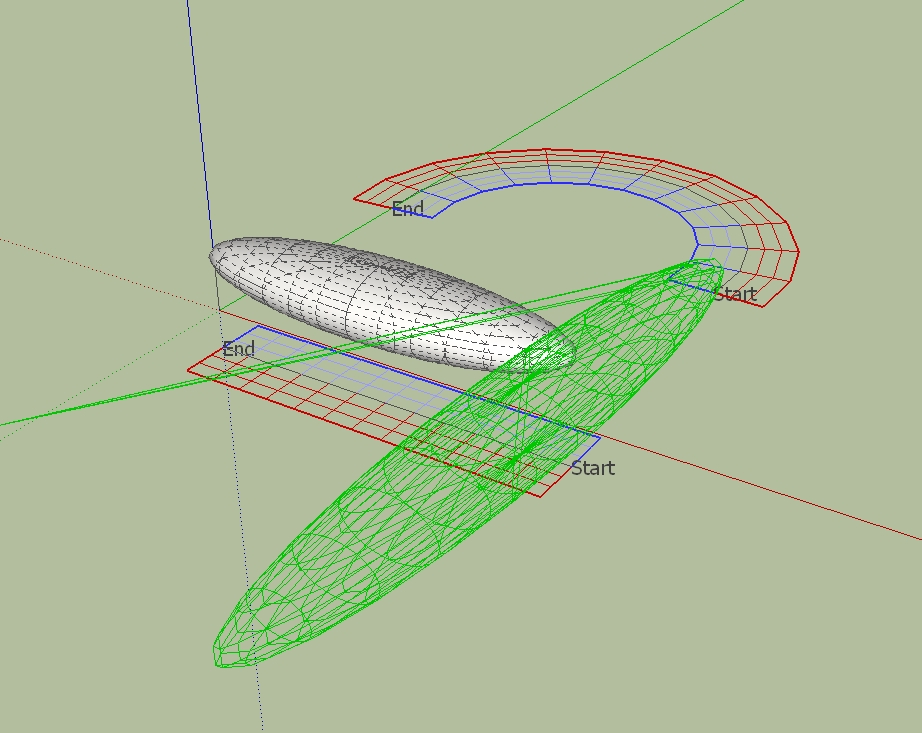
                              the error shown above occurs sporadically and over again. If I download the same file again the same error appears. After a restart SketchUp, and with a new model, the faulty behavior is gone. I've uploaded the file. Maybe one of you can open the file again and check whether the error also appears. Thanks in advance.

                              Charly

                              2011-06-29_215620.jpg


                              ShapeBender.skp


                              2011-06-29_222540.jpg

                              He who makes no mistakes, makes nothing

                              1 條回覆 最後回覆 回覆 引用 0
                              • Dave RD 離線
                                Dave R
                                最後由 編輯

                                I was getting the same results you show in your first image. How did you get it to work?

                                Etaoin Shrdlu

                                %

                                (THERE'S NO PLACE LIKE)

                                G28 X0.0 Y0.0 Z0.0

                                M30

                                %

                                1 條回覆 最後回覆 回覆 引用 0
                                • jeff hammondJ 離線
                                  jeff hammond
                                  最後由 編輯

                                  @dave r said:

                                  How did you get it to work?

                                  push the Down arrow
                                  ↓

                                  dotdotdot

                                  1 條回覆 最後回覆 回覆 引用 0
                                  • S 離線
                                    SketchUpNoobie
                                    最後由 編輯

                                    Karlheinz, I've been having the same thing happen to me lately. Tap the down arrow key. That fixes it for me. 😄

                                    Chris, out of curiosity, what does the down arrow key do exactly? 😕

                                    Edit: I've been beat. Sorry. 😳

                                    --

                                    SketchUpNoobie: the complete noob in all things SketchUp.

                                    1 條回覆 最後回覆 回覆 引用 0
                                    • Dave RD 離線
                                      Dave R
                                      最後由 編輯

                                      I used the Up arrow to change swap ends on the curve. Didn't try the down arrow to swap ends on the straight line. Weird.

                                      Etaoin Shrdlu

                                      %

                                      (THERE'S NO PLACE LIKE)

                                      G28 X0.0 Y0.0 Z0.0

                                      M30

                                      %

                                      1 條回覆 最後回覆 回覆 引用 0
                                      • charly2008C 離線
                                        charly2008
                                        最後由 編輯

                                        Hi Dave,

                                        I started sketchup again and made a new model then it worked. Strange!

                                        Charly

                                        He who makes no mistakes, makes nothing

                                        1 條回覆 最後回覆 回覆 引用 0
                                        • charly2008C 離線
                                          charly2008
                                          最後由 編輯

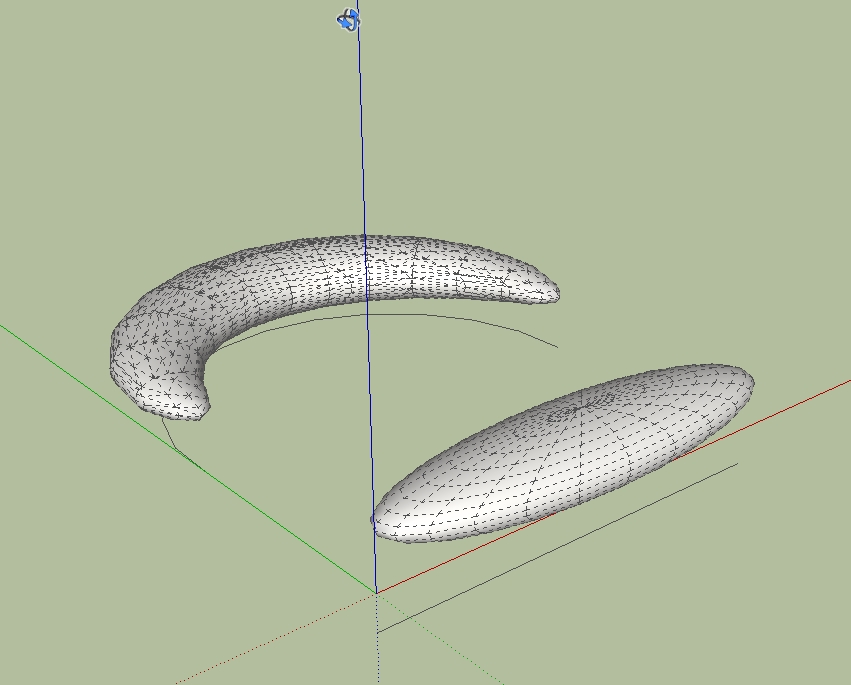
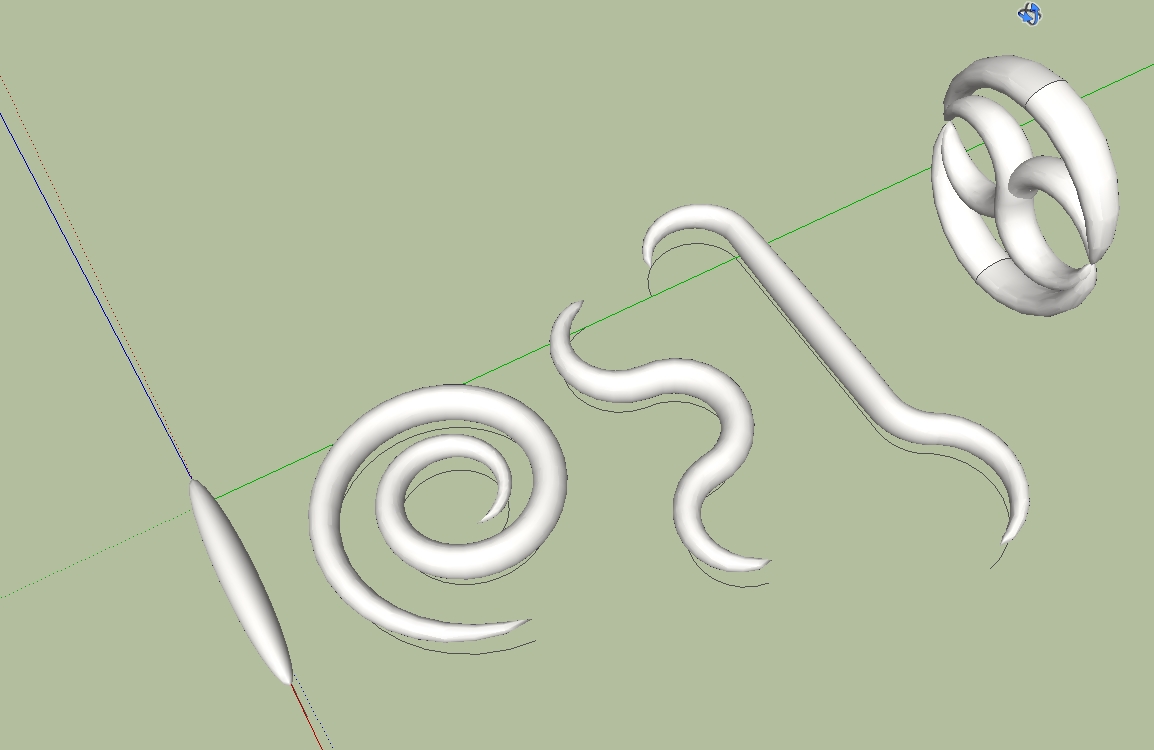
                                          With a little imagination you can create some interesting shapes.

                                          2011-06-29_232310.jpg

                                          He who makes no mistakes, makes nothing

                                          1 條回覆 最後回覆 回覆 引用 0
                                          • Dave RD 離線
                                            Dave R
                                            最後由 編輯

                                            Reminds me of hook worms. 😄

                                            Etaoin Shrdlu

                                            %

                                            (THERE'S NO PLACE LIKE)

                                            G28 X0.0 Y0.0 Z0.0

                                            M30

                                            %

                                            1 條回覆 最後回覆 回覆 引用 0
                                            • 1
                                            • 2
                                            • 3
                                            • 4
                                            • 5
                                            • 63
                                            • 64
                                            • 3 / 64
                                            • 第一個貼文
                                              最後的貼文
                                            Buy SketchPlus
                                            Buy SUbD
                                            Buy WrapR
                                            Buy eBook
                                            Buy Modelur
                                            Buy Vertex Tools
                                            Buy SketchCuisine
                                            Buy FormFonts

                                            Advertisement