[Plugin] Shape Bender Beta
-
I tried to post this earlier, but couldn't find it so sorry it it is in here twice. I have downloaded Shape bender and I have successfully used it on a rectangular box and text, however in both cases the ends of the box and text stay perfectly vertical and do not have a radial curve as shown in the video tutorial. Is there a setting that adjusts this?
diacovoni
-
Hi there, sorry your post took so long to get approved. I think we (the moderators) are on vacation mode a little. We try to get them approved quickly, but today it is taking a quite a few hours.
Well, I am not exactly sure what the problem is. Do you have an image to describe it? My guess is that you are experienceing a known fault with the plugin. It does not bend the first and last segments the same amount as the rest of the segments in the curve. It does this for a few technical reasons - sometiems it is the correct bending solution. But sometimes it is not. So if you post a picture of what you are experiencing, I'll look at it and I'll tell you if it is this same problem. IF it is, there is a bit of a workaround you can try that includes adding an extra segment to the arc in the beginning and the end.
Chris
PS I'm on vacation until Jan 3rd, so I might be slow-ish to respond.
-
I think I figured it out. My text was already rotated vertically on the wall. I read some previous posts where it indicated the script was based on the horizontal red green axis. I placed my text flat on the ground and then had no problem with the curve. All I needed to do after that was rotate it vertically to place on the wall.
Thanks for the response. Hope this helps others in the same situation.
diacovoni

-
Hello, I am a new user and while running the script, I am not able to select any line, be it single straight or curve.
Pls find below the ruby console output:
Error; #<TypeError; can't convert nil into String>
C;/Program Files (x86)/Google/Google SketchUp 8/Tools/clf_shape_bender/clf_shape_bender.rb;161;in `create_cursor'
C;/Program Files (x86)/Google/Google SketchUp 8/Tools/clf_shape_bender/clf_shape_bender.rb;161;in `make_cursors'
C;/Program Files (x86)/Google/Google SketchUp 8/Tools/clf_shape_bender/clf_shape_bender.rb;131;in `activate'
C;/Program Files (x86)/Google/Google SketchUp 8/Tools/clf_shape_bender/clf_shape_bender.rb;1017;in `select_tool'
C;/Program Files (x86)/Google/Google SketchUp 8/Tools/clf_shape_bender/clf_shape_bender.rb;1017
Thanks in advance.
-
@xtr3mx7 said:
Hello, I am a new user and while running the script, I am not able to select any line, be it single straight or curve.
Pls find below the ruby console output:
> Error; #<TypeError; can't convert nil into String>
> C;/Program Files (x86)/Google/Google SketchUp 8/Tools/clf_shape_bender/clf_shape_bender.rb;161;in `create_cursor'
> C;/Program Files (x86)/Google/Google SketchUp 8/Tools/clf_shape_bender/clf_shape_bender.rb;161;in `make_cursors'
> C;/Program Files (x86)/Google/Google SketchUp 8/Tools/clf_shape_bender/clf_shape_bender.rb;131;in `activate'
> C;/Program Files (x86)/Google/Google SketchUp 8/Tools/clf_shape_bender/clf_shape_bender.rb;1017;in `select_tool'
> C;/Program Files (x86)/Google/Google SketchUp 8/Tools/clf_shape_bender/clf_shape_bender.rb;1017
>
Thanks in advance.
It seems it's not finding
../Plugins/clf_shape_bender/curve_pointer.png- you should have these files in the 'clf_shape_bender' subfolder inside Plugins...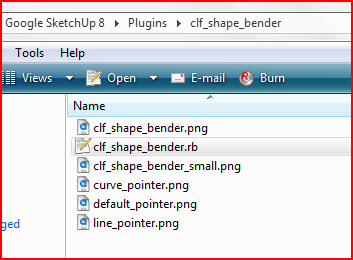
-
Hello everyone..
I'm using Google SketchUp Pro 8 . I am unable to make a ramp using shape bender that is 34 metres long and has 1:10 slope. The Shape Bender doesn't bend the ramp as expected. I've attached a video and a model of the ramp.
-
How about this?
-
Arjun,
I think the problem comes in that there needs to be some distortion in the top surface which shape Bender doesn't do. I think NumbThumb's suggestion is a good one. I did it manually because I wanted to see how the shape develops but I think the plugin would be much faster.


Is this what you want as a result?
-
@dave r said:
Is this what you want as a result?
yes i want a ramp like this only..is the edge on the end coming out to be 3.4 metres in height??
-
Yes, it is the same height as the straight ramp you had drawn in the file.
It's on my computer at home and I'm not there at the moment. I could send it to you or post it when I get back.
-
but isn't there an effective way to make the ramp i'm making using shapebender??

-
Thank you TIG for providing the solution. The plugin now works perfectly
This is indeed a very great script. Big cheers to Chris
-
thanx this wonderful Plugin
but it can not work with TIG's [HolePunchTool] Plugin, if punch was loaded, run Bender, SU would Crashed...
-
@unclex said:
thanx this wonderful Plugin
but it can not work with TIG's [HolePunchTool] Plugin, if punch was loaded, run Bender, SU would Crashed...I am working on it...

-
-
There's an updated version of the HolePunch tool available that avoids this clash...
see here for details http://forums.sketchucation.com/viewtopic.php?p=302853#p302853
and the zip's download is here http://forums.sketchucation.com/viewtopic.php?p=271170#p271170

-
@ben ritter said:
Chris, I can hardly keep up with your wonderful scripts. Most importantly though, you are very much appreciated for your kindness to the SU community.
Very well said.

Excellent plugin.
-
After I download how to I make it work on sketchup?
-
Hi Jonathan (and welcome),
Did you watch the video in the first post, It pretty much explains everything.
-
Yeah i watch them. I dont have the tab that has plugins on it.






Hello! It looks like you're interested in this conversation, but you don't have an account yet.
Getting fed up of having to scroll through the same posts each visit? When you register for an account, you'll always come back to exactly where you were before, and choose to be notified of new replies (either via email, or push notification). You'll also be able to save bookmarks and upvote posts to show your appreciation to other community members.
With your input, this post could be even better 💗
Register Login


Advertisement