sketchucation logo sketchucation
    • 登入
    Oops, your profile's looking a bit empty! To help us tailor your experience, please fill in key details like your SketchUp version, skill level, operating system, and more. Update and save your info on your profile page today!
    🔌 Smart Spline | Fluid way to handle splines for furniture design and complex structures. Download

    [Obsolete] BZ__Arc for BezierSpline 1.2

    已排程 已置頂 已鎖定 已移動 Plugins
    54 貼文 31 Posters 26.4k 瀏覽 31 Watching
    正在載入更多貼文
    • 從舊到新
    • 從新到舊
    • 最多點贊
    回覆
    • 在新貼文中回覆
    登入後回覆
    此主題已被刪除。只有擁有主題管理權限的使用者可以查看。
    • boofredlayB 離線
      boofredlay
      最後由 編輯

      Context click on the image itself and save as...

      http://www.coroflot.com/boofredlay

      1 條回覆 最後回覆 回覆 引用 0
      • J 離線
        jmmad
        最後由 編輯

        Fredo6
        what i like most of your script BezierSpilne is that the endpoints are intelligent and editable, you can move those points and the equation result for the geometry is auto updated, you can set the number of edges etc...
        So i have 3 request that i think it would be very useful.

        1.-Would it be possible to transform a normal set of SU lines to an editble polyline or bezier?
        2.-And to transform a BZ polyline to BZ Arc or any other Bezier and back?
        EDITED: ive notice you had those 2 option 😄. I should go to my oculist.
        When i go from BZ arc to Polyline would it be possible to get the primitive geometry and nont the points that make the arc?

        Ill try to explain this request...this i think it's more complex.
        Ive notice in your BZ plug in when you PushPull a closed BZ Spline or polyline surface, the BZ lines are copy, then you can edit the top and the bottom and edit somehow the geometry of the volume with the BZ edit command.
        But if i move a point in the top BZ polyline the point on the bottom polyline does not follow because its not related to the bottom spline.
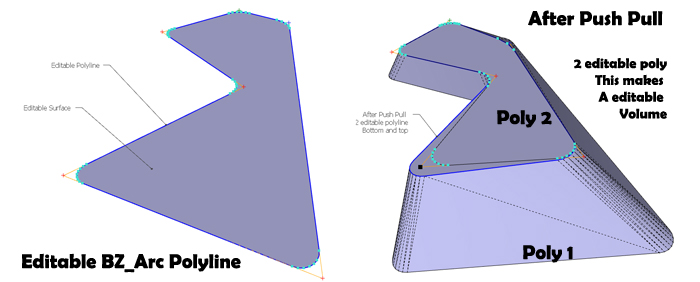
        Editable PolyVolume.jpg

        3.-Could it be posible to relate points between 2 or more "BZ polylines" maybe by an invisible vertex? So when you drag that vertex the the 2 or more beziers are modified at the same time. So if you have a volume made of an extruded BZ_Arc or spline you move this vertex and the geometry follows and not only the lines but the volume itself is updated. This will give more control over volumes just as you did with the 2d lines. With your talent you gave endpoints in SU properties that can be edited. Maibe that could be done with volumes.
        So this "inteligent vertex and endpoints could tell how the visible geometry should be.
        Uff... this is hard to explain for me.
        I hope you can follow mi idea.

        Get Upa !

        1 條回覆 最後回覆 回覆 引用 0
        • CadFatherC 離線
          CadFather
          最後由 編輯

          ..and icons if needed.

          BZ__Arc_16.pngBZ__Arc_24.png

          EDIT: strange my bezier tools have completely stopped working on SU7

          1 條回覆 最後回覆 回覆 引用 0
          • D 離線
            dtrarch
            最後由 編輯

            Fredo

            Super useful and thanks a bunch. ☀
            A really helpful road layout tool that will be used a lot.

            Question please. 😕
            What does offset reference ?
            Arc radius ? Arc segment ? or ?

            Thx again

            dtr

            1 條回覆 最後回覆 回覆 引用 0
            • fredo6F 離線
              fredo6
              最後由 編輯

              @dtrarch said:

              Question please. 😕
              What does offset reference ?
              Arc radius ? Arc segment ? or ?

              Offset is the distance from the corner to the start of the arc.
              You will notice that when the length of one of the segments defining the corner is not superior to twice the offset value, no round corner is generated.

              1 條回覆 最後回覆 回覆 引用 0
              • D 離線
                dtrarch
                最後由 編輯

                Fredo

                Thanks for the reply and again the really useful tool.

                dtr

                1 條回覆 最後回覆 回覆 引用 0
                • CadFatherC 離線
                  CadFather
                  最後由 編輯

                  Hi Fredo, i could be wrong but it seems BZ 1.2 only works with the default su7 installation

                  if i have SU installed in a different folder the tool will start but it will not draw a line upon clicking..

                  (i have multiple copies of SU one for working, one for experimentation)

                  1 條回覆 最後回覆 回覆 引用 0
                  • david_hD 離線
                    david_h
                    最後由 編輯

                    Cool Plugin. thanks.

                    D
                    👍

                    PS. I think we need a smilie emoticon of hands clapping in thunderous applause for just these types of occasions.
                    😄

                    If I make it look easy...It is probably easy

                    1 條回覆 最後回覆 回覆 引用 0
                    • fredo6F 離線
                      fredo6
                      最後由 編輯

                      @cadfather said:

                      Hi Fredo, i could be wrong but it seems BZ 1.2 only works with the default su7 installation

                      if i have SU installed in a different folder the tool will start but it will not draw a line upon clicking..

                      (i have multiple copies of SU one for working, one for experimentation)

                      You are right. BezierSpline asumes it is located in the default Sketchup Plugin folder.
                      For FreeScale and LibFredo6 I have arranged to support alternate folders however, provided you configure Sketchup for an alternate folder (via script acting on $:).
                      When I refresh Bezierspline, it should work.

                      Fredo

                      1 條回覆 最後回覆 回覆 引用 0
                      • N 離線
                        numerobis
                        最後由 編輯

                        @thomthom said:

                        "Sketchup Fredo Edition" 👍 😄 👍

                        +1 💚

                        Thank You very much Master Fredo!
                        Really Useful! 😎

                        1 條回覆 最後回覆 回覆 引用 0
                        • P 離線
                          putnik
                          最後由 編輯

                          Moderators, shouldn't Fredo's name be highlighted in a different colour on this forum, or something, like the names of other people who distinguished themselves in some way? He obviously is some kind of demigod at the very least but has an appearance of a mortal.

                          http://keshas.info

                          1 條回覆 最後回覆 回覆 引用 0
                          • X 離線
                            xrok1
                            最後由 編輯

                            maybe in neon 🤣

                            “There are three classes of people: those who see. Those who see when they are shown. Those who do not see.”

                            http://www.Twilightrender.com try it!

                            1 條回覆 最後回覆 回覆 引用 0
                            • CadFatherC 離線
                              CadFather
                              最後由 編輯

                              Thanks Fredo, is there no way to make it folder independent? or perhaps specified in a txt file?

                              1 條回覆 最後回覆 回覆 引用 0
                              • soloS 離線
                                solo
                                最後由 編輯

                                @unknownuser said:

                                Moderators, shouldn't Fredo's name be highlighted in a different colour on this forum, or something, like the names of other people who distinguished themselves in some way? He obviously is some kind of demigod at the very least but has an appearance of a mortal.

                                On my machine if one enables the sound every time you hover your mouse over his name you get a choir like "halelujia" sound clip. 😉

                                http://www.solos-art.com

                                If you see a toilet in your dreams do not use it.

                                1 條回覆 最後回覆 回覆 引用 0
                                • CadFatherC 離線
                                  CadFather
                                  最後由 編輯

                                  that's amazing - i've got aretha franklin's 'Fredoo'

                                  1 條回覆 最後回覆 回覆 引用 0
                                  • I 離線
                                    ideas_arte
                                    最後由 編輯

                                    Thank you very much..! Fredo.. 👍

                                    1 條回覆 最後回覆 回覆 引用 0
                                    • FrederikF 離線
                                      Frederik
                                      最後由 編輯

                                      @solo said:

                                      On my machine if one enables the sound every time you hover your mouse over his name you get a choir like "halelujia" sound clip. 😉

                                      🤣

                                      Off topic
                                      I assume that it's only mods who can get direct access into a user profile, when clicking the username... 😕
                                      Being a "regular mortal" nothing happens when pointing on a username... 😞

                                      Cheers
                                      Kim Frederik

                                      1 條回覆 最後回覆 回覆 引用 0
                                      • N 離線
                                        notareal
                                        最後由 編輯

                                        Thank you!

                                        Welcome to try Thea Render, Thea support | kerkythea.net -team member

                                        1 條回覆 最後回覆 回覆 引用 0
                                        • M 離線
                                          mpowell1234567890
                                          最後由 編輯

                                          Wow! Thia is amazing. Thanks for sharing this cool script. 😍

                                          1 條回覆 最後回覆 回覆 引用 0
                                          • T 離線
                                            tonyL
                                            最後由 編輯

                                            thanks Fredo.

                                            one question : how do u convert polyline to polyline arc corners?

                                            1 條回覆 最後回覆 回覆 引用 0
                                            • 1
                                            • 2
                                            • 3
                                            • 2 / 3
                                            • 第一個貼文
                                              最後的貼文
                                            Buy SketchPlus
                                            Buy SUbD
                                            Buy WrapR
                                            Buy eBook
                                            Buy Modelur
                                            Buy Vertex Tools
                                            Buy SketchCuisine
                                            Buy FormFonts

                                            Advertisement



