sketchucation logo sketchucation
    • 登入
    Oops, your profile's looking a bit empty! To help us tailor your experience, please fill in key details like your SketchUp version, skill level, operating system, and more. Update and save your info on your profile page today!
    🔌 Smart Spline | Fluid way to handle splines for furniture design and complex structures. Download

    [Obsolete] BZ__Arc for BezierSpline 1.2

    已排程 已置頂 已鎖定 已移動 Plugins
    54 貼文 31 Posters 26.4k 瀏覽 31 Watching
    正在載入更多貼文
    • 從舊到新
    • 從新到舊
    • 最多點贊
    回覆
    • 在新貼文中回覆
    登入後回覆
    此主題已被刪除。只有擁有主題管理權限的使用者可以查看。
    • pilouP 離線
      pilou
      最後由 編輯

      @tony
      just an idea 💭
      Group your existing curve
      use polyline Arc corner and redraw points over the curve
      kill the group et voilà 😄
      Not sure that is you want that 😒

      Frenchy Pilou
      Is beautiful that please without concept!
      My Little site :)

      1 條回覆 最後回覆 回覆 引用 0
      • D 離線
        Daniel S
        最後由 編輯

        @tonyl said:

        one question : how do u convert polyline to polyline arc corners?
        Right click on the polyline and choose: convert to polyline arc corners.
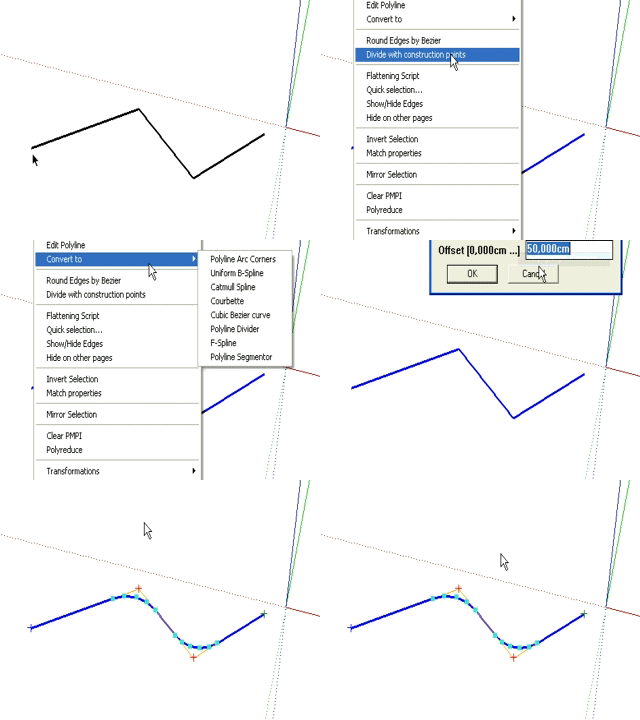
        convert to.gif
        Daniel S

        1 條回覆 最後回覆 回覆 引用 0
        • pilouP 離線
          pilou
          最後由 編輯

          yes maybe more speedy 😆

          Frenchy Pilou
          Is beautiful that please without concept!
          My Little site :)

          1 條回覆 最後回覆 回覆 引用 0
          • T 離線
            tonyL
            最後由 編輯

            hey guys,

            thanks for the pointer. 😄

            1 條回覆 最後回覆 回覆 引用 0
            • H 離線
              han_seller
              最後由 編輯

              thank you for your info

              1 條回覆 最後回覆 回覆 引用 0
              • Bob JamesB 離線
                Bob James
                最後由 編輯

                Alas! I've loaded BZ_Arc.rb into the BZ_Dir_12 folder and the icon files into IMAGES_standard and IMAGES_CadFather but still get only the original icons and no context command.

                Moreover, it seems that BoolTools icons have become blanks!!
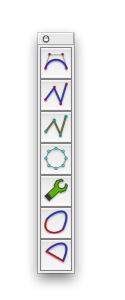

                Picture 22.JPG


                Picture 23.JPG


                Picture 24.JPG

                i7-4930K 3.4Ghz, 2x GTX780 6GB, 32GB DDR3-1600 ECC, OCZ Vertex 4 500GB, WD Black 3TB, 32TB NAS, 4x 27" Monitors, SpaceMouse Pro, X-keys XK-60

                1 條回覆 最後回覆 回覆 引用 0
                • fredo6F 離線
                  fredo6
                  最後由 編輯

                  Bob,

                  As you are on Mac, there maybe some specificities that have never been signaled by Mac users.

                  Just to understand more:

                  1. before you dowloaded and drop the BZ__Arc extensions, did you have a correct behavior of Bezierspline (i.e., icons, contextual menu, all extensions available), and possibly presence of the BoolTool icons?

                  2. Can you also check you do have the version 1.21 installed.

                  Fredo

                  1 條回覆 最後回覆 回覆 引用 0
                  • Bob JamesB 離線
                    Bob James
                    最後由 編輯

                    I'm on an iMac (Intel) here at home: I haven't had a chance to load it on my MacPro at work.

                    Yes, Bezierspline, icons and contextual menu worked fine and BoolTools icons were okay (The "blank" icons still "work", they just don't have the graphic face).

                    I downloaded and installed the latest 1.21 version pf BezierSpline and added the BZ_Arc and icons (I also re-installed BoolTools).

                    i7-4930K 3.4Ghz, 2x GTX780 6GB, 32GB DDR3-1600 ECC, OCZ Vertex 4 500GB, WD Black 3TB, 32TB NAS, 4x 27" Monitors, SpaceMouse Pro, X-keys XK-60

                    1 條回覆 最後回覆 回覆 引用 0
                    • fredo6F 離線
                      fredo6
                      最後由 編輯

                      @bob james said:

                      I loaded BZ_Dir_12 folder into Macintosh HD/Users/robertjames/Library/Application Support/Google SketchUp 7/SketchUp/Plugins and now get the full operational icon set.

                      In the past I've also had to load ProfileBuilder, Podium, Projection and SCF Power Toolbar into this directory instead of the standard location: Macintosh HD/Library/Application Support/Google SketchUp 7/SketchUp/Plugins

                      No effect on BoolTools: that must be some other interaction

                      I guess the choice of the correct Plugin directory on Mac must obey to some subtle laws related to the initial installation of Sketchup.
                      I hope some Mac users could clarify what are exactly the rules, because I am now lost on what is right or wrong, and, without a Mac, it's not easy to give any valuable advice.

                      Fredo

                      1 條回覆 最後回覆 回覆 引用 0
                      • Bob JamesB 離線
                        Bob James
                        最後由 編輯

                        The alternate location is true also for the new version of Layer Manager.

                        I've started a new Post to address this: "What are the rules for location of rubies on a Mac?"

                        i7-4930K 3.4Ghz, 2x GTX780 6GB, 32GB DDR3-1600 ECC, OCZ Vertex 4 500GB, WD Black 3TB, 32TB NAS, 4x 27" Monitors, SpaceMouse Pro, X-keys XK-60

                        1 條回覆 最後回覆 回覆 引用 0
                        • Bob JamesB 離線
                          Bob James
                          最後由 編輯

                          I loaded BZ_Dir_12 folder into Macintosh HD/Users/robertjames/Library/Application Support/Google SketchUp 7/SketchUp/Plugins and now get the full operational icon set.

                          In the past I've also had to load ProfileBuilder, Podium, Projection and SCF Power Toolbar into this directory instead of the standard location: Macintosh HD/Library/Application Support/Google SketchUp 7/SketchUp/Plugins

                          No effect on BoolTools: that must be some other interaction

                          PS (added 5 Aug 2009): Turns out that BoolTools is another that must be loaded in the User folder

                          i7-4930K 3.4Ghz, 2x GTX780 6GB, 32GB DDR3-1600 ECC, OCZ Vertex 4 500GB, WD Black 3TB, 32TB NAS, 4x 27" Monitors, SpaceMouse Pro, X-keys XK-60

                          1 條回覆 最後回覆 回覆 引用 0
                          • L 離線
                            Lulu4681
                            最後由 編輯

                            Thank you so much i really appreciate your time and offer.

                            1 條回覆 最後回覆 回覆 引用 0
                            • C 離線
                              chango70
                              最後由 編輯

                              Thank you very much! Another very useful plugin.

                              1 條回覆 最後回覆 回覆 引用 0
                              • P 離線
                                plessis
                                最後由 編輯

                                I try to install the BZ_Arc_plugin.
                                I've download the ruby and dropped it into the
                                BZ_Dir_12 folder.
                                It works .
                                But it is impossible to download the icon-files.
                                In the attachment they are light grey and don't react.
                                What am I doing wrong ???

                                Hans

                                1 條回覆 最後回覆 回覆 引用 0
                                • 1
                                • 2
                                • 3
                                • 3 / 3
                                • 第一個貼文
                                  最後的貼文
                                Buy SketchPlus
                                Buy SUbD
                                Buy WrapR
                                Buy eBook
                                Buy Modelur
                                Buy Vertex Tools
                                Buy SketchCuisine
                                Buy FormFonts

                                Advertisement