sketchucation logo sketchucation
    • Log Masuk
    Oops, your profile's looking a bit empty! To help us tailor your experience, please fill in key details like your SketchUp version, skill level, operating system, and more. Update and save your info on your profile page today!
    🔌 Smart Spline | Fluid way to handle splines for furniture design and complex structures. Download

    [Plugin][$] FredoScale - v3.6a - 01 Apr 24


    Scheduled Pinned Kunci Moved Plugins
    1.1k Kiriman 345 Posters 2.4m Lihat 342 Watching
    Memuatkan lagi kiriman
    • Lama ke Baru
    • Baru ke Lama
    • Most Votes
    Balas
    • Reply as topic
    Log masuk untuk balas
    Topik ini telah dipadam. Hanya pengguna dengan kuasa pengurusan boleh melihatnya.
    • jeff hammondJ Luar talian
      jeff hammond
      last edited by

      hey Fredo.

      i'm wondering if scaling to an intersecting plane is possible with fredoscale.. i'm not quite sure i have target mode figured out -or- it's not designed to do what i'm trying to do with it..

      see attached skp to see what i'm talking about. basically, i'd like to scale to a plane or line and it will stop at the exact point of intersection (much like the rest of SU's inferencing system)
      thanks much!

      [edit] actually, i just figured out if i draw a line from the topright to bottomleft corner that continues on to the plane (and will infer and stop at the correct point) then i can use target mode and scale to the desired point.. this alone is actually much better than i've been dealing with.. it's a few extra steps but at least it's precise which is the main importance.

      i guess this view sums up what i'm trying to accomplish.. (and i used fredoscale for this.. it's just the intersecting points weren't fully accurate and i was way zoomed in scaling to ratios of 1.069845 then 1.069846 etc 😄..) ..i could of used the workaround i just found and saved a lot of headache.. still, it'd be sweet if the scale tool can already do this in a way i'm unaware of..
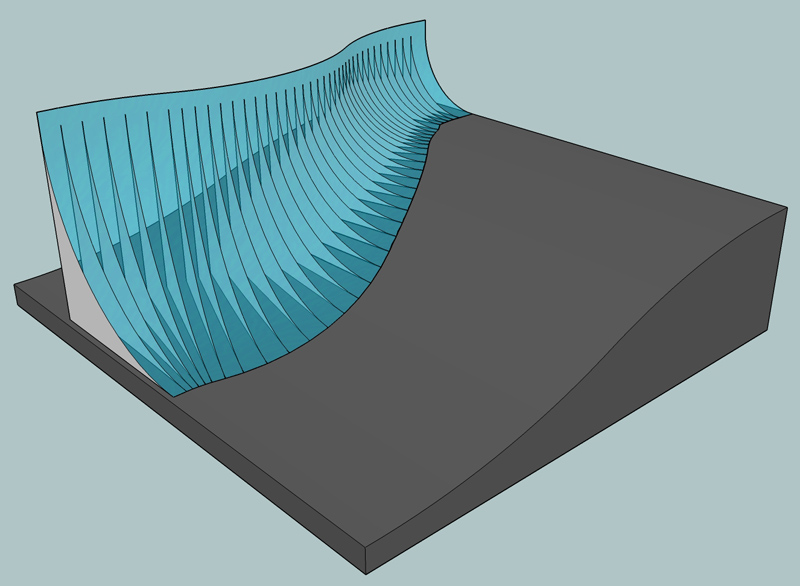
      fredoscale_example.jpg


      a basic situation to help explain my question 🙂

      dotdotdot

      1 Reply Last reply Balas Petikan 0
      • B Luar talian
        Blu3_Darren
        last edited by

        Hey people, I'm using sketchup version 7.

        But it seems failed to load this plugin.

        Does it require any special file to load it?

        1 Reply Last reply Balas Petikan 0
        • massimoM Luar talian
          massimo Moderator
          last edited by

          Hi Darren,
          from the very first post of this thread:
          @unknownuser said:

          It requires you also upgrade to LibFredo6 3.1b. See that post at http://www.sketchucation.com/forums/scf/viewtopic.php?f=180&t=17947#p144178.
          Maybe is this your problem?

          1 Reply Last reply Balas Petikan 0
          • B Luar talian
            Blu3_Darren
            last edited by

            @massimo said:

            Hi Darren,
            from the very first post of this thread:
            @unknownuser said:

            It requires you also upgrade to LibFredo6 3.1b. See that post at http://www.sketchucation.com/forums/scf/viewtopic.php?f=180&t=17947#p144178.
            Maybe is this your problem?

            Hey Massimo.
            I did download that and put it in to plugin folder.
            When I switching on my sketchup,
            Still, the errors with statements below appears:

            Error Loading File ZLoader__FredoScale.rb
            uninitialized constant Traductor::PluginError Loading File ZLoader__OnSurface.rb
            uninitialized constant Traductor::Plugin

            Any idea?

            1 Reply Last reply Balas Petikan 0
            • massimoM Luar talian
              massimo Moderator
              last edited by

              Check your plugin folder, do you have something like the picture below?
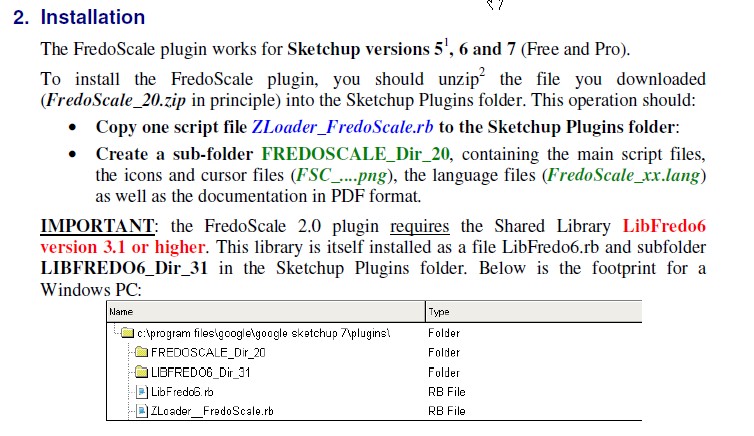

              ScreenHunter_01 Nov. 01 10.08.jpg

              1 Reply Last reply Balas Petikan 0
              • D Luar talian
                Daniel S
                last edited by

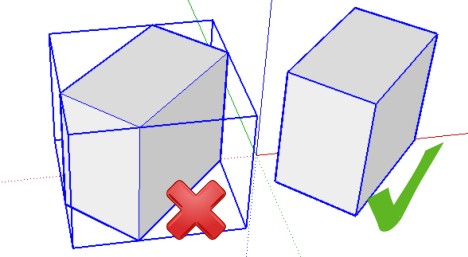
                When you make a group with SketchUp the bounding box will be always aligned to the axes.
                With this plugin you can choose the orientation of this bounding box but only for making deformations.
                Is it possible to make the script work to group the geometry with the selected user orientation box?

                Daniel S


                Gráfico1.jpg

                1 Reply Last reply Balas Petikan 0
                • fredo6F Luar talian
                  fredo6
                  last edited by

                  @daniel s said:

                  When you make a group with SketchUp the bounding box will be always aligned to the axes.
                  With this plugin you can choose the orientation of this bounding box but only for making deformations.
                  Is it possible to make the script work to group the geometry with the selected user orientation box?

                  Daniel S

                  Daniel,

                  It is probably possible, though a new function.
                  I have also seen a request from Pilou to generate the geometry of the bounding box.
                  Do you see any other function related to playing with Bounding boxes?

                  Fredo

                  1 Reply Last reply Balas Petikan 0
                  • D Luar talian
                    Daniel S
                    last edited by

                    I don´t see other function related to playing with Bounding boxes. But actually I use a lot this plugins to generate groups:

                    Explode2Groups.rb (TIG)
                    http://forums.sketchucation.com/viewtopic.php?p=15421

                    UnfoldPart1.rb (TIG) (It´s a very old script.. it was the first step for a unfold plugin but is very handy in lot of models)
                    "Select a group containing faces and choose 'Unfold Part 1' from the Plugins menu. The faces become separate groups(...)"

                    They are very usefull and very effective.. but in some situations you need to generate the groups not aligned to the axes.
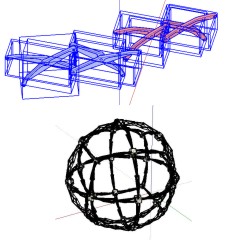
                    Gráfico1.jpg 😒

                    Daniel S

                    1 Reply Last reply Balas Petikan 0
                    • D Luar talian
                      Daniel S
                      last edited by

                      @xrok1 said:

                      Daniel, you could make a component instead of a group, then align axis.

                      Thank you xrok1.. I will try that.

                      Daniel S

                      1 Reply Last reply Balas Petikan 0
                      • X Luar talian
                        xrok1
                        last edited by

                        Daniel, you could make a component instead of a group, then align axis.

                        Fredo, it seems that the target scaling doesn't like small measures under and inch or two, sometimes i have to scale like 6" or so past so that i can then scale back to the place i originally intended. is this a known issue?

                        “There are three classes of people: those who see. Those who see when they are shown. Those who do not see.”

                        http://www.Twilightrender.com try it!

                        1 Reply Last reply Balas Petikan 0
                        • K Luar talian
                          Kuddl
                          last edited by

                          Hi Fredo,
                          I think that's a little bug in FredoScale!
                          "Make Groups and unique component"
                          Unique Component is OK, but groups remain unchanged.
                          Is this normal? 😳

                          Thanks for this great plugin! 👍

                          Kuddl

                          1 Reply Last reply Balas Petikan 0
                          • fredo6F Luar talian
                            fredo6
                            last edited by

                            @kuddl said:

                            Hi Fredo,
                            I think that's a little bug in FredoScale!
                            "Make Groups and unique component"
                            Unique Component is OK, but groups remain unchanged.
                            Is this normal? 😳

                            Thanks for this great plugin! 👍

                            Kuddl

                            In SU7, Groups are made unique only when you Edit them and change the geometry. So the concept is a little bit different.

                            Fredo

                            1 Reply Last reply Balas Petikan 0
                            • fredo6F Luar talian
                              fredo6
                              last edited by

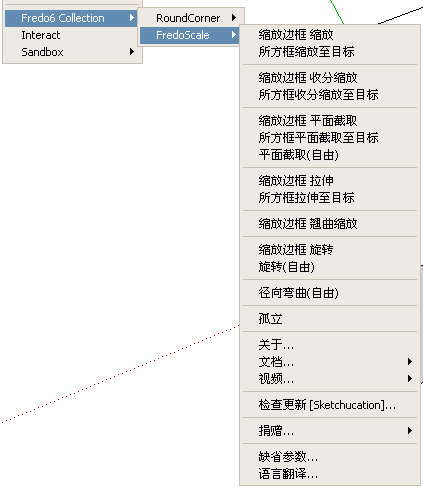
                              [Chinese version - 11 Nov 09 - 21:50 CET
                              Diweiman and the SuBAR_CLT team at SketchupBar have translated the script into Chinese.

                              See main post at http://forums.sketchucation.com/viewtopic.php?f=180&t=17948#p144180).
                              FredoScale 01.png

                              1 Reply Last reply Balas Petikan 0
                              • G Luar talian
                                gavvy
                                last edited by

                                😮 just fit me !

                                1 Reply Last reply Balas Petikan 0
                                • mariochaM Luar talian
                                  mariocha
                                  last edited by

                                  Just wanted to say that this plugin, amongs others, is really worth a donation, imho. 😄
                                  The parametric feature of the tools is so useful. !

                                  %(#008000)[Mario C.
                                  Every rule has exceptions, but some.]

                                  1 Reply Last reply Balas Petikan 0
                                  • fredo6F Luar talian
                                    fredo6
                                    last edited by

                                    [Update to Chinese version - 26 Nov 09 - 21:50 CET
                                    The SuBAR_CLT team at SketchupBar have updated the translation the script into Chinese.

                                    See main post at http://forums.sketchucation.com/viewtopic.php?f=180&t=17948#p144180).

                                    1 Reply Last reply Balas Petikan 0
                                    • J Luar talian
                                      jpurdy77
                                      last edited by

                                      unable to use plugin fredoscale on a mac, is there a help/ instructions on what to do.

                                      thanks

                                      1 Reply Last reply Balas Petikan 0
                                      • Chris FullmerC Luar talian
                                        Chris Fullmer
                                        last edited by

                                        Hi James, re-read the first post of this thread. It describes a lot. And it has a .pdf file that includes installation help.

                                        Or if you were a bit more specific, more specific help might returned too. Its unclear if you just can't find the downlaod file, can't figure out how to install it, or can't use the tools once its installed. Plenty of places people tend to get lost in the process.

                                        Chris

                                        Lately you've been tan, suspicious for the winter.
                                        All my Plugins I've written

                                        1 Reply Last reply Balas Petikan 0
                                        • J Luar talian
                                          jpurdy77
                                          last edited by

                                          ok, well i tried for a hour or so and im running a mac, the help is for windows or so it seems. downloaded it but cant seem to get it running in sketch up. must be something wrong, thus a mac step y step guid would help.

                                          James

                                          1 Reply Last reply Balas Petikan 0
                                          • Chris FullmerC Luar talian
                                            Chris Fullmer
                                            last edited by

                                            ok, so you're looking for installation help then, right? Where did you place the files? Perhaps you could take screenshot of the plugins folder if that is where youn put them?

                                            Chris

                                            Lately you've been tan, suspicious for the winter.
                                            All my Plugins I've written

                                            1 Reply Last reply Balas Petikan 0
                                            • 1
                                            • 2
                                            • 17
                                            • 18
                                            • 19
                                            • 20
                                            • 21
                                            • 56
                                            • 57
                                            • 19 / 57
                                            • First post
                                              Last post
                                            Buy SketchPlus
                                            Buy SUbD
                                            Buy WrapR
                                            Buy eBook
                                            Buy Modelur
                                            Buy Vertex Tools
                                            Buy SketchCuisine
                                            Buy FormFonts

                                            Advertisement