sketchucation logo sketchucation
    • 登入
    Oops, your profile's looking a bit empty! To help us tailor your experience, please fill in key details like your SketchUp version, skill level, operating system, and more. Update and save your info on your profile page today!
    🔌 Smart Spline | Fluid way to handle splines for furniture design and complex structures. Download

    [Plugin][$] FredoScale - v3.6a - 01 Apr 24


    已排程 已置頂 已鎖定 已移動 Plugins
    1.1k 貼文 345 Posters 2.4m 瀏覽 342 Watching
    正在載入更多貼文
    • 從舊到新
    • 從新到舊
    • 最多點贊
    回覆
    • 在新貼文中回覆
    登入後回覆
    此主題已被刪除。只有擁有主題管理權限的使用者可以查看。
    • K 離線
      kira
      最後由 編輯

      thank you

      1 條回覆 最後回覆 回覆 引用 0
      • S 離線
        SnowTiger
        最後由 編輯

        This is an Excellent Plugin that I would recommend to anyone and everyone who might ever need to create organic shapes such as boat sails and/or tensile roof structures and the like.

        It is extremely easy to use and works very well.
        The fact that it is Free is also amazing because it certainly does have value and will save you tons of time regardless what you are trying to create with it.

        Thanks again so much for sharing this excellent Plugin as well as for continuing to make improvements/updates.
        😎

        1 條回覆 最後回覆 回覆 引用 0
        • S 離線
          sags
          最後由 編輯

          thanks...This is an Excellent Plugin. 👍

          1 條回覆 最後回覆 回覆 引用 0
          • R 離線
            Rosta
            最後由 編輯

            what should I do - look at the attachment, thanks for an answer
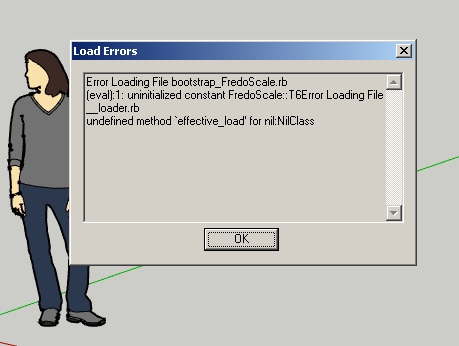

            after  the start of SketchUp

            1 條回覆 最後回覆 回覆 引用 0
            • Dave RD 離線
              Dave R
              最後由 編輯

              Looks like a bad install.

              Show us a screen shot of your Plugins folder as well as one showing the contents of the folder called FREDOSCALE_Dir_22. It appears you haven't got _loader.rb inside that folder. If you didn't get that one in there, you probably have others you didn't get in there, too. Follow the instructions in the first post of this thread and take a look at the sticky post about installing zipped plugins.

              Etaoin Shrdlu

              %

              (THERE'S NO PLACE LIKE)

              G28 X0.0 Y0.0 Z0.0

              M30

              %

              1 條回覆 最後回覆 回覆 引用 0
              • R 離線
                Rosta
                最後由 編輯

                Thanks, I did a new install and now it is ok. But I have another problem. I'd like to have Toolbar of FredoScale. I have the check of FredoScale ON in View -> Toolbars but I have nothing. Thanks

                1 條回覆 最後回覆 回覆 引用 0
                • Dave RD 離線
                  Dave R
                  最後由 編輯

                  Perhaps your install still isn't correct. Did the toolbar icons get extracted to the right folder? Did you check the box for FredoScale under Extensions?

                  Etaoin Shrdlu

                  %

                  (THERE'S NO PLACE LIKE)

                  G28 X0.0 Y0.0 Z0.0

                  M30

                  %

                  1 條回覆 最後回覆 回覆 引用 0
                  • R 離線
                    Rosta
                    最後由 編輯

                    I am a beginner for setup of SU. I do know what I did but now I have everything. Thanksssss

                    1 條回覆 最後回覆 回覆 引用 0
                    • K 離線
                      Kgon
                      最後由 編輯

                      Hi there guys.
                      Well i'm having some problems with this set of tools...mainly with the twisting tool...everything seems fine 'till i give the last click to finish the "command"...immediately i get a bugsplat, no matter the shape even with a single cube it crashes 😢 . Im using sketchup 8 and windows 7 64 bit.
                      Any clue? Thanks in advise

                      1 條回覆 最後回覆 回覆 引用 0
                      • fredo6F 離線
                        fredo6
                        最後由 編輯

                        @kgon said:

                        Hi there guys.
                        Well i'm having some problems with this set of tools...mainly with the twisting tool...everything seems fine 'till i give the last click to finish the "command"...immediately i get a bugsplat, no matter the shape even with a single cube it crashes 😢 . Im using sketchup 8 and windows 7 64 bit.
                        Any clue? Thanks in advise

                        It may come from a conflict with another plugin: Podium (some versions), Matchbox, Sun Position, may be others.
                        Did you try the Bend functions and do you get a bugsplat too.

                        Fredo

                        1 條回覆 最後回覆 回覆 引用 0
                        • pilouP 離線
                          pilou
                          最後由 編輯

                          Maybe you must post some file skp for more helps 😄 (save as V6)
                          And one image before / after 😄

                          Frenchy Pilou
                          Is beautiful that please without concept!
                          My Little site :)

                          1 條回覆 最後回覆 回覆 引用 0
                          • A 離線
                            alexpacio
                            最後由 編輯

                            few days is that I do not work anymore fredoscale.

                            fredoscale using the center of the object (CTRL), I scale the entire object and not expanding the center.
                            What has happened?
                            What should I change?

                            thanks

                            Solved.
                            Updated files and everything ok

                            thanks anyway 😍 😍 😍

                            1 條回覆 最後回覆 回覆 引用 0
                            • A 離線
                              alexpacio
                              最後由 編輯

                              @unknownuser said:

                              Maybe you must post some file skp for more helps 😄 (save as V6)
                              And one image before / after 😄

                              My screen capture

                              https://www.dropbox.com/s/hvahftfqaf3d6f6/scale 1.jpg

                              https://www.dropbox.com/s/68rq6gsyc26plhy/Scale 1b.jpg

                              https://www.dropbox.com/s/fae0p3kc5p46tuf/Scale 2.jpg

                              not scale

                              final result

                              https://www.dropbox.com/s/hvahftfqaf3d6f6/scale 1.jpg

                              1 條回覆 最後回覆 回覆 引用 0
                              • GaieusG 離線
                                Gaieus
                                最後由 編輯

                                Roberto, these DB images do not load here this way (it actually links to a page where they are inserted). Could you rather attach them to your post?

                                Gai...

                                1 條回覆 最後回覆 回覆 引用 0
                                • A 離線
                                  alexpacio
                                  最後由 編輯

                                  @gaieus said:

                                  Roberto, these DB images do not load here this way (it actually links to a page where they are inserted). Could you rather attach them to your post?

                                  Sorry,

                                  I solved it.

                                  I reinstalled and fredoscale libfredo and now everything is ok.

                                  Thanks anyway. 👍 👍

                                  compliments for the speed of responses. This forum is a really quick. 😄 😄

                                  sorry for my English (using Google translate) but my only language is Italian. 👊 👊

                                  1 條回覆 最後回覆 回覆 引用 0
                                  • GaieusG 離線
                                    Gaieus
                                    最後由 編輯

                                    We have an Italian subforum at the bottom (I have added you now). It's not the busiest forum but still, if you get stuck, there are a couple of Italians here...

                                    Gai...

                                    1 條回覆 最後回覆 回覆 引用 0
                                    • A 離線
                                      alfabenedict
                                      最後由 編輯

                                      Thank you! This SketchUp Bending rocks! 😎

                                      1 條回覆 最後回覆 回覆 引用 0
                                      • L 離線
                                        local
                                        最後由 編輯

                                        Hi!
                                        I have a little problem with this plugin. If the stretching device provided by the component or group, then the attribute does not change the size.

                                        Sorry, this turned out to google.

                                        1 條回覆 最後回覆 回覆 引用 0
                                        • Dave RD 離線
                                          Dave R
                                          最後由 編輯

                                          I think I understand what you wrote, local, but it isn't entirely clear.

                                          It is true that if you stretch a component or group, you only change the appearance of that entity but it doesn't change the definition not does it change any other instances of the component in the model. This happens with the native Scale tool as well. To change the definition (attributes) you need to open the component or group for editing and modify the geometry inside.

                                          Etaoin Shrdlu

                                          %

                                          (THERE'S NO PLACE LIKE)

                                          G28 X0.0 Y0.0 Z0.0

                                          M30

                                          %

                                          1 條回覆 最後回覆 回覆 引用 0
                                          • thomthomT 離線
                                            thomthom
                                            最後由 編輯

                                            Could it be that he's referring to Dynamic Components?

                                            Thomas Thomassen — SketchUp Monkey & Coding addict
                                            List of my plugins and link to the CookieWare fund

                                            1 條回覆 最後回覆 回覆 引用 0
                                            • 1
                                            • 2
                                            • 27
                                            • 28
                                            • 29
                                            • 30
                                            • 31
                                            • 56
                                            • 57
                                            • 29 / 57
                                            • 第一個貼文
                                              最後的貼文
                                            Buy SketchPlus
                                            Buy SUbD
                                            Buy WrapR
                                            Buy eBook
                                            Buy Modelur
                                            Buy Vertex Tools
                                            Buy SketchCuisine
                                            Buy FormFonts

                                            Advertisement



