sketchucation logo sketchucation
    • 登入
    Oops, your profile's looking a bit empty! To help us tailor your experience, please fill in key details like your SketchUp version, skill level, operating system, and more. Update and save your info on your profile page today!
    🔌 Smart Spline | Fluid way to handle splines for furniture design and complex structures. Download

    [Plugin][$] FredoScale - v3.6a - 01 Apr 24


    已排程 已置頂 已鎖定 已移動 Plugins
    1.1k 貼文 345 Posters 2.4m 瀏覽 342 Watching
    正在載入更多貼文
    • 從舊到新
    • 從新到舊
    • 最多點贊
    回覆
    • 在新貼文中回覆
    登入後回覆
    此主題已被刪除。只有擁有主題管理權限的使用者可以查看。
    • fredo6F 離線
      fredo6
      最後由 編輯

      @narayan said:

      I am using v3.7b (confirmed by using the Window>LibFredo6 settings...>About menu). Yet I do not see the Active options at statup section at all. It only has four sections: Plugin configuration, inference for lines, Check for update and Palette configuration. It does not have the two sections shown in Fredo6's screenshot.

      The default parameter is in FredoScale, not LibFredo6. So menu Fredo6 Collection > FredoScale > Default Parameters...

      Fredo

      1 條回覆 最後回覆 回覆 引用 0
      • GaieusG 離線
        Gaieus
        最後由 編輯

        Fredo, it is excellent! Thanks! I did not even know that (true my toolbars are horizontal).

        I know you always build in many customizable parameters - maybe too much sometimes so we cannot always remember (but of course, the "too much" here does not mean any critics - just my own opinion on my own laziness and superficial reading the manuals).
        😄

        Gai...

        1 條回覆 最後回覆 回覆 引用 0
        • massimoM 離線
          massimo Moderator
          最後由 編輯

          @unknownuser said:

          Fredo, it is excellent! Thanks! I did not even know that (true my toolbars are horizontal).

          Also with horizontal toolbar it takes less space. 😉


          Cattura_2.JPG

          1 條回覆 最後回覆 回覆 引用 0
          • fredo6F 離線
            fredo6
            最後由 編輯

            @gaieus said:

            I know you always build in many customizable parameters - maybe too much sometimes so we cannot always remember (but of course, the "too much" here does not mean any critics - just my own opinion on my own laziness and superficial reading the manuals).
            😄

            Actually this was a request from a user!
            It's always a good idea to have a look at the Default Parameters section, as this is very often how I customize things which are undecidable.

            Fredo

            1 條回覆 最後回覆 回覆 引用 0
            • N 離線
              narayan
              最後由 編輯

              Thanks Fredo!

              That solution worked well. I hope SU8 does not let the toolbars escape once again (the Fredo6 collection toolbar seems to play truant often.)

              BTW it is confusing to have window settings in two different menus:

              • Tools>Fredo6 collection>plugInName>Default parameters and
              • Windows>LibFredo6 settings > Default parameters

              TIG, thanks for the tip; but I already follow what you described (that is what I posted earlier: I undock the toolbar; fold it in a two-column configuration, and dock it again.)

              I actually described three possibly related problems.
              One of them is resolved thanks to the settings.

              The other two problems which are not yet resolved are-

              1. The Fredo6 toolbar snaps back to a three-column configuration on its own.
              2. ALL the toolbars escape their docking positions and pile up vertically (each toolbar takes up one line on its own). Then I have to drag each toolbar back to the top or left of the screen. This is a huge time-waster.

              In fact, I face the toolbar problem even without restarting SU8 OR restarting the PC: It simply happens even while I am working SU8. All of a sudden the toolbars escape and occupy the top of the screen, leaving very small space for the canvas area.

              I mentioned all three problems here because I am not sure whether the problem lies in SU8 or Fredo's plugin system. I somehow feel they are related.

              Thanks.

              1 條回覆 最後回覆 回覆 引用 0
              • COSEDIMARCOC 離線
                COSEDIMARCO
                最後由 編輯

                Updated version of the Italian Translation

                Italian Translation Updated version

                [floatl:2wjeiugn]COSEDIMARCO - The Website[/floatl:2wjeiugn]

                1 條回覆 最後回覆 回覆 引用 0
                • dereiD 離線
                  derei
                  最後由 編輯

                  @narayan said:

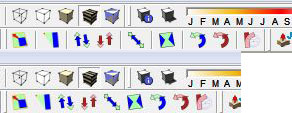
                  Excuse me, I noticed some "strange looking buttons on the toolbar image posted by narayan.
                  I marked them with red in the image, please tell me what are they and where I can find them?

                  strange toolbar.jpg
                  Thank you.

                  DESIGNER AND ARTIST DEREI.UK

                  1 條回覆 最後回覆 回覆 引用 0
                  • GaieusG 離線
                    Gaieus
                    最後由 編輯

                    The top left one is Pen tools by Rich:
                    http://forums.sketchucation.com/viewtopic.php?t=37359

                    (I don't know the others either)


                    Rather messy toolbars however. 😒

                    Gai...

                    1 條回覆 最後回覆 回覆 引用 0
                    • L 離線
                      Lorelalala
                      最後由 編輯

                      Thank you, Fredo!

                      1 條回覆 最後回覆 回覆 引用 0
                      • T 離線
                        Tinygrasshopper
                        最後由 編輯

                        Hi!!
                        First of all : Muchas gracias! Super plugin!
                        Now... I have somme trouble with the plugin. Almost everything works fine, but "PlanarShear" and "Radial Bend" give me a bugsplat immediately, no matter the size or the form of the component, even with a single line ❓

                        I tryed everything i found on the forum, i updated the plugin, i updated de Fredo Lybrary, etc.

                        The bugsplat gives me : SketchUpP2JD3HV5.dmp, OG5T2D56.xml, SketchupUndo0.log
                        I work on Windows XP, SU 7.0.11018, 3Go of Ram, Intel Dual-Core E5300 (I know my PC s***ks, but is not mine, is my firm's).

                        Any ideas? Thanks in advance!

                        1 條回覆 最後回覆 回覆 引用 0
                        • fredo6F 離線
                          fredo6
                          最後由 編輯

                          @tinygrasshopper said:

                          Hi!!
                          First of all : Muchas gracias! Super plugin!
                          Now... I have somme trouble with the plugin. Almost everything works fine, but "PlanarShear" and "Radial Bend" give me a bugsplat immediately, no matter the size or the form of the component, even with a single line ❓

                          I tryed everything i found on the forum, i updated the plugin, i updated de Fredo Lybrary, etc.

                          The bugsplat gives me : SketchUpP2JD3HV5.dmp, OG5T2D56.xml, SketchupUndo0.log
                          I work on Windows XP, SU 7.0.11018, 3Go of Ram, Intel Dual-Core E5300 (I know my PC s***ks, but is not mine, is my firm's).

                          Any ideas? Thanks in advance!

                          When do you get the blug splat

                          • when you select and start FredoScale
                          • When you generate the transformation.
                            Also, could you open the Ruby console, to see if you see something displayed just before you get the bug splat.
                            Thanks to be more accurate on the conditions

                          Fredo

                          1 條回覆 最後回覆 回覆 引用 0
                          • Rich O BrienR 離線
                            Rich O Brien Moderator
                            最後由 編輯

                            Thanks Fredo 👍

                            Download the free D'oh Book for SketchUp 📖

                            1 條回覆 最後回覆 回覆 引用 0
                            • thomthomT 離線
                              thomthom
                              最後由 編輯

                              That is a really nice feature addon. 👍

                              Thomas Thomassen — SketchUp Monkey & Coding addict
                              List of my plugins and link to the CookieWare fund

                              1 條回覆 最後回覆 回覆 引用 0
                              • J 離線
                                jorge2011
                                最後由 編輯

                                Thank you very much Mr. Fred for this new update. It is very good.

                                If possible, the next update adds the option to change the color and size of the nodes in the boxes?
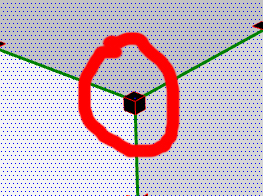
                                Box.jpg

                                and switch on or off the visualization of the axes
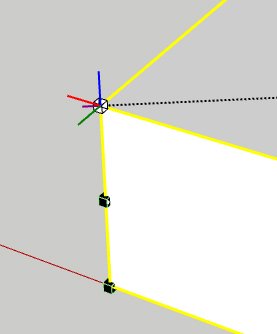
                                Axes.jpg

                                thank you very much

                                1 條回覆 最後回覆 回覆 引用 0
                                • fredo6F 離線
                                  fredo6
                                  最後由 編輯

                                  NEW RELEASE: FredoScale 2.2a- 24 Jul 11

                                  This release integrate a feature of Collapsing handles when dimensions are small on screen.

                                  This was suggested in a request by Cunningham.

                                  Kyyu also produced a plugin "Simple Scale Tool Handles" for the standard Scale tool.

                                  The principle is to hide the handles on corners and edges when the dimension of a side appears too small on the screen (like this is usually the case for boards or for timbers). However, when you zoom in, all handles will progressively reappear.

                                  By default a dimension is considered "small on screen" if its size appears to be under 30 pixels in the current view. You can change this value in the Default Parameters dialog box. Note that entering a value of 0 will disable the feature, i.e. all handles will always appear.
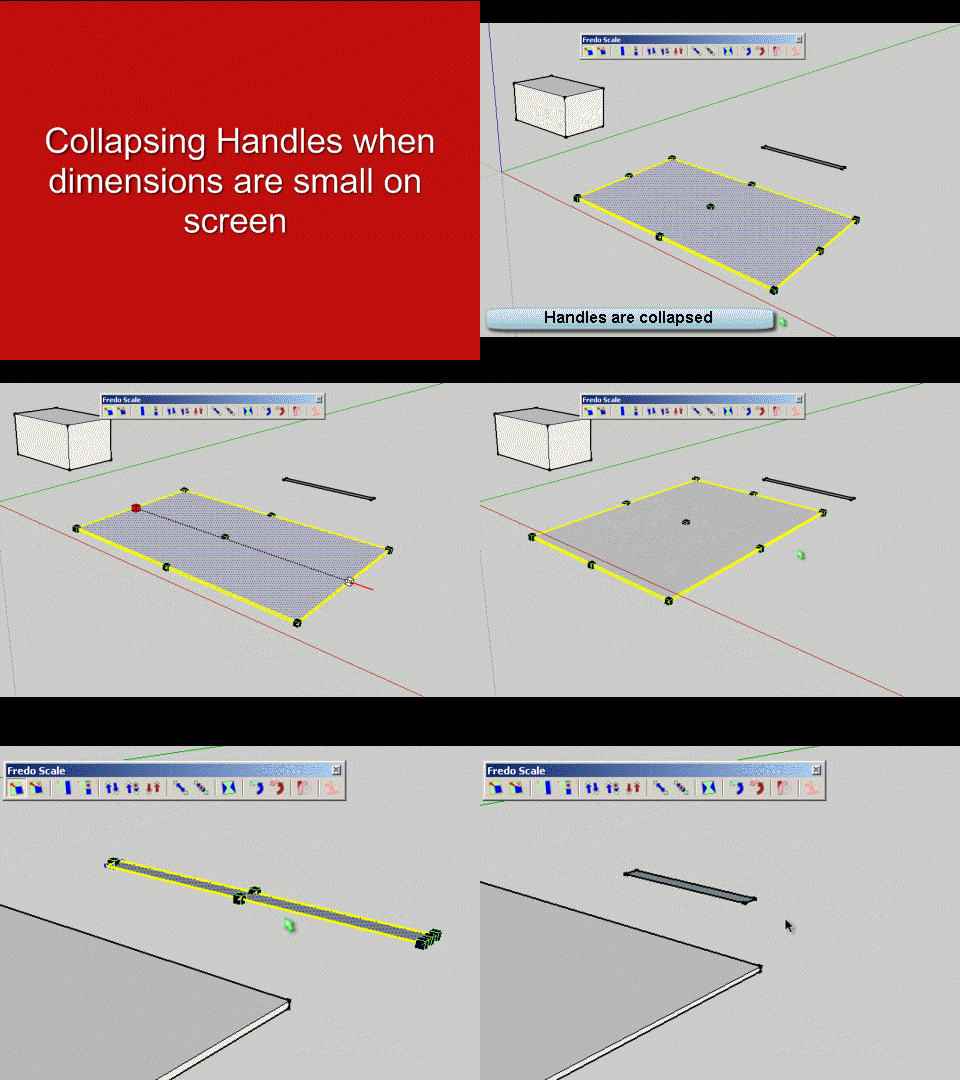
                                  FredoScale Collapse Handles.gif
                                  Note also that as of this release, the Dice option (activated by F4) is active by default

                                  Please see main post for download

                                  Fredo

                                  1 條回覆 最後回覆 回覆 引用 0
                                  • dereiD 離線
                                    derei
                                    最後由 編輯

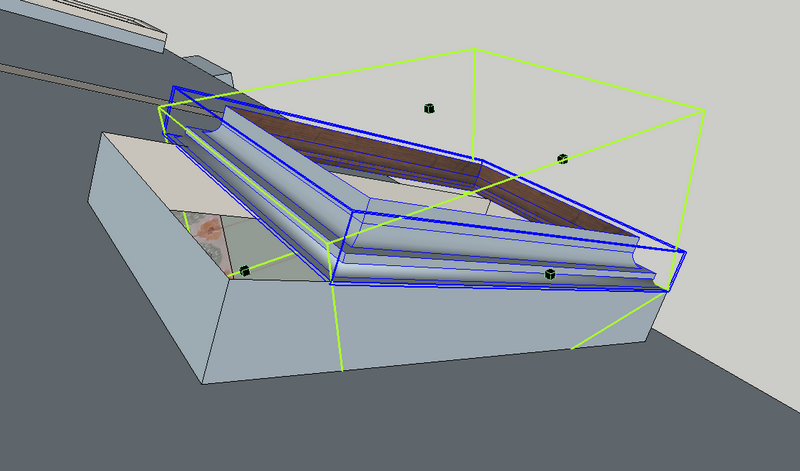
                                    I have two major problems with the plugin: I can't see the new scaling icon on toolbar and I could not find it on settings webdialog.
                                    Second problem is shown in the images below. It seems that stretching is made accordingly with global axis, not component's orientation.
                                    I have the last plugin and LibFredo3.7

                                    fredoscale1.png


                                    fredoscale2.png

                                    DESIGNER AND ARTIST DEREI.UK

                                    1 條回覆 最後回覆 回覆 引用 0
                                    • Rich O BrienR 離線
                                      Rich O Brien Moderator
                                      最後由 編輯

                                      Hi Fredo,

                                      I notice that this latest release isn't found via the 'Check for Update' feature within SU?

                                      Download the free D'oh Book for SketchUp 📖

                                      1 條回覆 最後回覆 回覆 引用 0
                                      • fredo6F 離線
                                        fredo6
                                        最後由 編輯

                                        @unknownuser said:

                                        I have two major problems with the plugin: I can't see the new scaling icon on toolbar and I could not find it on settings webdialog.
                                        Second problem is shown in the images below. It seems that stretching is made accordingly with global axis, not component's orientation.
                                        I have the last plugin and LibFredo3.7
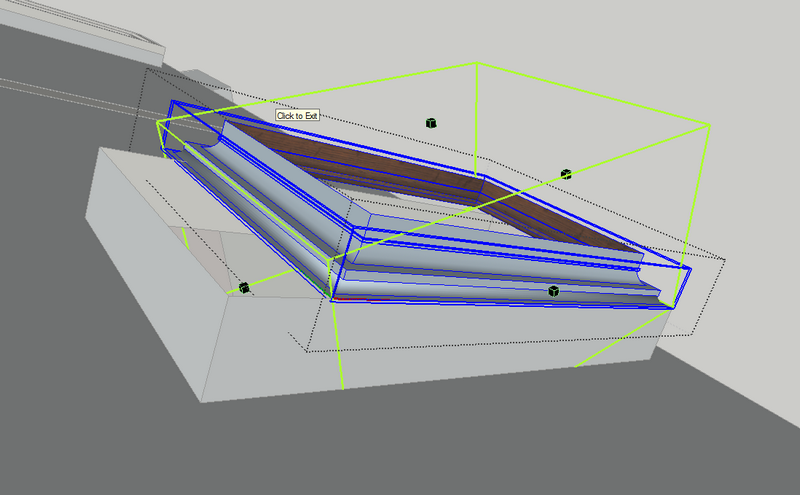
                                        1. There is no new scaling icon

                                        2. you need first to orientate the scaling box. Just click on the long edge of your component.

                                        Fredo

                                        1 條回覆 最後回覆 回覆 引用 0
                                        • fredo6F 離線
                                          fredo6
                                          最後由 編輯

                                          @unknownuser said:

                                          Hi Fredo,

                                          I notice that this latest release isn't found via the 'Check for Update' feature within SU?

                                          Rich,

                                          You are right. Thanks.
                                          I just published the notice for the version 2.2a.

                                          Fred

                                          1 條回覆 最後回覆 回覆 引用 0
                                          • dereiD 離線
                                            derei
                                            最後由 編輯

                                            @unknownuser said:

                                            1. There is no new scaling icon

                                            This post mislead me http://forums.sketchucation.com/viewtopic.php?f=323&t=17948&p=344976#p343978 In the image are two scaling icons on toolbar

                                            @unknownuser said:

                                            1. you need first to orientate the scaling box. Just click on the long edge of your component.

                                            Fredo

                                            Strange, I haven't done that before... is it a new feature? Also it is possible that I never was into position to stretch rotated components 😄
                                            Thanks for the tip. What about components that don't have edges collinear with axis orientation, how do we orientate the scaling box then?

                                            DESIGNER AND ARTIST DEREI.UK

                                            1 條回覆 最後回覆 回覆 引用 0
                                            • 1
                                            • 2
                                            • 12
                                            • 13
                                            • 14
                                            • 15
                                            • 16
                                            • 56
                                            • 57
                                            • 14 / 57
                                            • 第一個貼文
                                              最後的貼文
                                            Buy SketchPlus
                                            Buy SUbD
                                            Buy WrapR
                                            Buy eBook
                                            Buy Modelur
                                            Buy Vertex Tools
                                            Buy SketchCuisine
                                            Buy FormFonts

                                            Advertisement