sketchucation logo sketchucation
    • Conectarse
    Oops, your profile's looking a bit empty! To help us tailor your experience, please fill in key details like your SketchUp version, skill level, operating system, and more. Update and save your info on your profile page today!
    🔌 Smart Spline | Fluid way to handle splines for furniture design and complex structures. Download

    [Plugin][$] FredoScale - v3.6a - 01 Apr 24


    Programado Fijo Cerrado Movido Plugins
    1.1k Mensajes 345 Posters 2.4m Visitas 342 Watching
    Cargando más mensajes
    • Más antiguo a más nuevo
    • Más nuevo a más antiguo
    • Mayor número de Votos
    Responder
    • Responder como tema
    Accede para responder
    Este tema ha sido borrado. Solo los usuarios que tengan privilegios de administración de temas pueden verlo.
    • erikBE Desconectado
      erikB
      Última edición por

      great pluging Fredo !!
      Much appriciated !
      erikB

      1 Respuesta Última respuesta Responder Citar 0
      • jeff hammondJ Desconectado
        jeff hammond
        Última edición por

        i've already used bend and twist for a real project.. (and i mean bend and twist were the main tools used.. other than that, i only used rectangle and push/pull to create the basic slabs)

        it's a proposal for a skateboard-able sculpture and i'm hoping to build a few of these types of things in NYC.

        http://homepage.mac.com/jeffhammond/.Public/scf/bendtwist1.jpg

        http://homepage.mac.com/jeffhammond/.Public/scf/bendtwist2.jpg

        this new set of tools makes exploring shapes such as these very fast and intuitive and i can modify/develop the idea without the computer getting in the way.. thanks again fredo!

        dotdotdot

        1 Respuesta Última respuesta Responder Citar 0
        • K Desconectado
          kwistenbiebel
          Última edición por

          @princedragoncok said:

          Had some fun with twist. ...

          I love that vid, Prince ! 👍

          1 Respuesta Última respuesta Responder Citar 0
          • D Desconectado
            Daniel S
            Última edición por

            I dont know if its difficult to add more features to this plugin. But a good option for the bend will be to press CTRL and the plugin bend symmetrically around the center.

            Now is possible this:

            Bend.gif

            and this is the idea:

            Symmetric Bend.gif

            Daniel S

            1 Respuesta Última respuesta Responder Citar 0
            • fredo6F Desconectado
              fredo6
              Última edición por

              @unknownuser said:

              fredo, would it be possible to allow users to enter a distance in the VCB once the bend tool has been anchored ie: i select a group, activate the bend tool, now while im dragging the purple line to indicate the extent of the bended area, it would be nice if this line snapped to axis and i could enter a distance for this line as to match the geometry to an existing curve, given that i know the length of the curve i am matching the geometry to

              Interesting idea. I think this is feasible, and I'll try to include it in a next version.

              Fredo

              1 Respuesta Última respuesta Responder Citar 0
              • fredo6F Desconectado
                fredo6
                Última edición por

                @daniel s said:

                I dont know if its difficult to add more features to this plugin. But a good option for the bend will be to press CTRL and the plugin bend symmetrically around the center.
                Daniel S

                Daniel,

                The difficulty is always to make sure I do not break anything.
                Another good idea, but requires a little bit of work and testing. I'll see what I can do.

                Fredo

                1 Respuesta Última respuesta Responder Citar 0
                • W Desconectado
                  wrecknball
                  Última edición por

                  Fredo,

                  I popped these into my plugins folder and when I open SU I get this error. Quite possible I did not install them in the correct place.

                  Any ideas? Anyone?

                  Thanks.
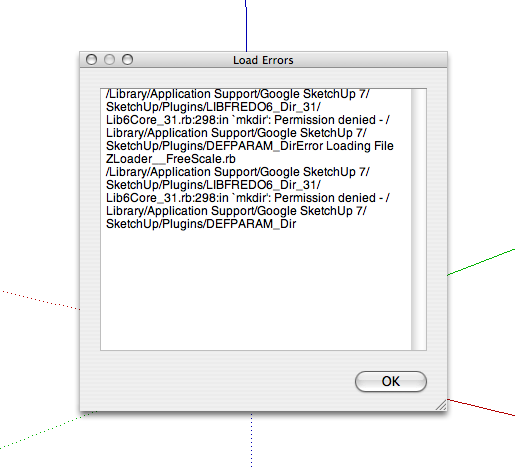

                  Picture 1.png

                  1 Respuesta Última respuesta Responder Citar 0
                  • W Desconectado
                    wrecknball
                    Última edición por

                    Here are the file locations...


                    Picture 2.png

                    1 Respuesta Última respuesta Responder Citar 0
                    • fredo6F Desconectado
                      fredo6
                      Última edición por

                      @wrecknball said:

                      Fredo,

                      I popped these into my plugins folder and when I open SU I get this error. Quite possible I did not install them in the correct place.

                      Any ideas? Anyone?

                      Thanks.

                      Just create manually a directory DEFPARAM_Dirin your Sketchup Plugins folder. Then restart Sketchup and it should work.
                      On Mac, it seems that in some situations, the system does not give permission to create folders via script.

                      Fredo

                      PS: Please respect the spelling of the directory name

                      1 Respuesta Última respuesta Responder Citar 0
                      • W Desconectado
                        wrecknball
                        Última edición por

                        Excuse my ignorance. What do you mean create a directory? A new folder to put them in?

                        Thanks for the quick reply.

                        1 Respuesta Última respuesta Responder Citar 0
                        • fredo6F Desconectado
                          fredo6
                          Última edición por

                          @wrecknball said:

                          Excuse my ignorance. What do you mean create a directory? A new folder to put them in?

                          Thanks for the quick reply.
                          Just create an empty folder with the name DEFPARAM_Dirin the Sketchup Plugins folder.
                          Do not touch the other files and folders, your installation is OK.

                          The script should normally create the folder DEFPARAM_Dir automatically, but it does not seem to have access rights to do so.

                          1 Respuesta Última respuesta Responder Citar 0
                          • W Desconectado
                            wrecknball
                            Última edición por

                            Thanks Fredo. Still waiting on my !@#$%^& admin person to come and type her password in. uggghhh.

                            1 Respuesta Última respuesta Responder Citar 0
                            • jeff hammondJ Desconectado
                              jeff hammond
                              Última edición por

                              @unknownuser said:

                              @wrecknball said:

                              Fredo,

                              I popped these into my plugins folder and when I open SU I get this error. Quite possible I did not install them in the correct place.

                              Any ideas? Anyone?

                              Thanks.

                              On Mac, it seems that in some situations, the system does not give permission to create folders via script.

                              i noticed by shawn's screenshots that he's using tiger (osx 10.4.xx) so i tried installing freescale on a laptop of mine that has tiger & SU 6.4.120 to see if that was the issue.

                              it's not.. the directory was still created automatically.. i'm now wondering what can be the cause.

                              Shawn, are you working from an admin account? (you can check by going System Preferences/System/Accounts.. your user name will say 'Admin' underneath it.)

                              [EDIT] -- ok, so i just removed the directory from my plugins folder and then logged on as a guest user.. when i tried starting sketchup from the guest account, i received the same message as shawn.. os x will not allow the directory to be created unless you have sufficient permissions to do so..

                              and yes, after manually placing a folder named DEFPARAM_Dir in the sketchup plugins folder, everything worked as expected.

                              (all of which required me to enter the system password along the way (ie- i had to enter the password in order to move the DEFPARAM_Dir into the sketchup plugins folder etc.)

                              dotdotdot

                              1 Respuesta Última respuesta Responder Citar 0
                              • fredo6F Desconectado
                                fredo6
                                Última edición por

                                Security is always an issue, because the plugins are installed in a directory assimilated to the System zone. This is the same on Windows Vista, where the system even creates shadow folders elsewhere.

                                My questions is then: how do you copy the script files.
                                Maye I should include an empty DEFPARAM_Dir in the distribution?

                                Fredo

                                1 Respuesta Última respuesta Responder Citar 0
                                • jeff hammondJ Desconectado
                                  jeff hammond
                                  Última edición por

                                  @unknownuser said:

                                  Security is always an issue, because the plugins are installed in a directory assimilated to the System zone. This is the same on Windows Vista, where the system even creates shadow folders elsewhere.

                                  My questions is then: how do you copy the script files.
                                  Maye I should include an empty DEFPARAM_Dir in the distribution?

                                  Fredo

                                  well, no.. that wouldn't work either.. you still couldn't move the files around without admin permissions..

                                  in shawn's case for instance, his boss(?) already had to enter her password for him to move the freescale and libfredo files into place.. unfortunately for him, she walked away before realizing he needed another folder in there (but if she were moving things around via her admin account, the directory would have been created automatically)

                                  she can however give him/his account permission to install apps etc. while still being the main administrator for the computer but apparently, that's not the case.. it's like my girlfriend's work computer(windows).. all she can do with it is run the apps that are already on it, browse the web/email etc.. nothing else though

                                  [edit] and i should add -- when logged into OS X with a non admin account, there is no user/library/application support/google sketchup

                                  so, shawn couldn't have even gone in that direction either..

                                  if you're going to be putting anything other than simple files or files that you have permissions to use on os x, you need to have root level control or admin approval to do so.

                                  dotdotdot

                                  1 Respuesta Última respuesta Responder Citar 0
                                  • T Desconectado
                                    torben.wadlinger
                                    Última edición por

                                    But you can create a personal plugin-folder under ~/Library/Application Support/Sketchup X and throw all your plug-ins into. SU will recognize that folder when starting up. And voila, no trouble with permissions!

                                    1 Respuesta Última respuesta Responder Citar 0
                                    • W Desconectado
                                      wrecknball
                                      Última edición por

                                      @unknownuser said:

                                      by torben.wadlinger on Tue Apr 07, 2009 2:02 pm

                                      But you can create a personal plugin-folder under ~/Library/Application Support/Sketchup X and throw all your plug-ins into. SU will recognize that folder when starting up. And voila, no trouble with permissions!

                                      eeeeeeeeeexcept I need permissions to modify the app support folder. meh.

                                      Thanks again for the timesaving plugins Fredo. maybe one day I will be able to use them.... 😎

                                      1 Respuesta Última respuesta Responder Citar 0
                                      • X Desconectado
                                        xrok1
                                        Última edición por

                                        i used to make a c:\progs directory and install stuff there instead, less hastle. or at work where we weren't allowed to install anything i found that you could use c:\temp without problems 😄
                                        of course i'm not talking about plugins i'm talking about the whole program (then of course plugins by association). 😉

                                        “There are three classes of people: those who see. Those who see when they are shown. Those who do not see.”

                                        http://www.Twilightrender.com try it!

                                        1 Respuesta Última respuesta Responder Citar 0
                                        • TIGT Desconectado
                                          TIG Moderator
                                          Última edición por

                                          Beware of using C:\Temp... It could be unexpectedly emptied by an admin's batch file...

                                          TIG

                                          1 Respuesta Última respuesta Responder Citar 0
                                          • jeff hammondJ Desconectado
                                            jeff hammond
                                            Última edición por

                                            @unknownuser said:

                                            And the other thing I hope you will add in a next version is allowing for the Bend tool to align itself to a plane, without having to use a surface. That is possible with the regular Rotate tool, where you orbit the scene so it aligns itself to a particular plane. That doesn't work with your Bend tool though.
                                            My workaround is to draw a temporary surface so I can align the tool how I want it to.

                                            hey Coen..

                                            try the arrow keys.. up will lock it to blue.. right - red.. left - green.. down reset

                                            [edit] by lock i mean -- you don't have to hold the arrow key down to maintain its orientation.. just push the left arrow once and it will stay green no matter how you orbit the model around.. it's quite nice


                                            dotdotdot

                                            1 Respuesta Última respuesta Responder Citar 0
                                            • 1
                                            • 2
                                            • 9
                                            • 10
                                            • 11
                                            • 12
                                            • 13
                                            • 56
                                            • 57
                                            • 11 / 57
                                            • First post
                                              Last post
                                            Buy SketchPlus
                                            Buy SUbD
                                            Buy WrapR
                                            Buy eBook
                                            Buy Modelur
                                            Buy Vertex Tools
                                            Buy SketchCuisine
                                            Buy FormFonts

                                            Advertisement