[Plugin Library] LibFredo6 - v16.3b - 21 Oct 26



-
Here is my error message:
Error Loading File Fredo6_!LibFredo6.rb Error: #<NameError: uninitialized constant Traductor> c:/users/mcesak/appdata/roaming/sketchup/sketchup 2017/sketchup/plugins/fredo6_!libfredo6/top_libfredo6.rbe:362:in `startup' C:/Users/mcesak/AppData/Roaming/SketchUp/SketchUp 2017/SketchUp/Plugins/Fredo6_!LibFredo6.rb:143:in `process' C:/Users/mcesak/AppData/Roaming/SketchUp/SketchUp 2017/SketchUp/Plugins/Fredo6_!LibFredo6.rb:151:in `<module:LibFredo6_Loader>' C:/Users/mcesak/AppData/Roaming/SketchUp/SketchUp 2017/SketchUp/Plugins/Fredo6_!LibFredo6.rb:31:in `<top (required)>' Error Loading File Fredo6_Curviloft.rb Error: #<TypeError: can't convert nil into an exact number> C:/Users/mcesak/AppData/Roaming/SketchUp/SketchUp 2017/SketchUp/Plugins/Fredo6_!LibFredo6.rb:161:in `-' C:/Users/mcesak/AppData/Roaming/SketchUp/SketchUp 2017/SketchUp/Plugins/Fredo6_!LibFredo6.rb:161:in `<top (required)>' C:/Program Files/SketchUp/SketchUp 2017/Tools/RubyStdLib/rubygems/core_ext/kernel_require.rb:54:in `require' C:/Program Files/SketchUp/SketchUp 2017/Tools/RubyStdLib/rubygems/core_ext/kernel_require.rb:54:in `require' C:/Users/mcesak/AppData/Roaming/SketchUp/SketchUp 2017/SketchUp/Plugins/Fredo6_Curviloft.rb:47:in `<module:Fredo6>' C:/Users/mcesak/AppData/Roaming/SketchUp/SketchUp 2017/SketchUp/Plugins/Fredo6_Curviloft.rb:26:in `<top (required)>' Error Loading File Fredo6_FredoScale.rb Error: #<TypeError: can't convert nil into an exact number> C:/Users/mcesak/AppData/Roaming/SketchUp/SketchUp 2017/SketchUp/Plugins/Fredo6_!LibFredo6.rb:161:in `-' C:/Users/mcesak/AppData/Roaming/SketchUp/SketchUp 2017/SketchUp/Plugins/Fredo6_!LibFredo6.rb:161:in `<top (required)>' C:/Program Files/SketchUp/SketchUp 2017/Tools/RubyStdLib/rubygems/core_ext/kernel_require.rb:54:in `require' C:/Program Files/SketchUp/SketchUp 2017/Tools/RubyStdLib/rubygems/core_ext/kernel_require.rb:54:in `require' C:/Users/mcesak/AppData/Roaming/SketchUp/SketchUp 2017/SketchUp/Plugins/Fredo6_FredoScale.rb:47:in `<module:Fredo6>' C:/Users/mcesak/AppData/Roaming/SketchUp/SketchUp 2017/SketchUp/Plugins/Fredo6_FredoScale.rb:26:in `<top (required)>' Error Loading File Fredo6_JointPushPull.rb Error: #<TypeError: can't convert nil into an exact number> C:/Users/mcesak/AppData/Roaming/SketchUp/SketchUp 2017/SketchUp/Plugins/Fredo6_!LibFredo6.rb:161:in `-' C:/Users/mcesak/AppData/Roaming/SketchUp/SketchUp 2017/SketchUp/Plugins/Fredo6_!LibFredo6.rb:161:in `<top (required)>' C:/Program Files/SketchUp/SketchUp 2017/Tools/RubyStdLib/rubygems/core_ext/kernel_require.rb:54:in `require' C:/Program Files/SketchUp/SketchUp 2017/Tools/RubyStdLib/rubygems/core_ext/kernel_require.rb:54:in `require' C:/Users/mcesak/AppData/Roaming/SketchUp/SketchUp 2017/SketchUp/Plugins/Fredo6_JointPushPull.rb:47:in `<module:Fredo6>' C:/Users/mcesak/AppData/Roaming/SketchUp/SketchUp 2017/SketchUp/Plugins/Fredo6_JointPushPull.rb:26:in `<top (required)>' Error Loading File Fredo6_RoundCorner.rb Error: #<TypeError: can't convert nil into an exact number> C:/Users/mcesak/AppData/Roaming/SketchUp/SketchUp 2017/SketchUp/Plugins/Fredo6_!LibFredo6.rb:161:in `-' C:/Users/mcesak/AppData/Roaming/SketchUp/SketchUp 2017/SketchUp/Plugins/Fredo6_!LibFredo6.rb:161:in `<top (required)>' C:/Program Files/SketchUp/SketchUp 2017/Tools/RubyStdLib/rubygems/core_ext/kernel_require.rb:54:in `require' C:/Program Files/SketchUp/SketchUp 2017/Tools/RubyStdLib/rubygems/core_ext/kernel_require.rb:54:in `require' C:/Users/mcesak/AppData/Roaming/SketchUp/SketchUp 2017/SketchUp/Plugins/Fredo6_RoundCorner.rb:47:in `<module:Fredo6>' C:/Users/mcesak/AppData/Roaming/SketchUp/SketchUp 2017/SketchUp/Plugins/Fredo6_RoundCorner.rb:26:in `<top (required)>' -
Is possible to download it somewhere?
Not here. Only recent versions are hosted.
-
You seem to have a wrong installation of LibFredo6 v16.3b.
Open the Ruby console and copy / paste UI.openURL LibFredo6.sudir.
I will open the Windows Explorer in the Sketchup Plugin directory.
Locate the folder Fredo6_!LibFredo6 and erase it.
Then reinstall LibFredo6
By the way, it will also useful that you give us the content of what appears in the Ruby console when you invoke the menu Window > LibFredo6 Settings .... > Fredo6 Plugins Information for Sketcucation Support.
-
-
-
After deleting the folder
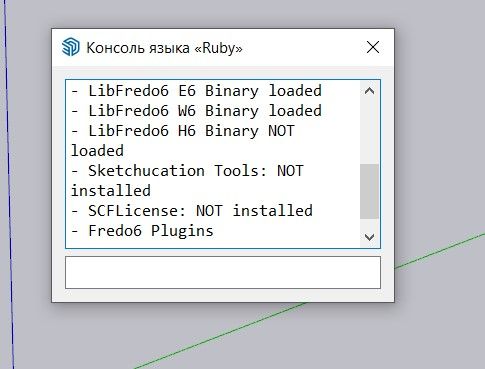
Fredo6_!LibFredo6and reinstalling the plugin, the folder reappears, and the issue remains unresolved. In the "Fredo6 Plugins Information for SketchUcation Support" section, the console output looks like this:
-
The SketchUcation tools is not installed get its RBZ from the PluginStore, then install it using the Extension Manager...
It installs the SCFLicensing stuff with it... -
Could you please seelct the text IN the Ruby console and copy / paste it here. This will help to have a global view on your installation.
-
I tried tree different versions of LibFredo6. The version 15.8 b. On this version works all other plugins, except FredoScale, which I really need. On verion 16.1 g, I can see Icons of FredoScale, but no one plugins is working. I can click on icon, but they are inactive. When I install version 16.2 or higher the icons of all plugins disappears and ruby console is empty. Aaaaarch. I delete LibFredo6 from root directory, but nothing help.
-
@fredo6
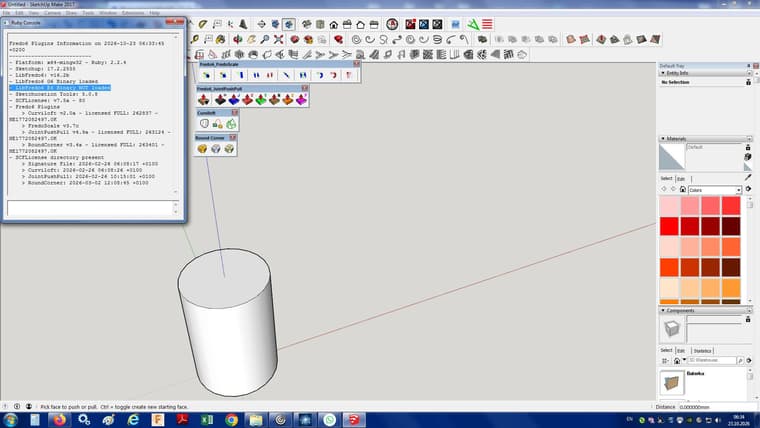
Here is what is in ruby console. I dont know why is this not loaded. May be this is the problem. But how can I fix it? - LibFredo6 E6 Binary NOT loaded




Hello! It looks like you're interested in this conversation, but you don't have an account yet.
Getting fed up of having to scroll through the same posts each visit? When you register for an account, you'll always come back to exactly where you were before, and choose to be notified of new replies (either via email, or push notification). You'll also be able to save bookmarks and upvote posts to show your appreciation to other community members.
With your input, this post could be even better 💗
Register Login


Advertisement