sketchucation logo sketchucation
    • 로그인
    Oops, your profile's looking a bit empty! To help us tailor your experience, please fill in key details like your SketchUp version, skill level, operating system, and more. Update and save your info on your profile page today!
    🚨 Skimp | 25% Off until March 30 Buy Now

    [Plugin Library] LibFredo6 - v15.9a - 25 Mar 26


    예약됨 고정됨 잠김 이동됨 Plugins
    2.2k 게시물 577 작성자 4.3m 조회수 579 Watching
    게시물 더 불러오는 중
    • 오래된 순
    • 최신 순
    • 가장 많은 투표
    답글
    • 토픽으로 답글
    로그인 후 답글 작성
    이 토픽은 삭제되었습니다. 토픽 관리 권한이 있는 사용자만 볼 수 있습니다.
    • Dave RD 오프라인
      Dave R
      마지막 수정자:

      @yago brown said:

      Error launching Sketchup Pro 2022. Crashes.
      "Curviloft: This plugin requires a LibFredo6 version greater than 124. The current version is 67"
      How to solve it?

      Update Curviloft, LibFredo6, and the Sketchucation ExtensionStore tool to their current versions.

      Etaoin Shrdlu

      %

      (THERE'S NO PLACE LIKE)

      G28 X0.0 Y0.0 Z0.0

      M30

      %

      1 답글 마지막 답글 답글 인용 0
      • TIGT 오프라인
        TIG Moderator
        마지막 수정자:

        The file does exist in the PluginStore !
        https://sketchucation.com/pluginstore?pln=LibFredo6
        What are you trying to do ?
        What error messages do you see ?
        Many thousands of people successfully download RBZ files from us every day.
        Why are you so different...

        TIG

        1 답글 마지막 답글 답글 인용 0
        • G 오프라인
          Gojadri Newcomers
          마지막 수정자:

          The file does not exist on the site, on the server. And so with many of the plugins.
          In 2023 can't you solve such a small problem? Put on Google Drive.

          1 답글 마지막 답글 답글 인용 0
          • TIGT 오프라인
            TIG Moderator
            마지막 수정자:

            PS:
            I've just found out that there was a glitch on our server yesterday, it prevented a few random users from downloading from the PluginStore.
            It's fixed now, so it might have fixed your problem ?

            TIG

            1 답글 마지막 답글 답글 인용 0
            • F 오프라인
              Filippidi
              마지막 수정자:

              Hello,
              could you please help me. I intall LibFredo6 versio 13.9a in order to use fredo corner but after that nothing is working of fredo library even the fredo tools...
              All plugins that i have install are the latest version in Sketchup 2023.
              Any ideas?

              1 답글 마지막 답글 답글 인용 0
              • Dave RD 오프라인
                Dave R
                마지막 수정자:

                @filippidi said:

                I intall LibFredo6 versio 13.9a in order to use fredo corner but after that nothing is working of fredo library even the fredo tools...

                What method are you using to install? Do you also have the current version of the Sketchucation ExtensionStore tool installed?

                @filippidi said:

                All plugins that i have install are the latest version in Sketchup 2023.

                Please update your profile. It is out of date.

                Etaoin Shrdlu

                %

                (THERE'S NO PLACE LIKE)

                G28 X0.0 Y0.0 Z0.0

                M30

                %

                1 답글 마지막 답글 답글 인용 0
                • TIGT 오프라인
                  TIG Moderator
                  마지막 수정자:

                  You need to have the latest versions of the extensions/lib and the SketchUcation toolset installed , and SketchUp restarted...
                  But are you really using SketchUp v2016 ?
                  It's pretty much unsupported - with v2017 being the outlier...
                  Perhaps therein lies your problem.
                  There are legacy copies of Fredo's extensions/lib in the PluginStore, but they will have limited use...
                  Otherwise update your profile with the correct SketchUp version and we go one step forward...

                  TIG

                  1 답글 마지막 답글 답글 인용 0
                  • J 오프라인
                    justask
                    마지막 수정자:

                    Hey,

                    I did all the required steps for this plug in, purchased the license, but the plug in does not work in any sketchup version. Any ideas why?

                    1 답글 마지막 답글 답글 인용 0
                    • Rich O BrienR 오프라인
                      Rich O Brien Moderator
                      마지막 수정자:

                      @justask said:

                      I did all the required steps for this plug in, purchased the license, but the plug in does not work in any sketchup version. Any ideas why?

                      Libfredo is a helper library for Fredo extensions. It does nothing on it own.

                      Download the free D'oh Book for SketchUp 📖

                      1 답글 마지막 답글 답글 인용 0
                      • TIGT 오프라인
                        TIG Moderator
                        마지막 수정자:

                        @justask

                        What extension are you trying to use ?
                        I suspect one of Fredo's but you've posted in his support Lib thread and not explained your problem very clearly.
                        You need the latest versions of LibFredo6 and the SketchUcation toolset installing and SketchUp restarting to allow Fredo's extensions to work and get licensed etc...

                        TIG

                        1 답글 마지막 답글 답글 인용 0
                        • N 오프라인
                          nicoreitze
                          마지막 수정자:

                          Hello, I'm having problems with fredo tools. A few weeks ago curviloft stopped working from one moment to another. I tried updating fredo tools versions, reinstalling, and even reinstalling sketchup. So far I tried SKP 2022 and 2023 and I still have the same problem. I manage to install the plugins but they don't respond. Pleas help

                          1 답글 마지막 답글 답글 인용 0
                          • F 오프라인
                            Flaggmakesart Newcomers
                            마지막 수정자:

                            Hello,

                            Ive just purchased a license for Round corner, love the tool, but when i come to install the sketchucation plug in i keep on getting this error message.

                            :file does not exist

                            Can you help with some advice as to what is going wrong?

                            1 답글 마지막 답글 답글 인용 0
                            • TIGT 오프라인
                              TIG Moderator
                              마지막 수정자:

                              There was a glitch with the SCF Amazon server.
                              It first happened yesterday, it was fixed...
                              Today it seems to have recurred - again it's been fixed...
                              Hopefully a bit more permanently !!

                              TIG

                              1 답글 마지막 답글 답글 인용 0
                              • M 오프라인
                                Morganemarchand
                                마지막 수정자:

                                Hello, I have an issu with the fredotools.
                                I tried to use Thrupaint to work my texture on a chair, but I have this "blank" tool bar where I am supposed to see every tool (like 'materials', 'uv painting' etc).
                                To be precise, on the tool bar of the sketchup app, I can see the "Trhupaint extension", but when I clic on it, I have a gray space that pop just under my sketchup toolbar, but with nothing in it. When I place my mouse on it, I have sometime a little hand that appear, wich means the buttons are here, but I can't see them, so I don't know what I am clicking on. (here is a screenshot to show you) blank toolbar.jpg
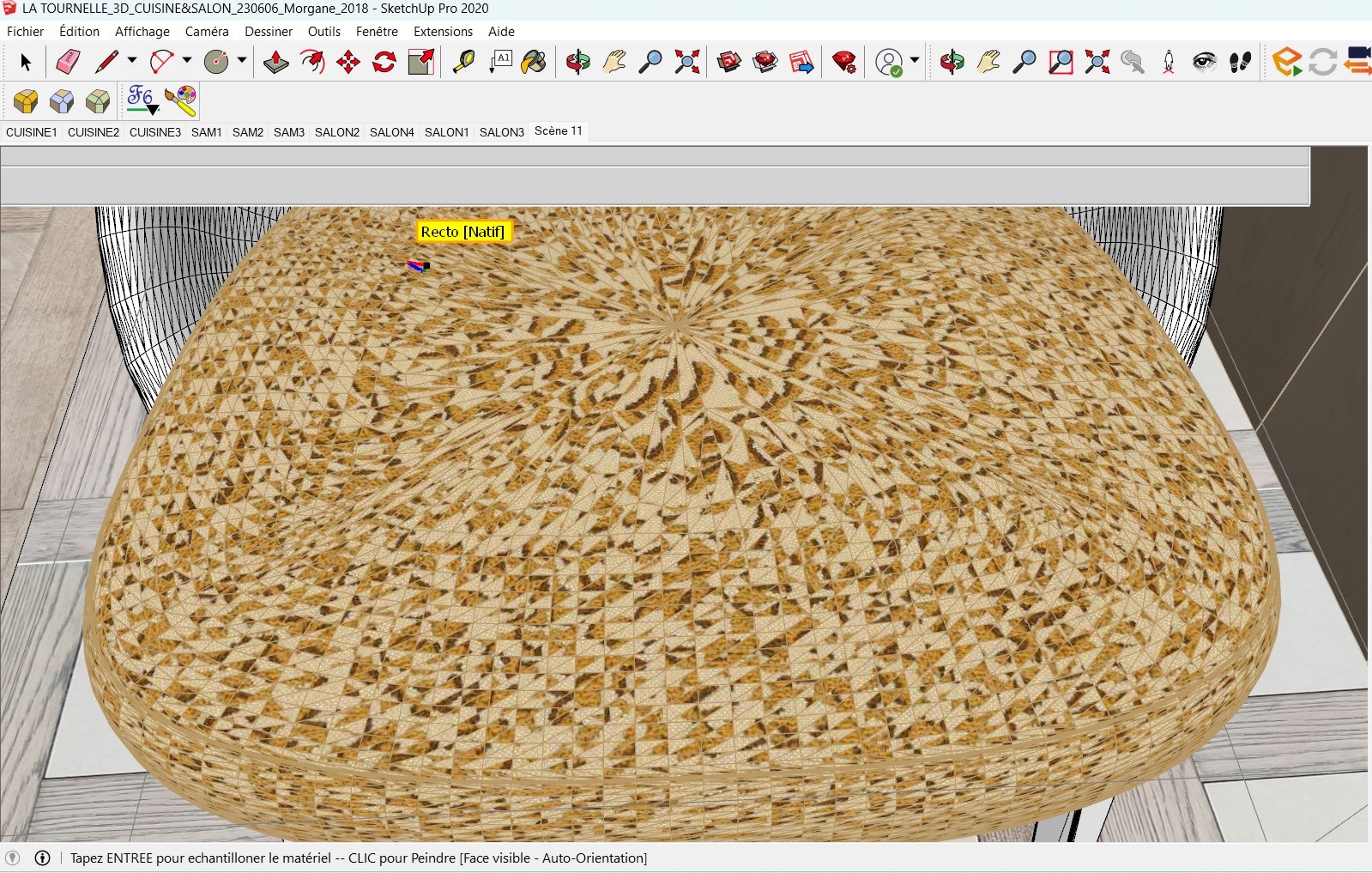
                                I hope someone know what I can do...
                                I have the same issu with round corner, and I don't know why. I have the latest version of the fredotools, and I'm on windows, with sketchup 2020.

                                1 답글 마지막 답글 답글 인용 0
                                • fredo6F 오프라인
                                  fredo6
                                  마지막 수정자:

                                  Just upgrade to the latest version of LibFredo6.

                                  1 답글 마지막 답글 답글 인용 0
                                  • F 오프라인
                                    FredPp83
                                    마지막 수정자:

                                    Hello,
                                    The license file "FredoCorner.scflicense" does not work for the Fredo6 "RoundCorner" plug-ins.
                                    Can you help me, please?
                                    Kind regards

                                    Bonjour,
                                    Le fichier de license "FredoCorner.scflicense" ne fonctionne pas pour le plug-ins "RoundCorner" de Fredo6.
                                    Pouvez-vous m'aider, s'il vous plait ?
                                    Cordialement
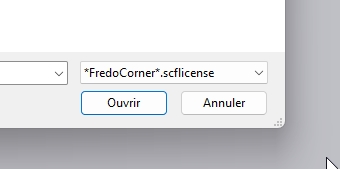

                                    License.jpg


                                    Plug-ins.jpg

                                    1 답글 마지막 답글 답글 인용 0
                                    • Rich O BrienR 오프라인
                                      Rich O Brien Moderator
                                      마지막 수정자:

                                      @fredpp83 said:

                                      The license file "FredoCorner.scflicense" does not work for the Fredo6 "RoundCorner" plug-ins. Can you help me, please?

                                      You need to install Roundcorner. FredoCorner and Roundcorner are different tools.

                                      Download the free D'oh Book for SketchUp 📖

                                      1 답글 마지막 답글 답글 인용 0
                                      • fredo6F 오프라인
                                        fredo6
                                        마지막 수정자:

                                        NEW RELEASE: LibFredo6 v14.1a - 10 Jul 23

                                        LibFredo6 14.1a includes:

                                        • JointPushPull: Fix about Groups with multiple instances. Now, only the instances selected will be transformed
                                        • JointPushPull: Preservation of special curves (circle, arc, polygon)
                                        • Various bug fixes and adjustments

                                        _____________________________________a

                                        Requirements: SU2017 and above

                                        See plugin home page of LibFredo6 for Download of LibFredo6.

                                        Main Post of the LibFredo6 thread

                                        Fredo

                                        1 답글 마지막 답글 답글 인용 0
                                        • M 오프라인
                                          mukadi criss Newcomers
                                          마지막 수정자:

                                          @hairman said:

                                          Hi Fredo6,

                                          I updated Libfredo6 yesterday because of your new FredoSketch extension. First tried with window-Libfredo settings-check for fredo6 plugin updates and was surprised that it said that everything was up to date. Libfredo6 version was 13.6..
                                          When checking with the sketchucation tool it said there was an update for Libfredo6.
                                          Just wanted to give you a heads up..
                                          Thanks for all your work and fantastic extensions!
                                          Herman.

                                          1 답글 마지막 답글 답글 인용 0
                                          • sprocket_S 오프라인
                                            sprocket_
                                            마지막 수정자:

                                            Hi! Something's not fine after upgrading to latest version of LibFredo6 14.1a with SketchUp 2021. When using any Fredo6 plugin, I have to double click buttons to make them work. Single click gets no effect. Reinstalled all of them and all remains the same. Any info about this?

                                            Thanks in advance.

                                            G 1 답글 마지막 답글 답글 인용 0

                                            Hello! It looks like you're interested in this conversation, but you don't have an account yet.

                                            Getting fed up of having to scroll through the same posts each visit? When you register for an account, you'll always come back to exactly where you were before, and choose to be notified of new replies (either via email, or push notification). You'll also be able to save bookmarks and upvote posts to show your appreciation to other community members.

                                            With your input, this post could be even better 💗

                                            등록 로그인
                                            • 1
                                            • 2
                                            • 95
                                            • 96
                                            • 97
                                            • 98
                                            • 99
                                            • 110
                                            • 111
                                            • 97 / 111
                                            • 첫 게시물
                                              마지막 게시물
                                            Buy SketchPlus
                                            Buy SUbD
                                            Buy WrapR
                                            Buy eBook
                                            Buy Modelur
                                            Buy Vertex Tools
                                            Buy SketchCuisine
                                            Buy FormFonts

                                            Advertisement