[Plugin Library] LibFredo6 - v15.9a - 25 Mar 26



-
@cemileca said:
Dear Fredo Curviloft not working in 2015 SU. Please help us
Thanks
In Fredo's absence... Have you installed the latest version from RBZ from the PluginStore ?
http://sketchucation.com/pluginstore?pln=CurviloftHave you also installed the latest version of the LibFredo ?
http://sketchucation.com/pluginstore?pln=LibFredo6Have you then restarted SketchUp to effect the updates ?
If so how is it 'not working' ?
e.g.
Not loading ?
Not functioning as expected ?
Error messages ?
etc...Help us to help you...
-
You are Super,
Plugin Working...
Thank you Very Very much for your attention and interest..
-
Hy
I install LibFredo 6.6b (SU2015) but not show the toolbar. I set the "Prefered language" EN. On SU toolbars panel not appear Fredo6 toolbar, but install other plugin that immediately appear on toolbar.Please help.
-
Sketchup crashes when I use Roundcorner. (I just installed roundcorner)
Using sketch up pro 2015 on Mac OS 10.9.5. Extentions installed: Mirror_v4.2, Libfredo v6.6b, Roundcorner V2.6a and jbb_layers_panel_16.Roundcorner IS working. I'm able to round of corners. When the corners are rounded and I pan my view, (using the middel mouse button) Sketchup crashes.
Anyone?
-
Have you installed the very latest version of SketchUp v2015 ?
It did previously have some issues with the MAC update to 'Yosemite'...Try disabling the
jbb_layers_panelplugin.
After a restart any improvement ?
It has observers etc and has been linked to some issues with MACs...My
Mirrorplugin is unlikely to cause issues as it's in its own name-space and only kicks in when it's activate. -
TIG,
Removing the layers plugin worked like a charm (so far). I'm amazed how people like you know all this stuff...... I would've never thought of that.
Thank you so much.... -
Oops.... A bit premature.... It still crashes.....
-
Installing the newest sketch up version did the trick.... (again: So far...)
-
@emn said:
Sketchup crashes when I use Roundcorner. (I just installed roundcorner)
Using sketch up pro 2015 on Mac OS 10.9.5. Extentions installed: Mirror_v4.2, Libfredo v6.6b, Roundcorner V2.6a and jbb_layers_panel_16.Roundcorner IS working. I'm able to round of corners. When the corners are rounded and I pan my view, (using the middel mouse button) Sketchup crashes.
Anyone?
Did you submit the BugSplats?
If you did - did you enter any details in the report? Description, name or email I can use to look up the crash? -
NEW RELEASE: LibFredo6 v6.7a - 25 Feb 15
LibFredo6 6.7a is a release mainly for FredoTools::AutoReverseFaces and FredoTools::Convexify, both introduced in FredoTools 2.6
See main post of this thread for Download of LibFredo6.
Fredo
-
Thanks
-
Hi Fredo. Is there any chance that you can mute all that text in the console for your release builds? When I develop I often set the console to upon on startup and it all the output by LibFredo cause a lot of noise.
Maybe I suggest that you set that up as a Sketchup.read_default preference that is disabled by default - which can then be enabled by you when you need it for your own debugging? -
@thomthom said:
Hi Fredo. Is there any chance that you can mute all that text in the console for your release builds? When I develop I often set the console to upon on startup and it all the output by LibFredo cause a lot of noise.
Maybe I suggest that you set that up as a Sketchup.read_default preference that is disabled by default - which can then be enabled by you when you need it for your own debugging?It would be a bug. There is no need for LibFredo to have traces in the Ruby console.
Could you tell me what is output in the console so that I remove the traces
Thanks very much
Fredo
-
not sure what TT gets, but I see this on every start-up...
(eval):1: warning: already initialized constant Traductor::SU_MAJOR_VERSION /Users/johns_iMac/Library/Application Support/SketchUp 2015/SketchUp/Plugins/Fredo6_!LibFredo6/Lib6Core.rb:40: warning: previous definition of SU_MAJOR_VERSION was here (eval):1: warning: already initialized constant Traductor::RUN_ON_MAC /Users/johns_iMac/Library/Application Support/SketchUp 2015/SketchUp/Plugins/Fredo6_!LibFredo6/Lib6Core.rb:39: warning: previous definition of RUN_ON_MAC was here -
OK. Thanks. Will fix and re-release.
These Ruby warnings are always ennoyng, and none has found a way to get rid of them.I thought it was some
putsforgotten in the code.Fredo
-
@fredo6 said:
...none has found a way to get rid of them.
I used to get them from a few different plugins and adding
if not defined?e.g.CAS = @cascade if not defined? CAS, but when looking through you dynamic code, I just couldn't work out where that might be added...
the other way is to load a 'Ruby Console' loader as the last ruby file...
john -
Hmm... I just assumed it was LibFredo.. Might have been Bezier Spline as well. I had to temporarily remove them to do some development, but I'll install again and track down the exact messages.
-
NEW RELEASE: LibFredo6 v6.7b - 22 Mar 15
LibFredo6 6.7b is a minor releaseremoving some noisy traces at Startup of Sketchup
See main post of this thread for Download of LibFredo6.
Fredo
-
@thomthom said:
Hmm... I just assumed it was LibFredo.. Might have been Bezier Spline as well. I had to temporarily remove them to do some development, but I'll install again and track down the exact messages.
You assumed right!
Actually most noisy traces were coming from BezierSpline, but I removed also two traces in LibFredo6.So you'll have to upgrade both
- BezierSpline 2.7b
- LibFredo6 6.7b
Fredo
-
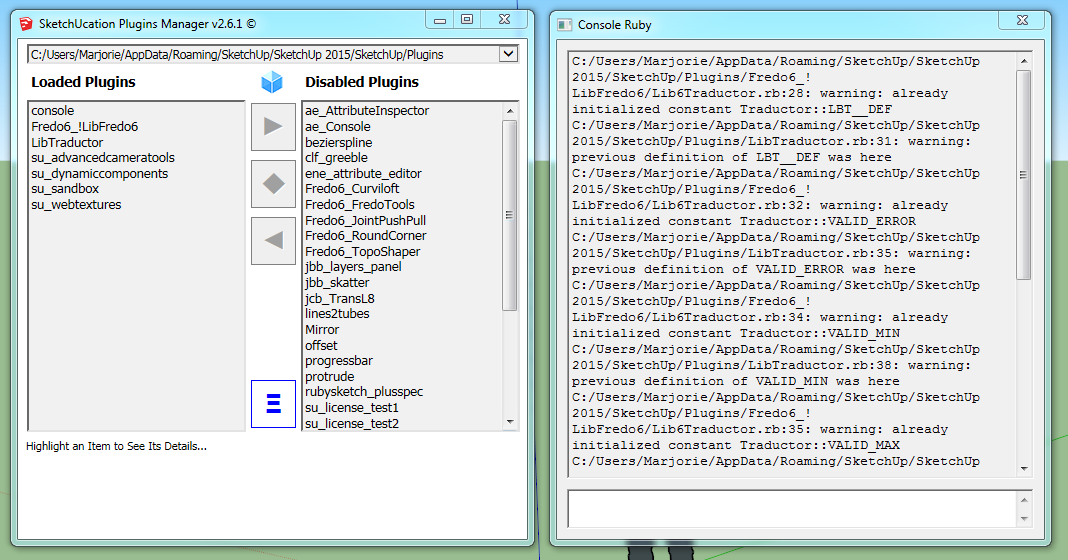
I still get this :
@unknownuser said:
C:/Users/Marjorie/AppData/Roaming/SketchUp/SketchUp 2015/SketchUp/Plugins/Fredo6_!LibFredo6/Lib6Traductor.rb:28: warning: already initialized constant Traductor::LBT__DEF
C:/Users/Marjorie/AppData/Roaming/SketchUp/SketchUp 2015/SketchUp/Plugins/LibTraductor.rb:31: warning: previous definition of LBT__DEF was here
C:/Users/Marjorie/AppData/Roaming/SketchUp/SketchUp 2015/SketchUp/Plugins/Fredo6_!LibFredo6/Lib6Traductor.rb:32: warning: already initialized constant Traductor::VALID_ERROR
C:/Users/Marjorie/AppData/Roaming/SketchUp/SketchUp 2015/SketchUp/Plugins/LibTraductor.rb:35: warning: previous definition of VALID_ERROR was here
C:/Users/Marjorie/AppData/Roaming/SketchUp/SketchUp 2015/SketchUp/Plugins/Fredo6_!LibFredo6/Lib6Traductor.rb:34: warning: already initialized constant Traductor::VALID_MIN
C:/Users/Marjorie/AppData/Roaming/SketchUp/SketchUp 2015/SketchUp/Plugins/LibTraductor.rb:38: warning: previous definition of VALID_MIN was here
C:/Users/Marjorie/AppData/Roaming/SketchUp/SketchUp 2015/SketchUp/Plugins/Fredo6_!LibFredo6/Lib6Traductor.rb:35: warning: already initialized constant Traductor::VALID_MAX
C:/Users/Marjorie/AppData/Roaming/SketchUp/SketchUp 2015/SketchUp/Plugins/LibTraductor.rb:39: warning: previous definition of VALID_MAX was here
C:/Users/Marjorie/AppData/Roaming/SketchUp/SketchUp 2015/SketchUp/Plugins/Fredo6_!LibFredo6/Lib6Traductor.rb:36: warning: already initialized constant Traductor::VALID_PATTERN
C:/Users/Marjorie/AppData/Roaming/SketchUp/SketchUp 2015/SketchUp/Plugins/LibTraductor.rb:40: warning: previous definition of VALID_PATTERN was here
C:/Users/Marjorie/AppData/Roaming/SketchUp/SketchUp 2015/SketchUp/Plugins/Fredo6_!LibFredo6/Lib6Traductor.rb:570: warning: redefining constant Struct::DlgItem
C:/Users/Marjorie/AppData/Roaming/SketchUp/SketchUp 2015/SketchUp/Plugins/Fredo6_!LibFredo6/Lib6Traductor.rb:570: warning: already initialized constant Traductor::DialogBox::DlgItem
C:/Users/Marjorie/AppData/Roaming/SketchUp/SketchUp 2015/SketchUp/Plugins/LibTraductor.rb:183: warning: previous definition of DlgItem was here






Hello! It looks like you're interested in this conversation, but you don't have an account yet.
Getting fed up of having to scroll through the same posts each visit? When you register for an account, you'll always come back to exactly where you were before, and choose to be notified of new replies (either via email, or push notification). You'll also be able to save bookmarks and upvote posts to show your appreciation to other community members.
With your input, this post could be even better 💗
등록 로그인


Advertisement