sketchucation logo sketchucation
    • 登入
    Oops, your profile's looking a bit empty! To help us tailor your experience, please fill in key details like your SketchUp version, skill level, operating system, and more. Update and save your info on your profile page today!
    🔌 Smart Spline | Fluid way to handle splines for furniture design and complex structures. Download

    [Plugin Library] LibFredo6 - v15.8e - 15 Feb 26


    已排程 已置頂 已鎖定 已移動 Plugins
    2.2k 貼文 573 Posters 4.2m 瀏覽 575 Watching
    正在載入更多貼文
    • 從舊到新
    • 從新到舊
    • 最多點贊
    回覆
    • 在新貼文中回覆
    登入後回覆
    此主題已被刪除。只有擁有主題管理權限的使用者可以查看。
    • S 離線
      SunnyGee2017 @TIG
      最後由 編輯

      @TIG It just freezes. I can still move the mouse, but nothing else works. I have to kill the app with the task manager and restart it. It only happens with Fredo plugins. All others work well.

      TIGT 1 條回覆 最後回覆 回覆 引用 0
      • TIGT 離線
        TIG Moderator @SunnyGee2017
        最後由 編輯

        @SunnyGee2017
        Thanks, that might be helpful...
        Now up to @fredo6

        TIG

        1 條回覆 最後回覆 回覆 引用 0
        • fredo6F 離線
          fredo6 @SunnyGee2017
          最後由 編輯

          @SunnyGee2017
          Can also invoke menu Window > LibFredo6 Settings.... > Fredo6 Plugin Information... and copy/paste here the content of the Ruby Console.
          This will tell me which version of plugins you have.

          S 1 條回覆 最後回覆 回覆 引用 0
          • S 離線
            SunnyGee2017
            最後由 編輯

            Fredo6 Plugins Information on 2026-02-08 18:19:24 +0800

            • Platform: x64-mswin64_140 - Ruby: 3.2.2
            • Sketchup: 24.0.553
            • LibFredo6: v15.8d
            • LibFredo6 Binary loaded
            • Sketchucation ExtensionStore: NOT installed
            • SCFLicense: NOT installed
            • Fredo6 Plugins

              Curviloft v2.0a
              FredoTools v4.5c
              JointPushPull v4.9a
              RoundCorner v3.4a

            1 條回覆 最後回覆 回覆 引用 0
            • S 離線
              SunnyGee2017 @fredo6
              最後由 編輯

              @fredo6
              Fredo6 Plugins Information on 2026-02-08 18:19:24 +0800

              • Platform: x64-mswin64_140 - Ruby: 3.2.2
              • Sketchup: 24.0.553
              • LibFredo6: v15.8d
              • LibFredo6 Binary loaded
              • Sketchucation ExtensionStore: NOT installed
              • SCFLicense: NOT installed
              • Fredo6 Plugins

                Curviloft v2.0a
                FredoTools v4.5c
                JointPushPull v4.9a
                RoundCorner v3.4a

              1 條回覆 最後回覆 回覆 引用 0
              • TIGT 離線
                TIG Moderator
                最後由 編輯

                I'm sure @fredo6 will have more to say...
                but the report your posted shows that although you have the latest versions of the 4 extensions installed,
                you don't have the SketchUcation toolset installed - for the ExtensionStore and the required SCFLicensing files.
                Without those all licensed extensions will not work.
                Download the RBZ for the SketchUcation tools and use the Extension Manager dialog's Install... button.
                Restart SketchUp to sync everything.
                Now you will have the licensing set up.
                You need to validate appropriate licenses for the 4 fredo extensions.
                If you already have those use them, or get them from the appropriate page on this forum.
                If you haven't already got a license then buy it.
                Restart SketchUp after all of this to sync everything...

                TIG

                1 條回覆 最後回覆 回覆 引用 0
                • G 離線
                  GavinG
                  最後由 編輯

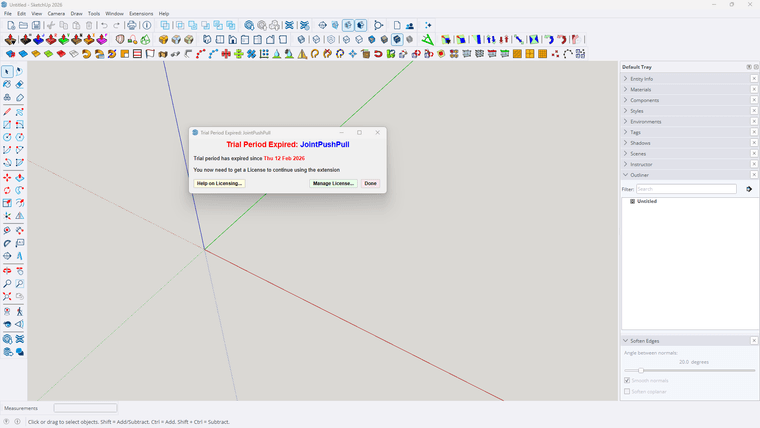
                  I have recently upgraded to sketchup 2026 and my laptop to windows 11. Up till today my Fredo^ plugins have been working fine, until today. I have the prepetual licences for all the plugins, and when I want to use them I get a window saying - TRIAL PERIOD EXPIRED etc etc. I have removed all the files from my PC, and reinstalled Fredo^ and all the plugins from my licence profile on Sketchucation. I have restarted sketchup and still receive the same notification. What must i do next please. Can admin assist?
                  Screenshot 2026-02-15 155403.png

                  Dave RD 1 條回覆 最後回覆 回覆 引用 0
                  • Dave RD 離線
                    Dave R @GavinG
                    最後由 編輯

                    @GavinG do you have the latest version of the Sketchucation Extension Store installed?

                    Etaoin Shrdlu

                    %

                    (THERE'S NO PLACE LIKE)

                    G28 X0.0 Y0.0 Z0.0

                    M30

                    %

                    1 條回覆 最後回覆 回覆 引用 0
                    • G 離線
                      GavinG
                      最後由 編輯

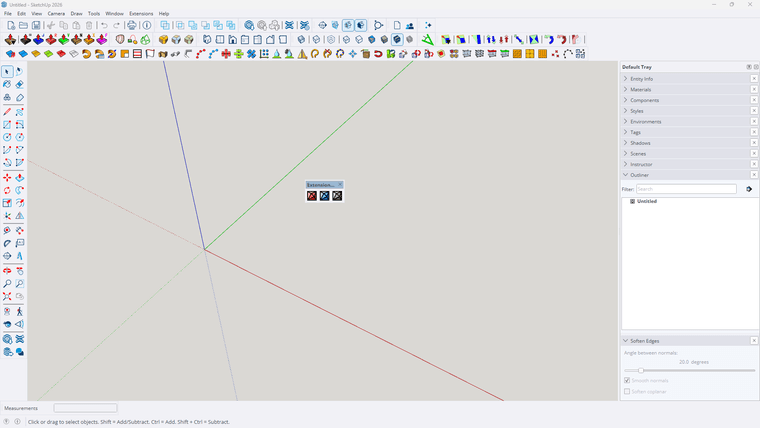
                      I think so, I have 3 new icons on my ribbon ( see attached). This is where I get directed when looking for Sketchucation Extension Store

                      1 條回覆 最後回覆 回覆 引用 0
                      • G 離線
                        GavinG
                        最後由 編輯

                        Screenshot 2026-02-15 172330.png

                        1 條回覆 最後回覆 回覆 引用 0
                        • fredo6F 離線
                          fredo6
                          最後由 編輯

                          First, when you have a problem of license, do not try to reinstall. Just check you have the latest versions.

                          Also, if you get the message of expiration, try first to revalidate the license. It won't count for a new seat.

                          Does it work in your case?

                          G 1 條回覆 最後回覆 回覆 引用 0
                          • fredo6F 離線
                            fredo6
                            最後由 fredo6 編輯

                            NEW RELEASE: LibFredo6 v15.8e - 15 Feb 26

                            LibFredo6 15.8e is a maintenance release. It includes changes related to:

                            • Bug Fixing
                            • Future compatibility

                            Requirements: SU2017 and above

                            See plugin home page of LibFredo6 for Download of LibFredo6.

                            Main Post of the LibFredo6 thread

                            ntxdaveN 1 條回覆 最後回覆 回覆 引用 0
                            • ntxdaveN 離線
                              ntxdave @fredo6
                              最後由 編輯

                              @fredo6 Is there any place where we can find out what the bug fixes are?

                              Press F1...thank me later

                              1 條回覆 最後回覆 回覆 引用 0
                              • ntxdaveN 離線
                                ntxdave
                                最後由 ntxdave 編輯

                                I did a quick test on an old Animator file and it looks like we now can use perspective and generate a video.

                                Press F1...thank me later

                                ntxdaveN 1 條回覆 最後回覆 回覆 引用 0
                                • G 離線
                                  GavinG @fredo6
                                  最後由 編輯

                                  @fredo6 - I have tried to uninstall and reinstall, no luck, I have just installed the plugin as indicated below in the next reply, still nothing working. I still get the TRIAL PRERIOD EXPIRED window

                                  fredo6F 1 條回覆 最後回覆 回覆 引用 0
                                  • fredo6F 離線
                                    fredo6 @GavinG
                                    最後由 編輯

                                    @GavinG
                                    When you get the expiration message, did you try to click on the button 'Manage License' and revalidate the license (using the file you received by email when you purchased the license)?

                                    If you do not have the license file, you can retrieve it and download it at https://sketchucation.com/webshop/my-licences.php. Just sign in.

                                    1 條回覆 最後回覆 回覆 引用 0
                                    • ntxdaveN 離線
                                      ntxdave @ntxdave
                                      最後由 編輯

                                      said in [Plugin Library] LibFredo6 - v15.8e - 15 Feb 26:

                                      I did a quick test on an old Animator file and it looks like we now can use perspective and generate a video.

                                      Well, I also tried to generate a video with the Animator file that has both perspective and parallel and the generation stopped when it switched from parallel to perspective. So, if the file has all scenes with the camera set the same way (either perspective or parallel) it works fine but having both options in the same file will not generate the video.

                                      Just thought I would pass this along but maybe you already knew that.

                                      Press F1...thank me later

                                      1 條回覆 最後回覆 回覆 引用 0
                                      • 1
                                      • 2
                                      • 106
                                      • 107
                                      • 108
                                      • 109
                                      • 110
                                      • 110 / 110
                                      • 第一個貼文
                                        最後的貼文
                                      Buy SketchPlus
                                      Buy SUbD
                                      Buy WrapR
                                      Buy eBook
                                      Buy Modelur
                                      Buy Vertex Tools
                                      Buy SketchCuisine
                                      Buy FormFonts

                                      Advertisement