sketchucation logo sketchucation
    • 登入
    Oops, your profile's looking a bit empty! To help us tailor your experience, please fill in key details like your SketchUp version, skill level, operating system, and more. Update and save your info on your profile page today!
    🔌 Smart Spline | Fluid way to handle splines for furniture design and complex structures. Download

    The "Duh!" thread (aka the Doh! thread)

    已排程 已置頂 已鎖定 已移動 SketchUp Discussions
    sketchup
    696 貼文 135 Posters 316.5k 瀏覽 135 Watching
    正在載入更多貼文
    • 從舊到新
    • 從新到舊
    • 最多點贊
    回覆
    • 在新貼文中回覆
    登入後回覆
    此主題已被刪除。只有擁有主題管理權限的使用者可以查看。
    • cottyC 離線
      cotty
      最後由 編輯

      A simple one, but helpful...
      (Model info -> components -> Show component axes)
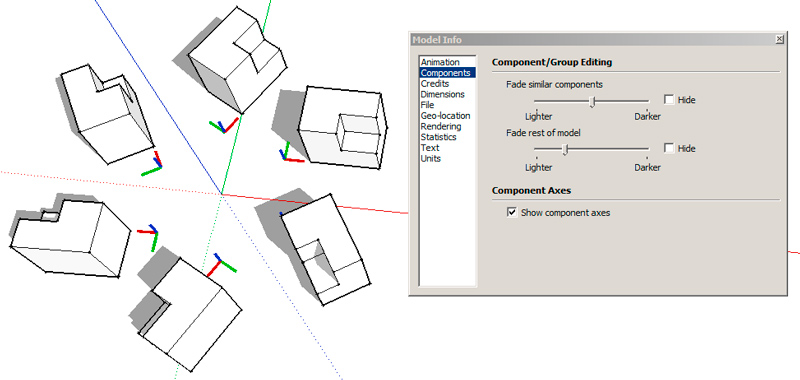

      comp_axes.jpg

      my SketchUp gallery

      1 條回覆 最後回覆 回覆 引用 0
      • R 離線
        rv1974
        最後由 編輯

        The Tips&Tricks thread would be a better place for this, but anyway,
        In case you produce a lot of vistas:

        1. Export your scenes with 'anti-aliasing off' and X2 demanded size 6000 pix wide instead of 3000 (well I'm sure you knew it already)
        2. Create Photoshop droplet (File-Automate-Create Droplet; google some tutorials in your internets) from your typical actions.
          For example: resize to 3000> add soft light layer> tweak it's transparency> shadows & highlights> smart sharpen> close file.
          Dudes, this is HUGE time saver. Actually there's no need to manually open Photoshop anymore
          Just drag & drop the folder with your pictures upon the droplet's exe icon and enjoy 😉
        1 條回覆 最後回覆 回覆 引用 0
        • pbacotP 離線
          pbacot
          最後由 編輯

          @unknownuser said:

          Just discovered the System settings> Open GL > Use hardware acceleration. Suddenly Sketchup looks sharp and smooth to work with. How can I have missed this before? 😳

          It "creeped -up" on me that my visual quality sucked (sketchy and disappearing lines) and I was told to look at this. It really cleared things up. At some point I had turned it off because of other graphic anomalies. So I think I will be going back and forth... 😕

          MacOSX MojaveSketchUp Pro v19 Twilight v2 Thea v3 PowerCADD

          1 條回覆 最後回覆 回覆 引用 0
          • M 離線
            MikeFJaguar
            最後由 編輯

            @rv1974 said:

            The 'Lock\unlock aspect ratio' at material edit drove me crazy for years.
            Clicking it wont change visually its state (stupid bug!). To see it changed one should move
            the cursor off the button.

            This one got me very frustrated, until I discovered it's just a slooow button!
            In Windows 7 at least, click the Lock/Unlock button and WAIT for a couple of seconds. Lo and behold the button icon changes!

            EDIT
            Hmm. I'm wrong, you're right! The cursor does need to be moved off the button. As you say, stupid bug. Perhaps I'm a stupid bug..r 😳

            1 條回覆 最後回覆 回覆 引用 0
            • cottyC 離線
              cotty
              最後由 編輯

              You can toggle the "active cut" setting of a section plane with a double click...

              my SketchUp gallery

              1 條回覆 最後回覆 回覆 引用 0
              • D 離線
                d12dozr
                最後由 編輯

                @cotty said:

                You can toggle the "active cut" setting of a section plane with a double click...

                !!! 👍 🎉 😄

                3D Printing with SketchUp Book
                http://goo.gl/f7ooYh

                1 條回覆 最後回覆 回覆 引用 0
                • panixiaP 離線
                  panixia
                  最後由 編輯

                  just discovered a DOH feature of the selection tool..
                  if you drag a selection rectangle from left to right it selects only the items completely wrapped in the rectangle, but if you drag the rectangle from right toward left,then also the items wich are only touched (but not fully wrapped) by the rectangle are selected.. never noticed it before.. 😲

                  1 條回覆 最後回覆 回覆 引用 0
                  • cottyC 離線
                    cotty
                    最後由 編輯

                    @panixia said:

                    just discovered a DOH feature of the selection tool..
                    if you drag a selection rectangle from left to right it selects only the items completely wrapped in the rectangle, but if you drag the rectangle from right toward left,then also the items wich are only touched (but not fully wrapped) by the rectangle are selected.. never noticed it before.. 😲

                    How could you select without this? 😛
                    (See here for details)

                    For complex selections, the combination with the parallel view can help a lot...

                    my SketchUp gallery

                    1 條回覆 最後回覆 回覆 引用 0
                    • pilouP 離線
                      pilou
                      最後由 編輯

                      And for some Selection / un-selection try some combinaisons of SHIFT and / Or CTRL 😉

                      Frenchy Pilou
                      Is beautiful that please without concept!
                      My Little site :)

                      1 條回覆 最後回覆 回覆 引用 0
                      • panixiaP 離線
                        panixia
                        最後由 編輯

                        i know how to use selection and modifier, the only DOH part is about the change of behaviour from left/right direction

                        1 條回覆 最後回覆 回覆 引用 0
                        • R 離線
                          rv1974
                          最後由 編輯

                          Say you worked in Untitled.skp and suddenly your PC crashed. To discover the unknown location of autosave file start the blank file and make 'Save': it will show the folder with autosave folder.

                          1 條回覆 最後回覆 回覆 引用 0
                          • ToboboT 離線
                            Tobobo
                            最後由 編輯

                            I have just found by accident that you can drag nested groups and components in the outliner from one to another and it keeps its location. 😮

                            Toby

                            Philippians 4:13

                            I can do everything through him who gives me strength.

                            1 條回覆 最後回覆 回覆 引用 0
                            • thomthomT 離線
                              thomthom
                              最後由 編輯

                              Ooh! That's nice! I've never used the Outliner much, but that's a nice observation.
                              +1 from me!

                              Thomas Thomassen — SketchUp Monkey & Coding addict
                              List of my plugins and link to the CookieWare fund

                              1 條回覆 最後回覆 回覆 引用 0
                              • TIGT 離線
                                TIG Moderator
                                最後由 編輯

                                Yes, highlighting and moving containers within the Outliner works very much like Cut+PasteInPlace when you move groups/instances between 'parents' - just MUCH easier...
                                It's also a useful way to open a nested container for editing, just find it 'by name' in the Outliner [benefit of naming sensibly!] and then select it and double-click it; and it's also best if View > Component Edit > Hide Rest of Model is toggled ON so you can see what you are doing [a shortcut-key to toggle this is de riguer]...

                                TIG

                                1 條回覆 最後回覆 回覆 引用 0
                                • brodieB 離線
                                  brodie
                                  最後由 編輯

                                  Just found a new one. You can copy a line over and type 10', then, after hitting enter you can type /10 to get 10 equally spaced lines.

                                  I have been doing that as two separate functions forever (copying the line 10' to get the spacing right then copying it back and snapping it to the other line 10' away and THEN hitting /10).

                                  -Brodie

                                  steelblue http://www.steelbluellc.com

                                  1 條回覆 最後回覆 回覆 引用 0
                                  • pilouP 離線
                                    pilou
                                    最後由 編輯

                                    ... and if you are not satisfy you can continue "*" "/" with any unity even different than settings untill taking another tool! 😄

                                    Frenchy Pilou
                                    Is beautiful that please without concept!
                                    My Little site :)

                                    1 條回覆 最後回覆 回覆 引用 0
                                    • arail1A 離線
                                      arail1
                                      最後由 編輯

                                      @panixia said:

                                      just discovered a DOH feature of the selection tool..
                                      if you drag a selection rectangle from left to right it selects only the items completely wrapped in the rectangle, but if you drag the rectangle from right toward left,then also the items wich are only touched (but not fully wrapped) by the rectangle are selected.. never noticed it before.. 😲

                                      This is important to know also because it's one of the few things that tends to be consistent across most 3D software applications.

                                      1 條回覆 最後回覆 回覆 引用 0
                                      • M 離線
                                        MikeFJaguar
                                        最後由 編輯

                                        Ctrl (in Windows) while orbiting lets me turn my model every which way! Fairly useless as an architectural user but a boon for modellers who make widgets. Doh!

                                        1 條回覆 最後回覆 回覆 引用 0
                                        • GaieusG 離線
                                          Gaieus
                                          最後由 編輯

                                          That's a "designed feature": Suspending the gravity setting

                                          Gai...

                                          1 條回覆 最後回覆 回覆 引用 0
                                          • mitcorbM 離線
                                            mitcorb
                                            最後由 編輯

                                            Sort of bootleg Camera Roll. I have used it to get a particular position for precise selection in a busy model. Of course, you could just do a bunch of layering and hiding to avoid this need altogether.

                                            I take the slow, deliberate approach in my aimless wandering.

                                            1 條回覆 最後回覆 回覆 引用 0
                                            • 1
                                            • 2
                                            • 8
                                            • 9
                                            • 10
                                            • 11
                                            • 12
                                            • 34
                                            • 35
                                            • 10 / 35
                                            • 第一個貼文
                                              最後的貼文
                                            Buy SketchPlus
                                            Buy SUbD
                                            Buy WrapR
                                            Buy eBook
                                            Buy Modelur
                                            Buy Vertex Tools
                                            Buy SketchCuisine
                                            Buy FormFonts

                                            Advertisement






