sketchucation logo sketchucation
    • 登入
    Oops, your profile's looking a bit empty! To help us tailor your experience, please fill in key details like your SketchUp version, skill level, operating system, and more. Update and save your info on your profile page today!
    🔌 Smart Spline | Fluid way to handle splines for furniture design and complex structures. Download

    The "Duh!" thread (aka the Doh! thread)

    已排程 已置頂 已鎖定 已移動 SketchUp Discussions
    sketchup
    696 貼文 135 Posters 316.5k 瀏覽 135 Watching
    正在載入更多貼文
    • 從舊到新
    • 從新到舊
    • 最多點贊
    回覆
    • 在新貼文中回覆
    登入後回覆
    此主題已被刪除。只有擁有主題管理權限的使用者可以查看。
    • david_hD 離線
      david_h
      最後由 編輯

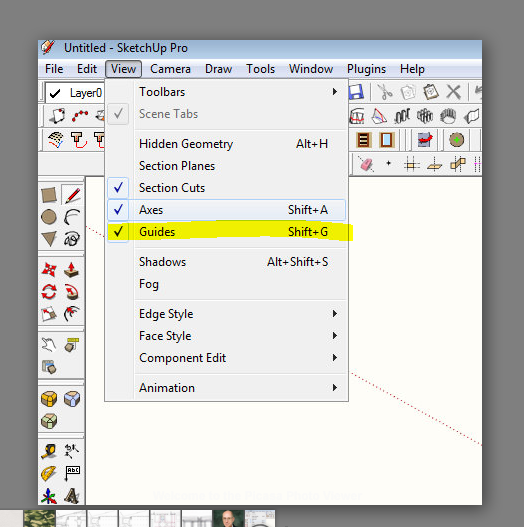
      I've been taken to task just now on this one. . . I asked for a plugin to toggle the Construction lines on and off. . .turns out it's in the view menu. . .

      WHICH I NEVER USE BY THE WAY!!!!

      Hide Construction lines

      This is so humiliating. . .. 😳 💚

      I'm okay now. . .


      Why I am an idiot.PNG

      If I make it look easy...It is probably easy

      1 條回覆 最後回覆 回覆 引用 0
      • J 離線
        Jim
        最後由 編輯

        I just learned that Edit > Delete Guides is context-sensitive - it deletes guides all guides starting from the current editing context and deeper, but not from "higher" level contexts. I had always thought it always deleted all guides, everywhere.

        Hi

        1 條回覆 最後回覆 回覆 引用 0
        • thomthomT 離線
          thomthom
          最後由 編輯

          @jim said:

          I just learned that Edit > Delete Guides is context-sensitive - it deletes guides all guides starting from the current editing context and deeper, but not from "higher" level contexts. I had always thought it always deleted all guides, everywhere.

          I had that same realization a couple of weeks ago. 😄

          Thomas Thomassen — SketchUp Monkey & Coding addict
          List of my plugins and link to the CookieWare fund

          1 條回覆 最後回覆 回覆 引用 0
          • thomthomT 離線
            thomthom
            最後由 編輯

            @rv1974 said:

            If Thom is already here..
            Only last week I discovered know that double clicking on blue balloons (edge tools-inspect gaps) actually close the gaps.
            Great tool!

            Ah, yea it's not that obvious - I had further plans for the UI. (also for CleanUp), but they've been down-prioritized.
            btw, no need to doubleclick - single click is enough.

            Thomas Thomassen — SketchUp Monkey & Coding addict
            List of my plugins and link to the CookieWare fund

            1 條回覆 最後回覆 回覆 引用 0
            • R 離線
              rv1974
              最後由 編輯

              If Thom is already here..
              Only last week I discovered that double clicking on blue balloons (edge tools-inspect gaps) actually close the gaps.
              Great tool!

              1 條回覆 最後回覆 回覆 引用 0
              • GaieusG 離線
                Gaieus
                最後由 編輯

                @jim said:

                I just learned that Edit > Delete Guides is context-sensitive - it deletes guides all guides starting from the current editing context and deeper, but not from "higher" level contexts. I had always thought it always deleted all guides, everywhere.

                Doh. 😲

                @rv1974 said:

                Only last week I discovered that double clicking on blue balloons (edge tools-inspect gaps) actually close the gaps.

                What???!!! 🎉

                Gai...

                1 條回覆 最後回覆 回覆 引用 0
                • pilouP 離線
                  pilou
                  最後由 編輯

                  @unknownuser said:

                  Being able to select only a few edges from a face and offset them instead of the whole face.

                  Yes but edges must be selected without discontinuity! 😳 😳 😳

                  Frenchy Pilou
                  Is beautiful that please without concept!
                  My Little site :)

                  1 條回覆 最後回覆 回覆 引用 0
                  • boofredlayB 離線
                    boofredlay
                    最後由 編輯

                    Something I just learned a couple days ago while studying the Google Earth Modeling videos.
                    D'oh, never knew that you could make a unique texture from a portion of another!

                    [flash=853,505:84crs2i3]http://www.youtube.com/v/18r2sCMUSBU&fs=1[/flash:84crs2i3]

                    http://www.coroflot.com/boofredlay

                    1 條回覆 最後回覆 回覆 引用 0
                    • DanielD 離線
                      Daniel
                      最後由 編輯

                      I've always known about hiding geometry by holding the shift key with the eraser, but last week I just noticed the "hidden" check box on the entity info window. 😳

                      My avatar is an anachronism.

                      1 條回覆 最後回覆 回覆 引用 0
                      • Bob JamesB 離線
                        Bob James
                        最後由 編輯

                        Never paid any attention to this thread until today 😳

                        @tig said:

                        .....select all faces with the same material as the one highlighted... then RickW pointed out that it is already a standard built-in tool under Select... 😳

                        OMG 😲 I soooo needed this yesterday 👊
                        This thread is one of the greatest tutorials ever made!
                        Now to Page 1 and read (and write down) all of the golden nuggets in this thread.

                        i7-4930K 3.4Ghz, 2x GTX780 6GB, 32GB DDR3-1600 ECC, OCZ Vertex 4 500GB, WD Black 3TB, 32TB NAS, 4x 27" Monitors, SpaceMouse Pro, X-keys XK-60

                        1 條回覆 最後回覆 回覆 引用 0
                        • J 離線
                          Jim
                          最後由 編輯

                          @bob james said:

                          This thread is one of the greatest tutorials ever made!

                          Yeah, this thread would make a great mini-pub for SCF. I'd probably even buy a tree-ware version as I can't retain online info as well as I can with a good sit with a book.

                          Hi

                          1 條回覆 最後回覆 回覆 引用 0
                          • pilouP 離線
                            pilou
                            最後由 編輯

                            @unknownuser said:

                            make a unique texture from a portion of another!

                            Seems only from the V7 and + 😉

                            Frenchy Pilou
                            Is beautiful that please without concept!
                            My Little site :)

                            1 條回覆 最後回覆 回覆 引用 0
                            • Bob JamesB 離線
                              Bob James
                              最後由 編輯

                              SU Duh.pdfCompilation of DUHs
                              This is an unedited regurgitation of all of the DUH items. Some are repeated.

                              i7-4930K 3.4Ghz, 2x GTX780 6GB, 32GB DDR3-1600 ECC, OCZ Vertex 4 500GB, WD Black 3TB, 32TB NAS, 4x 27" Monitors, SpaceMouse Pro, X-keys XK-60

                              1 條回覆 最後回覆 回覆 引用 0
                              • pilouP 離線
                                pilou
                                最後由 編輯

                                Cool idea! 😎

                                I will translate it when I arrive at this page! 😄 (in fact a sort of speedy copy / past because ...

                                I am now at the page 7 on French Section ! 💚

                                Frenchy Pilou
                                Is beautiful that please without concept!
                                My Little site :)

                                1 條回覆 最後回覆 回覆 引用 0
                                • dereiD 離線
                                  derei
                                  最後由 編輯

                                  What the... 😲?
                                  6.I could change the radius of a circle that's been extruded - maybe using Scale Tool 😕
                                  19. finding that by holding the spacebar down you can control the zoom in so you don't zip past the
                                  object your zooming to
                                  - really ? It doesn't seem to happen anything different when I zoom and keep spacebar pressed.

                                  ...and the list can continue.
                                  Maybe those should be verified, or given more detailed explanations. After all, its purpose is to teach the noobs, not to confuse them more 💚

                                  EDIT:
                                  22. Also, any selection that only contains a single entity (not only a line) cannot be made a
                                  component (or group) this way. If you select a sphere (with a bounding box), there's a single
                                  "surface" selected only and you right click to turn it into a group/component in vain.
                                  - try pressing G or use the Make Component icon ... 😉 maybe is not in vain

                                  DESIGNER AND ARTIST DEREI.UK

                                  1 條回覆 最後回覆 回覆 引用 0
                                  • GaieusG 離線
                                    Gaieus
                                    最後由 編輯

                                    @unknownuser said:

                                    1. Also, any selection that only contains a single entity (not only a line) cannot be made a
                                      component (or group) this way. If you select a sphere (with a bounding box), there's a single
                                      "surface" selected only and you right click to turn it into a group/component in vain. - try pressing G or use the Make Component icon ... maybe is not in vain

                                    That's true - thus the inconsistency. SU should work the same way no matter where we access the same tool.

                                    Gai...

                                    1 條回覆 最後回覆 回覆 引用 0
                                    • H 離線
                                      HFM
                                      最後由 編輯

                                      Found out last week that you can also color lines in your model 😲
                                      It even works with custom drawing styles 😄
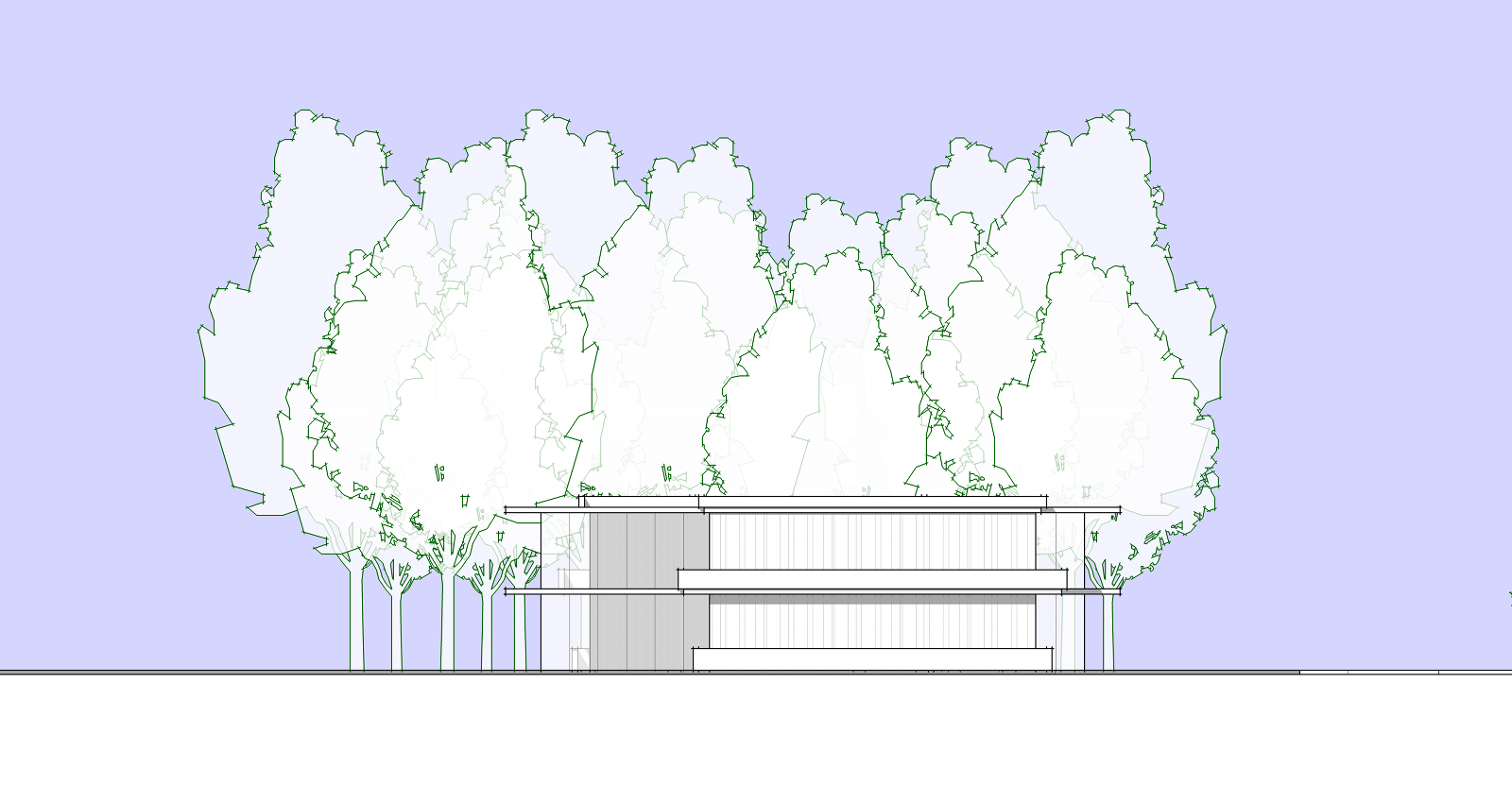

                                      Colored lines ^^

                                      1 條回覆 最後回覆 回覆 引用 0
                                      • jeff hammondJ 離線
                                        jeff hammond
                                        最後由 編輯

                                        @unknownuser said:

                                        What the... 😲?
                                        6.I could change the radius of a circle that's been extruded - maybe using Scale Tool 😕

                                        you can change the radius via the entity info dialog.. the same way you would change the radius of a circle except that it also works if the circle has been extruded

                                        dotdotdot

                                        1 條回覆 最後回覆 回覆 引用 0
                                        • dereiD 離線
                                          derei
                                          最後由 編輯

                                          @unknownuser said:

                                          you can change the radius via the entity info dialog.. the same way you would change the radius of a circle except that it also works if the circle has been extruded

                                          Heh, that's cool 😄 Inattentional blindness is to blame... I've seen that number of segments is grayed-out, and I didn't seen that the radius is fully editable.

                                          DESIGNER AND ARTIST DEREI.UK

                                          1 條回覆 最後回覆 回覆 引用 0
                                          • pilouP 離線
                                            pilou
                                            最後由 編輯

                                            @unknownuser said:

                                            Found out last week that you can also color lines in your model

                                            you have a crazzy plug about that! 😉
                                            ChrisP_Color_edge By C Plassais 😎

                                            Frenchy Pilou
                                            Is beautiful that please without concept!
                                            My Little site :)

                                            1 條回覆 最後回覆 回覆 引用 0
                                            • 1
                                            • 2
                                            • 5
                                            • 6
                                            • 7
                                            • 8
                                            • 9
                                            • 34
                                            • 35
                                            • 7 / 35
                                            • 第一個貼文
                                              最後的貼文
                                            Buy SketchPlus
                                            Buy SUbD
                                            Buy WrapR
                                            Buy eBook
                                            Buy Modelur
                                            Buy Vertex Tools
                                            Buy SketchCuisine
                                            Buy FormFonts

                                            Advertisement