sketchucation logo sketchucation
    • Login
    Oops, your profile's looking a bit empty! To help us tailor your experience, please fill in key details like your SketchUp version, skill level, operating system, and more. Update and save your info on your profile page today!
    ⚠️ Update | Sketchucation Tools 5.0.8 released with licensing improvements and bugfixes Download

    The "Duh!" thread (aka the Doh! thread)

    Scheduled Pinned Locked Moved SketchUp Discussions
    sketchup
    696 Posts 135 Posters 579.8k Views 135 Watching
    Loading More Posts
    • Oldest to Newest
    • Newest to Oldest
    • Most Votes
    Reply
    • Reply as topic
    Log in to reply
    This topic has been deleted. Only users with topic management privileges can see it.
    • pyrolunaP
      pyroluna
      last edited by

      well... there's a sketchup-wiki in Dutch... so... yay! for Dutch people

      1 Reply Last reply
      Reply Quote 0
      • J
        Jim
        last edited by

        Today I learned you can use the arrow keys to precisely move the selection in Paint.NET. (Holding Ctrl moves it by 10 pixels.)

        Hi

        1 Reply Last reply
        Reply Quote 0
        • GaieusG
          Gaieus
          last edited by

          I just realised it the other day myself, too. πŸ˜„

          Gai...

          1 Reply Last reply
          Reply Quote 0
          • david_hD
            david_h
            last edited by

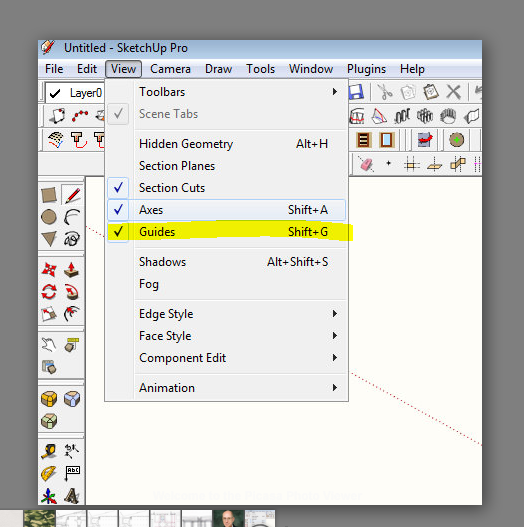
            I've been taken to task just now on this one. . . I asked for a plugin to toggle the Construction lines on and off. . .turns out it's in the view menu. . .

            WHICH I NEVER USE BY THE WAY!!!!

            Hide Construction lines

            This is so humiliating. . .. 😳 πŸ’š

            I'm okay now. . .


            Why I am an idiot.PNG

            If I make it look easy...It is probably easy

            1 Reply Last reply
            Reply Quote 0
            • J
              Jim
              last edited by

              I just learned that Edit > Delete Guides is context-sensitive - it deletes guides all guides starting from the current editing context and deeper, but not from "higher" level contexts. I had always thought it always deleted all guides, everywhere.

              Hi

              1 Reply Last reply
              Reply Quote 0
              • thomthomT
                thomthom
                last edited by

                @jim said:

                I just learned that Edit > Delete Guides is context-sensitive - it deletes guides all guides starting from the current editing context and deeper, but not from "higher" level contexts. I had always thought it always deleted all guides, everywhere.

                I had that same realization a couple of weeks ago. πŸ˜„

                Thomas Thomassen β€” SketchUp Monkey & Coding addict
                List of my plugins and link to the CookieWare fund

                1 Reply Last reply
                Reply Quote 0
                • thomthomT
                  thomthom
                  last edited by

                  @rv1974 said:

                  If Thom is already here..
                  Only last week I discovered know that double clicking on blue balloons (edge tools-inspect gaps) actually close the gaps.
                  Great tool!

                  Ah, yea it's not that obvious - I had further plans for the UI. (also for CleanUp), but they've been down-prioritized.
                  btw, no need to doubleclick - single click is enough.

                  Thomas Thomassen β€” SketchUp Monkey & Coding addict
                  List of my plugins and link to the CookieWare fund

                  1 Reply Last reply
                  Reply Quote 0
                  • R
                    rv1974
                    last edited by

                    If Thom is already here..
                    Only last week I discovered that double clicking on blue balloons (edge tools-inspect gaps) actually close the gaps.
                    Great tool!

                    1 Reply Last reply
                    Reply Quote 0
                    • GaieusG
                      Gaieus
                      last edited by

                      @jim said:

                      I just learned that Edit > Delete Guides is context-sensitive - it deletes guides all guides starting from the current editing context and deeper, but not from "higher" level contexts. I had always thought it always deleted all guides, everywhere.

                      Doh. 😲

                      @rv1974 said:

                      Only last week I discovered that double clicking on blue balloons (edge tools-inspect gaps) actually close the gaps.

                      What???!!! πŸŽ‰

                      Gai...

                      1 Reply Last reply
                      Reply Quote 0
                      • pilouP
                        pilou
                        last edited by

                        @unknownuser said:

                        Being able to select only a few edges from a face and offset them instead of the whole face.

                        Yes but edges must be selected without discontinuity! 😳 😳 😳

                        Frenchy Pilou
                        Is beautiful that please without concept!
                        My Little site :)

                        1 Reply Last reply
                        Reply Quote 0
                        • boofredlayB
                          boofredlay
                          last edited by

                          Something I just learned a couple days ago while studying the Google Earth Modeling videos.
                          D'oh, never knew that you could make a unique texture from a portion of another!

                          [flash=853,505:84crs2i3]http://www.youtube.com/v/18r2sCMUSBU&fs=1[/flash:84crs2i3]

                          http://www.coroflot.com/boofredlay

                          1 Reply Last reply
                          Reply Quote 0
                          • DanielD
                            Daniel
                            last edited by

                            I've always known about hiding geometry by holding the shift key with the eraser, but last week I just noticed the "hidden" check box on the entity info window. 😳

                            My avatar is an anachronism.

                            1 Reply Last reply
                            Reply Quote 0
                            • Bob JamesB
                              Bob James
                              last edited by

                              Never paid any attention to this thread until today 😳

                              @tig said:

                              .....select all faces with the same material as the one highlighted... then RickW pointed out that it is already a standard built-in tool under Select... 😳

                              OMG 😲 I soooo needed this yesterday πŸ‘Š
                              This thread is one of the greatest tutorials ever made!
                              Now to Page 1 and read (and write down) all of the golden nuggets in this thread.

                              i7-4930K 3.4Ghz, 2x GTX780 6GB, 32GB DDR3-1600 ECC, OCZ Vertex 4 500GB, WD Black 3TB, 32TB NAS, 4x 27" Monitors, SpaceMouse Pro, X-keys XK-60

                              1 Reply Last reply
                              Reply Quote 0
                              • J
                                Jim
                                last edited by

                                @bob james said:

                                This thread is one of the greatest tutorials ever made!

                                Yeah, this thread would make a great mini-pub for SCF. I'd probably even buy a tree-ware version as I can't retain online info as well as I can with a good sit with a book.

                                Hi

                                1 Reply Last reply
                                Reply Quote 0
                                • pilouP
                                  pilou
                                  last edited by

                                  @unknownuser said:

                                  make a unique texture from a portion of another!

                                  Seems only from the V7 and + πŸ˜‰

                                  Frenchy Pilou
                                  Is beautiful that please without concept!
                                  My Little site :)

                                  1 Reply Last reply
                                  Reply Quote 0
                                  • Bob JamesB
                                    Bob James
                                    last edited by

                                    SU Duh.pdfCompilation of DUHs
                                    This is an unedited regurgitation of all of the DUH items. Some are repeated.

                                    i7-4930K 3.4Ghz, 2x GTX780 6GB, 32GB DDR3-1600 ECC, OCZ Vertex 4 500GB, WD Black 3TB, 32TB NAS, 4x 27" Monitors, SpaceMouse Pro, X-keys XK-60

                                    1 Reply Last reply
                                    Reply Quote 0
                                    • pilouP
                                      pilou
                                      last edited by

                                      Cool idea! 😎

                                      I will translate it when I arrive at this page! πŸ˜„ (in fact a sort of speedy copy / past because ...

                                      I am now at the page 7 on French Section ! πŸ’š

                                      Frenchy Pilou
                                      Is beautiful that please without concept!
                                      My Little site :)

                                      1 Reply Last reply
                                      Reply Quote 0
                                      • dereiD
                                        derei
                                        last edited by

                                        What the... 😲?
                                        6.I could change the radius of a circle that's been extruded - maybe using Scale Tool πŸ˜•
                                        19. finding that by holding the spacebar down you can control the zoom in so you don't zip past the
                                        object your zooming to
                                        - really ? It doesn't seem to happen anything different when I zoom and keep spacebar pressed.

                                        ...and the list can continue.
                                        Maybe those should be verified, or given more detailed explanations. After all, its purpose is to teach the noobs, not to confuse them more πŸ’š

                                        EDIT:
                                        22. Also, any selection that only contains a single entity (not only a line) cannot be made a
                                        component (or group) this way. If you select a sphere (with a bounding box), there's a single
                                        "surface" selected only and you right click to turn it into a group/component in vain.
                                        - try pressing G or use the Make Component icon ... πŸ˜‰ maybe is not in vain

                                        DESIGNER AND ARTIST DEREI.UK

                                        1 Reply Last reply
                                        Reply Quote 0
                                        • GaieusG
                                          Gaieus
                                          last edited by

                                          @unknownuser said:

                                          1. Also, any selection that only contains a single entity (not only a line) cannot be made a
                                            component (or group) this way. If you select a sphere (with a bounding box), there's a single
                                            "surface" selected only and you right click to turn it into a group/component in vain. - try pressing G or use the Make Component icon ... maybe is not in vain

                                          That's true - thus the inconsistency. SU should work the same way no matter where we access the same tool.

                                          Gai...

                                          1 Reply Last reply
                                          Reply Quote 0
                                          • H
                                            HFM
                                            last edited by

                                            Found out last week that you can also color lines in your model 😲
                                            It even works with custom drawing styles πŸ˜„


                                            Colored lines ^^

                                            1 Reply Last reply
                                            Reply Quote 0

                                            Hello! It looks like you're interested in this conversation, but you don't have an account yet.

                                            Getting fed up of having to scroll through the same posts each visit? When you register for an account, you'll always come back to exactly where you were before, and choose to be notified of new replies (either via email, or push notification). You'll also be able to save bookmarks and upvote posts to show your appreciation to other community members.

                                            With your input, this post could be even better πŸ’—

                                            Register Login
                                            • 1
                                            • 2
                                            • 12
                                            • 13
                                            • 14
                                            • 15
                                            • 16
                                            • 34
                                            • 35
                                            • 14 / 35
                                            • First post
                                              Last post
                                            Buy SketchPlus
                                            Buy SUbD
                                            Buy WrapR
                                            Buy eBook
                                            Buy Modelur
                                            Buy Vertex Tools
                                            Buy SketchCuisine
                                            Buy FormFonts

                                            Advertisement