[Plugin] 1001bit Tools - Architectural tools for SketchUp
-
@gohch said:
Managed to catch the BUG!!!
The bugs in the tools that caused the crashes:
"extend to edge or face"
"information between 2 points"
have been fixed in the latest rbz file:
http://www.1001bit.com/pro/download/1001bit_pro(v2.2).rbzI have tested the other tools to work fine in SU2014,
if anyone has any issue, please let me know and i will look into it.
Thanks and cheers!
GohJust to let you know Goh that the link here is corrupted and cannot be downloaded. If this is a fix please re-post it again. Thank you. I love this plugin.
EliBjr
-
hi EliBjr,
Can you please try the link again, i managed to download the rbz file through the link.
Thanks!
Goh -
Dear Goh,
Thank you for an excellent plugin.
I ran into a curious problem. My first attempt at using your plugin. Used it on Ver. 7 & 8 (both free).
I made walls using the plugin. Then while making openings I made the internal doors in walls of varying thickness. No problems so far. Then I started on the windows on the 'external' walls. Here if the window was punched from 'outside', they would be made but only 3" deep without the back face. If the window was made on the same external wall from 'inside' it would punch through the full depth of the wall.
Is this how it is supposed to work?
VJsku
Sent from my HTC One X using Tapatalk
PS: Adding a screenshot of the behaviour...
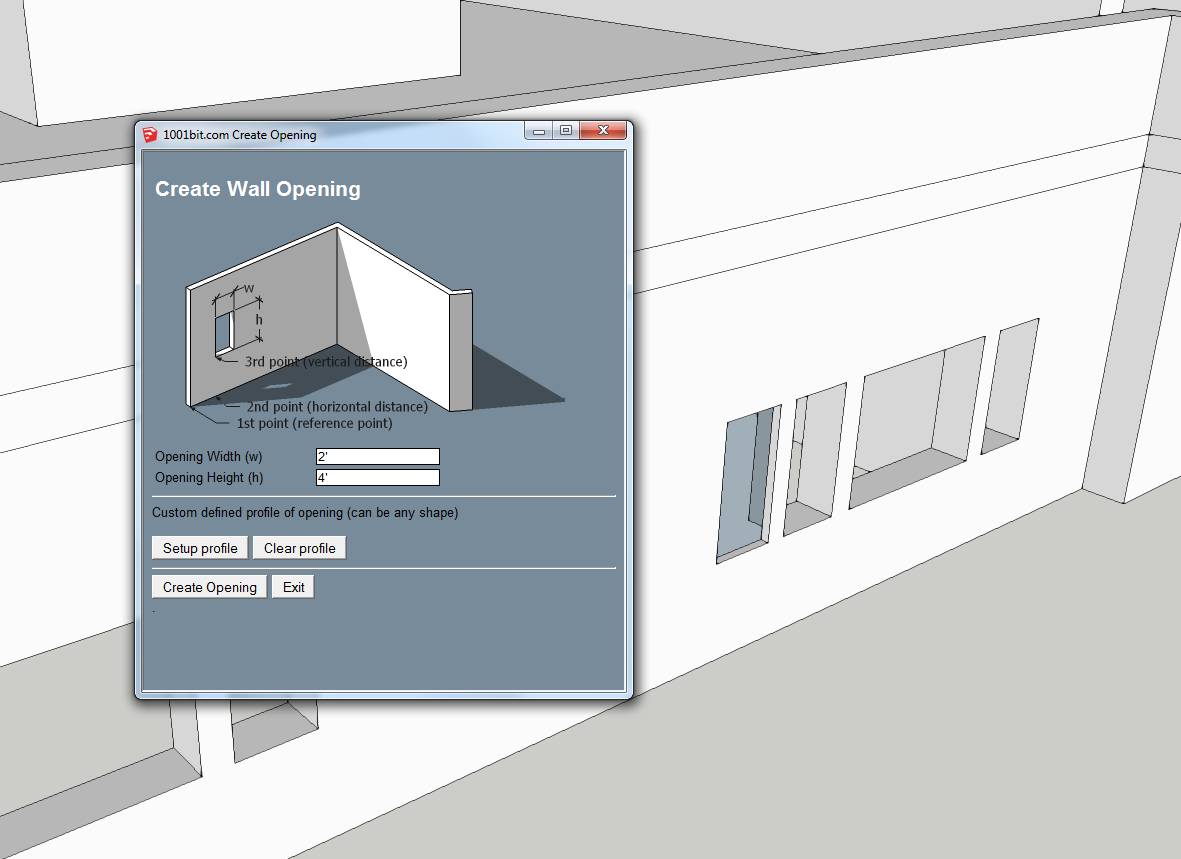
The left window is punched from 'outside', while the window on the right was punched from the 'inside' of the same wall. The wall is 15" thick in this example, but when an opening is created from 'outside' the opening goes 'in' by only 3".
Unfortunately I am not able to recreate this on a fresh 3d. So it seems something unique has happened to this particular model...
-
hi VJsku,
Thanks for the feedback. This seems to be a bug... in how the tool identify the opposite face of the wall.
I will look into this an come up with a patch.
Thanks for bringing this up!
Goh -
thnxxx
-
Your site is down, temporarily I hope?
edit - all good
-
I want to bring my 1001bits Pro from Sketchup v8 free over to my Sketchup2014 Pro installation. I get a crash every time. I think I'm just doing something wrong. I uninstalled from v8 and copied the plugin files along with my Prokey file I downloaded to my 2014 plugins directory in windows XP. I cannot get it to work. I get a "syntax error" and within the message is "Invalid Break". Is there anything I should be aware of concerning 1001 and SU2014? I tried looking for it through the plugin store but do not see the pro version. Any help is appreciated.
EDIT: Nevermind, I figured it out. I went to the official site and downloaded from the link to the rbz file. It came in as a regular zip file so I just renamed the extension to rbz and was able to install and put my key in. It works now.
I left the original post in case anyone else ran into this issue.
-
I tried to use the latest update. But the plugin (1001bit_freeware_v1.0.3_v1.0.5) did not work. I had to go back the the previous version (1.0.2), which of course works fine.
I get the following error on clicking on the 'Wall' on the Ruby console:
Plugins/1001bit_freeware/wall1.rb
looking for E:/Common Plugins/1001bit_freeware/wall1.rbs
loading E:/Common Plugins/1001bit_freeware/wall1.rbs
Error: #<NameError: uninitialized constant GCH_1001bit_loader::GCH_1001bit_load::GCH_1001bit_free::GCH_1001bit_tools::GCH_1001bit_wall1>
(eval):256:ingh_mnu_wall1' (eval):798:inload'
(eval):798:in `call'In the zip (rbz) file I could see two copies of 1001bit_freeware.rb. One needs to reside in the main plugin folder and one more in the <1001bit_freeware> folder inside the plugin folder. The error on the console remains the same irrespective of whether the 'extra' copy is kept in the <1001bit_freeware> folder or not.
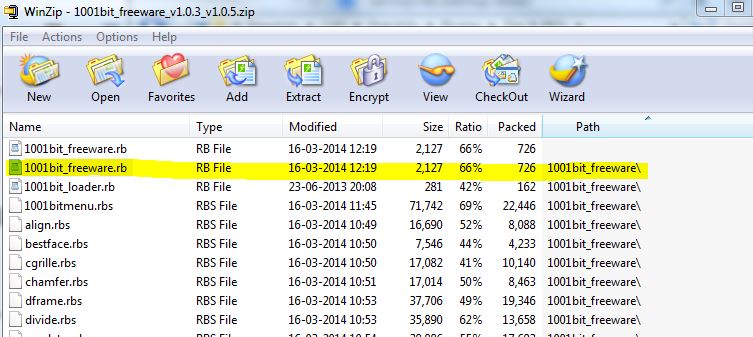
What am I doing wrong...
PS: I use Sketchup version 7 and 8 (both free).
Thanks..
-
Has anyone been having problems with 1001 on SU2013? Plugin loads fine when SU is started but when you click on any of the icons or try to start a command from the drop down menu, nothing happens.
However, everything works fine on SU2014.
Any ideas?
-
Just use 2014, there are less bugs inside!

-
@unknownuser said:
Just use 2014, there are less bugs inside!
If I was in charge of our IT dept I would
However, most of the office is still on 2013 with no word on when everyone will switch to 2014. So that's why i'd like to figure out the problem that 1001bit is having with SU2013.
-
Do you get any messages in the Ruby console when click on a tool?
Whatever are security settings for the Plugins folder?
-
@dave r said:
Do you get any messages in the Ruby console when click on a tool?
Whatever are security settings for the Plugins folder?
This is the text I'm getting in SU2013.
@unknownuser said:
looking for F:/03-Tools/Software/SketchUp/PLUGIN LIBRARY/Plugins/1001bit_freeware/staircase2.rb
looking for F:/03-Tools/Software/SketchUp/PLUGIN LIBRARY/Plugins/1001bit_freeware/staircase2.rbs
loading F:/03-Tools/Software/SketchUp/PLUGIN LIBRARY/Plugins/1001bit_freeware/staircase2.rbs
Error: #<NameError: uninitialized constant GCH_1001bit_loader::GCH_1001bit_load::GCH_1001bit_free::GCH_1001bit_tools::GCH_1001bit_staircase2>
(eval):285:ingh_mnu_staircase2' (eval):960:inload'This is the text I'm getting in SU2014.
@unknownuser said:
looking for F:/03-Tools/Software/SketchUp/PLUGIN LIBRARY/Plugins/1001bit_freeware/wframe.rb
looking for F:/03-Tools/Software/SketchUp/PLUGIN LIBRARY/Plugins/1001bit_freeware/wframe.rbs
loading F:/03-Tools/Software/SketchUp/PLUGIN LIBRARY/Plugins/1001bit_freeware/wframe.rbs
inside read
no language file. F:/03-Tools/Software/SketchUp/PLUGIN LIBRARY/Plugins/1001bit_freeware/language/wframe.txt
default sizeSecurity permissions are given to all users as the plugins are on a network drive.
-
The v2014 error says, "
...no language file. F:/03-Tools/Software/SketchUp/PLUGIN LIBRARY/Plugins/1001bit_freeware/language/wframe.txt..."
This suggests that a file or subfolder/file is missing ?The v2013 error suggests that Constant is not being set up.
If you copy/paste+<enter> these [in turn] into the Ruby Console what do you get ?
GCH_1001bit_loader GCH_1001bit_loader::GCH_1001bit_load GCH_1001bit_loader::GCH_1001bit_load::GCH_1001bit_free GCH_1001bit_loader::GCH_1001bit_load::GCH_1001bit_free::GCH_1001bit_tools:: GCH_1001bit_loader::GCH_1001bit_load::GCH_1001bit_free::GCH_1001bit_tools::GCH_1001bit_staircase2 -
@tig said:
The v2014 error says, "
...no language file. F:/03-Tools/Software/SketchUp/PLUGIN LIBRARY/Plugins/1001bit_freeware/language/wframe.txt..."
This suggests that a file or subfolder/file is missing ?The v2013 error suggests that Constant is not being set up.
If you copy/paste+<enter> these [in turn] into the Ruby Console what do you get ?
GCH_1001bit_loader GCH_1001bit_loader::GCH_1001bit_load GCH_1001bit_loader::GCH_1001bit_load::GCH_1001bit_free GCH_1001bit_loader::GCH_1001bit_load::GCH_1001bit_free::GCH_1001bit_tools:: GCH_1001bit_loader::GCH_1001bit_load::GCH_1001bit_free::GCH_1001bit_tools::GCH_1001bit_staircase2For 2014, I did a bit more digging around and found that there is no "language" folder. I've downloaded the plugin from both the 1001bit site and the extension warehouse. Both .rbz files have the same contents except for one thing. The .rbz from the warehouse has this "extension_info.txt" file which has this inside: ID=e5b1211a-8d1a-4813-bdc3-b321e5477d7b
VERSION_ID=fbd307e2-d0f0-4880-9568-80d2032f0ffeFor 2013, I did what you asked and got this:
@unknownuser said:
GCH_1001bit_loader
GCH_1001bit_loader
GCH_1001bit_loader::GCH_1001bit_load
GCH_1001bit_loader::GCH_1001bit_load
GCH_1001bit_loader::GCH_1001bit_load::GCH_1001bit_free
GCH_1001bit_loader::GCH_1001bit_load::GCH_1001bit_free
GCH_1001bit_loader::GCH_1001bit_load::GCH_1001bit_free::GCH_1001bit_tools::
Error: #<SyntaxError: (eval):285: compile error
(eval):285: syntax error, unexpected $end
...1bit_free::GCH_1001bit_tools::
^>
(eval):285
GCH_1001bit_loader::GCH_1001bit_load::GCH_1001bit_free::GCH_1001bit_tools::GCH_1001bit_staircase2
Error: #<NameError: (eval):285: uninitialized constant GCH_1001bit_loader::GCH_1001bit_load::GCH_1001bit_free::GCH_1001bit_tools::GCH_1001bit_staircase2>
(eval):285 -
Try making a folder with an empty file -
F:/03-Tools/Software/SketchUp/PLUGIN LIBRARY/Plugins/1001bit_freeware/language/wframe.txt
Does that still give the error messages...
None comes with the RBZ, so presumably the scripts make it ?Have you tried removing the whole toolset, including its subfolders, then reinstalling from the RBZ... perhaps you have a rogue extra file, or missing file ??
-
@tig said:
Try making a folder with an empty file -
F:/03-Tools/Software/SketchUp/PLUGIN LIBRARY/Plugins/1001bit_freeware/language/wframe.txt
Does that still give the error messages...
None comes with the RBZ, so presumably the scripts make it ?Have you tried removing the whole toolset, including its subfolders, then reinstalling from the RBZ... perhaps you have a rogue extra file, or missing file ??
Made a blank wfram.txt file. Just says that it's "finished reading language file". But then again, I never had a problem in loading the piugin in 2014. So i'm not too worried about this.
In 2013, I've deleted and installed the .RBZ twice. One from the 1001bit site and once from the SU warehouse. Didn't work on both occasions. But reading the comments it seems there a lot of people having the same problem as I am.
-
Any solution yet for smuncky issue? I am in the same boat where toolbar is loaded but no functionality.
Any help would be welcomed!
-
Hi,
I've been using this plugin for a while and encountered a bug where it says somewhat like this " Group located too deep,... use align tool" window, and when I've try closing the window, it pop back up again... repeatedly. I have to force close the sketchup window, and reopen it. Anyone encountered a similar error?
-
I haven't used all the tools in 2015 but it's working... I think his is autokey by email isn't it? You might email him from here. It's Goh isn't it?








Advertisement