sketchucation logo sketchucation
    • 登入
    Oops, your profile's looking a bit empty! To help us tailor your experience, please fill in key details like your SketchUp version, skill level, operating system, and more. Update and save your info on your profile page today!
    🔌 Smart Spline | Fluid way to handle splines for furniture design and complex structures. Download

    [Plugin] 1001bit Tools - Architectural tools for SketchUp

    已排程 已置頂 已鎖定 已移動 Plugins
    243 貼文 65 Posters 234.5k 瀏覽 65 Watching
    正在載入更多貼文
    • 從舊到新
    • 從新到舊
    • 最多點贊
    回覆
    • 在新貼文中回覆
    登入後回覆
    此主題已被刪除。只有擁有主題管理權限的使用者可以查看。
    • thomthomT 離線
      thomthom
      最後由 編輯

      Just tried the Hip Roof creator; and I get some errors:

      Error - Vertex with more than 2 edges found on face.
      followed by:
      Face #Sketchup::Face:0x7285f00 invalid. Cannot create hip roof from this face.

      I had pushpulled a box and selected the top face.
      If I grouped it first, then it worked fine.

      Why can't it create a roof from a face connected to other geometry? And could you make it so it automatically creates a copy of the face in a group from which it creates the roof? That'd be a smoother workflow.

      Thomas Thomassen — SketchUp Monkey & Coding addict
      List of my plugins and link to the CookieWare fund

      1 條回覆 最後回覆 回覆 引用 0
      • thomthomT 離線
        thomthom
        最後由 編輯

        Cheers TIG! 👍

        Thomas Thomassen — SketchUp Monkey & Coding addict
        List of my plugins and link to the CookieWare fund

        1 條回覆 最後回覆 回覆 引用 0
        • TIGT 離線
          TIG Moderator
          最後由 編輯

          My Roof.rb (v3 http://www.crai.archi.fr/RubyLibraryDepot/Ruby/em_arc_page.htm ) does all of this and more. The tools will do a hipped roof made from a selected horizontal face - it can be connected to others as only its edges are needed - it's ignored afterwards: one face only - not with inner holes! Note that some shapes - like a crooked star - cannot have a single-pitch hipped roof - needs impossible 3D geometry...

          There are other tools in the set to make mansard/sprocketed roofs, gabled and pyramid roofs and also get roof face slopes.

          The tools' dialogs allow you to specify angle or pitch or height/eaves/fascia/soffit/verge/type/materials/layer etc as appropriate. Also including sloping and orthogonal fascia/soffit and different gable types at each end, and differ materials for each part e.g. fascia/soffit/slope/gable etc. There is also a help file out there...

          TIG

          1 條回覆 最後回覆 回覆 引用 0
          • G 離線
            gohch
            最後由 編輯

            hi Thomthom,
            I was working on the idea of generating hiproof from just a single face. Come to think of it now, that's really quite limited. I'll improve it.
            hi TIG, always good to know that there's more than 1 solution to a problem.
            cheers! 😄

            1 條回覆 最後回覆 回覆 引用 0
            • thomthomT 離線
              thomthom
              最後由 編輯

              @unknownuser said:

              hi Thomthom,
              I was working on the idea of generating hiproof from just a single face. Come to think of it now, that's really quite limited. I'll improve it.
              hi TIG, always good to know that there's more than 1 solution to a problem.
              cheers! 😄

              Well, I did have only one face selected. But when it is connected to other, the script refuse to use it.

              Thomas Thomassen — SketchUp Monkey & Coding addict
              List of my plugins and link to the CookieWare fund

              1 條回覆 最後回覆 回覆 引用 0
              • G 離線
                gohch
                最後由 編輯

                @thomthom said:

                Well, I did have only one face selected. But when it is connected to other, the script refuse to use it.

                Yep, Thomthom, that's the part that i didn't take into account and definitely should improve on. 😉
                cheers!

                1 條回覆 最後回覆 回覆 引用 0
                • T 離線
                  tiriki
                  最後由 編輯

                  @unknownuser said:

                  @tiriki said:

                  Hi Gohch!
                  I bought the users license for 1001bit... I received the email whit the activation key... but when I activate the license and I close and restart SU the license still appears as trial.
                  In the 1001bit folder is been created the file: 1001bit.key

                  What do I have to do to activate the licens?

                  Thank's a lot!

                  Hi Tiriki,
                  Sorry, didn't check on this forum past few days. Saw your email today and emailed the 1001bit.key file to you. That should solve the issue. Feel free to drop me a note if there's any issue. Thanks

                  Hi Gohch!
                  I received the email, thank's for the file 😉
                  It works very well now, I find it very useful!

                  1 條回覆 最後回覆 回覆 引用 0
                  • G 離線
                    gohch
                    最後由 編輯

                    Hi everyone,
                    1001bit tools is now possible for different languages! 😄
                    A new language pack function is added into version 1.1.5, which allows for automatic translation of the dialog boxes, status bar, tooltips and error messages into your local languages.
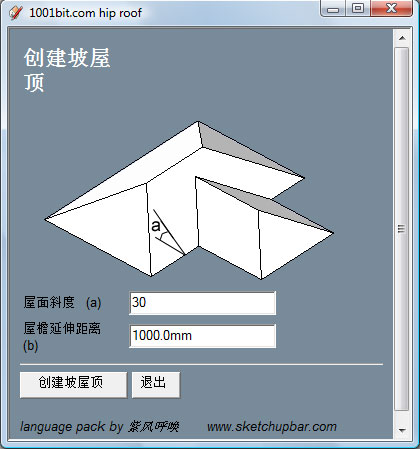
                    http://www.1001bit.com/language_pack/v1.1/images/dialog-cn.jpg

                    hip roof dialog in Chinese Simplified - courtesy of purplewind
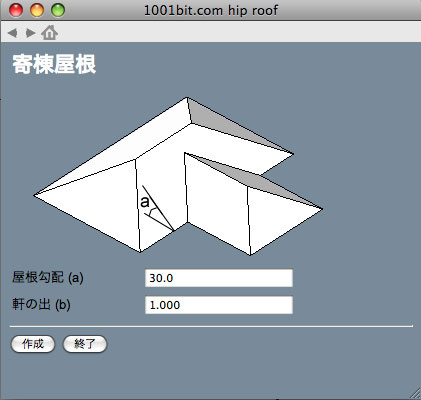
                    http://www.1001bit.com/language_pack/v1.1/images/dialog-jp.jpg

                    hip roof dialog in Japanese - courtesy of Takeshi

                    Here's how it works
                    In version 1.1.5, there's an additional language folder inside the 1001bit folder.
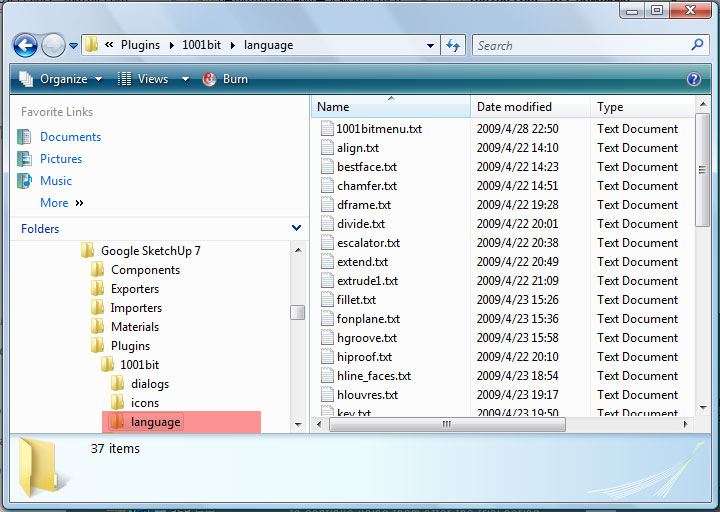
                    http://www.1001bit.com/language_pack/v1.1/images/language_folder.jpg

                    inside the language folder, there's a collection of text files (.txt) which contains the language translation.

                    http://www.1001bit.com/language_pack/v1.1/images/sample_cn.gif

                    translation courtesy of purplewind

                    The format of the translation is
                    id>>english>>translation
                    Just use a text editor to edit the .txt file and save it.
                    You may need to try saving the file in different format, for example, the Chinese version has to be saved in UTF-8 format for it to work properly on a Mac (English).

                    The first full translation into Chinese Simplified language has been completed and tested by purplewind of club.sketchupbar.com
                    http://www.1001bit.com/discussions/viewforum.php?f=17
                    Special thanks to Purplewind for his hardwork!

                    by the way, the 1001bit_tools.rbs file in the Plugins folder needs to be replaced with the latest. Otherwise you'll see a lot of errors!

                    1 條回覆 最後回覆 回覆 引用 0
                    • G 離線
                      gohch
                      最後由 編輯

                      hi guys,

                      I have modified the 1001bit_tools.rb to automatically look for the files in SU's Plugins/1001bit folder regardless of Windows or Mac.
                      if it cannot find the files, it then search for c:\1001bit.com

                      So, the setting up can be simplified to
                      Step 1: put the 1001bit folder in SU's Plugins folder
                      Step 2: copy the 1001bit_tools.rb file into the Plugins folder

                      Appreciate if you guys can test this for me:
                      Attached zip file contains 2 files,
                      1001bitmenu.rbs file
                      1001bit_tools.rb

                      1. Please overwrite the 1001bitmenu.rbs file (must be version 1.1.5)
                      2. remove the 1001bit_tools.rbs file , and use the 1001bit_tools.rb in your Plugins folder instead.
                      3. remove any file that indicates the path, like 1001bit_path_.....rb

                      In this case, the 1001bit folder must be in your Plugins folder.

                      Thanks and appreciate all feedbacks


                      patch for testing 1001bit default path

                      1 條回覆 最後回覆 回覆 引用 0
                      • pilouP 離線
                        pilou
                        最後由 編輯

                        I advanced the French version! ☀
                        Tell you when it's finished 😉

                        Frenchy Pilou
                        Is beautiful that please without concept!
                        My Little site :)

                        1 條回覆 最後回覆 回覆 引用 0
                        • G 離線
                          gohch
                          最後由 編輯

                          @unknownuser said:

                          I advanced the French version! ☀
                          Tell you when it's finished 😉

                          Great Pilou,
                          really looking forward to see 1001bit in more different languages! 🎉

                          1 條回覆 最後回覆 回覆 引用 0
                          • pilouP 離線
                            pilou
                            最後由 編輯

                            @GOHCH
                            French translation done ☀
                            See your PM system at PushPullbar 😉
                            See your forum for images & questions 😄

                            Frenchy Pilou
                            Is beautiful that please without concept!
                            My Little site :)

                            1 條回覆 最後回覆 回覆 引用 0
                            • G 離線
                              gohch
                              最後由 編輯

                              hi Pilou,
                              Thanks so much for your efforts!

                              1. Tooltip text: Seems like there is a maximum of 79 characters in the tooltip. I couldn't get it to do more, and couldn't get it to do multi lines of text.
                                Has anyone come across a tooltip with multi lines of text?

                              2. The Escalator title: tracked down the problem. It's that little Apostrophe (')
                                title>>Create Escalator>>Création d'Escalator
                                when Javascript sees a apostrophe('), it interprets as the beginning of another string and caused an error.
                                The translator defaults back to English when there's an error getting the translation.
                                Adding a back slash in front of it will get it to be interpreted correctly.

                              title>>Create Escalator>>Création d'Escalator
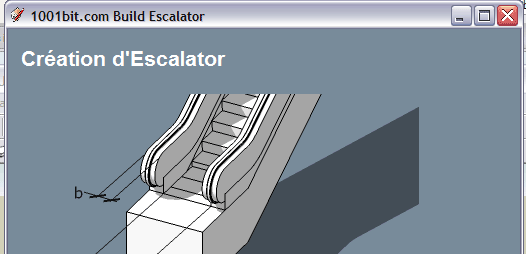
                              escalator title translated correctly with
                              cheers!
                              Goh

                              1 條回覆 最後回覆 回覆 引用 0
                              • pilouP 離線
                                pilou
                                最後由 編輯

                                OK! So some modify to make 😄

                                Frenchy Pilou
                                Is beautiful that please without concept!
                                My Little site :)

                                1 條回覆 最後回覆 回覆 引用 0
                                • pilouP 離線
                                  pilou
                                  最後由 編輯

                                  @GOHCH
                                  See your forum for little problems 😉

                                  Frenchy Pilou
                                  Is beautiful that please without concept!
                                  My Little site :)

                                  1 條回覆 最後回覆 回覆 引用 0
                                  • Z 離線
                                    zfconnor
                                    最後由 編輯

                                    Thank you for your effort.

                                    1 條回覆 最後回覆 回覆 引用 0
                                    • P 離線
                                      publied
                                      最後由 編輯

                                      very nice library! great job.

                                      hire me@ http://www.publied.it !

                                      1 條回覆 最後回覆 回覆 引用 0
                                      • G 離線
                                        gohch
                                        最後由 編輯

                                        😍 Thanks to Frenchy Pilou's hardwork, 😍
                                        the French language pack for 1001bit tools is now ready for download!
                                        http://www.1001bit.com/language_pack/v1.1/fr/1001bit_v1.1_language_fr_pilou.zip

                                        Some of the dialog boxes may be insufficiently sized to accomodate all the French languages. Please bear with this for another 2-3 weeks. I'll issue a version 1.1.6 update soon that addresses resizing of dialog boxes as well as installation path automatic settings.

                                        Again, Thanks Frenchy Pilou

                                        1 條回覆 最後回覆 回覆 引用 0
                                        • pilouP 離線
                                          pilou
                                          最後由 編輯

                                          😄 😉 ☀ 😎

                                          Frenchy Pilou
                                          Is beautiful that please without concept!
                                          My Little site :)

                                          1 條回覆 最後回覆 回覆 引用 0
                                          • P 離線
                                            putnik
                                            最後由 編輯

                                            GOHCH, 1001bit_patch(3-May-09).zip works fine for me. WinXP SP3. Russian language translation is a work in progress at the moment at stroyka.cc


                                            http://keshas.info

                                            1 條回覆 最後回覆 回覆 引用 0
                                            • 1
                                            • 2
                                            • 9
                                            • 10
                                            • 11
                                            • 12
                                            • 13
                                            • 12 / 13
                                            • 第一個貼文
                                              最後的貼文
                                            Buy SketchPlus
                                            Buy SUbD
                                            Buy WrapR
                                            Buy eBook
                                            Buy Modelur
                                            Buy Vertex Tools
                                            Buy SketchCuisine
                                            Buy FormFonts

                                            Advertisement