sketchucation logo sketchucation
    • 登入
    Oops, your profile's looking a bit empty! To help us tailor your experience, please fill in key details like your SketchUp version, skill level, operating system, and more. Update and save your info on your profile page today!
    ⚠️ Important | Libfredo 15.6b introduces important bugfixes for Fredo's Extensions Update

    Profile Builder released!

    已排程 已置頂 已鎖定 已移動 Plugins
    125 貼文 41 Posters 60.6k 瀏覽 41 Watching
    正在載入更多貼文
    • 從舊到新
    • 從新到舊
    • 最多點贊
    回覆
    • 在新貼文中回覆
    登入後回覆
    此主題已被刪除。只有擁有主題管理權限的使用者可以查看。
    • S 離線
      slugore
      最後由 編輯

      I love this plug-in! As soon as I saw the video I had to buy it.
      One question that I think hasn't been answered (and forgive me if it has been) has to do with adding textures to a profile.
      I created a wall profile that was then used to create several walls(Placement Point: Bottom Left). When I try to add a texture that has a definite vertical orientation, it seems to rotate the texture to the horizontal(in direction of extrusion). Exploding the group and then adding the texture seems to work but adds a few extra steps that I would rather not take. Is there something that I am missing? Or is this a Sketchup thing? (Follow me appears to keep the orientation right BTW.)
      Thanks in advance.
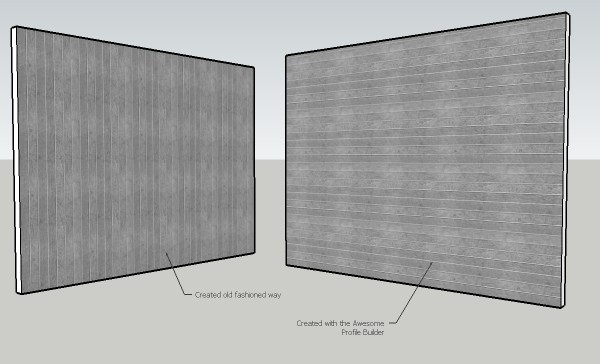
      http://slugisdoug.files.wordpress.com/2010/03/pbwallssmall.jpg

      1 條回覆 最後回覆 回覆 引用 0
      • boofredlayB 離線
        boofredlay
        最後由 編輯

        Thanks again for this one Dale, it saved my butt tonight.

        http://www.coroflot.com/boofredlay

        1 條回覆 最後回覆 回覆 引用 0
        • gtalaricoG 離線
          gtalarico
          最後由 編輯

          Crashed SU 8...
          Has anyone been able to "edit path" on SU 8?

          Cheers

          -Gui

          http://www.gtalarico.com

          1 條回覆 最後回覆 回覆 引用 0
          • thomthomT 離線
            thomthom
            最後由 編輯

            @gtalarico said:

            Crashed SU 8...
            Has anyone been able to "edit path" on SU 8?

            Cheers

            hm... I've used PB in SU8 - but I just realised I haven't edited a path yet - as it just crashed on me when I tried it.

            Thomas Thomassen — SketchUp Monkey & Coding addict
            List of my plugins and link to the CookieWare fund

            1 條回覆 最後回覆 回覆 引用 0
            • gtalaricoG 離線
              gtalarico
              最後由 編輯

              I guess whaat is aware of it:

              File Not Found

              favicon

              (www.smustard.com)

              -Gui

              http://www.gtalarico.com

              1 條回覆 最後回覆 回覆 引用 0
              • W 離線
                Whaat
                最後由 編輯

                @thomthom said:

                @gtalarico said:

                Crashed SU 8...
                Has anyone been able to "edit path" on SU 8?

                Cheers

                hm... I've used PB in SU8 - but I just realised I haven't edited a path yet - as it just crashed on me when I tried it.

                Yes, this bug has been reported awhile ago to the SketchUp team. I need to check with them to see if it will be fixed in the next update.

                SketchUp Plugins for Professionals

                1 條回覆 最後回覆 回覆 引用 0
                • thomthomT 離線
                  thomthom
                  最後由 編輯

                  You know what caused it?

                  Thomas Thomassen — SketchUp Monkey & Coding addict
                  List of my plugins and link to the CookieWare fund

                  1 條回覆 最後回覆 回覆 引用 0
                  • D 離線
                    Dsmelcer1234
                    最後由 編輯

                    Any update on the su8 edit path bug?

                    1 條回覆 最後回覆 回覆 引用 0
                    • gtalaricoG 離線
                      gtalarico
                      最後由 編輯

                      According to someone on Smustard, SU maintenance patch 8.0.4811 for sketchup fixes the bug:
                      http://www.smustard.com/forum/viewtopic.php?f=3&t=70

                      -Gui

                      http://www.gtalarico.com

                      1 條回覆 最後回覆 回覆 引用 0
                      • thomthomT 離線
                        thomthom
                        最後由 編輯

                        Yup! 😄

                        Thomas Thomassen — SketchUp Monkey & Coding addict
                        List of my plugins and link to the CookieWare fund

                        1 條回覆 最後回覆 回覆 引用 0
                        • MarianM 離線
                          Marian
                          最後由 編輯

                          I'm having a problem with Profile builder. I can't access any of the profile libraries even though they're correctly located.
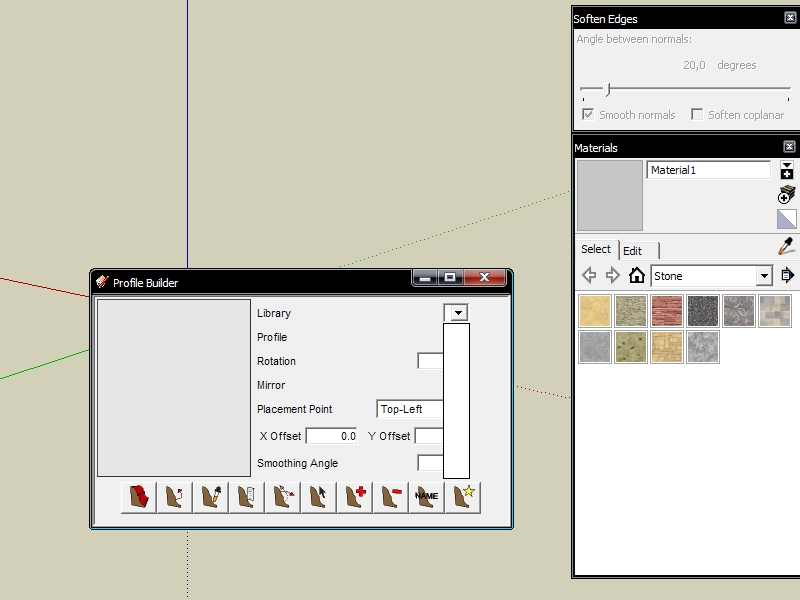
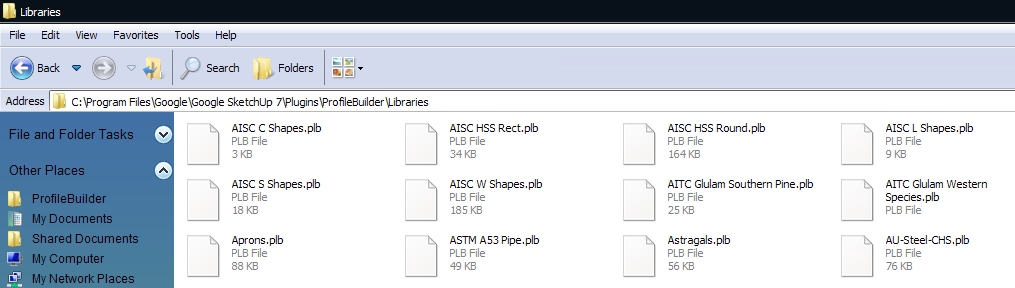
                          pb1.jpg


                          pb2.jpg

                          http://marian87.deviantart.com/

                          1 條回覆 最後回覆 回覆 引用 0
                          • W 離線
                            Whaat
                            最後由 編輯

                            Hi Marian,

                            Sorry about the wait. Do you have a file in your ProfileBuilder directory called 'profile_libraries.txt'? If so, what is in this file? It might be pointing to another folder.

                            It looks like you have your profile libaries in the right place... Did you have it working in a previous version of SketchUp? Has it ever worked for you?

                            Cheers,
                            Dale

                            SketchUp Plugins for Professionals

                            1 條回覆 最後回覆 回覆 引用 0
                            • MarianM 離線
                              Marian
                              最後由 編輯

                              Hi Dale, Thanks for replying.

                              @whaat said:

                              Do you have a file in your ProfileBuilder directory called 'profile_libraries.txt'?

                              No, there's no file like that, there's one called profileBuilder which seems to be a....Cascading Style Sheet Document and that doesn't have any folder address.

                              @whaat said:

                              Did you have it working in a previous version of SketchUp? Has it ever worked for you?

                              No I haven't tried it in SU6 and it never worked since I bought it a few weeks ago.

                              http://marian87.deviantart.com/

                              1 條回覆 最後回覆 回覆 引用 0
                              • TIGT 離線
                                TIG Moderator
                                最後由 編輯

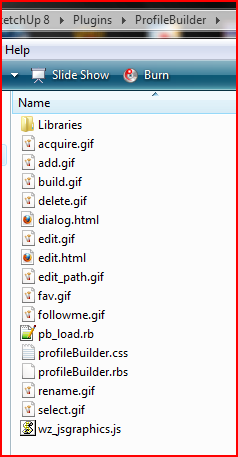
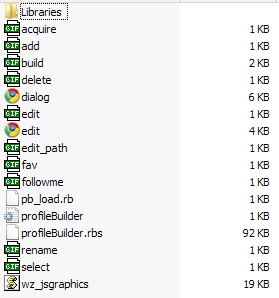
                                Here's what I have in my folder - it works finePBfolder.PNG

                                TIG

                                1 條回覆 最後回覆 回覆 引用 0
                                • MarianM 離線
                                  Marian
                                  最後由 編輯

                                  I have the same things. I don't get it.
                                  Does it have any known conflicts with some plugin?

                                  1.jpg

                                  http://marian87.deviantart.com/

                                  1 條回覆 最後回覆 回覆 引用 0
                                  • TIGT 離線
                                    TIG Moderator
                                    最後由 編輯

                                    Can you open the Ruby Console.
                                    Then run ProfileMaker.
                                    Click on the various drop-downs and options and see what errors you get reported...
                                    Post a copy here... 😕

                                    TIG

                                    1 條回覆 最後回覆 回覆 引用 0
                                    • MarianM 離線
                                      Marian
                                      最後由 編輯

                                      This is what I get.

                                      ProfileMaker
                                      Error; #<NameError; (eval);894; uninitialized constant ProfileMaker>
                                      

                                      http://marian87.deviantart.com/

                                      1 條回覆 最後回覆 回覆 引用 0
                                      • TIGT 離線
                                        TIG Moderator
                                        最後由 編輯

                                        I didn't mean type 'ProfileMaker' 😒
                                        Open the Ruby Console and run ProfileMaker by selecting it off the menu or its toolbar as usual... 😕

                                        TIG

                                        1 條回覆 最後回覆 回覆 引用 0
                                        • MarianM 離線
                                          Marian
                                          最後由 編輯

                                          Oh...I didn't get any error while opening it or pushing buttons. Nothing works and it doesn't show any errors.
                                          The ruby consoles clearly registers when editing and deleting but nothing happens when I push the profile builder buttons.

                                          http://marian87.deviantart.com/

                                          1 條回覆 最後回覆 回覆 引用 0
                                          • W 離線
                                            Whaat
                                            最後由 編輯

                                            @marian said:

                                            Oh...I didn't get any error while opening it or pushing buttons. Nothing works and it doesn't show any errors.
                                            The ruby consoles clearly registers when editing and deleting but nothing happens when I push the profile builder buttons.

                                            ProfileBuilder uses a IE based web-dialog so it is possible that your IE settings are preventing it from running properly.

                                            Try opening Internet Explorer and go to Tools->Internet Options->advanced->reset...

                                            You could also try upgrading your version of Internet explorer if you haven't done so for awhile.

                                            You could also try deleting PB entirely and then re-installing.

                                            SketchUp Plugins for Professionals

                                            1 條回覆 最後回覆 回覆 引用 0
                                            • 1
                                            • 2
                                            • 3
                                            • 4
                                            • 5
                                            • 6
                                            • 7
                                            • 5 / 7
                                            • 第一個貼文
                                              最後的貼文
                                            Buy SketchPlus
                                            Buy SUbD
                                            Buy WrapR
                                            Buy eBook
                                            Buy Modelur
                                            Buy Vertex Tools
                                            Buy SketchCuisine
                                            Buy FormFonts

                                            Advertisement