[Plugin] SCF PowerToolbar (09.Sep.2010)
-
I get this error after installing the power toolbar. Did I do something wrong, is there something else I need?
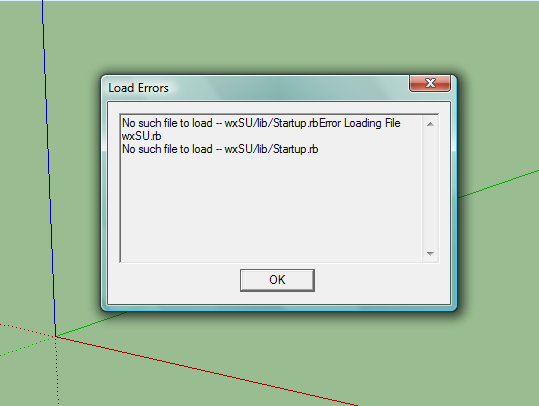
-
ok, wrong lines have been changed - hope it still works.
-
Could you add a Last Updated timestamp to your original post? Makes it easier to catch any updates when you browse the plugins.
-
@cadfather said:
ok, wrong lines have been changed - hope it still works.
Is there something I can do to fix this or do I need to uninstall it? It still works but is aggravating
 !
! -
Thom, you mean in the subject, or just the post?
@ humpmetwice, i don't think this has to do with SCF-PB - take out all your plugins then install PB, if it works then you know..
-
@cadfather said:
Thom, you mean in the subject, or just the post?
At least the subject - since that appears when you browse the forum and also in Jim's index.
-
yes of course.. done.
-
where is the new guy?
-
How do we can unpack the main file to edit it ? is it possible to unpack a code ? can you upload a unpacked version ?
-
thankkkkkkkkkkkkkkkkkkkk
-
I've try on SU8.0 PRO.that's no problem.
-
so cool, thank U
-
I've edited the download page - with a warning about 'rogue files' inside the zip!
CADfather, can you please sort out this issue, which can break some other tools and cause other problems - the older files [sketchup.rbandextensions.rb] supplied in the zip should NEVER be put into the Plugins folder. In all recent versions of Sketchup newer versions of those files come pre-installed in the Tools folder, so having these duplicates just messes things up - sometimes so subtly it causes hours of searching to find what's up!
-
sure, i'll post an update very soon
-
Hay all fearless Ruby Scripters!
First I want to thank you all for the wonderfull job your doing !
now,
Using SCF powerbar with Metric Meters template is O.k?
since I'v been having trouble with the Push-Pull along normals tool.
I set 6m as a value and it Pulls 0.15m...Thanks ! ALOT!
-
Hello¨
First of all, great work!
Second, am I the only one getting trouble installing all the SCF bars(power bar, architect, draw tool, selective etc)? They all have their icons in a folder called CD_ICONS, so loading them all in the plugins folder made them overwrite each other. In the end I had to change each folder to CD_ICON1, CD_ICON2, and then change the routing in the orignial rb. file.
Am I the only one experiencing this?
Third: All my plugin toolbars load at startup except the different SCF
s. I have tried twenty times to place them and save the template, but it doesnt work When I manually toggle them on, theyre in the right place, so I guess the template is saved, but the toolbars wont show up without manually enabling them.Any suggestions?
Thanks!




Hello! It looks like you're interested in this conversation, but you don't have an account yet.
Getting fed up of having to scroll through the same posts each visit? When you register for an account, you'll always come back to exactly where you were before, and choose to be notified of new replies (either via email, or push notification). You'll also be able to save bookmarks and upvote posts to show your appreciation to other community members.
With your input, this post could be even better 💗
Register Login


Advertisement