sketchucation logo sketchucation
    • Login
    Oops, your profile's looking a bit empty! To help us tailor your experience, please fill in key details like your SketchUp version, skill level, operating system, and more. Update and save your info on your profile page today!
    Mac User? | Join the Rayscaper Beta for Mac Learn More

    [Plugin] SCF PowerToolbar (09.Sep.2010)

    Scheduled Pinned Locked Moved Plugins
    76 Posts 36 Posters 85.6k Views 36 Watching
    Loading More Posts
    • Oldest to Newest
    • Newest to Oldest
    • Most Votes
    Reply
    • Reply as topic
    Log in to reply
    This topic has been deleted. Only users with topic management privileges can see it.
    • CadFatherC
      CadFather
      last edited by

      i'm hoping to fix the bugs soon..

      1 Reply Last reply
      Reply Quote 0
      • T
        tina0603
        last edited by

        try to replace it with haroldcampbell attachments

        1 Reply Last reply
        Reply Quote 0
        • R
          rongvuong
          last edited by

          Don't work with sketchup 8.
          help me?

          1 Reply Last reply
          Reply Quote 0
          • HumpmetwiceH
            Humpmetwice
            last edited by

            I get this error after installing the power toolbar. Did I do something wrong, is there something else I need?
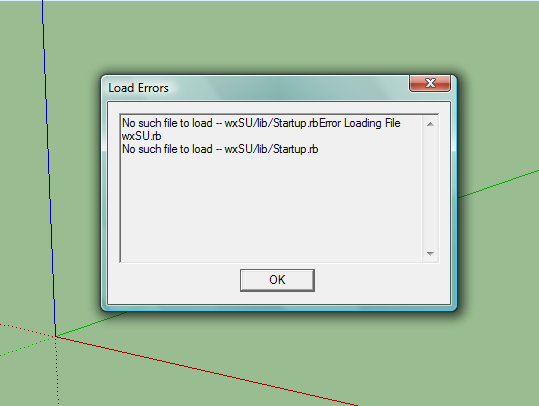

            2010-09-09_0817.png

            1 Reply Last reply
            Reply Quote 0
            • CadFatherC
              CadFather
              last edited by

              ok, wrong lines have been changed - hope it still works.

              1 Reply Last reply
              Reply Quote 0
              • thomthomT
                thomthom
                last edited by

                Could you add a Last Updated timestamp to your original post? Makes it easier to catch any updates when you browse the plugins.

                Thomas Thomassen — SketchUp Monkey & Coding addict
                List of my plugins and link to the CookieWare fund

                1 Reply Last reply
                Reply Quote 0
                • HumpmetwiceH
                  Humpmetwice
                  last edited by

                  @cadfather said:

                  ok, wrong lines have been changed - hope it still works.

                  Is there something I can do to fix this or do I need to uninstall it? It still works but is aggravating 😮 !

                  1 Reply Last reply
                  Reply Quote 0
                  • CadFatherC
                    CadFather
                    last edited by

                    Thom, you mean in the subject, or just the post?

                    @ humpmetwice, i don't think this has to do with SCF-PB - take out all your plugins then install PB, if it works then you know..

                    1 Reply Last reply
                    Reply Quote 0
                    • thomthomT
                      thomthom
                      last edited by

                      @cadfather said:

                      Thom, you mean in the subject, or just the post?

                      At least the subject - since that appears when you browse the forum and also in Jim's index.

                      Thomas Thomassen — SketchUp Monkey & Coding addict
                      List of my plugins and link to the CookieWare fund

                      1 Reply Last reply
                      Reply Quote 0
                      • CadFatherC
                        CadFather
                        last edited by

                        yes of course.. done.

                        1 Reply Last reply
                        Reply Quote 0
                        • U
                          unclex
                          last edited by

                          where is the new guy?

                          1 Reply Last reply
                          Reply Quote 0
                          • T
                            the.pjt
                            last edited by

                            How do we can unpack the main file to edit it ? is it possible to unpack a code ? can you upload a unpacked version ?

                            1 Reply Last reply
                            Reply Quote 0
                            • B
                              bd99
                              last edited by

                              thankkkkkkkkkkkkkkkkkkkk

                              1 Reply Last reply
                              Reply Quote 0
                              • E
                                exposal
                                last edited by

                                I've try on SU8.0 PRO.that's no problem.

                                1 Reply Last reply
                                Reply Quote 0
                                • H
                                  hyprc
                                  last edited by

                                  so cool, thank U

                                  1 Reply Last reply
                                  Reply Quote 0
                                  • TIGT
                                    TIG Moderator
                                    last edited by

                                    I've edited the download page - with a warning about 'rogue files' inside the zip!
                                    CADfather, can you please sort out this issue, which can break some other tools and cause other problems - the older files [ sketchup.rb and extensions.rb] supplied in the zip should NEVER be put into the Plugins folder. In all recent versions of Sketchup newer versions of those files come pre-installed in the Tools folder, so having these duplicates just messes things up - sometimes so subtly it causes hours of searching to find what's up! 😒

                                    TIG

                                    1 Reply Last reply
                                    Reply Quote 0
                                    • CadFatherC
                                      CadFather
                                      last edited by

                                      sure, i'll post an update very soon

                                      1 Reply Last reply
                                      Reply Quote 0
                                      • U
                                        Unr Cruurni
                                        last edited by

                                        Hay all fearless Ruby Scripters!
                                        First I want to thank you all for the wonderfull job your doing !
                                        now,
                                        Using SCF powerbar with Metric Meters template is O.k?
                                        since I'v been having trouble with the Push-Pull along normals tool.
                                        I set 6m as a value and it Pulls 0.15m...

                                        Thanks ! ALOT!

                                        1 Reply Last reply
                                        Reply Quote 0
                                        • A
                                          anderseide
                                          last edited by

                                          Hello¨

                                          First of all, great work!

                                          Second, am I the only one getting trouble installing all the SCF bars(power bar, architect, draw tool, selective etc)? They all have their icons in a folder called CD_ICONS, so loading them all in the plugins folder made them overwrite each other. In the end I had to change each folder to CD_ICON1, CD_ICON2, and then change the routing in the orignial rb. file.

                                          Am I the only one experiencing this?

                                          Third: All my plugin toolbars load at startup except the different SCFs. I have tried twenty times to place them and save the template, but it doesnt work When I manually toggle them on, theyre in the right place, so I guess the template is saved, but the toolbars wont show up without manually enabling them.

                                          Any suggestions?

                                          Thanks!

                                          1 Reply Last reply
                                          Reply Quote 0

                                          Hello! It looks like you're interested in this conversation, but you don't have an account yet.

                                          Getting fed up of having to scroll through the same posts each visit? When you register for an account, you'll always come back to exactly where you were before, and choose to be notified of new replies (either via email, or push notification). You'll also be able to save bookmarks and upvote posts to show your appreciation to other community members.

                                          With your input, this post could be even better 💗

                                          Register Login
                                          • 1
                                          • 2
                                          • 3
                                          • 4
                                          • 2 / 4
                                          • First post
                                            Last post
                                          Buy SketchPlus
                                          Buy SUbD
                                          Buy WrapR
                                          Buy eBook
                                          Buy Modelur
                                          Buy Vertex Tools
                                          Buy SketchCuisine
                                          Buy FormFonts

                                          Advertisement