sketchucation logo sketchucation
    • Login
    Oops, your profile's looking a bit empty! To help us tailor your experience, please fill in key details like your SketchUp version, skill level, operating system, and more. Update and save your info on your profile page today!
    Mac User? | Join the Rayscaper Beta for Mac Learn More

    [Plugin] BezierSpline - v2.2a - 22 Apr 21

    Scheduled Pinned Locked Moved Plugins
    460 Posts 183 Posters 2.1m Views 183 Watching
    Loading More Posts
    • Oldest to Newest
    • Newest to Oldest
    • Most Votes
    Reply
    • Reply as topic
    Log in to reply
    This topic has been deleted. Only users with topic management privileges can see it.
    • H
      hsjzyangbin
      last edited by

      Hope to improve the function :control point along z axis

      maybe add "ctrl" key to control XY plan or z plan
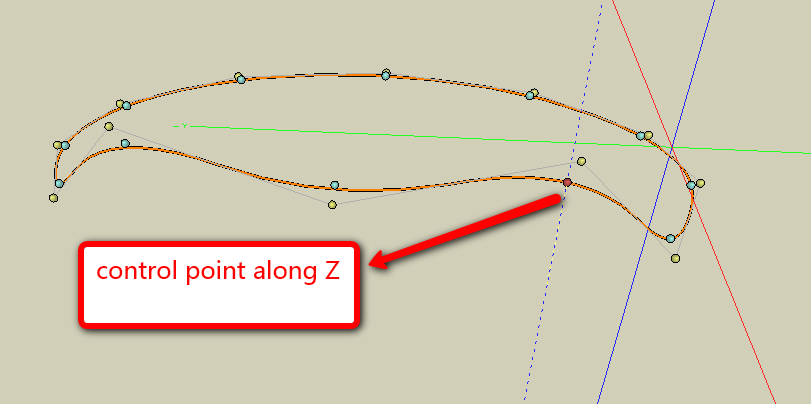

      2010-03-17_1910.png

      1 Reply Last reply
      Reply Quote 0
      • fredo6F
        fredo6
        last edited by

        @hsjzyangbin said:

        Hope to improve the function :control point along z axis

        maybe add "ctrl" key to control XY plan or z plan

        Do you mean you can do it or you wish to do it.
        Planar lock is supported in creation mode.
        Axis lock is also supported in Edition mode for th moving the control points.
        This is explained in the doc, using Ctrl and Arrows
        In a next version, I'll try to make something more explicit and straightforward however.

        Fredo

        1 Reply Last reply
        Reply Quote 0
        • H
          hsjzyangbin
          last edited by

          I used Bonzai3d to do it .
          thanks a lot

          hsjzyangbin

          1 Reply Last reply
          Reply Quote 0
          • H
            hsjzyangbin
            last edited by

            wish to have a visual interface control nodes of the function like YAD
            here is an example:

            best regards


            1.png

            1 Reply Last reply
            Reply Quote 0
            • D
              Daniel S
              last edited by

              @hsjzyangbin said:

              wish to have a visual interface control nodes of the function like YAD
              here is an example:

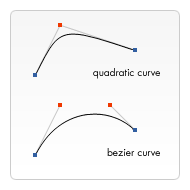
              About visual interface control nodes... Something like this is possible? (Like most 2d Vector software)
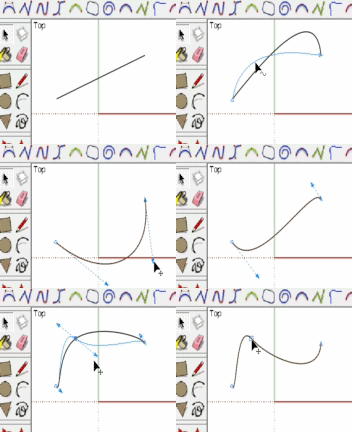
              simulation.gif

              bezier.png
              "A quadratic Bézier curve has a start and an end point (blue dots) and just one control point (red dot) while a cubic Bézier curve uses two control points."

              404 Not Found

              favicon

              (www.caffeineowl.com)

              Daniel S

              1 Reply Last reply
              Reply Quote 0
              • H
                hsjzyangbin
                last edited by

                @daniel s said:

                @hsjzyangbin said:

                wish to have a visual interface control nodes of the function like YAD
                here is an example:

                About visual interface control nodes... Something like this is possible? (Like most 2d Vector software)
                [attachment=1:21zf7cs5]<!-- ia1 -->simulation.gif<!-- ia1 -->[/attachment:21zf7cs5]

                [attachment=2:21zf7cs5]<!-- ia2 -->bezier.png<!-- ia2 -->[/attachment:21zf7cs5]
                "A quadratic Bézier curve has a start and an end point (blue dots) and just one control point (red dot) while a cubic Bézier curve uses two control points."

                404 Not Found

                favicon

                (www.caffeineowl.com)

                Daniel S

                maybe some difference:

                visual interface control number of nodes
                [flash=][attachment=0:21zf7cs5]<!-- ia0 -->2010-03-18_0456.swf<!-- ia0 -->[/attachment:21zf7cs5][/flash]

                thank you


                2010-03-18_0456.swf

                1 Reply Last reply
                Reply Quote 0
                • T
                  thanhsjc
                  last edited by

                  thank you very much

                  1 Reply Last reply
                  Reply Quote 0
                  • K
                    kyyu
                    last edited by

                    Hi Fredo6,

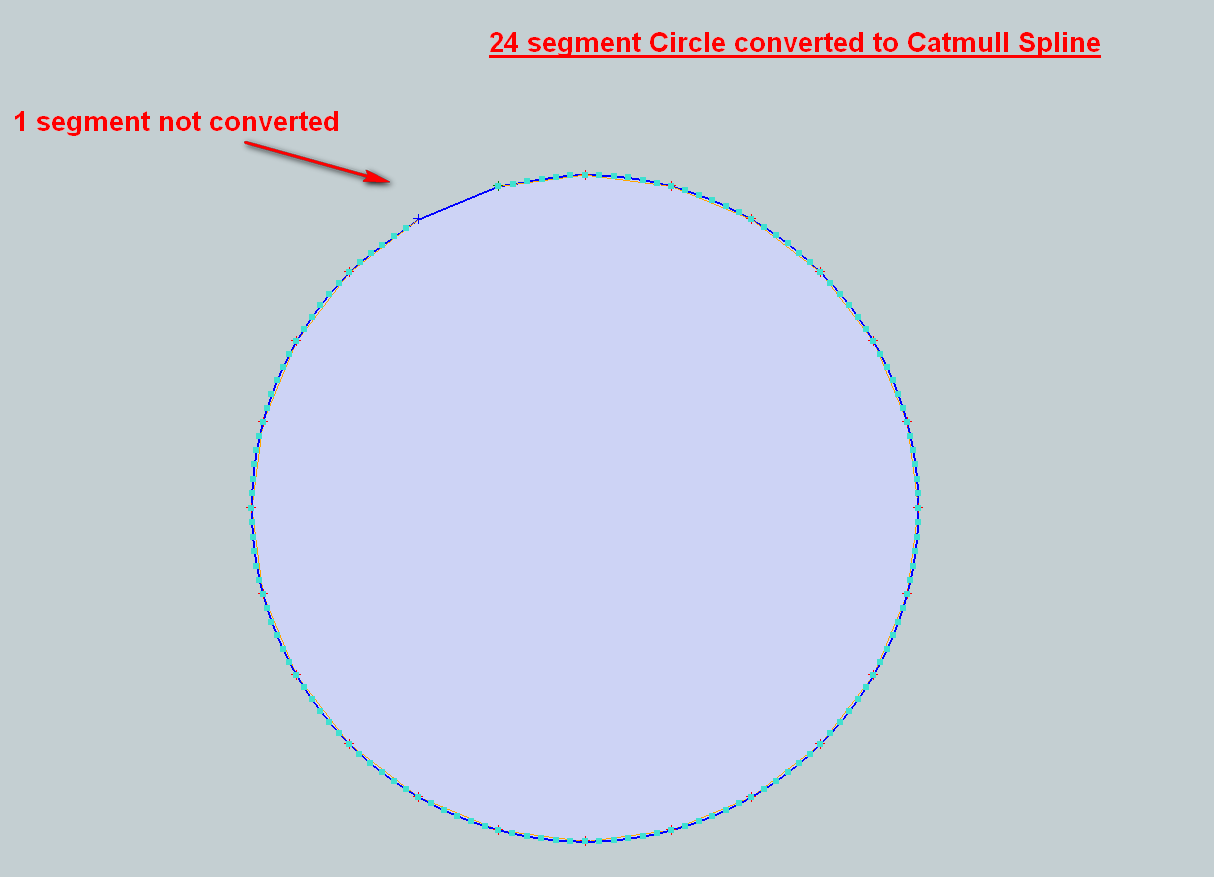
                    First of all, thank you very much for this wonderful plugin! 😄 I would like to report a small bug with the "Convert to Catmull Spline" feature. One of the segments is always left out of the conversion.

                    -Kwok

                    Convert to Catmull Spline bug.png

                    1 Reply Last reply
                    Reply Quote 0
                    • fredo6F
                      fredo6
                      last edited by

                      @kyyu said:

                      Hi Fredo6,

                      First of all, thank you very much for this wonderful plugin! 😄 I would like to report a small bug with the "Convert to Catmull Spline" feature. One of the segments is always left out of the conversion.

                      -Kwok

                      You need to explictly close the loop, by hitting the Key F9 (or via contextual menu).

                      Fredo

                      1 Reply Last reply
                      Reply Quote 0
                      • K
                        kyyu
                        last edited by

                        @unknownuser said:

                        @kyyu said:

                        Hi Fredo6,

                        First of all, thank you very much for this wonderful plugin! 😄 I would like to report a small bug with the "Convert to Catmull Spline" feature. One of the segments is always left out of the conversion.

                        -Kwok

                        You need to explictly close the loop, by hitting the Key F9 (or via contextual menu).

                        Fredo

                        Thanks, that worked perfectly!

                        -Kwok

                        1 Reply Last reply
                        Reply Quote 0
                        • S
                          Slimdog
                          last edited by

                          Hi guys I have just downloaded the most recent version. BezierSpline%201.

                          I have put LibTraductor.rb, BZ_Dir_13, and bezierspline.rb into the plugins folder on my MAC. When I open sketchup I get this error:

                          Error Loading File #extrusionToolbar.rb
                          no such file to load -- deBabelizer.rbError Loading File 2D#.rb
                          no such file to load -- deBabelizer.rbError Loading File extrudeEdgesByEdges.rb
                          no such file to load -- deBabelizer.rbError Loading File extrudeEdgesByFaces.rb
                          no such file to load -- deBabelizer.rbError Loading File extrudeEdgesByLathe.rb
                          no such file to load -- deBabelizer.rbError Loading File extrudeEdgesByRails.rb
                          no such file to load -- deBabelizer.rbError Loading File extrudeEdgesByVector.rb
                          no such file to load -- deBabelizer.rb

                          any ideas guys???

                          Cheers

                          Steve

                          1 Reply Last reply
                          Reply Quote 0
                          • thomthomT
                            thomthom
                            last edited by

                            That's messages related to TIG's tools. you're missing one of his dependant files deBabelizer.rb.

                            Thomas Thomassen — SketchUp Monkey & Coding addict
                            List of my plugins and link to the CookieWare fund

                            1 Reply Last reply
                            Reply Quote 0
                            • TIGT
                              TIG Moderator
                              last edited by

                              Since you must have downloaded both my 2DTools and ExtrusionTools I wonder where you put deBabelizer.rb that comes with both of them ?
                              Anyway... here's another copy to save you having to find it - put it into the Plugins folder and restart SUp - that error should then be gone...deBabelizer.rb

                              TIG

                              1 Reply Last reply
                              Reply Quote 0
                              • S
                                Slimdog
                                last edited by

                                Yes you guys are correct. My bad. I thought it out when I was loading Bezierspline.

                                Thanks for the responses.

                                S

                                1 Reply Last reply
                                Reply Quote 0
                                • M
                                  Morphing_24
                                  last edited by

                                  Hi fredo

                                  I work on a mac and I have a really big problem here.
                                  I dont know how can I view the cadfather toolbar on sketchup, I can only see the standard one and I installed all the files in the correct places bezierspline.rb, LibTraductor.rb and BZ_DIR_13 subfolder. I don't even see the option "convert to" when I right click on a bezier line , I need to use the polyline segmentor and courbette. I tried everything...reinstalling sketchup, also removing all the plugins I have from the Library/AplicationSupport/Google Sketchup 7/Sketchup/ plugins folder,but guest what, I still see all the toolbars working perfectly even though the plugin folder is empty.
                                  However, when I work on windows I have no problems, I install the latest bezierspline and it works perfect.... what am I doing wrong?
                                  Thanks for the responses

                                  1 Reply Last reply
                                  Reply Quote 0
                                  • I
                                    inasia
                                    last edited by

                                    Many Thanks Fredo,

                                    Much appreciated, for your Plugin.

                                    Thank you again

                                    have a good day

                                    cheers

                                    inasia

                                    1 Reply Last reply
                                    Reply Quote 0
                                    • fredo6F
                                      fredo6
                                      last edited by

                                      @morphing_24 said:

                                      Hi fredo

                                      I work on a mac and I have a really big problem here.
                                      I dont know how can I view the cadfather toolbar on sketchup, I can only see the standard one and I installed all the files in the correct places bezierspline.rb, LibTraductor.rb and BZ_DIR_13 subfolder. I don't even see the option "convert to" when I right click on a bezier line , I need to use the polyline segmentor and courbette. I tried everything...reinstalling sketchup, also removing all the plugins I have from the Library/AplicationSupport/Google Sketchup 7/Sketchup/ plugins folder,but guest what, I still see all the toolbars working perfectly even though the plugin folder is empty.
                                      However, when I work on windows I have no problems, I install the latest bezierspline and it works perfect.... what am I doing wrong?
                                      Thanks for the responses

                                      If the Library/AplicationSupport/Google Sketchup 7/Sketchup/ plugins folder is empty and you still have BezierSpline working, then you may have something left in the other plugin folder which is under /user/....

                                      Otherwise, maybe some Mac users could help you to troubleshoot, as I don't have a Mac at hand.

                                      Fredo

                                      1 Reply Last reply
                                      Reply Quote 0
                                      • fredo6F
                                        fredo6
                                        last edited by

                                        @unknownuser said:

                                        Thank you so much for this fantastic plugin Fredo6. Is there a way to tweak the snap? I'm a little heavy handed with the mouse - it's very easy for the cursor to fall off the line, or to move a line segment instead of a point when editing polylines.

                                        The script relies on the regular Sketchup inferences. So if there is a way to tweak it, then it should be valid for BezierSpline too.

                                        Fredo

                                        1 Reply Last reply
                                        Reply Quote 0
                                        • K
                                          kurma
                                          last edited by

                                          Thanks for the quick reply Fredo6. It's not in any options that I can see. Perhaps it's something a Ruby script can do. But a cursory search for such a script lead nowhere.

                                          1 Reply Last reply
                                          Reply Quote 0
                                          • K
                                            kurma
                                            last edited by

                                            Thank you so much for this fantastic plugin Fredo6. Is there a way to tweak the snap? I'm a little heavy handed with the mouse - it's very easy for the cursor to fall off the line, or to move a line segment instead of a point when editing.


                                            1 Reply Last reply
                                            Reply Quote 0

                                            Hello! It looks like you're interested in this conversation, but you don't have an account yet.

                                            Getting fed up of having to scroll through the same posts each visit? When you register for an account, you'll always come back to exactly where you were before, and choose to be notified of new replies (either via email, or push notification). You'll also be able to save bookmarks and upvote posts to show your appreciation to other community members.

                                            With your input, this post could be even better 💗

                                            Register Login
                                            • 1
                                            • 2
                                            • 5
                                            • 6
                                            • 7
                                            • 8
                                            • 9
                                            • 22
                                            • 23
                                            • 7 / 23
                                            • First post
                                              Last post
                                            Buy SketchPlus
                                            Buy SUbD
                                            Buy WrapR
                                            Buy eBook
                                            Buy Modelur
                                            Buy Vertex Tools
                                            Buy SketchCuisine
                                            Buy FormFonts

                                            Advertisement